 SmartSoloFlow

Key Takeaway: No-code solutions let small business owners automate repetitive tasks and connect their favorite apps without hiring a developer or writing a single line of code.
Primary Tool(s): Make.com + Airtable
Build Time: ~2-4 Hours
No code solutions give small business owners a way to automate daily tasks, connect their apps, and build simple internal tools without hiring a developer or learning to code. If you're a small business owner who's tired of copying data between spreadsheets, chasing down invoices, or manually updating your CRM after every sale, a no-code platform like Make.com can handle that grind for you. It works through drag-and-drop workflows instead of programming languages, so you set up the logic once and it runs on its own from then on.
This matters because most small businesses can't afford a full-time developer, and hiring one for a single automation project rarely makes financial sense. No-code tools close that gap. You get the same result, a working system that saves you hours every week, without the developer price tag or the months-long build timeline. This guide walks through exactly how it works and how to get started today.
Running a small business usually means wearing five hats at once, and none of them is "in-house developer." If you've ever thought about building a custom tool to handle your invoicing, lead tracking, or customer follow-ups, you've probably also run into the same wall: hiring a developer costs more than most small operations can justify, and you simply don't have the spare hours to learn to code yourself. That's exactly the gap no code solutions were built to close.
No code platforms let you build real, working automations and simple apps using visual, drag-and-drop tools instead of programming. You describe what you want to happen, connect a few apps, and the platform handles the technical part behind the scenes. For a small business owner juggling sales, operations, and customer service all at once, that's the difference between a task staying manual forever and getting automated by next week.
What is a No-Code Solution?
A no-code solution is any software platform that lets you build workflows, apps, or automations using visual tools instead of writing code, which means anyone on your team can create one regardless of technical background. Instead of hiring a programmer, you use pre-built blocks, drag-and-drop triggers, and simple "if this happens, then do that" logic to get the same result.
Here's what that actually looks like in practice:
- Trigger-based automation: A new order comes into Shopify, and a no-code workflow automatically logs it in a spreadsheet and notifies your team on Slack.
- Visual app builders: Tools like Airtable or Softr let you build a working internal database or customer portal without touching a database query.
- Integration platforms: Make.com connects the individual apps you already use, like Gmail, QuickBooks, and Stripe, so data moves between them automatically instead of you copying and pasting it by hand. See Make's official product documentation for the full picture of how this works.
This isn't a niche trend anymore, either. Industry estimates suggest a large majority of US businesses already use no-code or low-code tools somewhere in their operations. And it's not just large companies using them: solopreneurs and five-person shops are building the exact same kind of automation that used to require a full development team. The SBA's small business technology resources point to the same trend: technology adoption is no longer optional for staying competitive as a small operation.
By the time you finish reading this, you'll understand which of these categories fits your business best and how to set your first automation up using Make.com, the platform we recommend most often for small businesses because of how affordable and flexible it is.
3 Major Business Benefits
No-code automation gives small businesses three concrete advantages: it saves hours of manual work every week, it cuts out the cost of hiring a developer, and it lets you adapt your systems fast as your business changes. Here's how each one plays out in real terms.
- You get hours of your week back. A single automated workflow, like auto-logging new leads from a contact form into your CRM, can typically save a small business several hours a week that used to go into manual data entry. That's time you can put back into sales calls, client work, or actually taking a lunch break.
- You skip the developer bill entirely. According to Forrester's Total Economic Impact research, businesses that avoid hiring two additional developers by using low-code/no-code platforms can generate an estimated $4.4 million in business value over three years. Your numbers won't be in the millions as a solo operator, but the same math applies at your scale: no dev salary, no freelancer invoices, no long build timeline. AWS's breakdown of no-code advantages for SMBs covers similar cost-saving patterns at smaller scale.
- You can change your systems on the fly. Traditional software development means waiting weeks for a developer to make a small change. With no-code tools, you can update a workflow yourself in minutes when your process changes, whether that's adding a new step, connecting a new app, or fixing something that isn't quite working the way you expected.
Put together, that's the real appeal here. It's not about chasing a tech trend. It's about getting the same outcome a developer would build you, faster, cheaper, and without depending on someone else's schedule.
Make.com Automation for Non-Technical Business Owners
Make.com is the easiest way for a non-technical small business owner to build real automation, because it uses a visual, drag-and-drop canvas instead of any code, and most people build their first working workflow inside their first sitting. You don't need to understand APIs or databases. You just connect the apps you already use and tell Make.com what should happen and when.
Here's what makes it different from a lot of the other tools out there:
- Visual workflow builder: You see your entire automation laid out as connected boxes on a screen, so you can follow the logic at a glance instead of reading through lines of code.
- Thousands of app connections: Make.com connects to the tools small businesses already run on, things like Gmail, QuickBooks, Shopify, Google Sheets, and Stripe, so you're not stuck rebuilding your whole tech stack to use it.
- Affordable for solo operators: Compared to hiring even a part-time freelance developer, Make.com's pricing tiers are built for small teams and solopreneurs, not enterprise IT budgets.
Notice there's no step in that flow where anyone has to log in and manually move data. That's the whole point. Once you build it, it runs itself every single time a new form comes in, whether you're at your desk or asleep.
One of the more thorough breakdowns of Make.com automation workflows you'll find for small business owners specifically comes down to matching the platform's building blocks (called modules) to your actual daily bottlenecks, not just picking a tool because it's popular, from SmartSoloFlow.
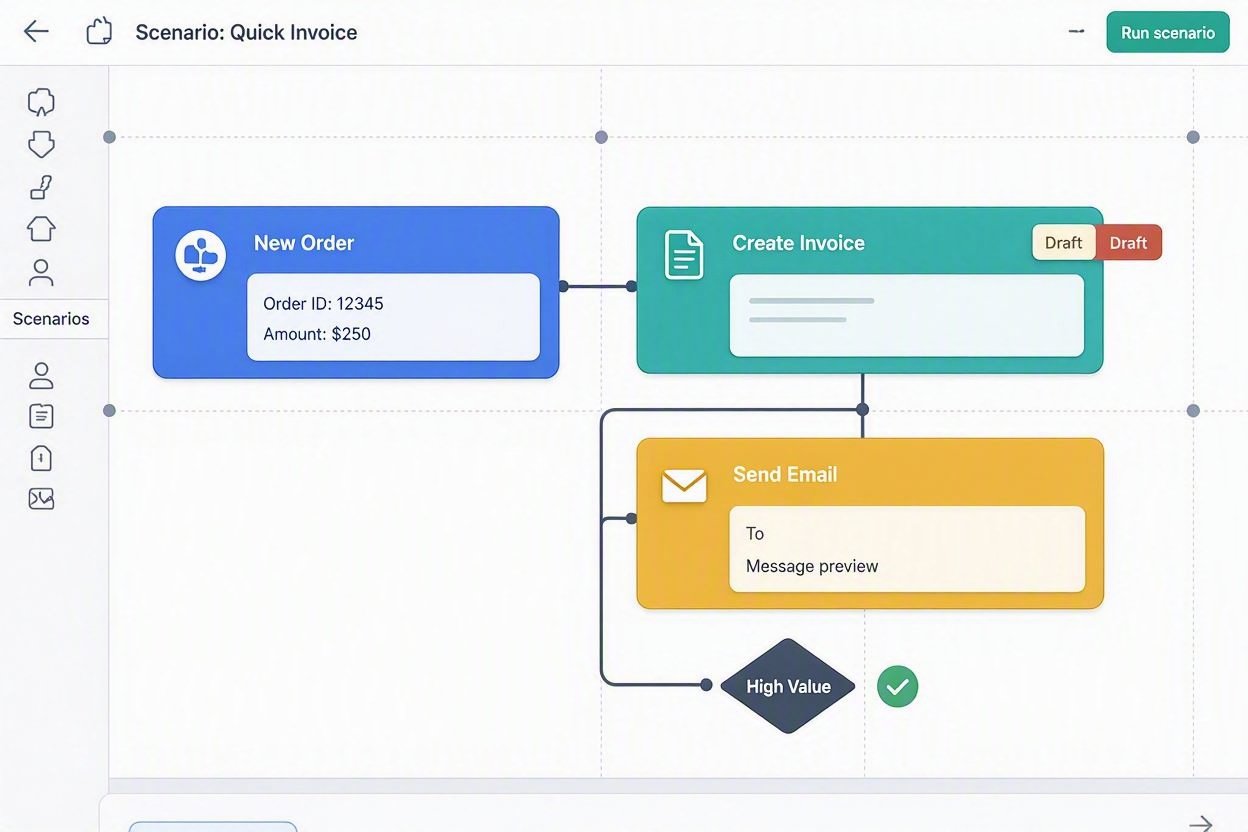
Real-Life Use Case
For example: a small landscaping company owner was spending close to an hour every evening manually copying new customer inquiries from a website form into a spreadsheet, then texting each lead to schedule a quote. After setting up a single Make.com workflow, that entire process now runs automatically the moment a form is submitted.
Here's what the automation actually does:
- A customer fills out the "Get a Quote" form on the website.
- Make.com instantly adds their name, service needed, and contact info to a Google Sheet.
- A text message goes out to the owner's phone with the lead's details.
- The customer receives an automatic confirmation email letting them know someone will follow up within 24 hours.
No code was written to build this. The whole workflow took about two hours using Make.com's drag-and-drop editor, and this kind of setup typically keeps running without any manual intervention once it's live. That's the kind of time given back that lets an owner focus on the actual work instead of managing a spreadsheet.
How to Get Started
The fastest way to start is to pick one repetitive task you do by hand at least three times a week, and build a single automation for just that task before trying to automate your whole business at once.
Sign up for a free Make.com account, connect the two apps involved in that one task (say, your contact form and your email inbox), and use their pre-built templates as a starting point rather than building from a blank canvas. Most small business owners have their first working automation live within an hour of signing up.
Here's a ready-to-use prompt you can hand to Make.com's AI assistant, or use as a starting brief for yourself, to build your first workflow:
When a new form submission comes in from [your form tool], add the submitter's name, email, and message to a new row in [your spreadsheet tool], then send me a notification in [Slack/email/text] with their details, and send the submitter an automatic confirmation email thanking them for reaching out.Swap in your actual tools where the brackets are, and you have a working first automation to build from.
2026 Advanced Tips & Scalability
Once your first automation is running, the next real upgrade small business owners are making in 2026 is layering an AI step into the workflow, not just connecting apps, but having the automation make a small decision on its own. For example, instead of just logging a new customer inquiry, an AI step inside the same Make.com workflow can read the message, flag it as urgent or routine, and route urgent ones straight to a text alert while routine ones just land in the spreadsheet.
A few things worth knowing as you scale past your first workflow:
- Start layering, don't rebuild. Add one AI-powered decision point to an existing workflow rather than starting a brand-new automation from scratch. It's faster and lower-risk.
- Watch your permissions. As you connect more apps, keep an eye on which team members can edit which workflows, especially anything touching customer data or payments.
- Don't automate a broken process. If a task is confusing or inconsistent today, automating it just makes the confusion happen faster. Fix the process first, then automate it.
None of this requires a developer either. It's the same visual, no-code approach, just with one more building block added to what you already have running.
Explore This Topic Further
More No-Code-Solutions guides are on the way, covering common automation mistakes, benefit-focused walkthroughs, and platform comparisons for small business owners. Check back soon, or reach out directly if there's a specific no-code question you'd like covered first.
Get in TouchConclusion
No-code solutions like Make.com give small business owners a real path to automating the repetitive work eating up their week, without the cost or wait time of hiring a developer. Start with one task, build one workflow, and let the time savings prove the concept before you scale up. The businesses seeing the biggest wins from this in 2026 aren't the ones with the fanciest tech stack, they're the ones who automated the one thing that was actually slowing them down.
If setting this up yourself isn't the best use of your week, this is exactly the kind of build I hand off, fully working, for small teams like yours. Here's one tip you can use today even without hiring anyone: pick the task you do most often by hand, and check whether it happens between just two apps, since that's almost always the easiest and fastest thing to automate first. And when you're ready for something built end-to-end without touching a single setting yourself, that's exactly what I build as a No-Code Architect.
People Also Ask
What is a no-code solution and how does it work for a small business?
A no-code solution is a software platform that lets a small business build automations, apps, or workflows using visual, drag-and-drop tools instead of programming. You connect the apps you already use and set simple trigger-and-action rules, and the platform handles everything technical behind the scenes.
Can no-code tools really replace hiring a developer?
For most common small business needs, like connecting apps, automating data entry, or building a simple internal tool, yes. No-code platforms cover the vast majority of everyday automation tasks. A developer is still worth hiring for highly custom, complex software, but that's rarely what a small business needs on day one.
How much does it cost to build a no-code solution for a small business?
Most no-code platforms, including Make.com, offer free or low-cost starting tiers, often under $20 a month for a small business's first few automations. That's a fraction of even a single hour of freelance developer time, making it accessible for nearly any budget.
Do I need any technical skills to use no-code automation tools?
No. No-code platforms are built specifically for people without a programming background. If you can drag and drop and follow a simple visual flowchart, you have everything you need to build your first automation.
What's the difference between no-code and low-code platforms?
No-code platforms require zero programming knowledge and are built entirely around visual tools. Low-code platforms are aimed at users who may occasionally write small snippets of code for more advanced customization. For most small business needs, no-code alone is enough.
Which apps can I connect with a no-code solution like Make.com?
Make.com connects to thousands of apps small businesses already use, including Gmail, QuickBooks, Shopify, Google Sheets, Slack, and Stripe. If you use it day-to-day, there's a strong chance it already has a direct connection built in.
Is it hard to learn how to use a no-code platform?
Most small business owners build their first working automation within an hour of signing up. The interfaces are visual and drag-and-drop, so there's no syntax to memorize and no coding manual to read through first.
Can no-code automation handle more than one task at a time?
Yes. You can run as many separate workflows as you need, and many platforms let a single workflow branch into multiple actions at once, like updating a spreadsheet, sending a notification, and firing off an email all from one trigger.
What happens if an automation breaks or an app connection fails?
Most no-code platforms, including Make.com, show you exactly where a workflow failed and why, so you can fix the specific step instead of troubleshooting the entire system. Some also let you set up error notifications so you know right away.
Do no-code solutions work for service-based businesses, not just online stores?
Yes. Service businesses like consultants, contractors, and agencies use no-code automation just as often, typically for lead intake, scheduling, invoicing, and client follow-up rather than order processing.
⚡ Pro Tip: Before building any automation, write out the exact manual steps you take today, in order. If you can't clearly list those steps, the automation will be just as confusing as the manual process was.
⚠ Watch Out For: Free tiers on no-code platforms usually cap how many automation runs you get per month. If your business processes a high volume of leads or orders, check the pricing tiers before you build your workflow so you don't hit a wall right when it starts paying off.
Building your own no-code system is one option. If you'd rather have it built for you, correctly, the first time, SmartSoloFlow can set up the exact automation your business needs. Reach out through our Contact page to get started.
Found this guide useful? Share it with a fellow freelancer who's still doing things manually. 🚀
Got a question or a workflow roadblock? Drop it in the comments below — happy to help.
Last Updated: September 2, 2026

// Comments