 SmartSoloFlow

Key Takeaway: The best time blocking app for a solopreneur isn't always the one you pay for. You can build the same auto-scheduling most $10-30/month apps sell you, for free, using Google Calendar and a simple Make.com automation.
System Goal: Stop manually re-planning your day and let one automated system handle the scheduling for you.
Weekly Time Savings: ~3-4 Hours/week
Core Framework: Time Blocking + Make.com Automation
If you're a solopreneur searching for the best time blocking app, you've probably already noticed the catch: every option on the market costs somewhere between $10 and $30 a month. That's real money when you're already stretched thin managing client work, invoices, and everything in between on your own. Time blocking, the practice of assigning every task a specific slot on your calendar instead of working off a loose to-do list, genuinely works for reducing overwhelm and burnout. But you don't have to rent that benefit forever. This guide covers seven strong apps worth your money if you'd rather buy a finished tool, ranked by who they actually fit best. It also covers something none of the big "best of" lists mention: a free way to build the same auto-scheduling using Google Calendar and Make.com, so you own the system instead of paying a subscription for it indefinitely.
- Motion — Best for Hands-Off AI Auto-Scheduling
- Sunsama — Best for a Daily Planning Ritual
- Reclaim.ai — Best for Defending Focus Time
- Akiflow — Best for Pulling Every Task Source Into One Calendar
- Morgen — Best for Multi-Calendar Solopreneurs
- TickTick — Best Budget-Friendly Option
- The Free DIY Option — Time Blocking Automation With Google Calendar and Make.com
- 2026 AI Productivity Hacks
Success Story: Replacing a $20/Month App With a Free Automation
For example: a freelance copywriter juggling five ongoing clients was paying $20 a month for an auto-scheduling app just to keep her calendar realistic day to day. She replaced it with a simple Make.com scenario that watches her Google Tasks list and drops each new task into an open slot on her Google Calendar automatically. It took one afternoon to set up, and she cancelled the paid subscription that same week.
Running a one-person business means you're the strategist, the bookkeeper, and the person answering client emails at 9 PM, all before lunch. It's no wonder so many solopreneurs end up overwhelmed and quietly burning out, even when the work itself is going well. A good time blocking app can genuinely fix that, by turning a vague mental to-do list into a calendar that actually reflects what your day looks like. If you want the full breakdown of how a time-blocking system fits together beyond just app picks, our complete time blocking system guide covers the fundamentals this article builds on.
But here's the thing nobody selling you a time blocking app wants to say out loud: every "best time blocking app" list you'll find costs $10 to $30 a month. That's the same pattern across Motion, Sunsama, Reclaim, Akiflow, and Morgen. You'll get real value from at least a few of these. You'll also find, later in this guide, a version you can build yourself for free using Google Calendar and Make.com.
Motion — Best for Hands-Off AI Auto-Scheduling
Motion is the right pick if you want an app that reschedules your entire day automatically whenever something changes, without you touching the calendar. As of 2026, Motion's Pro AI plan runs $19 a month billed annually, or $29 a month billed monthly, per seat.
What makes Motion different from a normal calendar app is that you don't drag tasks into slots yourself. You hand it a deadline and a rough time estimate, and its AI finds the gap and drops the task in. When a client call runs long, Motion automatically shuffles the rest of your afternoon instead of leaving you to redo it by hand.
The catch: there's no free tier, only a 7-day trial that requires a card upfront. For a solopreneur who genuinely dreads replanning a blown-up schedule, that's often still worth it. For someone who just wants a calendar to look at, it's more automation than you need.
And that's really the split worth noticing across this whole list. Some of these tools are calendars with reminders bolted on. Others, like Motion, are closer to a lightweight automation engine wearing a calendar's interface, which is the same category the free Make.com approach later in this article falls into.
Sunsama — Best for a Daily Planning Ritual
Sunsama fits you if what you actually want isn't automation, but a guided 10-minute ritual each morning that forces you to be honest about what fits in your day. Sunsama raised its pricing in 2026 for the first time in five years: the Individual plan now costs $20 a month billed annually, or $25 a month billed monthly.
Unlike Motion, Sunsama doesn't reschedule anything for you. You open it, review yesterday's leftover tasks, and manually place today's work into time slots against your real calendar. That friction is deliberate. For solopreneurs who tend to over-commit, the daily check-in itself becomes the productivity win, not just the calendar.
It pulls in tasks from Todoist, Asana, and a handful of other tools, so you're not retyping your to-do list into a second app. If you liked the idea of time blocking but abandoned it before because "life happened," Sunsama's ritual format is built specifically to survive that.
Reclaim.ai — Best for Defending Focus Time
Reclaim.ai is the strongest choice if your calendar keeps getting eaten alive by other people's meetings and you need something that actively protects blocks of uninterrupted work. It has a genuine free plan (one calendar connection, basic habit scheduling), with paid Starter plans starting around $10 per seat monthly when billed annually.
Reclaim works by treating your own priorities, like "2 hours of deep work" or "gym," as flexible habits it defends on your calendar. If someone books a meeting into a slot you'd protected, Reclaim automatically moves your habit elsewhere instead of just losing it.
Where Reclaim gets a little awkward for solo use is the pricing structure. It's genuinely built and priced for teams, so a solopreneur on a paid plan is technically paying a per-seat team rate for one seat. The free plan is real, but limited to a single calendar and a 1-week scheduling range, which won't be enough once you're juggling client and personal calendars together.
Akiflow — Best for Pulling Every Task Source Into One Calendar
Akiflow is the pick if your tasks are scattered across Gmail, Slack, Notion, and three other tools, and you're tired of maintaining the same to-do list in multiple places. Pricing runs around $19 a month billed annually, or $34 a month billed monthly, for the single Pro plan Akiflow currently offers.
Akiflow's signature feature is its command bar. You hit a keyboard shortcut, and it pulls in tasks, emails, and calendar events from every connected source into one unified inbox, which you then drag directly onto your calendar as time blocks. For a solopreneur running client work through five different apps, that consolidation alone can save the mental overhead of checking each tool separately every morning.
It's a manual drag-and-drop tool, not an auto-scheduler like Motion. You're still the one deciding where each task lands. If you want the task-gathering superpower without giving up control over your actual schedule, Akiflow earns its price tag. If you're already fine using just Google Calendar and Google Tasks, it's more consolidation than you need.
Morgen — Best for Multi-Calendar Solopreneurs
Morgen makes the most sense if you're juggling more than one calendar, say, a personal Gmail calendar and a separate business one, and want AI suggestions you approve rather than automation that acts without asking. Morgen's Pro plan costs $15 a month billed annually, or $30 a month billed monthly.
The standout here is that Morgen connects Google Calendar, Outlook, iCloud, Fastmail, and Zoho calendars into one unified view, then its AI Planner suggests where new tasks should go based on your real availability. Nothing lands on your calendar without you confirming it first, which sits in the middle ground between Sunsama's fully manual ritual and Motion's fully automatic rescheduling.
That "you approve everything" design is exactly what makes Morgen a comfortable fit for someone who wants help planning without handing over full control of their day to an algorithm. For a solopreneur running two separate calendars, that unified view alone removes the daily habit of manually checking a personal Gmail calendar against a business one before agreeing to any new commitment.
TickTick — Best Budget-Friendly Option
TickTick deserves a spot here for the opposite reason from the rest of this list: it's genuinely cheap. TickTick's free plan already includes calendar views and a built-in Pomodoro timer, and its Premium tier runs about $3 a month (billed at $35.99 a year), a fraction of what every other app on this list charges.
You won't get AI auto-scheduling or Reclaim-style habit defense here. What you get is fast task capture with natural-language parsing (type "call client Friday at 3pm" and it just works), a drag-and-drop calendar view, and built-in habit tracking, all without a $20-30 monthly bill.
If your actual problem is that you never write tasks down consistently, not that you need AI managing your calendar, TickTick solves the cheaper, more common version of that problem. It also includes a free habit tracker and an Eisenhower Matrix view built right in, so a solopreneur who mainly needs to see today's priorities clearly, rather than have an algorithm manage them, gets there without paying for features they'll never touch.
The Free DIY Option — Time Blocking Automation With Google Calendar and Make.com
Here's the section every "best time blocking app" list skips: you don't actually need to pay $10-30 a month to get auto-scheduling. If you already use Google Calendar and Google Tasks, which most solopreneurs do by default, you can build the same core behavior Motion and Reclaim charge for, using a free Make.com automation you set up once.
The logic is simple. Every time you add a new task in Google Tasks, a Make.com scenario watches for it and automatically creates a matching event on your Google Calendar, in the next open time-blocked slot. Google Calendar is an official, Verified app inside Make.com's own app library, maintained directly by Make, so this isn't a fragile workaround built on an unofficial workaround. It's a native, supported connection.
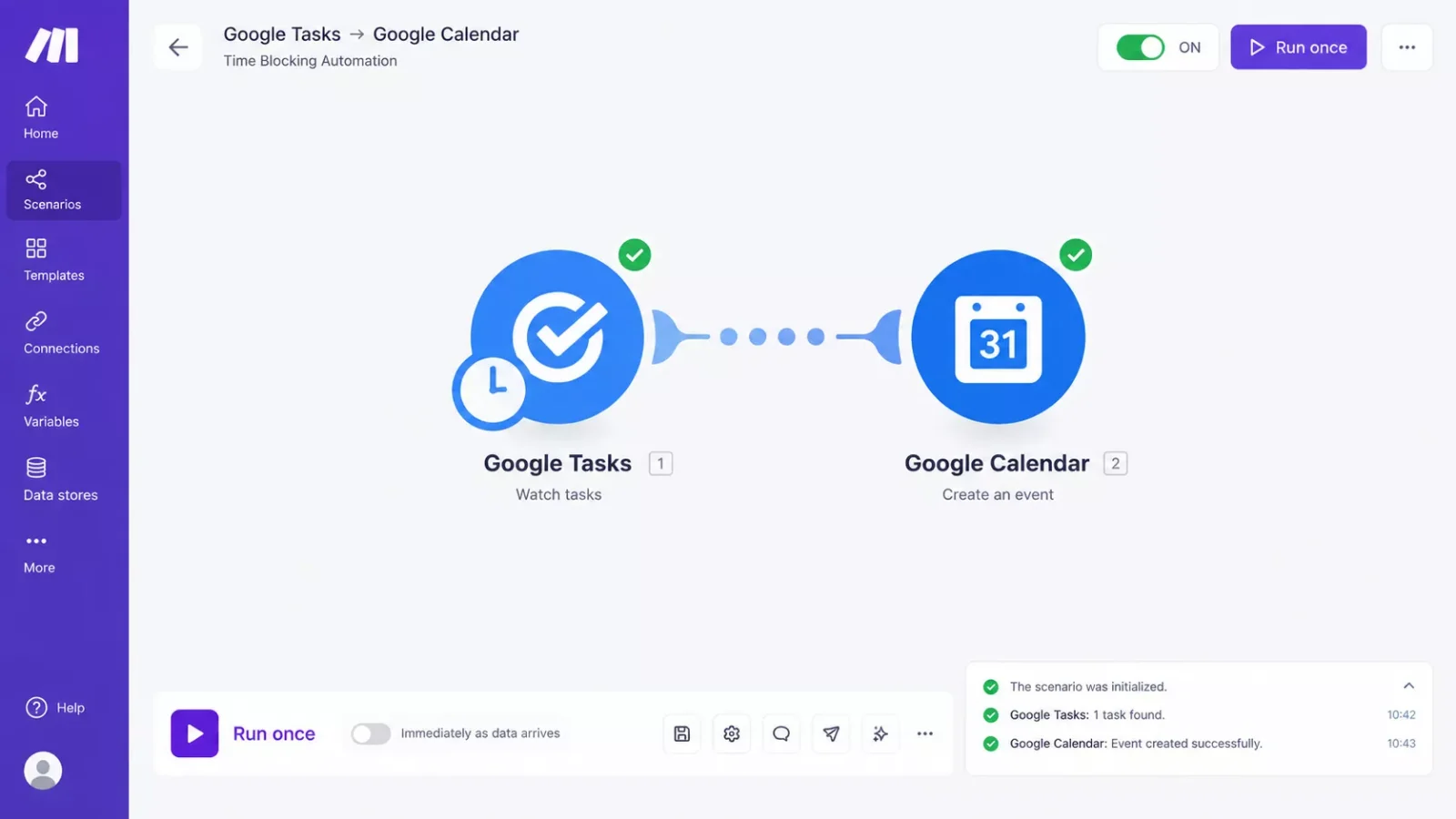
Setting this up doesn't require any coding. You pick a Google Tasks trigger ("Watch Tasks"), connect it to a Google Calendar action ("Create an Event"), and map the task's due date and title into the new event. Make.com's free plan includes enough monthly operations to run this comfortably for a single solopreneur's task volume.
⚡ Pro Tip: Add a filter that only creates a calendar event when the task has a due date set. Otherwise every stray task without a deadline turns into a calendar block, which defeats the point of time blocking in the first place.
This is exactly the kind of system solopreneurs building their own stack tend to reach for once they realize a subscription isn't the only path to automation, and it's a natural entry point into thinking about Make.com more broadly for other repetitive parts of running a one-person business.
2026 AI Productivity Hacks
A couple of small additions make this system even more useful without adding another subscription. First, most phone keyboards now include reliable voice-to-text, so instead of typing tasks into Google Tasks by hand between client calls, you can dictate them in seconds while you're still thinking about the work. Second, if you regularly draft similar client updates or proposals, a free-tier AI assistant can handle the first-pass draft while your calendar automation handles when that drafting time actually happens. Neither replaces the core system above. Both just shave a few more minutes off a day that's already tight.
People Also Ask
What is the best free time blocking app?
Reclaim.ai has the most complete free plan among dedicated apps, though it's limited to one calendar. For a solopreneur who wants no limits at all, building your own automation with Google Calendar and Make.com gives you unlimited free time blocking without any app restrictions.
Does Google Calendar have a time blocking feature?
Not natively as a built-in feature, but Google Calendar's drag-and-drop event creation makes manual time blocking simple. Paired with a free Make.com automation, it can also auto-create time-blocked events from your task list, matching what paid apps charge for.
Can I automate time blocking without a paid app?
Yes. Make.com's free plan, connected to Google Calendar's official app, can automatically turn new tasks into calendar events with zero monthly cost. It takes about an hour to set up once and requires no coding experience.
How much time does time blocking actually save a solopreneur?
Most solopreneurs report reclaiming 3-5 hours a week, mainly by cutting the time lost to re-deciding what to work on and reducing task-switching between unrelated jobs.
What's the difference between time blocking and a to-do list?
A to-do list tells you what needs doing. Time blocking assigns each task an actual slot on your calendar, so your day has a realistic shape instead of an open-ended list you're never quite done with.
Do I need any technical skills to set up the free Make.com automation?
No coding is required. Make.com's scenario builder is visual and drag-and-drop, connecting Google Tasks to Google Calendar through pre-built modules rather than custom code.
How many time blocking apps should I use at once?
Just one. Running two systems in parallel usually creates more mental overhead than it saves, which defeats the point of time blocking in the first place.
Whichever route you pick, the goal is the same: stop losing hours to a schedule that lives only in your head. If a paid app fits your budget, Motion, Sunsama, and the others each solve a genuinely different problem well. If it doesn't, the free Make.com route gets you real, working automation without a recurring bill eating into money that should be going toward growing your business. It's also worth knowing this is only one small example of what's possible. For solopreneurs looking for more of the best Make.com automation workflows built specifically for running a business solo, this is the exact kind of system SmartSoloFlow focuses on.
⚡ Pro Tip: Start with just one automation, like the task-to-calendar flow above, before adding more. A single reliable system beats three half-finished ones.
⚠ Watch Out For: Make.com's free plan has a monthly operations cap. It's plenty for one solopreneur's task volume, but if you later add several more automations on the same account, check your usage before you hit the limit.
You already know the pain of paying for a tool that only half-solves the problem. If you'd rather get that time back than spend a weekend building this yourself, this is exactly the kind of system I set up so solopreneurs don't have to.
Want This Automation Built for You?
If setting up Make.com scenarios yourself isn't how you want to spend your weekend, I build exactly this kind of automation for solopreneurs, fully working, ready to use. Reach out and let's talk about what your business actually needs.
Let's TalkFound this guide useful? Share it with a fellow freelancer who's still doing things manually. 🚀
Got a question or a workflow roadblock? Drop it in the comments below — happy to help.
Last Updated: September 17, 2026

// Comments