 SmartSoloFlow

Key Takeaway: You can set up client feedback software to automatically ask for a review the moment a project wraps, and turn the good responses into testimonials without ever writing a follow-up email again.
System Goal: Automate the feedback ask and the testimonial capture
Weekly Time Savings: ~1-2 Hours/week
Core Framework: Trigger-based feedback automation (Make.com)
Client feedback software helps solopreneurs collect reviews and testimonials from past clients, but most freelancers still ask for feedback the hard way: manually, after the fact, if they remember at all. If you're overwhelmed running a one-person business, the fix isn't a better reminder app. It's a solopreneur productivity system where a finished project triggers the request on its own, and a good response turns into a testimonial without you touching it. This guide walks through exactly how to set that up.
Success Story: The Testimonial Page That Built Itself
For example: a freelance web designer used to close out every project, breathe a sigh of relief, and completely forget to ask for a review until weeks later, when the client had already moved on mentally. After setting up an automated feedback trigger tied to her project-management tool, the request went out the same day the project was marked done. Her testimonial page filled up in a few months with almost no extra effort on her part.
The Core Problem
If you're running a one-person business, you already know the feeling. You finish a project, invoice the client, move straight into the next thing, and somewhere in that shuffle, asking for feedback just never happens. It's not that you don't want testimonials. It's that testimonial requests live at the bottom of a list that never actually gets shorter.
Here's the real cost. According to Zendesk's Customer Experience Trends Report 2026, 57% of consumers say they'd switch to a competitor after just one negative interaction. That number cuts both ways for solopreneurs: good experiences that go uncelebrated are lost opportunities, and a slow, manual feedback process means you rarely catch problems early enough to fix them before a client quietly walks away unhappy.
Client feedback software exists to solve exactly this. But most solopreneurs use it the same way a big company would: send one survey, hope for a response, manually copy the good ones into a testimonials page. That approach works fine when you have a marketing team. It falls apart fast when you're also the delivery team, the accountant, and the customer support line. This same manual-bottleneck problem shows up in how I automated my CRM as a solopreneur, and the fix follows the same logic.
The deeper issue is timing. Feedback requests sent a week or two after a project wraps get ignored. Clients have moved on. The emotional high point (right when they see the finished work) has already passed. Waiting for a "good moment" to ask is exactly what lets the ask disappear entirely.
My Productivity Strategy
The way I think about this now is simple: if a task depends on me remembering to do it after I'm already mentally on to the next client, it's going to get skipped eventually. So instead of trying to be more disciplined about asking for feedback, I built a system where the ask happens automatically, tied to something that already marks a project as finished.
This isn't about buying more feedback software. It's about connecting the client feedback software you already have (or a simple one like Feedspace) to the moment a project actually ends, so the request goes out at the exact point a client is happiest with your work. That single timing shift does more for response rates than any follow-up email ever will.
The same logic applies to the second half of the problem: once feedback comes in, it shouldn't sit in an inbox waiting for you to notice it, copy it, and format it for your website. A genuinely good response should flow straight into a testimonial-ready format on its own. We'll cover exactly how to wire both halves together in the next section.
Implementation (Step-by-Step)
The Manual Way
Right now, most solopreneurs handle feedback like this: finish the project, deliver the files, then at some point (usually days later, if at all) send a one-off email asking for a review. If a client actually responds with something usable, it gets copied by hand into a testimonials page, a slide deck, or a folder that never gets opened again.
Every one of those steps depends on you remembering to do it. That's the actual problem — not a lack of client feedback software, but a process with no trigger.
The Automated Way
Here's the version that runs itself. Instead of a manual email, the feedback request fires automatically the moment a project is marked complete in whatever tool you already use to track work (a project management board, an invoicing tool, even a simple shared checklist with a "done" status). This works the same way as a similar trigger-based setup for email — the event, not the calendar, does the work.
The automated flow looks like this:
- Project marked complete — this status change is the trigger, not a date on a calendar.
- Feedback request sent instantly — the client feedback software (Feedspace or a similar tool) sends the survey or review link within minutes, while the work is still fresh.
- Response captured automatically — no checking an inbox required.
- Good responses flagged — based on a simple rating threshold (say, 4 stars or higher).
- Testimonial-ready copy generated — the flagged response gets formatted and saved somewhere you can actually use it.
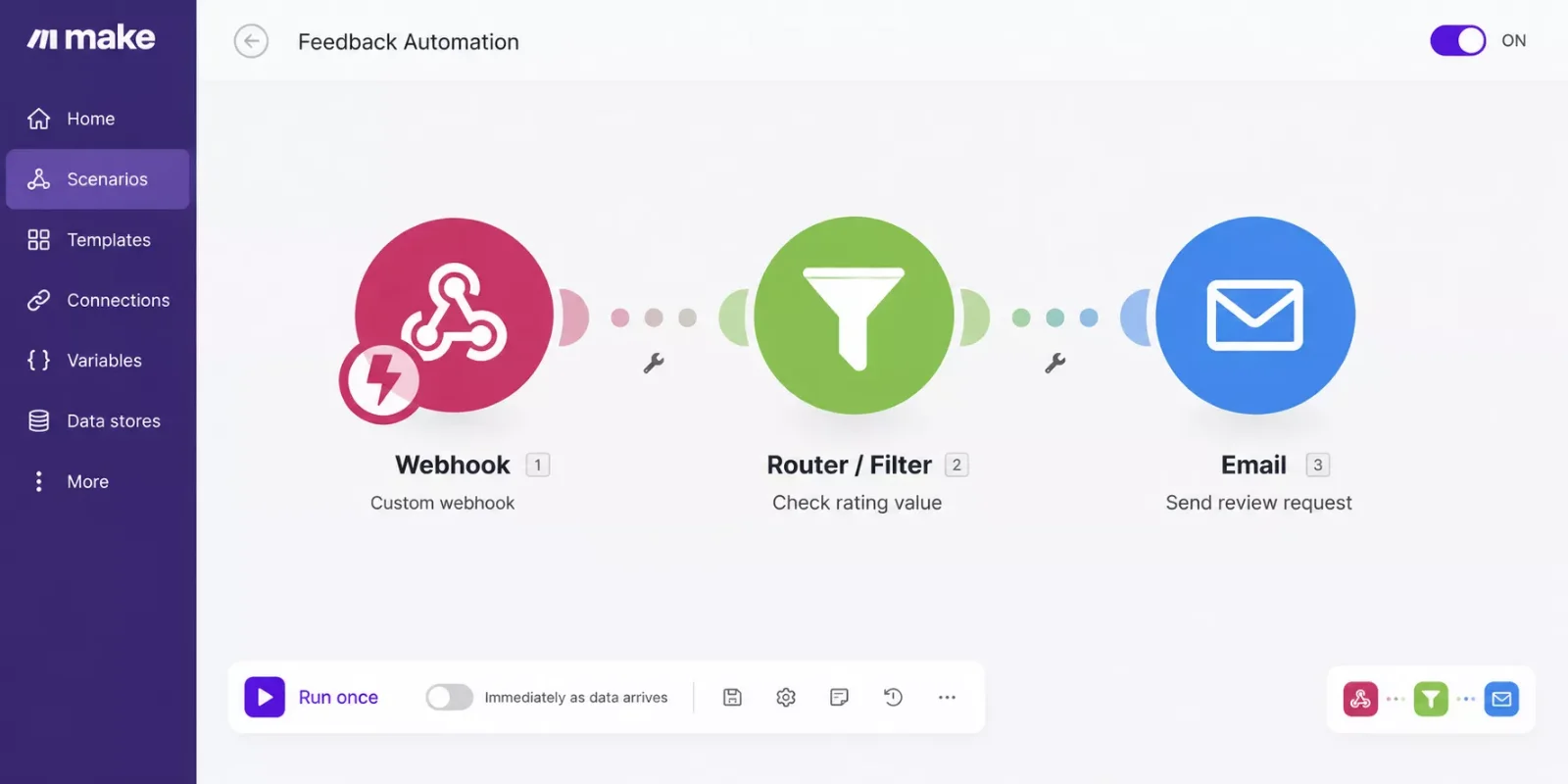
A quick note on how tools connect here: many feedback platforms, including Feedspace, expose their data through webhooks rather than a dedicated, officially listed Make.com app. That's still enough to build this automation — a generic Make.com HTTP or webhook module can pick up the response the moment it comes in, without needing a native, pre-built integration. If you're choosing a feedback tool specifically for this setup, confirm it supports outgoing webhooks before you commit, since that's what makes the "automatic" part actually automatic.
Turning Feedback Requests Into Testimonials Automatically
This is the part almost nobody sets up, and it's the actual gap worth closing. Once a response comes in and clears your rating threshold, you don't need to manually reformat it. A simple filter step checks the star rating or NPS score, and only responses above your cutoff move forward. From there, the client's name, their quote, and the date can drop straight into a saved document, a spreadsheet row, or even a pending post on your website, ready for you to glance at and approve before it goes live.
The point isn't to publish testimonials with zero human review. It's to remove the part where you're the bottleneck for finding, copying, and formatting them in the first place. You still get final say. You just stop being the reason it takes three weeks to add one testimonial to your site.
This same trigger-based thinking is worth applying anywhere else in your business where a finished task should kick off a follow-up action automatically — the same idea shows up in automating a full contract-to-invoice workflow, just with a different starting trigger.
People Also Ask
What is the best client feedback software for a freelancer with multiple clients?
The best option is usually the simplest one that supports automation, not the one with the most features. Look for a tool with webhook or API support so it can trigger automatically from your project management system, rather than one built for enterprise dashboards you'll never fully use.
Can a feedback request be sent automatically when a project is marked complete?
Yes. By connecting your project management tool to your feedback software through Make.com, a status change to "complete" can trigger the request instantly, with no manual step required on your end.
Can collected client feedback be automatically turned into testimonials for my website?
Yes, with a filter step that checks the rating and only passes strong responses forward. From there, the quote and client name can be formatted and saved for you to review and publish, cutting out the manual copy-and-paste work entirely.
FAQs
Do I need paid client feedback software to automate this?
No. Many feedback tools, including free-tier options, support webhooks or basic API access, which is all Make.com needs to trigger and receive data. You're paying for the feedback tool's features, not for the automation itself.
What if a client leaves negative feedback through this system?
Negative responses simply don't clear the rating threshold, so they're never auto-published. They land wherever you choose to route them (an email alert or a spreadsheet row) so you can follow up personally instead of losing the signal.
How long does it take to set this up?
A basic version (trigger, request, capture) can be running in under an hour once you've confirmed your feedback tool supports webhooks. Adding the testimonial-formatting step usually takes another 20-30 minutes.
Will this work if I use a simple to-do list instead of full project management software?
Yes, as long as that tool can send a webhook or has a Make.com connection when an item is marked done. Even a shared spreadsheet with a "status" column can work with the right setup.
Setting this up is also a natural companion to any AI tools that pair well with your Make.com stack. If you're using an AI assistant for content, scheduling, or client communication, pairing it with the same Make.com scenario that handles your feedback loop keeps everything running through one central automation hub instead of five disconnected apps.
Conclusion
Client feedback software doesn't need constant manual attention to be useful. Once the request fires automatically the moment a project wraps, and the good responses flow straight into testimonial-ready copy, the whole system runs quietly in the background while you focus on the next client. That's one less thing pulling at your attention when you're already stretched thin running everything solo.
⚡ Pro Tip: Set your rating threshold slightly higher than you think you need to (say, 4.5 out of 5 instead of 4) so only your strongest responses get flagged for the testimonial pipeline. A handful of great quotes beats a folder full of "it was fine."
⚠ Watch Out For: Before auto-publishing anything pulled from a feedback response, confirm your feedback tool's terms allow reuse as a testimonial, and always keep a manual approval step before it goes live on your site. Automating the collection doesn't mean skipping a client's permission to be quoted publicly.
If you're already this deep into automating the parts of your business that eat up your time without adding value, this is exactly the kind of system I build as a No-Code Architect: the complete, done-for-you automation, so you're not the one wiring webhooks and filters together on a weekend you'd rather spend somewhere else. One genuinely useful starting point if you want to try it yourself first: pick any feedback tool that lists webhook support on its integrations page before you sign up, since that one detail decides whether this entire workflow is even possible.
Want This Running in Your Business Without Building It Yourself?
If chasing feedback and testimonials is one more thing you'd rather hand off, reach out and I'll set up the exact automation for your workflow, or something fully custom if your setup looks different.
Let's TalkFound this guide useful? Share it with a fellow freelancer who's still chasing testimonials by hand. 🚀
Got a question or a workflow roadblock? Drop it in the comments below — happy to help.
Last Updated: September 12, 2026

// Comments