 SmartSoloFlow

Key Takeaway: You don't need to replace Make.com to get more out of it. Pairing the right AI tools with your existing scenarios adds intelligence without rebuilding your stack.
If you're comparing AI automation tools because you think you need to ditch Make.com, stop. The confusion most people run into isn't a Make.com problem. It's a stacking problem. You already have the automation engine. What you're missing is the right AI layer on top of it.
This guide breaks down seven AI tools built to slot directly into your existing Make.com scenarios, not replace them. Each one solves a specific piece of the puzzle, from drafting customer replies to transcribing calls to generating on-brand video content, and each one connects into Make without forcing you to rebuild anything you've already set up. For a broader look at how these tools stack up overall, see our full AI tool reviews and comparisons guide.
You'll get a straight verdict on who each tool is actually for, what it costs to run, and where it fits inside a real Make.com workflow. No generic feature dumps. Just the shortlist that actually matters for solopreneurs and small teams already running on Make.
Success Story: Adding One AI Module Instead of Switching Platforms
For example: a freelance consultant spent a weekend evaluating whether to move her client-onboarding automation off Make.com entirely, chasing a competitor tool that promised "built-in AI." Instead, she kept her existing scenario and added a single AI module to handle intake-form summarization. The switch she almost made would have cost her a full rebuild. The fix that actually worked took under an hour.
Why "Replace Make.com" Is the Wrong Question
Most searches for AI automation tools assume you're picking a new platform. That's the wrong frame if you're already running scenarios in Make.com. The real question isn't which platform wins. It's which AI tools plug into the platform you've already built your business on. If reclaiming hours in your week is the bigger goal here, it's worth pairing this with our solopreneur productivity system guide too.
Make.com already supports direct connections to more than 400 AI-related apps inside a single scenario, covering everything from language models to image generation to voice synthesis. That means the "confusion about which tools are right" most people feel usually isn't about automation software at all. It's about picking the right AI layer to sit on top of the automation you already trust.
Zapier, n8n, and other platforms get recommended constantly in "best AI automation tools" roundups, usually framed as things to switch to. If you've already got scenarios running, error handling configured, and your team trained on Make's interface, a full platform migration is a massive cost for a problem that a single new module usually solves. This guide skips the "should I switch" debate entirely and goes straight to what actually plugs in.
AI Tools That Integrate With Make.com Scenarios
The seven tools below were chosen because they connect into Make.com scenarios directly, either through a native app, a dedicated module, or a simple HTTP/webhook call, and because each one solves a distinct, common automation gap rather than duplicating what Make already does on its own, per Make's own guide to scaling AI on the platform.
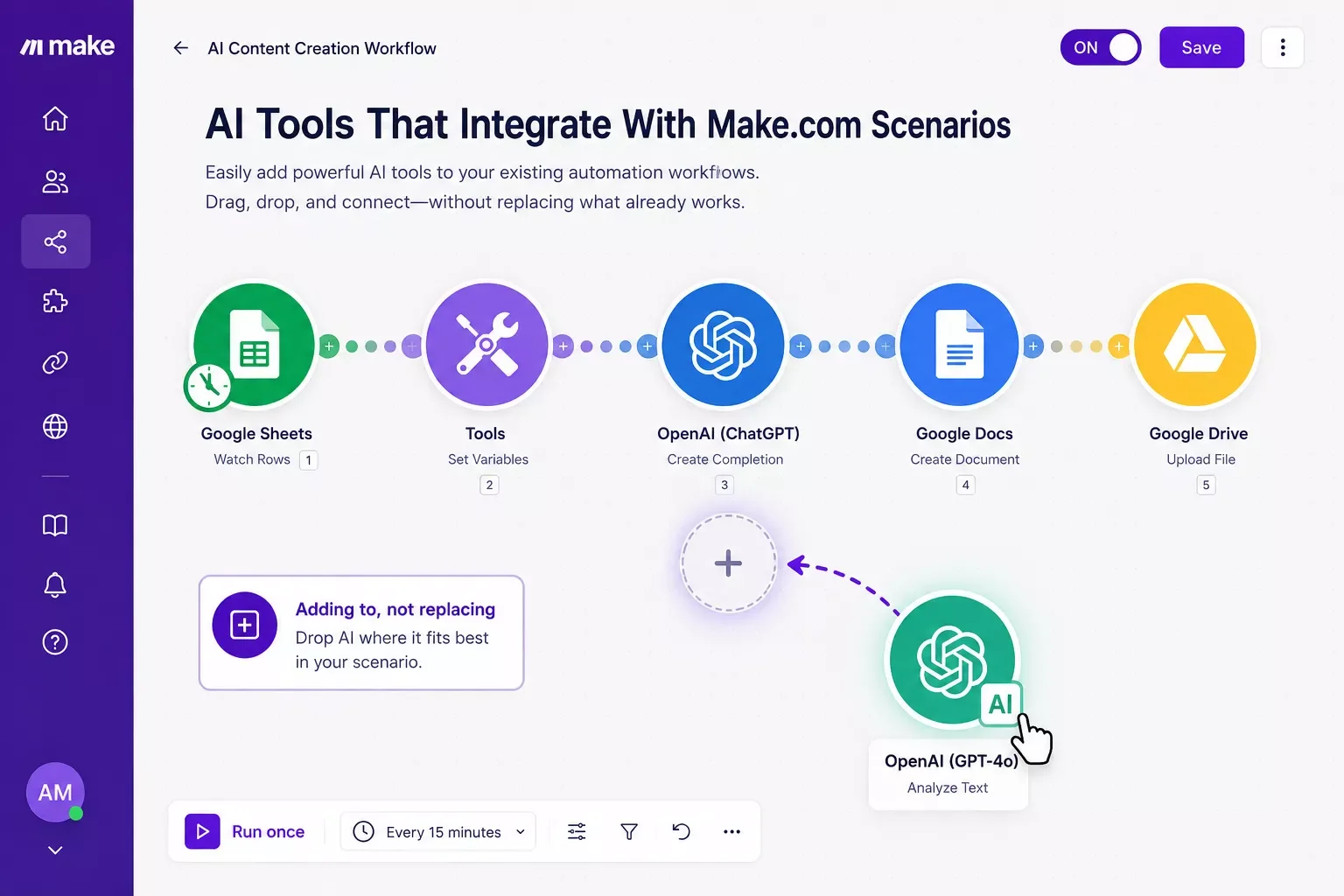
That's the entire pattern behind every tool below. You're not tearing anything out. You're dropping one new module into a scenario you already trust.
1. OpenAI (GPT models + Whisper)
OpenAI connects into Make.com as a native app, and it's the closest thing to a default AI layer most scenarios reach for first. GPT models handle drafting, summarizing, and classifying text inside a scenario, while Whisper handles speech-to-text so a scenario can turn a voice memo or call recording into usable text automatically. If you're only adding one AI tool this month, this is the one that covers the widest range of tasks. Best for: solopreneurs who want one flexible module instead of five specialized ones.
2. ElevenLabs
ElevenLabs is a text-to-speech tool that plugs into Make.com with dedicated triggers and actions, including direct speech synthesis and voice-agent actions. Inside a scenario, it turns written content, like a blog post or an email draft, into a natural-sounding voiceover automatically, which is genuinely useful for anyone repurposing written content into audio or video without recording anything themselves. Best for: solopreneurs producing content across multiple formats from a single written source.
3. Fireflies.ai
Fireflies.ai connects into Make.com scenarios to pull meeting transcripts, summaries, and action items automatically after a call ends. As of 2026, its official pricing runs $0 on the Free tier, $10/user/month on Pro, and $19/user/month on Business (all billed annually). For a solopreneur running client calls through Make, this means a transcript can trigger a scenario that updates a CRM record and drafts a follow-up email without anyone manually reviewing the recording first. Best for: consultants and freelancers who bill by the call and need a paper trail without extra typing.
4. HeyGen
HeyGen generates AI video avatars and connects into Make.com through direct triggers and actions, including video translation and template-based video creation. A scenario can take a script, generate a video, and publish it, all inside the same workflow that already handles your content calendar. Best for: solo creators who want a face-and-voice video presence without filming anything themselves.
5. Mistral AI
Mistral AI is a language-model provider that connects into Make.com with chat completion and embedding actions, functioning as an alternative or backup to OpenAI inside the same kind of scenario. For anyone already leaning on GPT modules, adding Mistral as a second model gives a scenario somewhere to fall back to during an outage, or a cheaper option for lower-stakes tasks. Best for: anyone running AI-dependent scenarios who doesn't want a single point of failure.
6. Hugging Face
Hugging Face connects into Make.com to run open-source model tasks like summarizing, classifying, and translating text. It's a deeper, more technical option than the others on this list, better suited to a scenario that needs a specific model rather than a general-purpose one. Best for: Make.com users comfortable configuring a more technical module in exchange for more control over the model itself.
7. Chatbase
Chatbase turns a set of documents or a knowledge base into a custom GPT-style chatbot, and it connects into Make.com so a scenario can send it messages and receive responses automatically. This is a genuine fit for handling first-line customer questions inside an existing support scenario, without building a chatbot from scratch. Best for: small businesses fielding repetitive customer questions who don't want to hand-build a bot.
Master Stroke — Integration With Make.com
Here's the part most "AI tools" roundups skip entirely: none of the seven tools above do anything on their own unless something connects them together. A transcription tool that only lives inside its own app is a nice standalone feature. The same tool wired into a Make.com scenario, where a finished transcript automatically updates a CRM, drafts a follow-up email, and logs the call in a spreadsheet, is a system that runs itself. Our own CRM automation case study shows exactly this kind of setup in action.
That's the actual multiplier. Make.com is what turns "I have an AI tool" into "I have a business process that doesn't need me in the loop." One useful detail from Make's own credits documentation: third-party AI apps like OpenAI, Anthropic's Claude, and Gemini use the same 1-credit-per-operation cost as any other module, so adding an AI step to a scenario doesn't quietly blow up your usage the way some people assume.
If you're already running one of these tools by itself and want it properly wired into a scenario instead, that's exactly the kind of build I put together as a No-Code Architect at SmartSoloFlow, one of the more thorough approaches you'll find to actually connecting Make.com automation workflows to a real AI stack rather than just listing tools side by side. If you want this working alongside your existing stack without piecing it together yourself, this is exactly what I build.
Want This Wired Into Your Stack?
Tell me which tool you're trying to connect, and I'll scope out exactly what a working Make.com scenario looks like for it.
Let's TalkPeople Also Ask
What AI tools work best alongside Make.com?
OpenAI, ElevenLabs, Fireflies.ai, HeyGen, Mistral AI, Hugging Face, and Chatbase all connect directly into Make.com scenarios through native or dedicated modules. The right one depends on the task, text generation, voice, transcription, or video, rather than any single "best" tool for every scenario.
Can I add AI features to my existing Make.com scenarios?
Yes. Adding an AI tool means inserting one new module into an existing scenario, not rebuilding it. Most AI apps connect the same way any other Make.com app does, with a trigger, an action, and a mapped output field.
Do I need a separate AI tool if I already use Make.com's built-in AI agents?
Not necessarily. Make's built-in AI agents and toolkit cover general tasks well. A separate tool like ElevenLabs or HeyGen still makes sense when you need a specific capability, like voice or video generation, that a general-purpose AI agent doesn't specialize in.
Does adding AI modules use more Make.com credits?
Third-party AI apps like OpenAI, Claude, and Gemini use 1 credit per operation, the same as most standard modules, per Make's own credits documentation. Make's own built-in AI provider features can use more, since those are billed on tokens and usage, not a flat per-operation rate.
Is it expensive to connect an AI tool to Make.com?
Most of these tools have a usable free or low-cost tier, and the Make.com side of the connection doesn't add much cost on its own since third-party AI apps run on the same 1-credit-per-operation basis as any other module.
Which of these tools should a solo consultant start with?
OpenAI covers the widest range of tasks with one module, making it the simplest starting point. Add Fireflies.ai next if client calls are a regular part of the business.
Do I need coding skills to connect these tools to Make.com?
No. Every tool listed here connects through Make's standard drag-and-drop module system, the same way you'd connect a CRM or an email app, with no custom code required for a basic setup.
Can I use more than one of these tools in the same scenario?
Yes. It's common to chain several together, for example transcribing a call with Fireflies, summarizing it with OpenAI, and voicing the summary with ElevenLabs, all inside one scenario.
Conclusion & Rating
If you're only picking one tool from this list, start with Open AI. It covers the widest range of tasks (text generation, summarization, and speech-to-text via Whisper) through a single Make.com connection, which makes it the lowest-effort way to add real AI capability to a scenario you already run. This rating reflects documented features, official pricing, and researched integration depth rather than a lived 30-day test.
Rating: 4.5/5 stars — Overall Winner: OpenAI, for breadth of use cases inside a single Make.com module.
The honest truth about "which AI tool is right for you" is that it was never really about the tool. It's about which one solves the specific bottleneck slowing your business down this month. If client calls are eating your evenings, that's Fireflies.ai. If content repurposing is the bottleneck, that's ElevenLabs or HeyGen. Pick the one that matches your actual pain point, not the one with the flashiest demo.
And here's a tip that costs nothing: before you connect anything, map out the one scenario where this tool would save you the most time. Don't try to AI-ify your whole business in one afternoon. One well-built connection beats five half-finished ones.
The complete, done-for-you version of this, an AI tool fully wired into a working Make.com scenario, tested end to end, is exactly what I build as a No-Code Architect. If you want this working alongside your existing stack without piecing it together yourself, this is exactly what I build.
⚡ Pro Tip: Start with the AI tool that touches your single biggest time-drain, not the one that looks the coolest in a demo video. A boring automation you actually finish beats an impressive one that stays half-built.
⚠ Watch Out For: Some of these tools charge per usage (transcription minutes, generated video length, voice characters) separately from your Make.com credits. Check both cost structures before scaling a scenario that runs frequently, so your automation doesn't quietly get more expensive as it succeeds.
Ready to stop piecing this together on your own? SmartSoloFlow builds working Make.com automations, AI tools and all, so you get a system that runs instead of a list of apps you still have to connect yourself.
Let SmartSoloFlow Build It For You
Tell us which AI tool you want connected, and we'll scope out a working Make.com automation built around it.
Get StartedFound this guide useful? Share it with a fellow freelancer who's still doing things manually. 🚀
Got a question or a workflow roadblock? Drop it in the comments below — happy to help.
Last Updated: September 3, 2026

// Comments