 SmartSoloFlow

Key Takeaway: One connected automation system, not another app, is what actually stops the daily role-switching that drains solopreneurs.
System Goal: Replace scattered tools with one connected workflow
Weekly Time Savings: ~5-8 Hours/week (typical range, varies by workload)
Core Framework: Make.com-Connected Client & Task System
Solopreneur productivity breaks down fastest when one person is switching between strategist, marketer, and admin all day with nothing connecting the pieces. If you run your business solo and feel like you're always catching up, the fix usually isn't another app. It's one automation system that moves work between the tools you already have, so nothing depends on you remembering to do it by hand. This guide walks through where that system actually pays off across a solo business, and exactly where Make.com fits into building it without hiring a developer.
- Why Solopreneur Productivity Breaks Down Without a System
- Capturing & Booking New Business
- Turning a Lead Into a Client
- Staying on Top of Client Communication
- Managing Tasks & Projects Solo
- Keeping the Money Side Automated
- Staying Visible Without Manual Posting
- All-in-One Platform or Connect Your Own Tools?
- How Make.com Automation Ties Your One-Person Business Systems Together
- 2026 AI Productivity Hacks for Solopreneurs
- Conclusion
Success Story: From Five Apps to One Workflow
For example: a freelance consultant tracking leads in a spreadsheet, invoicing by hand, and following up with clients from memory alone can connect all three into a single Make.com workflow. A new lead auto-fills the tracker, triggers a welcome email, and schedules a follow-up reminder, turning hours of weekly admin into a few minutes of checking that everything ran.
Why Solopreneur Productivity Breaks Down Without a System
Solopreneur productivity collapses because one person keeps switching between roles that were never meant to sit on a single plate, and every switch has a measured time cost, not just a mental one. That constant toggling is why solo work feels harder than the task list alone would suggest.
A study of 20 teams across three Fortune 500 companies, tracked by workplace-analytics firm Soroco and independently reported by the Association for Talent Development, found workers toggle between apps and websites roughly 1,200 times a day, losing close to four hours a week just reorienting after each switch. Solopreneurs don't have a coworker to catch what slips during that reorientation. Every dropped thread is theirs alone.
The instinct is to add another tool. A better calendar app, a shinier task manager, one more system promising to fix the chaos. But every app you bolt on without connecting it to the rest of your stack is one more place work can get lost, and one more context to switch into.
What actually works is different. Connect the tools you already use so information moves between them without you doing it by hand. That's where Make.com comes in. It sits behind your existing apps, watching for triggers like a new inquiry or a signed contract, and moves that information to wherever it needs to go next. You keep the tools you know. You just stop being the thing that connects them.
Capturing & Booking New Business
New business slips through the cracks most often between "someone found you" and "someone's actually on your calendar," and that gap is where a connected system earns its keep before any other part of the workflow does.
A portfolio site or lead form that just sits there, waiting for you to check it, is a bottleneck. Connect that portfolio site's inquiry form to an automated follow-up sequence, and a new visitor gets a reply within minutes instead of whenever you next open your inbox. First impressions are won or lost in that window.
The same logic applies once someone's ready to actually book time with you. Connecting your booking tool directly to your CRM means a scheduled call doesn't just sit as an event on a calendar. It becomes a tracked lead the moment it's booked, with no manual copy-paste step in between.
Think about the last time you filled out a contact form on someone else's site and never heard back. That's exactly the experience your own site avoids once inquiries and bookings feed into the same automated system, instead of sitting in two separate, easy-to-forget inboxes waiting for you to notice them.
Turning a Lead Into a Client
A signed contract or a completed intake form should start onboarding and billing on its own, without you spending the next hour manually setting up folders, tasks, and invoices for the client you just won.
When onboarding is built as a triggered automation instead of a manual checklist, the moment a new client signs on, a welcome email, a project folder, and a kickoff task all fire automatically. You're not starting from a blank checklist every single time someone new comes on board.
The billing side works the same way. A signed contract can trigger the first invoice directly, pulling the agreed amount and terms straight from the contract instead of you retyping them into a separate invoicing tool. That single connection quietly closes one of the most common gaps in a solopreneur business: work that's already been agreed to, sitting unbilled because nobody got around to it.
Staying on Top of Client Communication
Client communication breaks down for solopreneurs not from a lack of care, but from having no system that reliably surfaces what needs a reply, so a connected workflow's real job here is making sure nothing depends on you remembering.
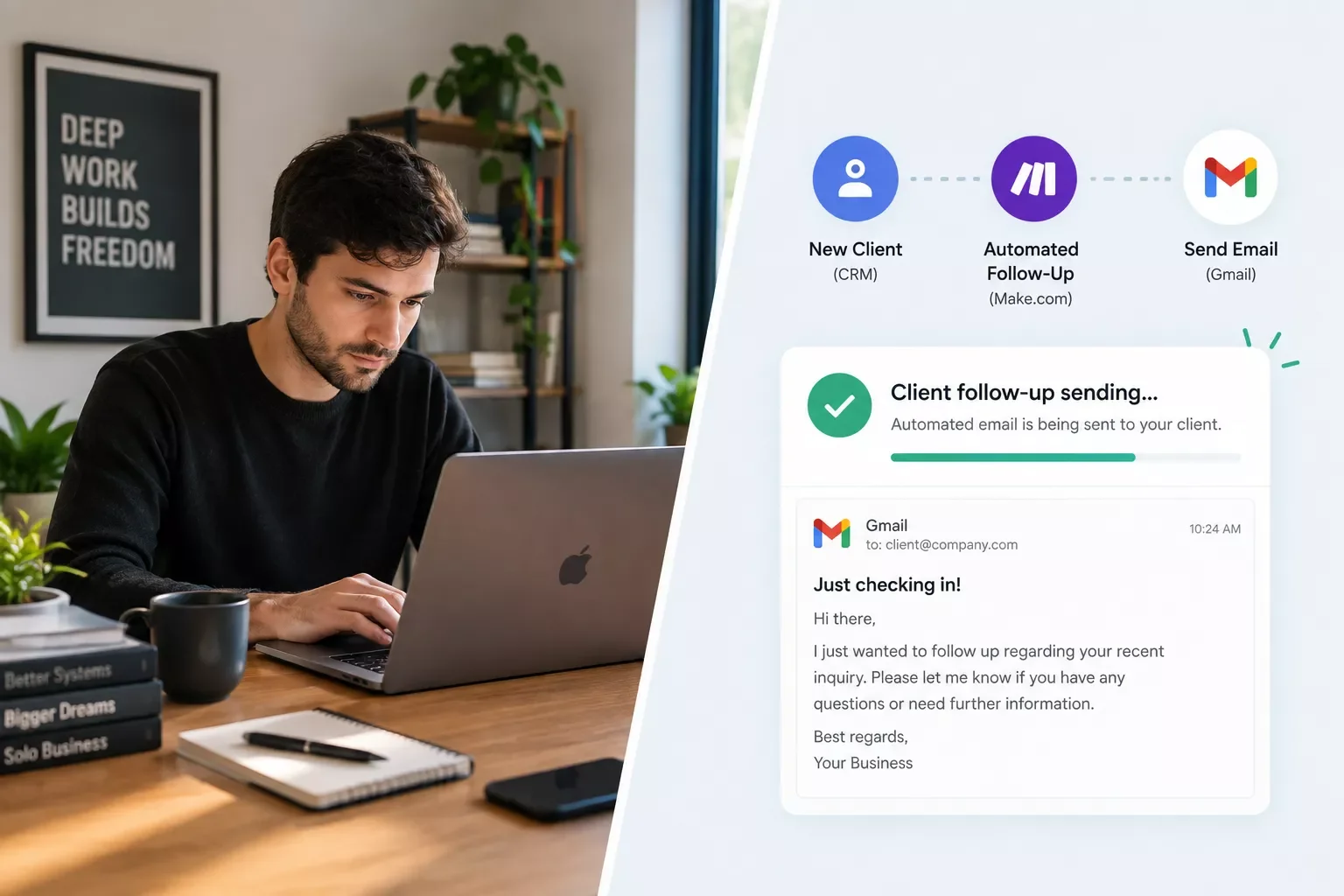
Start with the basics. Automating CRM follow-ups means a lead who hasn't heard from you in a week gets a nudge without you having to scan your list looking for who's gone quiet. And a real event, like a form submission or a milestone hit, can trigger the right email sequence automatically, instead of you writing a fresh one every time something happens.
I've seen a lot of solopreneurs lose good ideas simply because they were driving, walking, or between calls when the thought hit. Turning a quick voice memo into a CRM entry automatically fixes that. You talk for ten seconds, and it's filed where you'll actually see it later, instead of trapped in a notes app you forget to check.
Feedback works the same way. Rather than remembering to ask every client how a project went, a completed-project trigger can send that feedback request automatically. According to Zapier's 2021 State of Business Automation Report, which surveyed 2,000 US knowledge workers at small and mid-sized businesses, 67% reported automation made them more productive at work. That's a workplace study, not a solopreneur-specific one, but the underlying point holds even more when there's no coworker to pick up what you miss.
Managing Tasks & Projects Solo
Task and project tools only help if something reliably puts work in front of you, so this section is less about which app to pick and more about making sure tasks show up without you typing every single one in by hand.
A to-do list that only holds what you remember to add isn't much of a system. Pulling tasks in automatically from email and form submissions means a client request becomes a task the moment it lands, not whenever you next sit down to plan your day.
The same trigger that starts onboarding can go a step further. A signed contract can automatically create the project itself, not just a task inside one, complete with the right folder structure and a starting checklist already in place.
You don't need an expensive project management stack for this to work. Even Asana's free plan gains real automation power once it's connected through Make.com instead of relying only on Asana's own built-in rules, which are limited on the free tier. And if the bottleneck isn't which tasks show up but when you actually work on them, pairing this with time-blocking your calendar around what's already automated closes the loop between "the task exists" and "the task gets done."
Keeping the Money Side Automated
Chasing payments, tracking expenses, and estimating quarterly taxes are three separate admin jobs for most solopreneurs, and each one is a strong candidate for the same kind of connected trigger already covered above.
Late invoicing is one of the quietest ways solopreneurs lose money, not because clients refuse to pay, but because the invoice never gets sent promptly in the first place. Automating invoice reminders for freelancers means a follow-up goes out on a schedule, whether or not you remembered the due date yourself.
Expense tracking has the same problem in reverse. Reconstructing a year of expenses from memory every tax season is exactly the kind of task automation is built for. Syncing expense tracking into a tax-ready report as transactions happen means January never turns into a scramble through old receipts.
What I've seen work best for solopreneurs who don't want to pay for a full accounting suite: pairing a free accounting tool with a quarterly tax-estimate automation. You get a running number instead of a guess, without adding another subscription to the stack.
Staying Visible Without Manual Posting
Marketing is usually the first thing to slip when a solopreneur gets busy with client work, because posting content has no deadline attached the way client deliverables do.
The fix isn't posting more. It's triggering social posts from real business events, like a new blog post going live or a project wrapping up, instead of sitting down every week to figure out what to say. A finished case study can become a post on its own, without a separate "remember to promote this" step on your to-do list.
This matters more than it sounds. Consistent visibility is what keeps referrals and repeat clients coming back, and it's usually the first habit to break during a busy stretch, exactly when new client interest starts to quietly dry up. A trigger-based posting habit keeps showing up even when you don't have the bandwidth to sit down and think about content that week.
All-in-One Platform or Connect Your Own Tools?
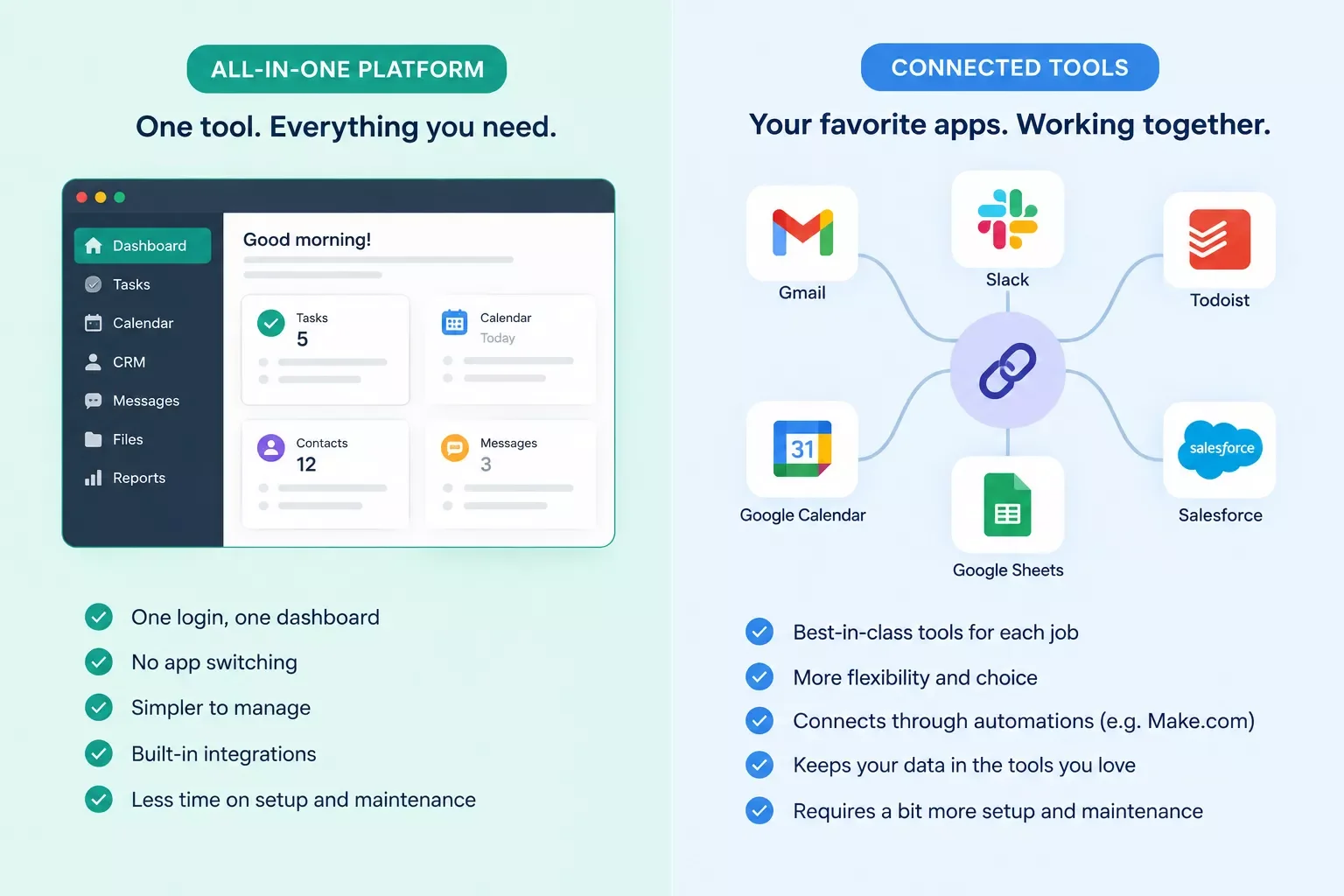
Some solopreneurs are better off with a single bundled platform than a connected stack, and it's worth being honest about that before this guide keeps pushing the connect-your-own-tools approach.
Products like The Solopreneur Hub genuinely solve the "too many logins" problem by putting clients, projects, invoices, and proposals in one dashboard from day one, with no setup required beyond signing up. As of this writing, it lists a freemium plan starting around $29/month, plus a 14-day free trial.
Pricing above was verified at the time of writing. Since pricing changes frequently, please confirm current rates and plan details directly on each provider's official website before making a decision.
That's a fair trade for someone just starting out who wants one dashboard and nothing to configure. The trade-off is that you're locked into whatever that platform decides to build next, and if you're already invested in tools you like, your own CRM, your own invoicing app, migrating everything into a new all-in-one platform is its own project.
Connecting the tools you already use, the approach this guide covers, keeps you in the apps you've already learned and paid for. It takes more setup up front, but nothing gets thrown away if one piece of your stack changes later. If you're starting from zero with no existing tools, an all-in-one platform is a completely reasonable choice. If you already have a CRM, an invoicing tool, and a task manager you don't want to abandon, connecting them is usually the better use of your time.
How Make.com Automation Ties Your One-Person Business Systems Together
Make.com automation for one-person business systems works by watching for a trigger event, like a new lead or a signed contract, in one app, then automatically carrying out actions across your other apps, connecting tools that would otherwise stay isolated from each other.
Most "best tools for solopreneurs" lists treat every app as its own island. You get a task manager recommendation, a CRM recommendation, an invoicing tool recommendation, and you're left to stitch them together yourself, usually by copying information from one to the next by hand. That's not a system. That's just more tools to switch between.
Here's what that connection actually looks like in practice, step by step:
- A trigger fires in one app. A new lead form submission, a signed contract, or a completed project, something that already happens in your business today.
- Make.com watches for that trigger. A scenario, Make's term for one of these automated workflows, is set up once to watch for that exact event.
- Make.com carries out actions in your other apps. A CRM entry gets created, an invoice goes out, a task gets added, all without you touching either app directly.
- You review, you don't rebuild. The scenario runs the same way every time. Your only ongoing job is spot-checking that it's still working.
Say a new client signs a contract through your e-signature tool. That single action can trigger Make.com to create a project in your task manager, add the client to your invoicing tool, and log a note in your CRM, all within seconds, with no manual data entry.
This is exactly what separates solopreneurs who feel constantly behind from the ones who don't. It's also worth pairing with a broader shift toward no-code systems generally. If you're building your first system this way, this guide to no-code automation for small businesses covers the same underlying idea from a slightly different angle, no code, no developer.
Setting this up doesn't require a technical background. Make.com's own scenario builder is built for exactly this kind of non-developer use case, which is why it's one of the more thorough breakdowns of Make.com automation for one-person businesses you'll find, from SmartSoloFlow.
2026 AI Productivity Hacks for Solopreneurs
AI tools add real value for solopreneurs when used as a thinking partner alongside your automation system, not as a replacement for the connected workflow itself. Voice-to-text capture and AI-assisted first drafts are two of the highest-leverage additions right now.
Voice-to-text capture is worth setting up if you spend any time away from your desk. Recording a quick idea while walking or driving, then having it transcribed and filed into your notes system automatically, means fewer good ideas get lost simply because you couldn't type them down in the moment.
AI-assisted first drafts work the same way. Feeding a rough outline to an AI tool for a first-pass client email or social post, then editing it into your own voice, cuts the blank-page time dramatically. It won't replace your judgment, but it removes the slowest part of writing: getting from nothing to something.
Both of these pair naturally with the automation system already covered above. A voice memo can trigger a Make.com scenario that transcribes it and files it automatically. An AI draft can slot into the same client-communication workflow that already fires when a project milestone is hit.
📚 Explore This Topic Further
- CRM for Solopreneurs: How I Automated Mine in 2026
- How to Automate Invoicing Software for Freelancers in 2026
- 6 Appointment Booking Software Options for Solopreneurs in 2026
- To Do List App That Fills Itself: My 2026 Automation Setup
- How to Set Up Email Automation That Triggers Itself in 2026
- 6 Best Social Media Scheduling Tools That Auto-Post in 2026
- Memo App to CRM: My Automated Voice Note Setup in 2026
- How to Automate Expense Tracking App Reports in 2026
- CLM Software Case Study: My Contract-to-Invoice Setup (2026)
- How to Automate Project Management Software Setup in 2026
- 5 Ways to Automate Asana's Free Plan in 2026
- Client Onboarding Software Case Study: My DIY Setup (2026)
- How to Automate Client Feedback Software Requests in 2026
- 6 Free Accounting Tools That Automate Tax Prep in 2026
- Portfolio Website Leads: My Automated Follow-Up System (2026)
People Also Ask
How can a solopreneur stay productive without a team?
Build a connected automation system instead of relying on personal discipline alone. Tools like Make.com handle follow-ups, invoicing, and status updates automatically, covering tasks a team would normally catch, without needing to hire anyone.
What productivity tools do solopreneurs actually need?
Fewer standalone tools and more connection between the ones you already use. A CRM, an invoicing tool, and a task manager are enough, as long as an automation layer like Make.com links them together.
How do solopreneurs avoid burnout while managing multiple roles alone?
Automate the repetitive, low-value parts of each role so mental energy goes toward higher-value work instead of admin. Removing manual follow-ups and invoicing alone frees up meaningful time and reduces the constant switching that drives burnout.
Is AI or automation better for solopreneur productivity?
They solve different problems. AI helps with thinking and drafting tasks like emails or outlines, while automation handles repetitive, rules-based work like invoicing and follow-ups. Most solopreneurs benefit from combining both rather than choosing one.
Can automation replace hiring a virtual assistant?
For rules-based, repetitive tasks like data entry, follow-ups, and status updates, yes, automation often replaces the need for a VA entirely. For judgment-based work, like handling a sensitive client conversation, a VA or the solopreneur's own time is still the better fit.
Do I need to know how to code to set up Make.com automations?
No. Make.com uses a visual, drag-and-drop scenario builder built for non-technical users, which is exactly why it fits solopreneurs without a developer on staff.
How much time can automation actually save a solopreneur?
It varies by workload, but automating follow-ups, invoicing, and status updates typically saves several hours a week by removing entire categories of manual, repetitive tasks from your routine.
What's the difference between using separate apps and a connected system?
Separate apps require you to manually move information between them. A connected system, built with something like Make.com, moves that information automatically the moment a trigger event happens, removing you from the process entirely.
Where should a solopreneur start if they've never automated anything before?
Start with your most repetitive manual task, often follow-ups or invoicing, and automate just that one workflow first. Getting one scenario working builds confidence before connecting more of your stack.
Conclusion
Solopreneur productivity doesn't improve by working harder inside a broken system. It improves by removing the role-switching entirely, one connected automation at a time, until your business runs on a system instead of your memory.
⚡ Pro Tip: Start with the one manual task you dread doing most each week. That's almost always the highest-leverage first automation to build.
⚠ Watch Out For: Don't automate a broken process. Test any new workflow manually a few times first, and confirm it behaves correctly before connecting it to client-facing communication. An automation that fires incorrectly at scale is a lot harder to clean up than one caught early.
Want This Built For You?
Want a system built specifically for your business instead of piecing one together yourself? Let's talk about what a fully connected setup looks like for your exact workflow.
Let's TalkFound this guide useful? Share it with a fellow freelancer who's still doing things manually. 🚀
Got a question or a workflow roadblock? Drop it in the comments below, happy to help.
Last Updated: September 21, 2026

// Comments