 SmartSoloFlow

Key Takeaway: The best AI coding agent for you depends on how much autonomy you want to hand over, and whether you're willing to manually check GitHub to see if it actually finished.
The best AI coding agent for you depends on how autonomous you want the work to be, and whether you're tired of checking GitHub every hour to see if it finished. This guide ranks 7 leading AI coding agents for developers already running Make.com, then shows how to make any of them ping your team the second a task wraps up.
Most comparisons stop at "here's what the tool does." That leaves a real gap for solopreneurs and small dev teams: an agent that finishes a pull request at 2 a.m. is useless if nobody knows until the next afternoon. We'll cover what each agent actually does well, where it falls short, and the one thing none of the other guides mention: wiring your agent's finish line straight into Slack. If you're weighing broader AI options for your stack too, our roundup of AI automation tools that pair with Make.com is a useful companion read alongside this one.
- 1. Claude Code: Best for Deep, Multi-File Reasoning
- 2. Cursor: Best Daily-Driver IDE With AI Built In
- 3. GitHub Copilot: Best Cheap Entry Point With Tight GitHub Ties
- 4. OpenAI Codex: Best for Cloud Agent Tasks That Open Their Own PRs
- 5. Cline: Best Free, Open-Source AI Pair Programmer
- 6. Devin: Best for Fully Autonomous, Unattended Delegation
- 7. Gemini CLI: Best for Teams Already on Google Workspace
- Master Stroke: Integration With Make.com
Success Story: The 2 a.m. Pull Request Nobody Saw
For example: a solo developer sets an autonomous coding agent loose on a backlog of small bug fixes overnight. By morning, three pull requests are sitting there, merged and ready. But nobody checks GitHub until early afternoon, so a client update that could've gone out at 7 a.m. doesn't ship until almost 3 p.m. The fix wasn't a better agent. It was a Slack ping the moment the merge happened.
Every agent on this list can write real code without much hand-holding. The harder question is what happens after it's done, and that's where this guide differs from a typical AI coding agent roundup. For a look at how another team wired an AI tool directly into Make.com for a similar always-on job, see how we added an AI customer service bot to Make.com.
Pricing above was verified at the time of writing. Since pricing changes frequently, please confirm current rates and plan details directly on each provider's official website before making a decision.
1. Claude Code: Best for Deep, Multi-File Reasoning
Claude Code is the strongest pick when a task touches many files at once and needs real judgment, not just pattern-matching. It's Anthropic's terminal-native agentic coding tool, and it now drives over half of Anthropic's enterprise revenue, hitting $2.5 billion in annualized revenue in early 2026. See Claude Code's official documentation for the full feature set.
On SWE-bench Verified, the leading Claude Code model scores 80.9%, one of the highest marks of any tool on this list. It asks for explicit approval before editing files or running terminal commands, and it reads a CLAUDE.md file at the start of every session so you can hard-code your own project rules.
In one June 2026 test, Claude Code finished a full feature build (API endpoint, migration, service layer, and docs) inside a 200,000-line TypeScript project in 9 minutes using sub-agents. That's the kind of throughput that makes "did it actually finish" a real problem worth solving.
Verdict for Make.com users: if your stack is already Anthropic-heavy, Claude Code is the safest default, and it plugs cleanly into the notification setup below.
2. Cursor: Best Daily-Driver IDE With AI Built In
Cursor is the right call if you want an AI-native code editor rather than a separate agent bolted onto your workflow. It's a VS Code fork built by Anysphere, with Tab completions trained on your codebase and an Agent mode that handles multi-file changes.
Cursor's Cloud Agents run longer jobs in the background while you work on something else, and its optional Bugbot feature auto-reviews pull requests for an extra $40 per user per month. Pricing starts at $20/mo for Pro, with Ultra at $200/mo for heavy usage and Teams at $40/user/mo.
In a recent 4-week trial pitting Cursor against Windsurf on a 45,000-line TypeScript codebase, Cursor's agent completed multi-file refactoring tasks at roughly 75% success versus its rival's 70%, with comparable code quality. That gap is small, but it's part of why Cursor remains the most broadly recommended AI-native IDE going into 2026.
The tradeoff: Cursor is code-editing only. It doesn't touch deployment, business integrations, or anything outside the editor, which is exactly why pairing it with an outside automation layer matters.
Verdict for Make.com users: great as your daily agentic coding tool, but you'll need Make.com to cover everything Cursor doesn't, like telling your team it's done.
3. GitHub Copilot: Best Cheap Entry Point With Tight GitHub Ties
GitHub Copilot is the obvious starting point if your whole workflow already lives on GitHub. It's the most widely adopted AI coding assistant on the market, with roughly 26 million total users and 4.7 million paid subscribers, up about 75% year over year.
As of June 1, 2026, every Copilot plan moved to usage-based billing. GitHub retired its old premium-request quotas and replaced them with GitHub AI Credits, billed by token consumption, though code completions stay free and unlimited on every paid plan. Pro runs $10/mo, with Business and Enterprise scaling up to $19-$39 per user per month.
Copilot also shipped a full CLI agent in February 2026 that can open pull requests autonomously, closing a gap that used to separate it from more agentic tools like Devin. For another take on tools built specifically to work alongside GitHub, see our comparison of the best AI transcript generators, which uses the same head-to-head format.
Verdict for Make.com users: the cheapest way to get a genuine autonomous coding agent tied directly to GitHub, with native webhook support that makes the notification setup below almost trivial.
4. OpenAI Codex: Best for Cloud Agent Tasks That Open Their Own PRs
OpenAI Codex is built for handing off a well-defined task and getting a pull request back without touching your own machine. Codex Web runs autonomously in the cloud for anywhere from 1 to 30 minutes per task, while Codex CLI is an open-source tool that runs locally.
Codex rides on your ChatGPT plan rather than selling a separate subscription. Plus at $20/mo covers most individual developers, with Pro tiers at $100 and $200 for 5x and 20x the usage. Plus and every tier above it include Codex on web, CLI, IDE extension, and iOS, all running on OpenAI's GPT-5.6 model family.
Adoption has moved fast: Codex passed 3 million weekly active users in mid-2026, a fivefold jump in three months with 70% month-over-month growth. Much of that growth traces back to Codex's tight GitHub integration, since it can open pull requests directly against your repository without an extra connector step.
Verdict for Make.com users: a strong autonomous option if you already pay for ChatGPT, and its GitHub-native PR creation makes it another easy fit for the automation below.
5. Cline: Best Free, Open-Source AI Pair Programmer
Cline is the pick if you don't want to pay a subscription at all and are fine bringing your own API key. It's a free, open-source VS Code extension under the Apache 2.0 license, and it works as an AI pair programmer that plans, edits, runs, and reacts inside your existing editor.
Cline supports OpenAI-compatible endpoints plus first-party connections to Anthropic, Google, and Bedrock, so you can point it at whichever model you already have credits for. It's also one of the strongest MCP-native agents available in a VS Code extension, and approval prompts gate every write operation so it never edits files without your sign-off.
Because Cline has no vendor subscription pushing its pricing, your actual monthly cost tracks whatever the underlying model provider charges per token, which means a lighter workload can genuinely cost just a few dollars a month instead of a flat subscription fee.
Verdict for Make.com users: the lowest-cost way to run an agentic coding tool, though you'll want to set up your Make.com webhook manually since Cline has no built-in notification layer of its own.
6. Devin: Best for Fully Autonomous, Unattended Delegation
Devin is built for a different kind of trust: handing over a task and walking away entirely. Cognition's autonomous AI software engineer runs inside a sandboxed cloud VM with its own browser and terminal, planning, coding, testing, and self-correcting when a build fails.
Pricing starts at $20/mo on the Core plan, then meters usage in Agent Compute Units at roughly $2.25 each, which works out to about $9 for an hour of active autonomous work. Cognition raised $1 billion at a $25 billion valuation in May 2026, with annualized revenue near $492 million, a sign of how fast unattended coding agents are scaling.
The current version, Devin 2.2, added desktop GUI support and automated code review (Devin Review), plus a boot time of around 15 seconds for spinning up a new task environment, down from the multi-minute waits earlier versions were known for.
Verdict for Make.com users: this is exactly the profile that needs the notification setup below the most. Devin working unattended for hours is only useful if something tells you the moment it stops.
7. Gemini CLI: Best for Teams Already on Google Workspace
Gemini CLI makes sense mainly if your team already lives inside Google Workspace. It's Google's open-source terminal agent, built around Gemini 3 models with a 1-million-token context window.
One thing worth knowing before you commit: the fully free path for individuals ended on June 18, 2026. Google shifted free-tier and Google AI Pro/Ultra users over to a smaller-quota tool called Antigravity CLI, and reliable Gemini CLI access now runs through Google AI Pro at $19.99/mo or a Gemini Code Assist Standard license at roughly $19 to $22.80 per user per month.
The change caught a lot of the CLI's existing user base off guard, since the old free tier offered a generous 1,000 requests a day. The new Antigravity CLI free path is reported to sit in the low tens of requests per day by comparison, which is a real downgrade worth factoring in before you build a workflow around the free version.
Verdict for Make.com users: solid if Workspace is already your hub, but check the current quota situation before you plan a workflow around it since Google changed this recently.
Master Stroke: Integration With Make.com
None of the tools above solve the actual problem this guide opened with: knowing the moment an agent finishes, without babysitting GitHub. A simple Make.com scenario fixes that for any of the 7 agents above in about 10 minutes. If you'd rather see Make.com's built-in code capabilities first, check out what Make.com's own code writer can already do before adding an external agent to the mix.
GitHub has an official, Verified app in Make's own integration directory, maintained directly by Make, with a native trigger for "pull request created or updated." That means this workflow doesn't rely on a fragile third-party workaround. It's a fully supported, native integration on both ends.
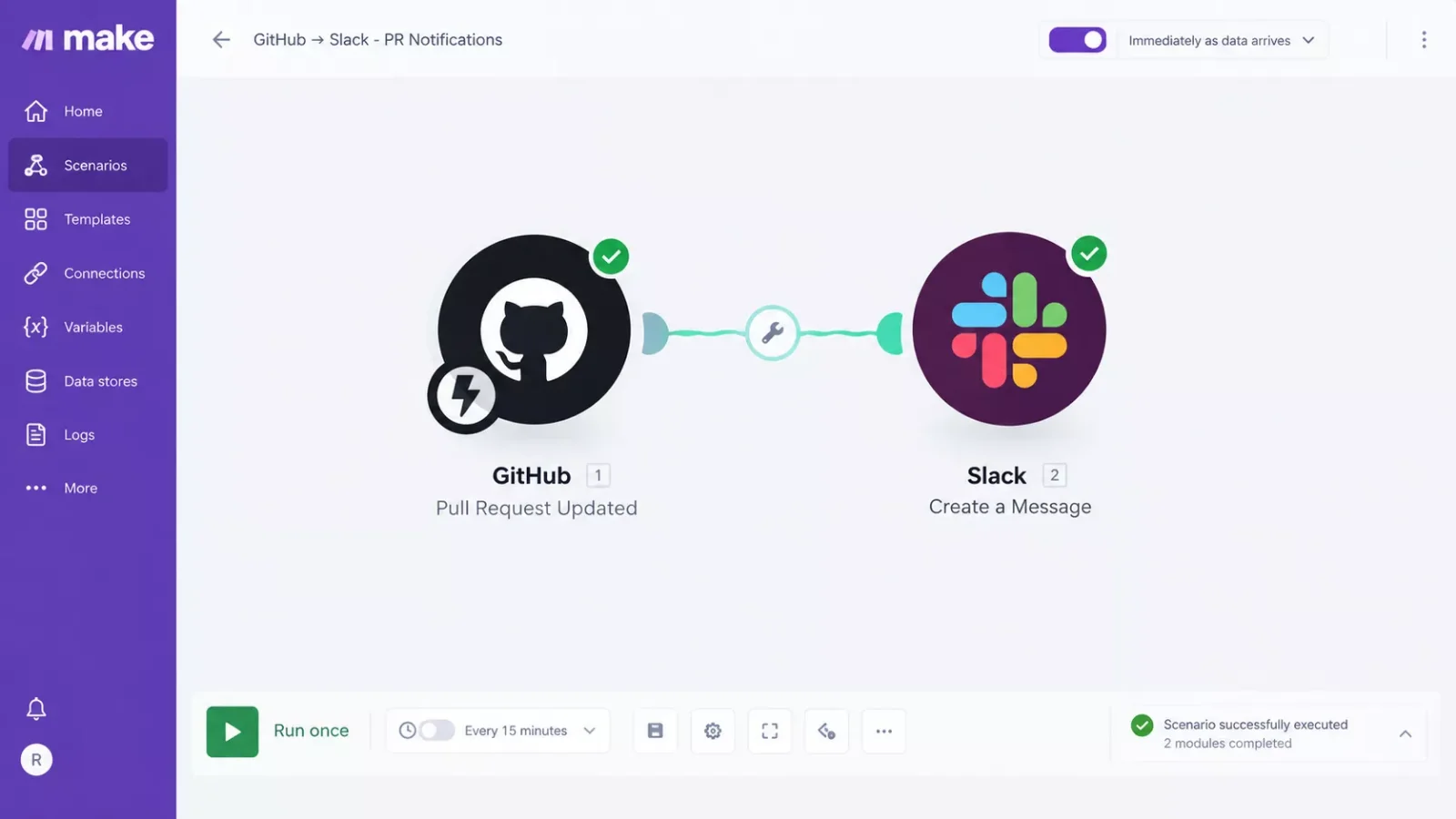
The logic is simple on purpose. GitHub's PR-merged event fires a webhook, Make.com's GitHub module picks it up, a Slack module posts the update to whichever channel your team actually watches, and a final module logs the task into a tracker (a Google Sheet, Airtable base, or whatever you already use). No custom code, and no polling GitHub every few minutes to check.
If you're setting this up for the first time, our guide to connecting your business workflow software covers the general pattern of wiring one app's events into another through Make, which applies directly here even though that guide isn't coding-agent specific. And if you want to see how this same "connect an AI tool to Make.com" pattern plays out elsewhere on the site, our look at AI SEO tools that actually connect to Make.com is a close cousin to this setup.
This is exactly the kind of thorough Make.com automation workflow breakdown that's harder to find than it should be, from SmartSoloFlow.
People Also Ask
How is an AI coding agent different from a regular chatbot?
A chatbot answers questions in text. An AI coding agent actually runs inside a loop: it reads your files, writes code, executes commands or tests, checks the results, and repeats until the task is done. That loop, not the chat window, is what makes it an agent instead of an assistant.
Can an AI coding agent work well on a large, messy codebase?
It depends heavily on the tool and the codebase's structure. Agents with large context windows and strong repository search, like Claude Code and Gemini CLI, tend to hold up better on sprawling, inconsistent codebases than tools built mainly for small, focused edits.
Should an AI coding agent be allowed to fix failing tests automatically without supervision?
Only for low-risk work. An agent that "fixes" a failing test by loosening the assertion instead of fixing the underlying bug can quietly hide a real problem. Keep unsupervised runs to routine, well-scoped tasks, and review anything touching auth, payments, or data handling.
Is it safe to let an AI coding agent work unattended overnight?
It's safe for well-scoped, low-risk tasks with proper sandboxing, which is exactly what tools like Devin and Codex Web are built for. It's riskier for anything touching production credentials or infrastructure. Either way, unattended work only pays off if you actually find out when it's done, which is the whole point of the Make.com setup above.
Do I need to review code an AI coding agent writes before merging it?
Yes, every time. A 2026 review of AI-generated code security found 25.7% of samples across six leading models contained at least one confirmed vulnerability (down from 40% in the original 2021 Copilot study, but still far from zero). Treat every AI-written pull request as a first draft, not a finished one.
Which AI coding agent is cheapest to start with?
GitHub Copilot and Cline are the two cheapest paths in. Copilot has a real free tier plus a $10/mo Pro plan, and Cline is entirely free and open-source if you're willing to bring your own API key and pay only for the tokens you actually use.
Do I need a paid Make.com plan to build this notification workflow?
No. Make's free plan includes 1,000 operations a month and full webhook support, no credit card required. A GitHub-to-Slack notification workflow uses only a few operations per run, so most solopreneurs can run this entire setup on the free tier comfortably.
Which AI coding agent is best for a solo developer versus a team?
Solo developers tend to get the most value from Claude Code, Cursor, or Cline, since pricing and setup scale with a single seat. Teams delegating whole tasks at volume, especially unattended ones, usually get more from Devin's Team plan or Copilot's Business tier, which add shared admin controls and audit logs.
What happens if an AI coding agent breaks something while I'm not watching?
Most of these tools work in a sandboxed environment or a separate branch, so a broken build doesn't touch your live code until you review and merge it. The real risk isn't the break itself, it's not noticing for hours, which is exactly the gap the Make.com notification setup above closes.
⚡ Pro Tip: Before trusting your Make.com scenario in production, trigger it once manually with a test pull request. Make's scenario editor lets you run a single test execution so you can confirm the Slack message and tracker log both fire correctly before you turn on the live webhook.
⚠ Watch Out For: A notification that a task is "done" is not the same as a notification that it's done correctly. Keep a human review step before merging anything an agent produces, especially around authentication, payments, or data handling, where AI-generated code still carries a real, measured vulnerability rate.
Conclusion & Rating: For most Make.com users comparing AI coding agents in 2026, Claude Code is the strongest overall pick. It combines a leading SWE-bench score, genuine multi-file reasoning, and a native, officially Verified path into Make.com through GitHub's webhook trigger, so the notification workflow above takes minutes, not a custom integration project.
⭐⭐⭐⭐☆ Claude Code: 4/5
Want This Notification Workflow Built for You?
Comparing coding agents is one thing. Wiring the actual Make.com automation so your team never misses a finished task again is exactly the kind of build I put together for solopreneurs who'd rather get that time back than piece it together themselves. If you want this working alongside your existing stack without doing it yourself, let's talk.
Let's TalkFound this guide useful? Share it with a fellow freelancer who's still doing things manually. 🚀
Got a question or a workflow roadblock? Drop it in the comments below, happy to help.
Last Updated: September 23, 2026

// Comments