 SmartSoloFlow

Key Takeaway: Semrush and SE Ranking plug into Make.com with verified native apps, Ahrefs works through a community-built connector, and Surfer SEO, Frase, and Writesonic all route through their own API keys plus Make's HTTP module. Pick your stack based on how much setup friction you're willing to accept.
If you're running Make.com scenarios and want your SEO stack wired directly into them, ai seo tools aren't all built the same way. Some, like Semrush, drop straight into Make.com through a verified app. Others need an API key and a generic HTTP module before they'll talk to your scenarios at all.
That gap is exactly what trips up a lot of solopreneurs who assume "AI SEO tool" automatically means plug and play. It doesn't. Below are six ai seo tools I've actually checked for real Make.com compatibility, what kind of connection each one needs, and which ones are worth the setup time if you're already deep in your automation stack. For the broader picture on tool selection in general, our AI tool reviews and comparisons hub covers more ground. This one is about the wiring specifically.
- 1. Semrush: The Native Make.com App That Just Works
- 2. Ahrefs: Community-Built, But Backed by the Real API
- 3. Surfer SEO: Powerful Content Scoring, But It'll Cost You an Add-On
- 4. SE Ranking: Two Native Apps, Split by What You Actually Need
- 5. Frase: Great Content Briefs, DIY Wiring Required
- 6. Writesonic: Built for Zapier, Workable in Make with Extra Steps
- How to Actually Connect These AI SEO Tools to Make.com
- Master Stroke — Integration With Make.com
- Final Take
TL;DR: Semrush is the easiest AI SEO tool to connect to Make.com for a zero-code setup, though its API sits behind a pricier plan than the others here. Ahrefs comes close through a community app built on its real API. Surfer SEO, SE Ranking, Frase, and Writesonic all work too, but each needs its own API key and a Make HTTP module to make the connection.
1. Semrush: The Native Make.com App That Just Works
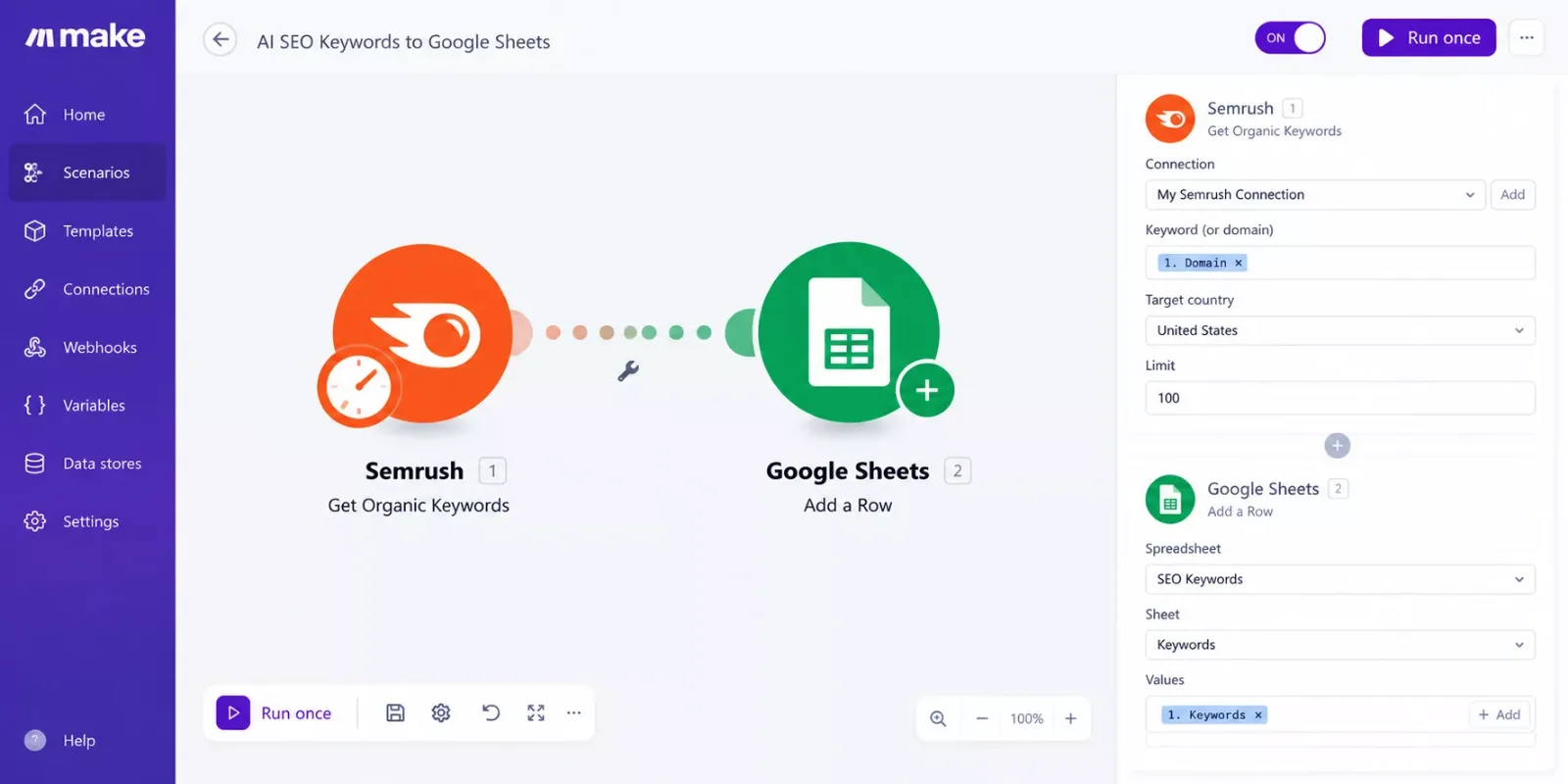
Semrush is the least frustrating place to start. Make.com lists it as a verified app, meaning Make itself built and maintains the connection instead of leaving it to a community developer. You authenticate once and start dragging modules straight into your scenario.
The available actions cover the parts of SEO work that actually eat up a week: adding keywords to an existing tracking project, pulling keyword difficulty scores, grabbing keyword overview data like volume, CPC, and competition, and enabling Position Tracking so a project gets daily ranking updates without you opening the dashboard.
For a Make.com power user, that means a scenario where a new keyword lands in a spreadsheet, gets pushed into Semrush for tracking, and comes back into a weekly report automatically. If your spreadsheet automation breaks somewhere in that chain, that's a separate fix, but the Semrush side of it rarely is the problem. It's just the tool least likely to break your scenario overnight.
Verdict: the best pick if you want a stable, low-maintenance connection and you're already tracking rankings at any real scale. One catch worth knowing first: Semrush's API sits behind its priciest tier, the Business plan at $499.95 a month (or a custom plan), plus API units purchased on top of that. It's not the cheap "authenticate and go" option it looks like next to Surfer's $29 a month add-on.
Pricing above was verified at the time of writing. Since pricing changes frequently, please confirm current rates and plan details directly on each provider's official website before making a decision.
2. Ahrefs: Community-Built, But Backed by the Real API
Ahrefs doesn't have an official Make.com app, but Ahrefs's Make.com integration is community-built and connects straight to Ahrefs's own API endpoints rather than faking data through a middleman. It's already running in a handful of live scenarios, so it isn't some abandoned side project.
Because it runs on the real API, you get the backlink and keyword data Ahrefs is actually known for without building your own HTTP request from scratch. Anyone who's hand-rolled an Ahrefs API call in Make's generic HTTP module knows how tedious that gets. One wrong header and it just returns nothing instead of an error you can debug.
The catch is that Ahrefs API access typically needs a higher-tier subscription. This pairing makes more sense once you're already paying for Ahrefs's data, not as your first entry point into the tool.
Verdict: solid if you're already an Ahrefs subscriber and want backlink or ranking data flowing into your scenarios without writing raw HTTP calls yourself.
3. Surfer SEO: Powerful Content Scoring, But It'll Cost You an Add-On
Surfer SEO doesn't have a native Make.com app, and that's the first thing to know before you get excited about automating your Content Editor. Everything runs through Surfer's API documentation, which sits behind a $29/month add-on unless you're already on Surfer's Enterprise plan, where it's included.
Once you have API access, you can automate the parts of Surfer that usually eat the most manual time: spinning up new Content Editor queries, generating content through Surfer AI, running Audit or SERP Analyzer reports, and pulling structured data out for your own dashboards. Surfer also has an official Zapier integration for the same API, but for Make.com specifically, you're building this through Make's generic HTTP module rather than a plug-and-play app.
That extra setup step is exactly the kind of thing that quietly kills a weekend automation project. It's not hard, but it's one more thing that can silently break if Surfer changes an endpoint and nobody tells you.
Verdict: worth the $29/month if you're already generating Content Editors by hand every week. Skip it if you're not deep enough into Surfer to feel that pain yet.
4. SE Ranking: Two Native Apps, Split by What You Actually Need
SE Ranking is the other tool on this list with a real, verified Make.com presence, and it's split into two separate apps instead of one, following SE Ranking's own Make.com integration guide. SE Ranking SEO Data handles the raw datasets: backlinks, domain stats, referring IPs, keyword data. SE Ranking SEO Project handles your own account's data: reports, audits, project stats, and competitor research.
That split actually makes sense once you're building anything nontrivial. You're rarely pulling raw SEO datasets and your own project reports in the same scenario step, so having two focused apps instead of one bloated one keeps your scenario easier to read six months from now.
Setup follows the same pattern as most native apps: grab an API key from SE Ranking's dashboard (there are separate keys for the Data API and the Project API), then connect each one to its matching Make app. Ten minutes, no HTTP module required.
Verdict: a strong middle-ground pick if you want native-app simplicity but need more than Semrush's project-tracking-focused actions.
5. Frase: Great Content Briefs, DIY Wiring Required
Frase is one of the more popular ai seo content generator tools for brief-building, but it has no native Make.com app at all. Every integration runs through Frase's own API key, generated by logging into app.frase.io, clicking API in the left menu, and hitting Generate Token.
From there, connecting it to Make.com means dropping that token into an HTTP module and pointing it at Frase's endpoints yourself. Third-party integration platforms that support Frase all work the same way behind the scenes: API key in, request out. There's no drag-and-drop app hiding this complexity from you in Make. If briefs are your main use case, it's worth comparing AI content writers too, since some of them overlap with what Frase covers.
The upside is that once it's wired up, you can trigger a Frase document creation the moment a new keyword or content brief lands in your system, without ever opening Frase's own interface.
Verdict: worth building if content briefs are a recurring bottleneck for you, but budget an actual afternoon for setup, not ten minutes.
6. Writesonic: Built for Zapier, Workable in Make with Extra Steps
Writesonic leans hard into Zapier. Its Integrations tab generates an API key specifically for Zapier, and its most useful trigger, "New Copy Published," fires automatically the moment new content goes live, whether that's a tweet, a blog post, or a product description.
Make.com doesn't get that same native trigger. There's no verified Writesonic app in Make's library, so you're back to the API-key-plus-HTTP-module pattern for calling Writesonic's generation endpoints directly. What you lose is that clean "something got published" event. What you keep is the ability to trigger content generation from anywhere else in your stack.
If publish-triggered automation matters more to you than generation-triggered automation, this is honestly the one case on this list where sticking with Zapier for that specific piece, and using Make for everything else, makes more sense than forcing everything into one platform.
Verdict: fine as an seo ai tools pick for generation tasks inside Make, but don't expect Zapier's polish around published-content triggers. Worth knowing before you go looking for that API key: Writesonic gates API access to its Professional plan and above, around $249 a month. The Lite and Standard tiers don't include it at all, on Zapier or on Make.com.
How to Actually Connect These AI SEO Tools to Make.com
The connection method splits into three buckets: native Make apps (Semrush, SE Ranking), a community-built app backed by a real API (Ahrefs), and the API-key-plus-HTTP-module route (Surfer SEO, Frase, Writesonic). Knowing which bucket a tool falls into tells you how much setup time to actually budget.
For native and community apps, the process is nearly identical: generate or copy your API key from the tool's own dashboard, search for the app inside Make, paste the key in, and start picking actions. Ten to fifteen minutes, no code.
For the HTTP module route, you're doing three things manually that a native app would otherwise hide from you: adding the API key as a header (usually Authorization: Bearer [your key]), building the request body to match that tool's documented endpoint, and parsing whatever JSON comes back so the next module in your scenario can actually use it.
None of this is advanced Make.com work. It's the same HTTP module pattern used constantly for tools without dedicated apps. The only real risk is a tool changing its API without warning, which is worth checking each provider's changelog for before you build anything you plan to rely on long-term.
Master Stroke — Integration With Make.com
Here's the actual multiplier: none of these six tools do anything for you on their own once the report or the brief exists. The real power shows up when the output from one of these tools becomes the trigger for something else, a Slack alert when a ranking drops, a new row in your content calendar when a brief finishes, or the kind of setup covered in AI automation tools that pair well with Make.com, where the AI output itself becomes the next automation step.
That's the gap between "I use an AI SEO tool" and "I built an AI SEO workflow." Setup speed matters here because a native app (Semrush, SE Ranking) gets you to that multiplier in minutes, while an HTTP-module tool (Surfer, Frase, Writesonic) makes you earn it with an extra setup step first. It's a similar principle to adding an AI customer service bot to Make.com, where the value only shows up once the AI piece is actually wired into the rest of the workflow.
SmartSoloFlow's own take on this is simple: if you're already automating your email follow-ups or automating your CRM updates with Make.com, adding an SEO tool to that same scenario is the natural next move, not a separate project. It's one of the more practical breakdowns of Make.com automation workflows you'll find for this specific pairing.
Final Take
If you want the least setup pain, start with Semrush or SE Ranking and build from there. Ahrefs is a strong second pick once you're already paying for its data. The rest (Surfer SEO, Frase, Writesonic) are all genuinely good ai seo software, they just make you work a little harder to get them talking to Make.com.
One more thing worth factoring in: 2026's SEO conversation has shifted toward tracking visibility across AI answer engines like ChatGPT and Perplexity, not just Google rankings. None of these six tools were built primarily for that job, so if AI-visibility tracking becomes a bigger priority for you, treat that as a separate tool decision rather than expecting one of these six to quietly cover it.
Overall Rating: Semrush, 4.5/5 stars, for the specific job of "easiest ai seo tools to connect to Make.com," it's the clear winner. Not because it's the most powerful SEO platform on this list, but because it removes the one thing that actually stops most people from automating: the setup itself.
⚡ Pro Tip: Before building any scenario around one of these tools, check that provider's own API changelog first. A silent endpoint change is the most common reason a working Make.com scenario suddenly stops returning data.
⚠ Watch Out For: Surfer's API add-on and Ahrefs's API access both sit behind higher-tier plans. Don't commit to building a scenario around either one before confirming your current plan actually includes API access.
If you've made it this far, you're probably already past "should I automate my SEO reporting" and onto "which tool do I wire in first." That's exactly the mindset this whole list was written for.
Here's the honest tip regardless of which tool you pick: start with whichever one has a native Make.com app. The time you save on setup is time you can spend actually building the scenario logic that matters, not debugging an HTTP header.
The complete, done-for-you version of this, an actual working Make.com scenario connecting your SEO tool to the rest of your stack, is exactly what I build as a No-Code Architect. If you want this working alongside your existing stack without piecing it together yourself, this is exactly what I build.
Want your AI SEO stack wired into Make.com for you?
Skip the API keys and HTTP modules. Tell me what you're working with and I'll build the automation around it.
Let's TalkPeople Also Ask
Can AI SEO tools be connected directly into an existing Make.com workflow?
Yes, but the method depends on the tool. Semrush, SE Ranking, and Ahrefs connect through dedicated Make.com apps. Surfer SEO, Frase, and Writesonic need an API key wired through Make's generic HTTP module instead.
Which AI SEO tool pairs best with Make.com for automating content briefs or audits?
For audits and ranking data, Semrush or SE Ranking pair best thanks to native apps. For content briefs specifically, Frase does the job well once you've wired up its API key, though the setup takes more effort than a native app.
Do I need a separate automation layer, or can Make.com handle SEO data movement between tools?
Make.com can handle it on its own. Whether you're moving keyword data from Semrush into a spreadsheet or triggering a Frase brief from a new row, Make.com's own modules and HTTP capability cover the movement without needing a second automation platform.
Do I need a paid Make.com plan to connect these AI SEO tools?
Make.com's free tier supports basic scenarios, but frequent SEO data pulls (daily rank checks, scheduled reports) will likely hit its operation limits fast. Most solopreneurs running this kind of setup end up on Make's Core or Pro tier.
What's the real difference between an AI SEO tool and a traditional SEO tool?
Traditional SEO tools mostly surface data and leave the interpretation to you. AI SEO tools add generation and scoring on top, writing briefs, scoring content against competitors, or drafting copy, which is exactly what makes them worth automating in the first place.
Do any of these AI SEO tools work with Make.com for free?
Semrush, Ahrefs, and SE Ranking all require a paid subscription tier before their data is useful for automation anyway, so the Make.com connection itself isn't the limiting factor. Surfer SEO's API specifically costs an extra $29/month on top of a regular plan.
Which is easier to automate, Semrush or Ahrefs?
Semrush, by a clear margin. It's a Make-verified native app with no extra cost for API access. Ahrefs works well too, but its community-built app assumes you already have Ahrefs API access, which typically means a higher-tier subscription.
Can I use more than one of these tools in the same Make.com scenario?
Yes, and that's actually where the real value shows up. A common pattern is pulling keyword data from Semrush, generating a brief in Frase, and posting a Slack notification when it's ready, all in one scenario.
What's the best AI SEO tool for someone just starting to automate their SEO workflow?
Semrush. The native Make.com app removes the biggest barrier (setup complexity), so you can build your first working scenario in one sitting instead of getting stuck debugging an API call before you've automated anything.
Found this guide useful? Share it with a fellow freelancer who's still doing things manually. 🚀
Got a question or a workflow roadblock? Drop it in the comments below, happy to help.
Last Updated: September 13, 2026

// Comments