 SmartSoloFlow
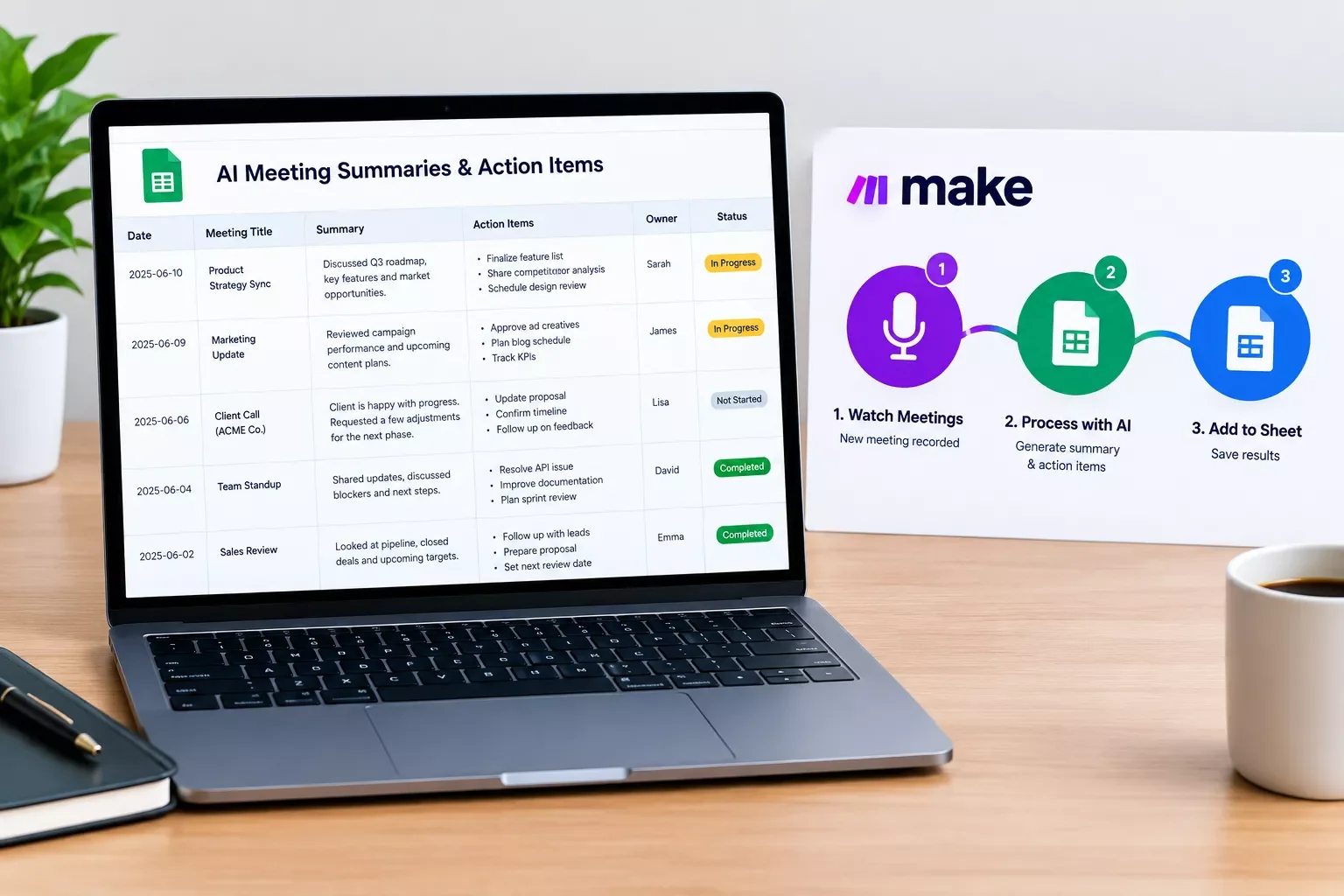
Key Takeaway: Fathom has a ready-made Make.com trigger, while Fireflies.ai gets there through its own webhook. Either can feed Google Sheets, and the plan you pay for decides how much of that works.
An AI meeting note taker only saves time if its notes can leave the app without you copying anything by hand. Fathom has a Make.com trigger for new recordings, while Fireflies.ai has no trigger module and needs its own webhook.
If you're already building around AI agents in Make.com, that difference decides which tool fits. This guide compares how Fathom and Fireflies.ai hand notes and action items to the rest of your stack, then shows how to send them to Google Sheets automatically, with plan limits checked in October 2026.
Pick a tool below and wire it up yourself, or have SmartSoloFlow build the hand-off in Make.com through the SmartSoloFlow Hub.
Choose Fathom if: you want a Make.com trigger that starts when a new recording's content is ready, with no webhook to set up.
Choose Fireflies.ai if: your team already records in it and you're fine building a webhook plus a transcript fetch yourself.
Overall Winner: ⭐⭐⭐⭐☆ Fathom: 4/5
Rating based on vendor documentation and pricing pages checked in October 2026; this is research, not a hands-on test.
- How to Tell If an AI Meeting Note Taker Can Pass Notes On
- Head-to-Head Comparison
- Send AI Meeting Notes to Google Sheets Automatically
- What Starts the Scenario: Webhook or Schedule
- Pros & Cons
- Fathom
- Fireflies.ai
- Who Is This For?
- Deep Dive Into Features
- Summaries and Action Items You Can Move
- How Each Tool Starts a Scenario
- Plan Limits That Affect Automation
- What Slack Huddle Notes Already Cover Without Make.com
- Pricing & Hidden Costs
- What the Credits Add Up To
- When Fathom Stays Silent or Fireflies Returns a 429
- Fathom: Nothing Fires After a Test Call
- Fireflies: A 429 on the Fetch Step
- Final Verdict & Use-Case Scenarios
- Master Stroke: Integration With Make.com
- Conclusion & Rating
How to Tell If an AI Meeting Note Taker Can Pass Notes On
An AI meeting note taker can pass notes on only if it gives Make.com something to start from: a trigger module in its Make app, a webhook, or an API you can poll. Without one of those, the summary stays inside the app and you're back to copying action items into your task list by hand.
Here is where each tool stands, based on Make's app list and each vendor's own pages:
- Fathom has a Make app with a Watch Recordings trigger, plus Get a Summary and Get a Transcript modules.
- Fireflies.ai has a Make app with Get a Transcript and List Transcripts, but no trigger module. Its webhooks can start a scenario through Make's Custom webhook instead.
Three questions sort any tool the same way. Does it start a scenario on its own? Can you read the summary and action items afterward? And which plan unlocks both?
Fathom's own page says its Make modules fire as soon as a meeting is captured and summarized, which answers the first question for that tool. Fireflies.ai answers it with webhook events, including one that fires when a summary has been generated.
Head-to-Head Comparison
Fathom is the easier start for a Make.com user, because its Make app includes a trigger. Fireflies.ai takes two extra pieces: a webhook that tells Make a meeting summary is ready, and a second step that fetches the transcript with the meeting ID the webhook sends.
That webhook route isn't a workaround. Make's documentation says a Custom webhook gives you a URL that accepts data from any service, and that a scenario runs immediately when data arrives. The trade-off is setup time, not reliability.
| Feature | Fathom | Fireflies.ai |
|---|---|---|
| Make connection label | Make.com app (badge not confirmed) | Via webhook for the trigger, Make.com app (badge not confirmed) for fetching |
| Trigger | Watch Recordings, when a new recording's content is ready | None in the Make app; the meeting.summarized webhook event starts a Custom webhook |
| Reading the notes | Get a Summary and Get a Transcript modules | Get a Transcript, List Transcripts and a GraphQL query module |
| Plan for Make use | Integrations page: limited on Premium, full on Team and Business; the pricing table marks it on every plan | Docs don't name a plan for webhooks; every plan has a per-minute API limit, and Free and Pro also have a daily quota |
Plan details above were checked at the time of writing. Since plans and limits change, please confirm the current details on each provider's official website before making a decision.
Send AI Meeting Notes to Google Sheets Automatically
To send AI meeting notes to Google Sheets automatically, build a Make.com scenario that starts when a meeting is processed, fetches the summary, and adds one row to your sheet. With Fathom that takes three modules. With Fireflies.ai it takes a webhook, a GraphQL fetch and the same Add a Row.
Check the built-in options first. Fathom's workflow page points to Zapier and Make for automations like this, and Fireflies' knowledge base lists Make as a custom integration platform. Neither page describes a built-in Google Sheets export.
In the Fathom version, Watch Recordings starts the scenario, Get a Summary takes a recording ID and fetches that meeting's summary, and Google Sheets' Add a Row appends a new row at the bottom of your table.
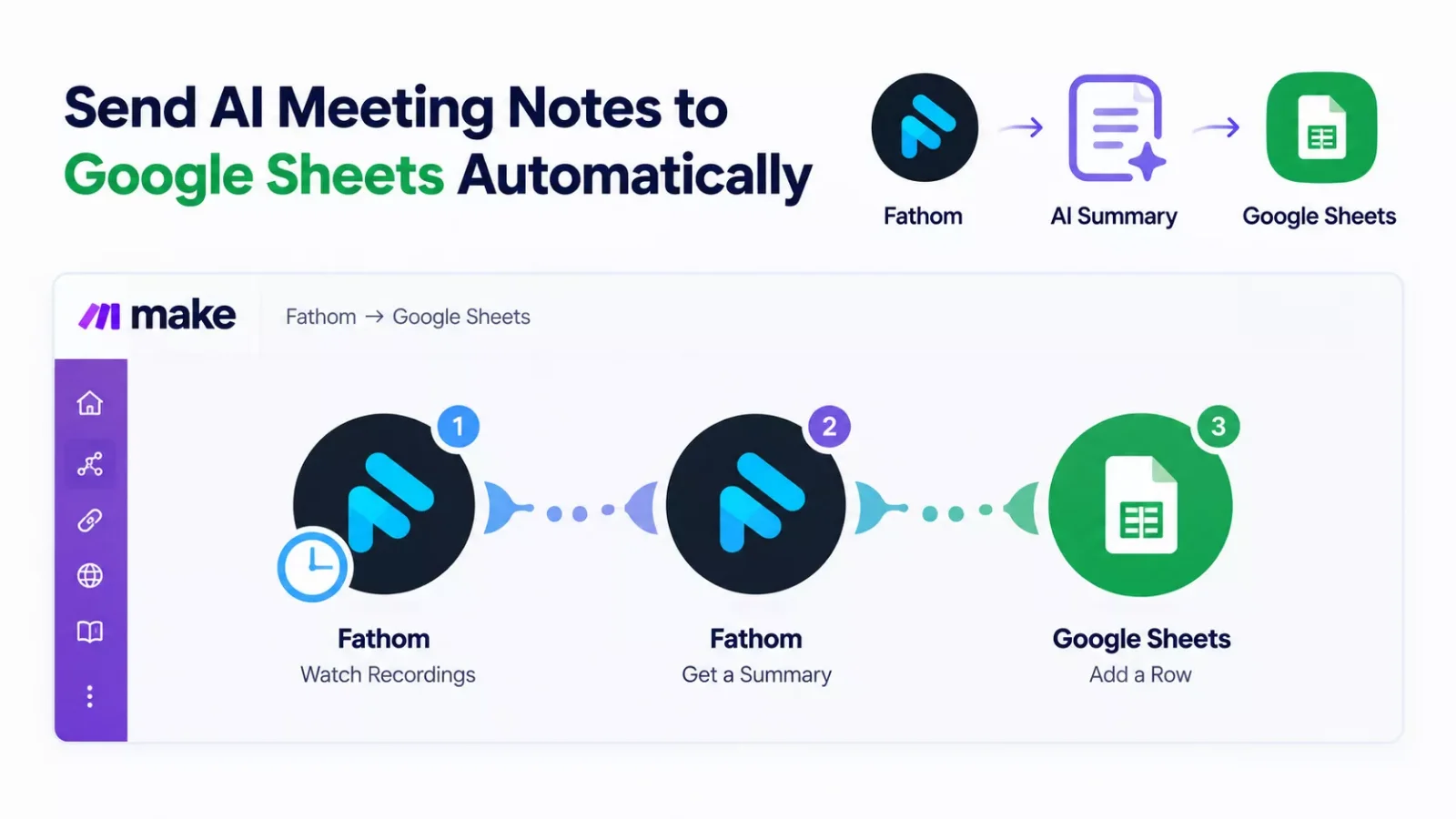
Scenario layout: Fathom Watch Recordings, then Get a Summary, then Google Sheets Add a Row.
For columns, use the fields Fathom's API returns for each meeting: title, creation date, recording link, summary and action items.
The Fireflies.ai version swaps the first two steps. Fireflies' docs show a GraphQL query that returns a meeting's title, date, summary overview and action items from a meeting ID, and Make's Execute a GraphQL Query module can run it.
Its webhook docs list two separate events: one when the raw transcript is ready, another when the summary has been generated. For notes, subscribe to the summary event.
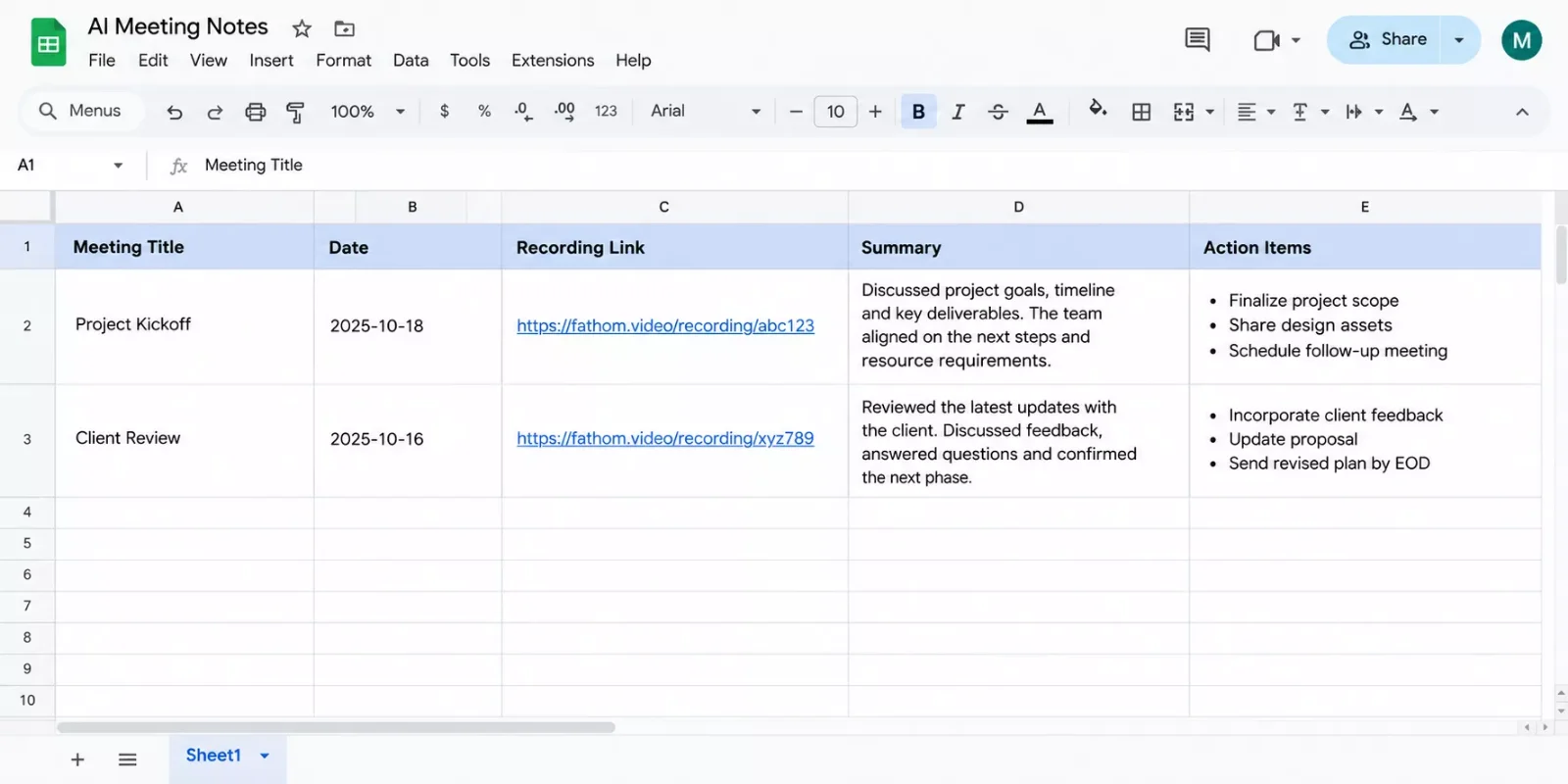
Example column layout: one column per field the scenario writes.
What Starts the Scenario: Webhook or Schedule
A webhook starts a scenario only when data arrives. A schedule checks on a timer, and every check costs a credit even when no new meeting exists.
Make's help center puts the trigger alone at 24 credits a day for an hourly schedule, so a List Recordings or List Transcripts loop adds a standing cost before it writes a single row.
Fathom says its Make modules fire as soon as a meeting is captured and summarized, and Make says a webhook runs the scenario immediately. For notes, pick the webhook.
Pros & Cons
Fathom's main advantage for a Make.com user is the built-in trigger, and its main drawback is that full Make use sits on the Team and Business plans. Fireflies.ai flips that: more flexibility through its API and webhooks, and more setup to get there.
Fathom
Pros
- The Make app includes a Watch Recordings trigger, plus Get a Summary and Get a Transcript modules.
- Fathom says its API is available on all plans.
- The Free plan lists unlimited recordings and instant AI call summaries.
Cons
- Fathom's integrations page says Make use is limited on Premium and full on Team and Business, while its pricing table marks it on every plan.
- The Team plan has a two-user minimum.
- Only Zoom, Google Meet and Microsoft Teams are listed as supported platforms.
Fireflies.ai
Pros
- Documented webhook events and a GraphQL API that returns the summary overview and action items.
- Fireflies' guide lists Google Meet, Zoom, Microsoft Teams and Webex.
- Its knowledge base names Make as a supported custom integration platform.
Cons
- The Make app has no trigger module, so you build a webhook plus a fetch step.
- Free and Pro have a daily API quota on top of a per-minute limit; Business and Enterprise have no daily cap.
Who Is This For?
Choose by how you hand notes off, because the meeting platform won't decide it. Fathom lists Zoom, Google Meet and Microsoft Teams on its own site, and Fireflies' guide lists those three plus Webex. Either way, the same calls get recorded.
- Fathom suits a Make.com user who wants one trigger and few moving parts. Check the plan first, though. Fathom's integrations page says Make use is limited on Premium and full on Team and Business, and Team starts at two users. A solo operator should confirm what their plan allows before building around it.
- Fireflies.ai suits teams on Webex, or teams already recording in it, who are comfortable with a webhook and a GraphQL query. The Make app gives you Get a Transcript, List Transcripts and an Execute a GraphQL Query module, and you assemble the rest.
Skip both if you only need notes inside one app. A hand-off scenario earns its keep when the same notes must land in a sheet, a task list or a CRM.
Deep Dive Into Features
Summaries and Action Items You Can Move
Both tools produce a summary and action items, and both let you read them from outside the app. Fathom's API returns a meeting's summary and action items, and its Make app has a Get a Summary module. Fireflies' GraphQL query returns the summary overview and action items for a meeting ID.
How Each Tool Starts a Scenario
Fathom gives Make a Watch Recordings trigger inside the Make app itself. Fireflies.ai sends a webhook to a Make Custom webhook URL, which you then use to fetch the notes. Its webhook docs also include a transcript event, so pick the summary event if action items matter.
Plan Limits That Affect Automation
Fathom's feature table shows AI action items on Premium and above but not on Free, and its integrations page describes Make use as limited on Premium and full on Team and Business. Fireflies' docs give every plan a per-minute API limit and add a daily quota on Free and Pro, which matters if you fetch every meeting automatically.
⚠ Watch Out For: Plan limits decide whether a hand-off keeps working. Confirm your Fathom plan's Make access, and Fireflies' request cap on Free and Pro, before you build.
What Slack Huddle Notes Already Cover Without Make.com
If your meetings already happen in Slack huddles, Slack's built-in huddle notes may be all you need, and no Make.com scenario is required. Slack's help center lists huddle notes on its paid plans: Pro, Business+ and Enterprise+. That's the right call when your team reads the notes where they were written and nothing downstream needs them.
I've used Slackbot. Slack describes Slackbot as a personal AI agent, and its help center says Slackbot may be available to preview in a limited capacity on the free and Pro plans.
Reach for Make.com when the notes have to leave Slack, for instance into a sheet or a CRM. This guide covers Fathom and Fireflies.ai because their Make apps were checked directly. Make's Slack app also has a Send a Message module, so the same scenario can post a summary to a channel as well as write the row.
- Notes only need to be read: use the built-in tool.
- Notes need to be acted on in another app: build the hand-off.
Pricing & Hidden Costs
Both tools have a free plan, and the real cost of a Make.com hand-off sits in plan gating and in the credits your scenario burns. Prices are per user per month on annual billing, as listed on each vendor's pricing page in October 2026.
Pricing above was verified at the time of writing. Since pricing changes frequently, please confirm current rates and plan details directly on each provider's official website before making a decision.
On the Free plans, Fathom lists unlimited recordings and instant AI call summaries but no AI action items. Fireflies lists unlimited transcription, limited AI summaries, 400 minutes of storage per team and API access.
What the Credits Add Up To
This worked example uses Make's counting rules and isn't a measured result. With 40 meetings a month, a three-module webhook scenario uses 3 credits per meeting, or 120 credits. An hourly check uses 24 credits a day, 720 a month, plus about 2 credits per meeting, roughly 800 credits.
Make's pricing page lists 1,000 credits a month on its Free plan, so the hourly version would use most of it while the webhook version would use about an eighth.
When Fathom Stays Silent or Fireflies Returns a 429
Two failures are documented by the vendors themselves: a Fathom webhook that never fires, and a Fireflies request that gets rejected with a 429 error.
Fathom: Nothing Fires After a Test Call
Fathom's API FAQ says webhooks are tied to post-call summaries, so a call with no summary sends no webhook, and short test calls without enough audio may not fire. It also says one event fires per new meeting.
If Watch Recordings stays silent, first check that the call produced a summary, and test with a real meeting instead of re-running one.
Fireflies: A 429 on the Fetch Step
A 429 Too Many Requests means the plan's API limit was hit: 30 requests a minute and 500 a day on Free, 60 a minute and 5,000 a day on Pro. Fireflies says requests sent during a block still count toward the next window. Wait for the Retry-After seconds, and fetch each meeting once.
A Free account's first API request also starts a 14-day trial at Pro limits, so the Free numbers apply once that trial ends.
Final Verdict & Use-Case Scenarios
For sending notes onward through Make.com, Fathom is the better starting point, because its Make app has a trigger and Fireflies.ai needs a webhook plus a fetch step. Pick Fireflies.ai when your team already records in it or meets on Webex.
- Ideal for a two-person team on Make.com: pick Fathom Team, because Fathom's integrations page lists full Make use on Team and Business, and Team starts at two users.
- Ideal for teams already on Fireflies.ai: keep it and build the webhook plus fetch. Business and Enterprise have no daily API cap.
- Skip Fathom if you meet on Webex, since its site lists only Zoom, Google Meet and Microsoft Teams, or if you need AI action items on a free plan, since Fathom's feature table shows them from Premium up.
- Skip Fireflies.ai if you want a ready-made trigger in Make's app, because it has none.
- Skip both if the notes only need to be read. Slack's huddle notes or the vendor's own app is enough.
Master Stroke: Integration With Make.com
A Make.com scenario turns a note taker from a place where notes sit into the start of a workflow. The same recording can write a Google Sheets row, post a summary to Slack and push each action item into a to-do list. Add destinations only when someone will use them, because every extra module adds credits to each run.
Where a source gives you a list, Make's Iterator converts an array into a series of bundles, so a list of action items can become one row each. Each bundle runs the modules after the Iterator, so five action items cost five Add a Row credits.
This is the kind of hand-off SmartSoloFlow builds in Make.com. When the sheet itself starts misbehaving as rows pile up, fix that before adding more destinations. And if you only need text from a recording, a transcription tool is a different job from a live note taker.
People Also Ask
What's the best free AI meeting note taker if I want to use Make.com?
Neither wins outright. Both free plans record and summarize, and both vendors say API access is included. Fathom's Free plan has no AI action items, and Fireflies' Free lists limited AI summaries.
Does an AI meeting note taker work with Google Meet and Microsoft Teams?
Fathom's site lists Zoom, Google Meet and Microsoft Teams. Fireflies' guide lists those three plus Webex.
Can an AI meeting note taker send notes to Google Sheets automatically?
Yes, through a Make.com scenario. Fathom starts it with the Watch Recordings trigger, Fireflies.ai with a webhook, and Add a Row writes the data. Neither vendor's pages describe a built-in Sheets export.
What's the difference between an AI meeting note taker and a transcript generator?
A note taker joins your calls and returns a summary and action items. A transcript generator turns audio you already have into text.
Which Fathom plan do I need to use it with Make.com?
Fathom's integrations page says Make use is limited on Premium and full on Team and Business, while its pricing table marks Make on every plan. Team costs $15 per user a month on annual billing, with a two-user minimum.
Fathom or Fireflies.ai: which is better for sending notes to Google Sheets?
Fathom takes fewer steps, because its Make app has a trigger. Fireflies.ai needs a webhook plus a fetch step, though its GraphQL query can return the summary and action items together. Both end with Add a Row.
How many Make.com credits does a meeting-notes scenario use?
In a worked example, a three-module webhook scenario uses 3 credits per meeting, so 40 meetings cost 120 credits. An hourly check adds 720 credits a month by itself. Make's Free plan lists 1,000 credits a month.
Conclusion & Rating
Fathom edges out Fireflies.ai for a Make.com hand-off, and these review ratings show it:
- ⭐⭐⭐⭐☆ Fathom: 4/5
- ⭐⭐⭐☆☆ Fireflies.ai: 3/5
Rating based on vendor documentation and pricing pages checked in October 2026; this is research, not a hands-on test.
Here's the honest limit. Neither tool is a one-click answer. Fathom's integrations page describes full Make use only on Team and Business, and Fireflies.ai makes you build the trigger yourself.
⚡ Pro Tip: Run your first test on a real meeting that ends with a summary. Fathom's docs say a call with no summary sends no webhook.
You're probably weighing a tool against the work of wiring it into the rest of your stack. One tip: start with a single destination, a Google Sheets row, and add more only after a week of real meetings shows which notes people open.
The complete, done-for-you version is exactly what I build as a No-Code Architect, so a note taker works alongside your existing tools without you piecing it together.
Want This Built for Your Business?
Tell SmartSoloFlow which note taker you use and where the notes should land, and we'll build the Make.com hand-off for you.
Let's TalkFound this guide useful? Share it with a fellow freelancer who's still doing things manually. 🚀
Got a question or a workflow roadblock? Drop it in the comments below, happy to help.
Details checked: October 2026
Last Updated: October 20, 2026

// Comments