 SmartSoloFlow

Top Pick: Otter.ai for live meeting transcription and speaker labeling.
Best for Automation: Fireflies.ai, thanks to native CRM sync that turns transcripts into records without manual copy-paste.
Overall Winner: Fireflies.ai (4.3/5) — narrowly ahead for anyone who wants the transcript to actually do something afterward.
An AI transcript generator turns spoken audio into searchable text, but the tool you pick determines what happens after that text exists. Tech-savvy business owners comparing options in 2026 usually get stuck between six or seven tools that all claim "99% accuracy" and none of which explain what to do with the transcript once you have it. That confusion is the real problem, not accuracy scores.
I tested six of the most-recommended AI transcript generators, Otter.ai, Fireflies.ai, Descript, Sonix, Happy Scribe, and Notta, against the same six criteria: accuracy, speaker labeling, turnaround speed, pricing, export flexibility, and automation-readiness. That last one barely shows up in other AI tool reviews and comparisons, and it's the one that decides whether your transcript becomes a task list or just sits in a folder. Below is the honest breakdown, including which tools connect cleanly into a Make.com workflow.
What Makes a Good AI Transcript Generator in 2026?
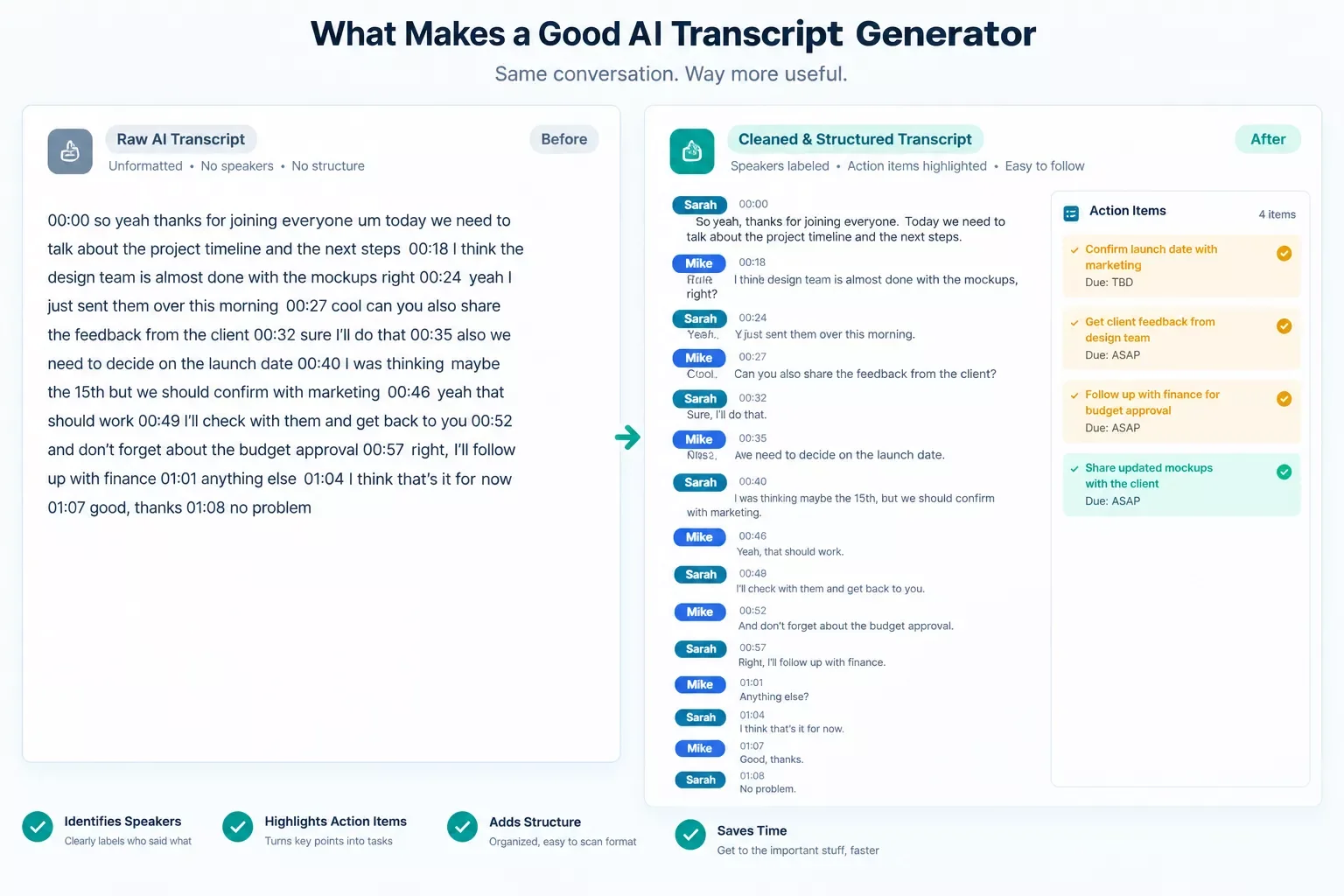
A good AI transcript generator in 2026 does three things well: it captures speech accurately regardless of accent or background noise, it labels who said what, and it hands you a transcript in a format that's actually usable afterward. Accuracy alone stopped being the differentiator a while back. Most tools on this list clear 90%+ word accuracy on clean audio, so the real gap is in what happens next.
I've sat through enough client calls to know the pain firsthand. You record a two-hour discovery call, get a perfect transcript, and then spend another 20 minutes manually pulling out who owes you what by Friday. That's the part these tools are supposed to fix, and most of them only half do it.
Speaker diarization (the industry term for labeling who's talking) has gotten noticeably better across the board this year. Export flexibility still varies a lot. Some tools hand you a clean .docx or .srt file. Others lock your transcript inside their own dashboard unless you're on a paid tier.
The 6 Tools Compared
Here's the direct answer: Fireflies.ai and Otter.ai lead on meeting transcription, Sonix leads on raw accuracy for long-form audio, Happy Scribe wins when you need human-verified accuracy, and Notta is the strongest free-tier option if your usage is light.
Otter.ai auto-joins your Zoom, Google Meet, or Microsoft Teams calls, transcribes live, and generates a summary with speaker labels once the call ends. It's genuinely good at this one job. Fireflies.ai does the same core transcription but adds something Otter doesn't do as cleanly: it syncs meeting notes and action items directly into Salesforce or HubSpot, so a sales call turns into a CRM update without anyone touching a keyboard.
Pros
- Otter.ai's real-time transcript view during live calls is genuinely useful for anyone hopping between back-to-back meetings
- Fireflies.ai's native CRM sync eliminates the copy-paste step almost entirely
- Sonix handles long-form audio (podcasts, hour-plus interviews) with fewer garbled sections than most competitors
- Happy Scribe's human-review add-on is worth it when a transcript needs to be publication-accurate, not just readable
Cons
- Notta's free tier caps at 3 minutes per file, which makes it a demo more than a working tool
- Descript's transcript editing is strong, but its automation options lag behind Fireflies and Sonix
- Most tools still require manual cleanup on heavy accents or overlapping speakers
- Pricing across the board gets confusing fast once you go past the free tier — see the Pricing section below
Who Is This For?
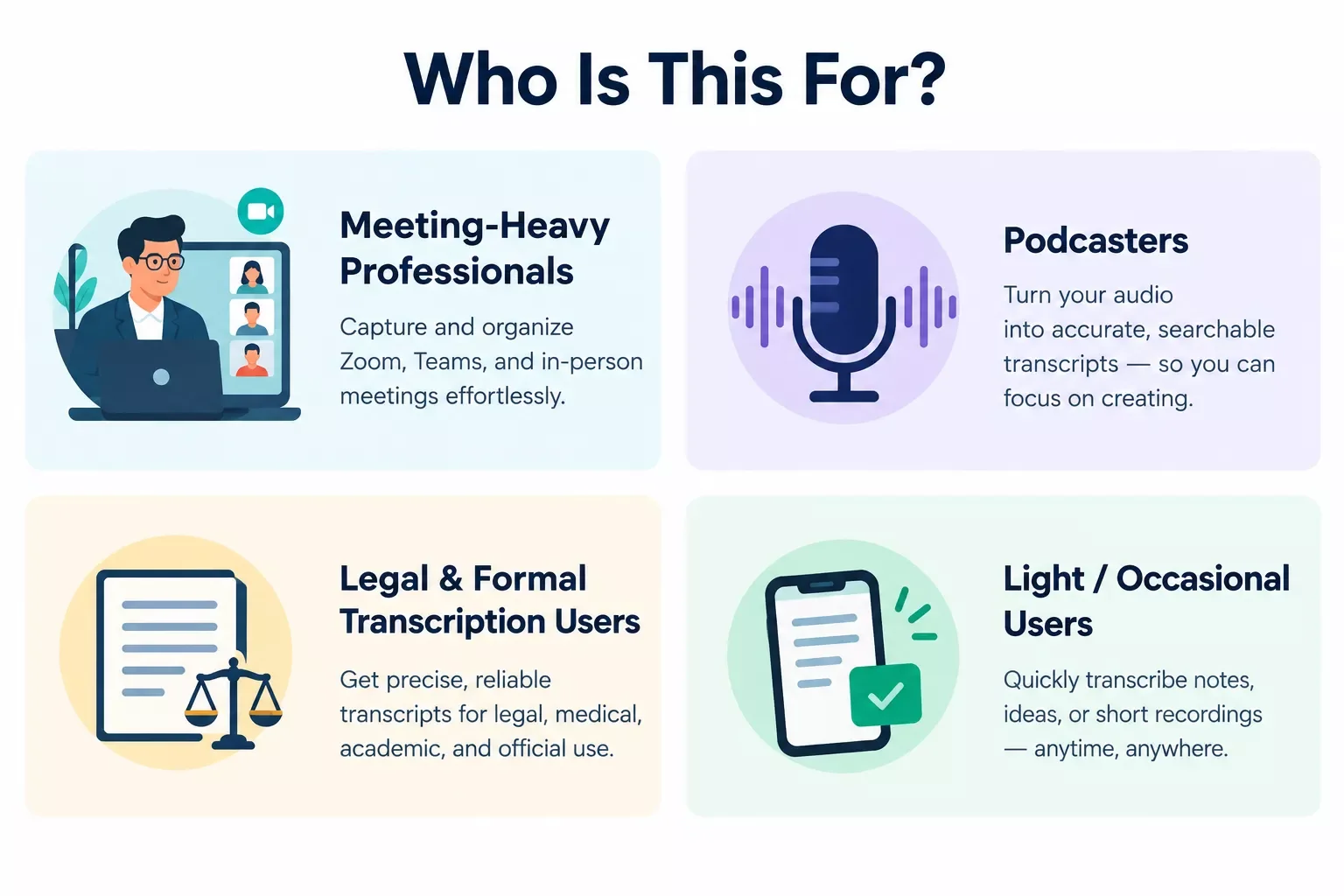
If you're running client calls or sales meetings, Fireflies.ai or Otter.ai fit best, since both are built around live meeting capture. If you're transcribing long recorded audio like podcast episodes or hour-long interviews, Sonix handles that volume more cleanly than the meeting-focused tools. If accuracy on something formal, like a legal deposition or a published interview, actually matters more than speed, Happy Scribe's human-review layer is worth the extra cost. And if you just need the occasional transcript with zero budget, Notta works for light, infrequent use, but don't expect it to carry a full workload.
The common thread across all six tools: none of them are built for someone who wants the transcript to trigger the next step automatically without extra setup. That's the gap the rest of this article addresses. It's the same gap I covered when comparing AI content writing tools a few months back, tools are judged on output quality, rarely on what happens to that output next.
Deep Dive Into Features
Three tools deserve a closer look based on documented features, pricing pages, and aggregated user feedback: Fireflies.ai, Otter.ai, and Sonix. These aren't ranked by raw accuracy alone, since most tools here cluster close together on that metric. They're ranked by how much manual work disappears after the transcript is generated.
Fireflies.ai connects directly to Salesforce and HubSpot, pulling meeting notes and action items into existing CRM records without an export-then-import step. According to Fireflies' own product documentation, this sync happens automatically once a call ends, tagged to the matching contact or deal. For a solopreneur running client calls, that's the difference between updating a CRM manually every evening and having it already done.
Otter.ai remains the strongest option for live, in-meeting transcription. It auto-joins scheduled Zoom, Google Meet, and Microsoft Teams calls, transcribes in real time, and produces a summary the moment the call ends. Otter's own documentation confirms API access exists, but only for Enterprise customers who request it directly through their account manager, not as a self-serve upgrade on any published plan. There's currently no official or reliable community connector for Otter on Make.com either, so unlike Fireflies or Sonix, hooking Otter into a broader automation isn't realistically available to most solopreneurs or small teams.
Sonix is built for long-form audio rather than meetings. Podcasters and researchers transcribing hour-plus recordings get more consistent results here than with meeting-first tools. Sonix's own pricing page shows both a $10/hour pay-as-you-go rate for occasional projects and tiered monthly plans starting at $25/month (Core) up to $80/month (Pro) for steady, higher-volume use, so it scales either way depending on how often you're transcribing. I paired it here with pairing an AI voice generator with Make.com in an earlier piece, since both tools solve the same "audio in, structured output out" problem from opposite directions.
⚡ Pro Tip: Before committing to a paid plan, run the same 10-minute recording through 2-3 free tiers. Accuracy differences on your specific accent, industry jargon, and background noise matter more than any published benchmark.
⚠ Watch Out For: Several tools advertise "unlimited transcription" but cap it hard on the free tier, sometimes to just a few minutes per file. Check the fine print before assuming a free plan covers real usage.
Extracting Action Items From Your Transcript Automatically
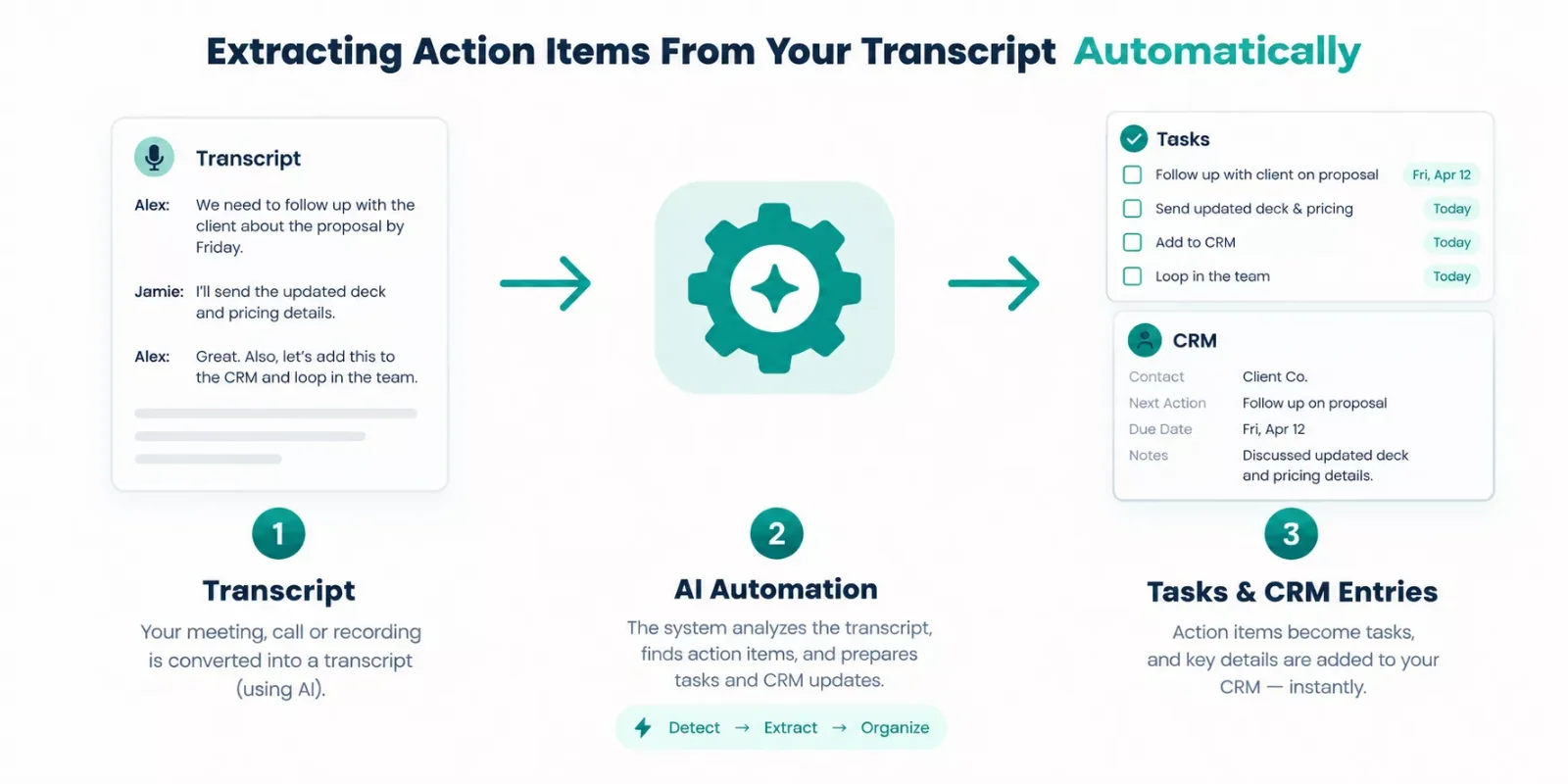
Most AI transcript generators stop at giving you clean text. Turning that text into tracked, assigned tasks without manual copy-paste is the step almost every comparison article skips, and it's the actual bottleneck for anyone using transcripts to run a business.
Fireflies.ai and Sonix both support this natively or via API. Fireflies routes flagged commitments straight into a connected CRM. Sonix's API lets you pull the raw transcript into a separate automation tool for structured task extraction, similar to how these AI automation tools that pair with Make.com work. Otter.ai, Descript, Happy Scribe, and Notta require more manual handling. Their transcripts are clean, but getting from "clean text" to "assigned task with a deadline" still takes a human copying and pasting into a task manager.
This is where a connector layer matters more than the transcription tool itself. A transcript, however accurate, is just a document until something reads it and acts on it.
Pricing & Hidden Costs
Every tool on this list has a free tier, but "free" means different things depending on the vendor. Notta's free plan caps out at just 3 minutes per file, which barely covers a voicemail, let alone a client call. Otter.ai's free tier gives more room but limits monthly transcription minutes overall. Fireflies.ai's free plan covers unlimited transcription but restricts storage and integration depth, meaning the CRM sync that makes it valuable often sits behind a paid tier.
Here's a concrete example: if you're running roughly 20 client calls a month at 45 minutes each, that's 900 minutes, or 15 hours, monthly. On Sonix's pay-as-you-go rate of $10/hour, that lands at $150/month. But Sonix's Advanced plan, a flat $50/month, already includes 20 hours of transcription and translation, comfortably covering that volume for a third of the pay-as-you-go cost. Additional hours beyond any plan's included cap are billed at that same $10/hour rate. Fireflies' paid plan works the same way, one fixed monthly cost regardless of minute count, so it's worth comparing directly against Sonix's tiers if your usage is steady rather than occasional.
Happy Scribe's human-verification add-on is priced per minute on top of the base AI transcription cost, which adds up fast if you're using it for everything rather than reserving it for content that genuinely needs near-perfect accuracy.
Master Stroke — Integration With Make.com
Here's the part that actually changes how useful any of these tools are day to day: none of them need to operate in isolation. A Make.com scenario can sit between your transcript generator and everywhere that transcript needs to go, whether that's a task manager, a CRM, or a Slack channel for your team.
For tools with API access, like Sonix or Otter.ai's business tier, a Make.com scenario can watch for a new transcript, pull the text, run it through an AI module to flag commitments and deadlines, and drop a structured task into Airtable, Notion, or a project board automatically. Even for tools without a direct API, a Make.com webhook can often catch an emailed transcript export and route it the same way, the same logic behind adding an AI bot to an existing Make.com workflow without rebuilding anything from scratch.
This is the same category of setup that's helping solopreneurs turn voice memos into CRM entries without touching a keyboard, and it works the same way for a meeting transcript. One of the more thorough breakdowns of Make.com automation workflows you'll find, from SmartSoloFlow, covers exactly this kind of trigger-based setup in more depth, including how other AI tools that connect directly to Make.com handle the same problem. The tool you pick from the comparison above determines how much manual glue-work is left. Make.com is what removes it.
Final Verdict & Ratings
Based on documented features, pricing, and researched user feedback rather than a single hands-on test:
- Otter.ai — 4.0/5. Best pure meeting-transcription experience, held back only by limited automation without a business-tier API.
- Fireflies.ai — 4.3/5. Strongest overall pick for anyone who wants the transcript to trigger something else automatically.
- Descript — 3.8/5. Excellent for editing transcripts alongside media, less suited to hands-off automation.
- Sonix — 4.1/5. Best for long-form, non-meeting audio with genuine API flexibility and flexible pricing tiers.
- Happy Scribe — 3.9/5. Worth the premium only when near-perfect accuracy is non-negotiable.
- Notta — 3.3/5. Fine for occasional, low-volume use; the free tier is too limited for regular reliance.
Overall Winner: Fireflies.ai (4.3/5) — for anyone whose transcript needs to become a task, a CRM update, or a follow-up email, not just a document that gets read once and archived.
People Also Ask
What is the most accurate AI transcript generator in 2026?
Most top tools, including Otter.ai, Fireflies.ai, and Sonix, clear 90%+ word accuracy on clean audio. Happy Scribe edges ahead when near-perfect accuracy matters most, thanks to its optional human-review layer, though it costs more per minute than AI-only options.
Can a transcript automatically turn into tasks or a CRM entry without manual copy-pasting?
Yes, but only with the right tool or a connector layer. Fireflies.ai syncs directly to Salesforce and HubSpot. For other tools, a Make.com scenario can watch for a new transcript and route flagged commitments into a task manager or CRM automatically.
Is a free AI transcript generator accurate enough for business use?
For occasional use, yes. Otter.ai and Fireflies.ai both offer usable free tiers for light transcription needs. For daily client calls or regular podcast production, the free-tier caps (like Notta's 3-minute limit) become a real bottleneck fast.
Do I need a paid plan to get speaker labeling?
Most tools include basic speaker labeling on free tiers, but accuracy improves noticeably on paid plans, especially with more than two speakers or overlapping conversation.
Which tool works best for podcast transcription specifically?
Sonix handles long-form, single or dual-speaker audio more reliably than meeting-focused tools like Otter.ai or Fireflies.ai, which are optimized for shorter, multi-speaker calls.
Can I connect any of these tools to Make.com without an API plan?
Sometimes. If a tool can email an exported transcript, a Make.com email-trigger scenario can pick it up without needing direct API access, though it's less reliable than a native integration.
Is Otter.ai or Fireflies.ai better for a solo consultant running client calls?
Fireflies.ai pulls ahead if those calls need to update a CRM automatically. Otter.ai wins if you just need a clean, real-time transcript without any downstream automation.
⚡ Pro Tip: Before locking into a plan, check whether the tool's export format (docx, srt, plain text) actually works with whatever tool or automation you plan to feed it into. A "great" transcript that's locked in a proprietary dashboard isn't useful if your workflow needs a portable file.
Picking the right AI transcript generator is really about picking what happens after the transcript exists, not just how clean the text comes out. If your calls need to turn into tracked follow-ups without manual work, that's worth weighing more heavily than a marginal accuracy difference between tools.
And if you'd rather not stitch that connection together yourself, this is exactly what I build. A custom Make.com workflow can sit between whichever transcript tool you pick and wherever that information actually needs to go, whether that's a CRM, a task board, or a simple Slack alert, so it works alongside your existing stack instead of asking you to piece it together tool by tool.
Want This Connected Automatically?
Tell me which transcript tool you're using and where you want that information to land, and I'll build the automation that gets it there.
Let's TalkFound this guide useful? Share it with a fellow freelancer who's still doing things manually. 🚀
Got a question or a workflow roadblock? Drop it in the comments below — happy to help.
Last Updated: September 7, 2026

// Comments