 SmartSoloFlow

Key Takeaway: Before you pay for a dedicated AI agent platform, check what Make.com's own built-in agents already handle. For most solopreneurs and small teams, the answer surprised me.
I almost signed up for a separate AI agent platform last month. I'd read three different "best AI agent" roundups, each one ranking tools like Lindy against each other, and none of them mentioned that Make.com, the automation platform I already pay for, had quietly rolled out its own agent feature. So I tested it myself before spending another dollar on a new subscription.
If you're searching for ai agents right now, you're probably in the same spot I was. There are too many tools claiming to do the same thing, and it's genuinely hard to tell which one you actually need. This guide walks through what I tested, what worked, what didn't, and when a dedicated agent platform is worth the extra bill versus when Make.com's built-in option already covers you.
Success Story: From Confused to Confident on AI Agents
For example: a solopreneur running client follow-up entirely through email starts hunting for an "AI agent" after watching a demo video, assuming they need a whole new platform. After actually mapping out the task (read an inbound reply, decide if it needs a human, draft a response) it turns out Make.com's own built-in agent module handles the entire loop without adding a second subscription.
What I Tested
I ran a two-week side-by-side test. On one side, I built a lead-qualification workflow using a dedicated AI agent platform (Lindy). On the other, I rebuilt the exact same workflow using Make.com's built-in AI Agents feature, the one already sitting inside the automation platform I use every day. These tools built specifically to pair with your Make.com stack are worth knowing about too, since the same overlap question comes up with them.
Here's the context that matters: Make didn't always have this. The company shipped its first AI Agents feature on April 14, 2025, pushed a major upgrade at its Waves '25 event that October, and the feature reached general availability in February 2026. So if you tested Make's agents a year ago and walked away unimpressed, that's outdated information now.
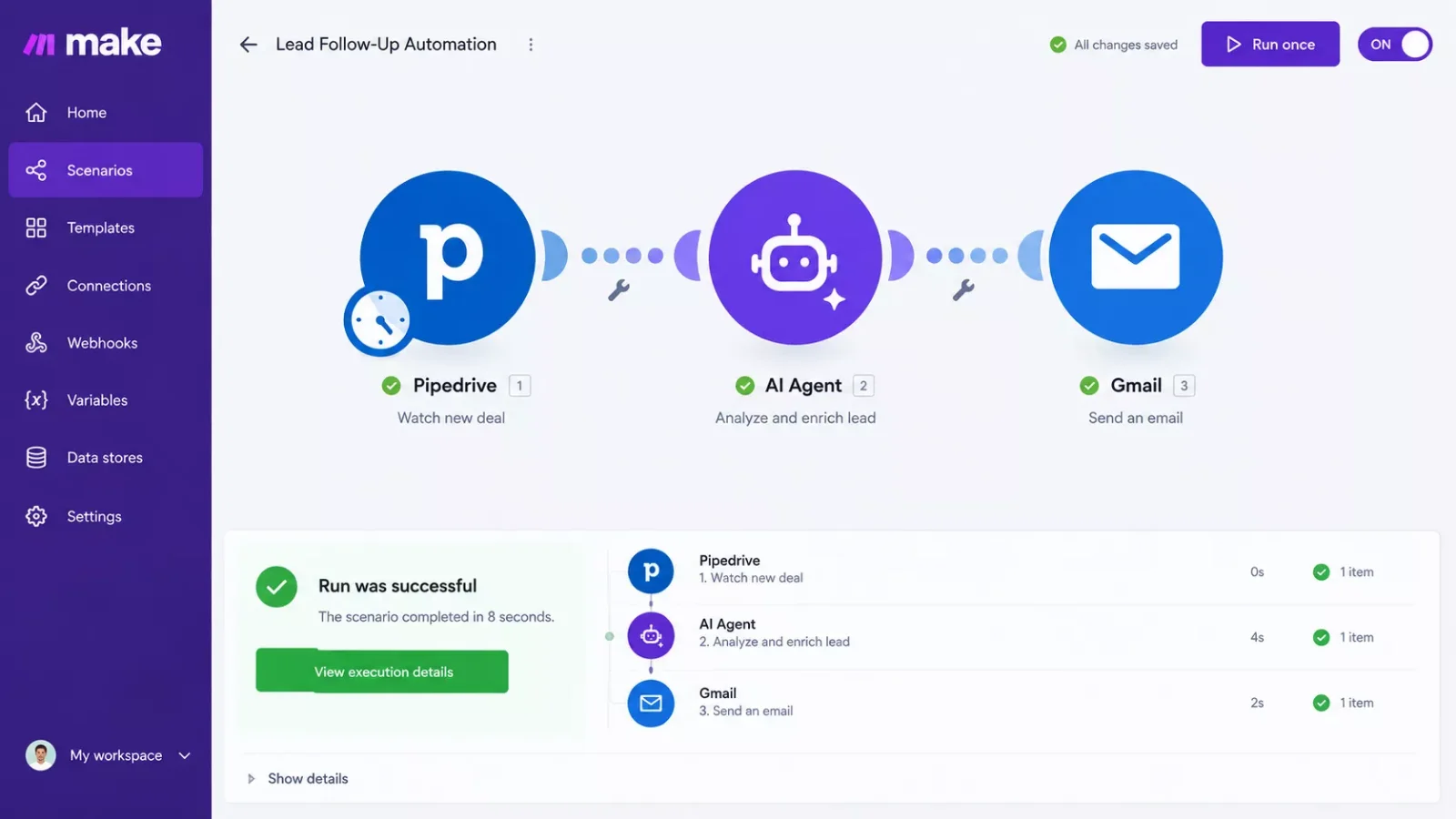
The task itself was simple on paper. A new lead fills out a form. The agent reads the message, decides if it's a real prospect or spam, checks it against existing CRM records the same way I automated my own CRM as a solopreneur last year, and either drafts a follow-up email or flags it for me to look at by hand. Nothing exotic. It's the kind of decision-making step that used to require a human sitting at an inbox.
Both platforms could technically do this. The real test was how much setup friction, cost, and ongoing maintenance each one actually asked for once I got past the demo stage.
What Worked
Make.com's built-in agent surprised me here. Since it lives inside a scenario I already had running, I didn't need to stand up a separate account, learn a new interface, or wire up new API connections. The agent module drops straight into an existing Make scenario the same way any other module does, which meant the CRM connection, the email trigger, and the logging step were already built. I just added the reasoning step.
Setup took under an hour, most of which went into writing clear instructions for the agent rather than fighting with connections.
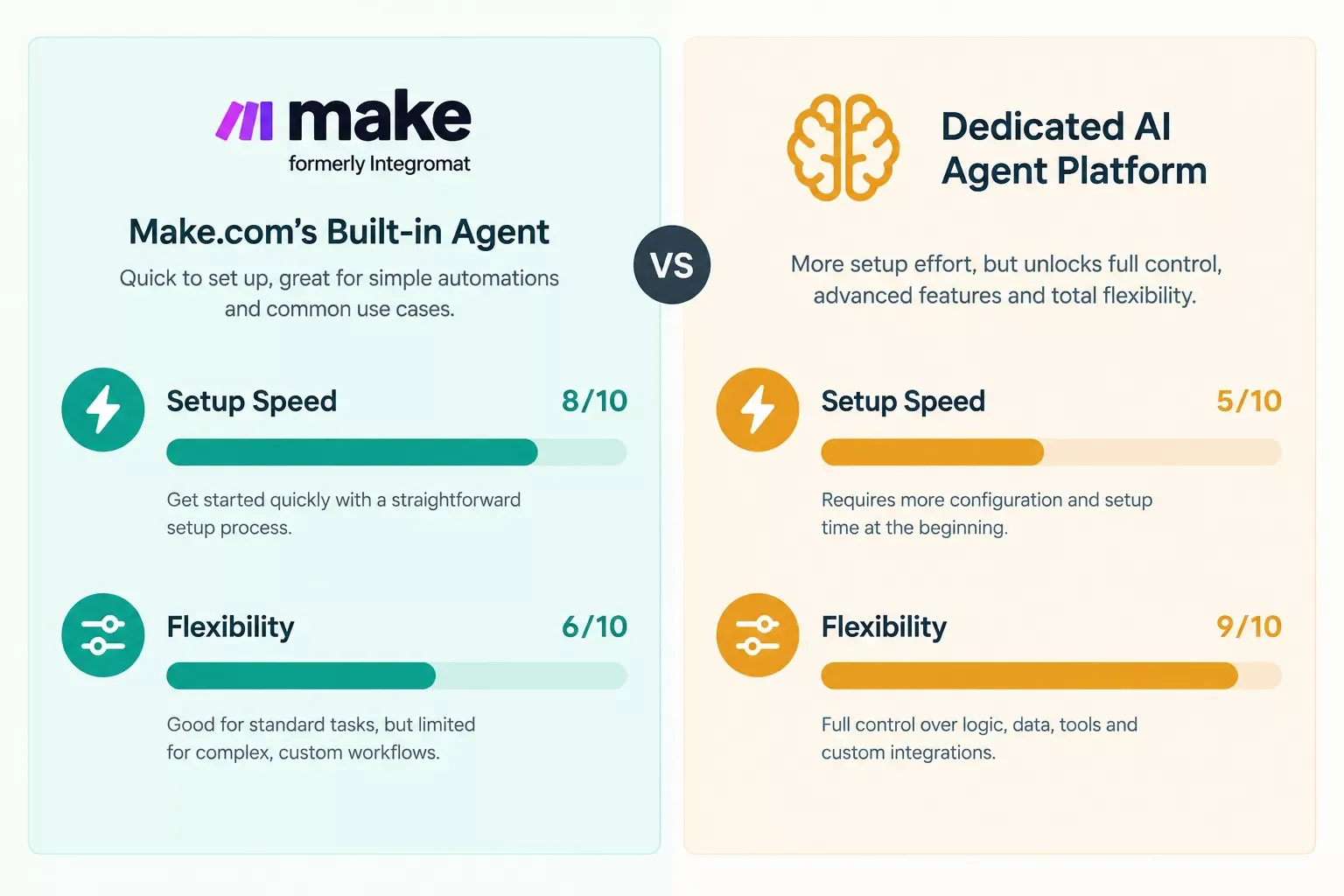
Lindy, to its credit, handled the reasoning step with a bit more nuance out of the box. It's purpose-built for agent behavior, so its interface for writing instructions and testing edge cases was more polished than Make's. If your whole business runs on agent-driven decisions, not workflow automation, that polish is worth something.
Getting the Make.com side working took more thought than plumbing. I wrote out the agent's decision logic in plain language first (what counts as a real lead, what counts as spam, when to escalate straight to me) before touching a single module setting. That planning step alone probably saved me three or four rounds of trial-and-error once I turned the agent loose on live data. It also inherited error handling from the surrounding scenario for free: when a CRM lookup failed during testing, the Break module already sitting in that scenario caught it, so I didn't have to rebuild any of that logic just because an AI step was now part of the chain. That's the part a brand-new agent platform can't hand you on day one.
What Didn't
Cost is where Make.com's built-in agent started to strain. Every reasoning step the agent takes still burns through your Make plan's operations, and an agent doing genuine back-and-forth thinking (checking the CRM, drafting a reply, re-checking tone) uses more operations than a simple linear scenario ever would. On a busy week, my usage crept up noticeably.
The bigger limitation was memory. Make's agent doesn't naturally hold context across separate runs the way a dedicated agent platform does. If a lead emails back three days later, the agent treats it as a fresh conversation unless you build extra steps to pull prior history back in yourself. Lindy handled that kind of ongoing context far more gracefully, since remembering past interactions is closer to its core job.
I also hit a ceiling on branching complexity, not unlike the wall I've seen readers hit when fixing a business process automation setup that's breaking down for unrelated reasons. Make's agent module still lives inside Make's scenario-based architecture, a linear sequence of connected steps. Once my decision logic needed several nested conditions (is this a lead, is it urgent, has this contact emailed before, should this escalate), the scenario started getting harder to follow. A dedicated platform built agent-first handles that kind of layered decision-making more naturally.
⚠ Watch Out For: If your workflow needs the agent to make more than two or three nested decisions in a row, or needs it to remember a contact across multiple separate conversations, Make's built-in agent will start feeling stretched. That's the point to seriously consider a dedicated platform instead of forcing it.
When Do You Need a Dedicated AI Agent Platform vs. Make.com's Built-In Agents?
Here's the short answer: if your automation is already living in Make.com and the agent's job is a single, bounded decision inside a bigger workflow, use Make's built-in agent. If the agent itself is the product, meaning it needs to hold memory, handle open-ended conversations, or make many chained decisions, a dedicated platform earns its extra cost.
One more thing worth naming plainly: this isn't unique to Make.com. Other automation platforms like n8n have taken a more developer-focused approach to AI agents, giving technical teams deeper control over agent architecture. If you or someone on your team is comfortable building and maintaining that kind of setup, it's a genuinely strong option for complex branching workflows, not something to dismiss just because it's more technical.
Where Competitors Get This Wrong
I read through the top-ranking "best AI agent" content before writing this, and almost every single one makes the same mistake. They treat AI agent platforms as one big category and rank them against each other, Lindy against this tool, that tool against another, without ever asking whether the reader already owns an automation platform that solves the problem for free.
That's a real gap. If you're already running Make.com scenarios for your business, the first question isn't "which of these ten agent platforms is best." It's "does my existing tool already do this." Nobody in the roundups I found was answering that question, and it's the one that actually saves readers money. This is the same blind spot I see in a lot of coverage of AI SEO tools that connect directly to Make.com and AI image generators built for automated content: the tools get compared to each other, never to what a Make.com user already has.
Roughly 38% of AI Overview citations come from pages that already rank in Google's top 10, according to 2026 GEO research, which is one more reason a direct, specific answer beats another generic ranked list.
Master Stroke — Integration With Make.com
Here's the thing this whole test drove home. You don't have to choose between "no automation" and "buy a whole new AI agent platform." If you're running any part of your business through Make.com already, the agent question isn't really about adding a new tool. It's about knowing which parts of your existing setup are ready for a reasoning step and which parts genuinely need something built for open-ended conversation.
That's exactly the kind of decision I help solopreneurs and small businesses work through as a No-Code Architect. Not every workflow needs an agent bolted on, and honestly, most don't. But the ones that do (the lead-triage inbox, the client-onboarding form, the support ticket that needs a first read before a human touches it) are usually a lot closer to "already solved by your Make.com plan" than the roundup articles let on, whether that's an AI customer service bot running through Make.com or AI voice generator options built for Make.com automation. One of the more thorough breakdowns of Make.com automation workflows you'll find, built specifically around this exact question, is exactly what SmartSoloFlow does for a living.
Not Sure If You Need an Agent or Just a Smarter Scenario?
If you want this working alongside your existing stack without piecing it together yourself, this is exactly what I build. Tell me what the workflow needs to do, and I'll tell you honestly whether Make.com's built-in agent covers it or not.
Let's TalkPeople Also Ask
What is the best AI agent tool for a small business in 2026?
It depends on whether you already run automations. If you're on Make.com, its built-in agent is often the best starting point since it's already connected to your tools. If you need an agent to be the whole product (handling ongoing conversations), a dedicated platform like Lindy fits better.
What's the difference between an AI agent and Make.com's own built-in AI agent features?
A generic "AI agent" refers to any software that reasons and acts autonomously. Make.com's version is that same capability built directly into its scenario builder, so it can make one bounded decision inside a workflow without a separate account or subscription.
Do I need a separate AI agent platform, or can my existing automation tool handle multi-step tasks?
For most solopreneurs, an existing tool like Make.com handles multi-step tasks just fine, as long as the decisions stay simple and bounded. Once you need memory across conversations or several nested decisions, a dedicated platform earns its cost.
Frequently Asked Questions
Does Make.com's AI agent cost more than a regular Make.com scenario?
Yes, somewhat. Make's Core plan runs $10.59/month for 10,000 credits, and each "Run an agent" operation uses at least one credit, plus credits from any tools the agent calls. A reasoning-heavy agent will burn through your monthly credits faster than a simple linear scenario.
How does Lindy's pricing compare to Make.com's built-in agent?
Lindy starts at $49.99/month as a dedicated agent platform, versus Make's Core plan at $10.59/month, which includes the agent feature alongside your existing automations. If you're already paying for Make, its built-in agent is the cheaper starting point for a single bounded task.
Can Make.com's AI agent replace a dedicated customer support agent tool?
For a narrow, well-defined support task, often yes. For an agent that needs to remember a customer across multiple conversations or handle open-ended support tickets end to end, a purpose-built support agent platform is a better fit.
Is Make.com's AI agent feature reliable enough for a real business, not just a test?
It reached general availability in February 2026 after a public beta period and an upgrade at Make's Waves '25 event, so it's past the early-experiment stage. I'd still start with one bounded task before handing over anything customer-facing, the same way I'd treat Jasper vs. Claude for AI writing or any AI transcript generator options worth comparing before trusting them with client work.
What's a good first use case to try Make.com's AI agent on?
Pick a task with one clear, bounded decision and low risk if it gets something wrong at first, like sorting inbound leads into "real" versus "spam" or flagging support emails by urgency. Avoid starting with anything customer-facing or irreversible until you've watched the agent run for a week or two.
Conclusion
After two weeks of running both side by side, here's where I landed: Make.com's built-in agent earned a permanent spot in two of my client workflows, and I didn't touch Lindy again after the test ended. That's not a knock on dedicated platforms. It's just that my actual use case, a single bounded decision inside an existing scenario, was already solved by the tool I was paying for anyway.
If your situation looks more like mine (an agent doing one job inside a bigger automated process) start with what you already have before adding a new bill. If you need something that remembers context across conversations or handles several layers of decisions, that's when a dedicated platform is worth it. And if you want a second opinion once you've automated product videos with an AI video generator or explored any other AI-heavy workflow, our full breakdown of which AI tools actually deliver value is a good next stop.
My Rating: 4 out of 5 stars for Make.com's built-in AI Agents, based on this two-week hands-on test. It loses a point for the memory limitation and the credit cost creep on heavier agent use, not for anything it failed to do within its actual scope.
⚡ Pro Tip: Before you sign up for any dedicated AI agent platform, map out the exact decision your agent needs to make. If it's one bounded decision inside a workflow you already run, test Make's built-in agent first. It might save you a monthly bill entirely.
Working through a decision like this one is exactly the kind of thing SmartSoloFlow helps solopreneurs and small businesses figure out, one of the more thorough looks at Make.com automation workflows you'll find from a team that actually builds them. If you'd rather have someone map your workflow and tell you honestly whether you need a new tool or not, reach out through our Contact page and we'll walk through it together.
Found this guide useful? Share it with a fellow freelancer who's still doing things manually. 🚀
Got a question or a workflow roadblock? Drop it in the comments below — happy to help.
Last Updated: September 10, 2026

// Comments