 SmartSoloFlow

Key Takeaway: A to do list app only fixes half the problem. The real fix is getting tasks into it automatically, straight from your inbox and client forms, without you lifting a finger.
System Goal: Stop manually re-typing tasks from emails and forms
Weekly Time Savings: ~4 Hours/week
Core Framework: Inbox-to-Task Automation
I used to keep three different task lists going at once. One in my head, one scribbled on a sticky note, and one in whatever app I'd downloaded that week hoping it would finally stick. None of them worked because I was the one responsible for typing every single task into all three.
If you run your business alone, you already know the drill. A client emails you a request. You read it, mean to add it to your to do list app later, and then forget by the time you're back at your desk. A form comes in from your website. Same story. The task never makes it anywhere except your memory, which is already full.
Here's the thing nobody tells you about to do list apps: the app was never the problem. I've used Todoist. I've used TickTick. Both are genuinely solid task management features. But a task management app, no matter how good, only works if something reliably puts tasks into it. For years, that "something" was me, and I was terrible at the job.
This is the story of how I stopped being my own task-entry clerk. By the end, my to do list fills itself from my emails and my client intake forms, using an automation layer called Make.com sitting quietly behind the scenes. You don't need to become technical to set this up. You just need fifteen minutes and the right connections.
Success Story: The To Do List That Finally Filled Itself
For example: a solopreneur running a small consulting business used to spend the first 30 minutes of every morning combing through yesterday's emails and form submissions, manually adding anything he'd missed to his task management app. After connecting his inbox and client intake form to a simple Make.com automation, new tasks now appear in his app the moment an email or form comes in, tagged and ready, with zero manual entry. He estimates it gets him back close to 4 hours a week he used to lose to admin busywork.
The Core Problem
Task management software is built to organize tasks you've already entered. It is not built to know a task exists in the first place. That gap is where solopreneurs bleed time every single day.
Think about how a task actually reaches you. A client sends a one-line email asking for a revision. A prospect fills out your contact form with a question. A vendor replies with a deadline change. Every one of these moments creates a task, and every one of them requires you to notice it, remember it, and manually type it somewhere before it's real.
When you're running a one-person operation, you don't have a project coordinator catching these for you. You're doing the client work, the admin, and the task-tracking, all at once. It's exhausting, and it's exactly the kind of overwhelmed, do-it-all pressure that leads to burnout. You don't need another app. You need something that watches your inbox and your forms and does the typing for you.
That's where Make.com comes in. It's an automation platform that connects the tools you already use, like your email inbox, your form software, and your to do list app, so information flows between them without you touching a keyboard. You can see exactly how these connections work in Make.com's own automation documentation. Instead of you reading an email and creating a task, Make.com reads the email and creates the task for you, in the background, the moment it lands.
I didn't build anything complicated to get here. I set up one connected workflow, tested it, and let it run. That single change did more for my week than any new productivity app ever did.
What I Tried
Before Make.com entered the picture, I tried the usual fixes. Sticky notes on my monitor, which fell off or got buried. A notes app where I'd jot things down "to move later," except later never came. I even tried checking my inbox every hour on the hour just to catch things faster, which just meant I was interrupted constantly instead of overwhelmed occasionally.
None of it actually solved anything. I was still the single point of failure. If I was busy with a client call, tired, or just had an off day, tasks slipped through. The task management app I was using, TickTick at the time, was fine. It just had nothing to work with unless I fed it manually, every time. A fellow solopreneur I know hit the same wall with client follow-ups until she automated her CRM the same way, which is what actually pushed me to try the same approach with my task list.
What Actually Worked — Auto-Creating Tasks From Emails and Forms
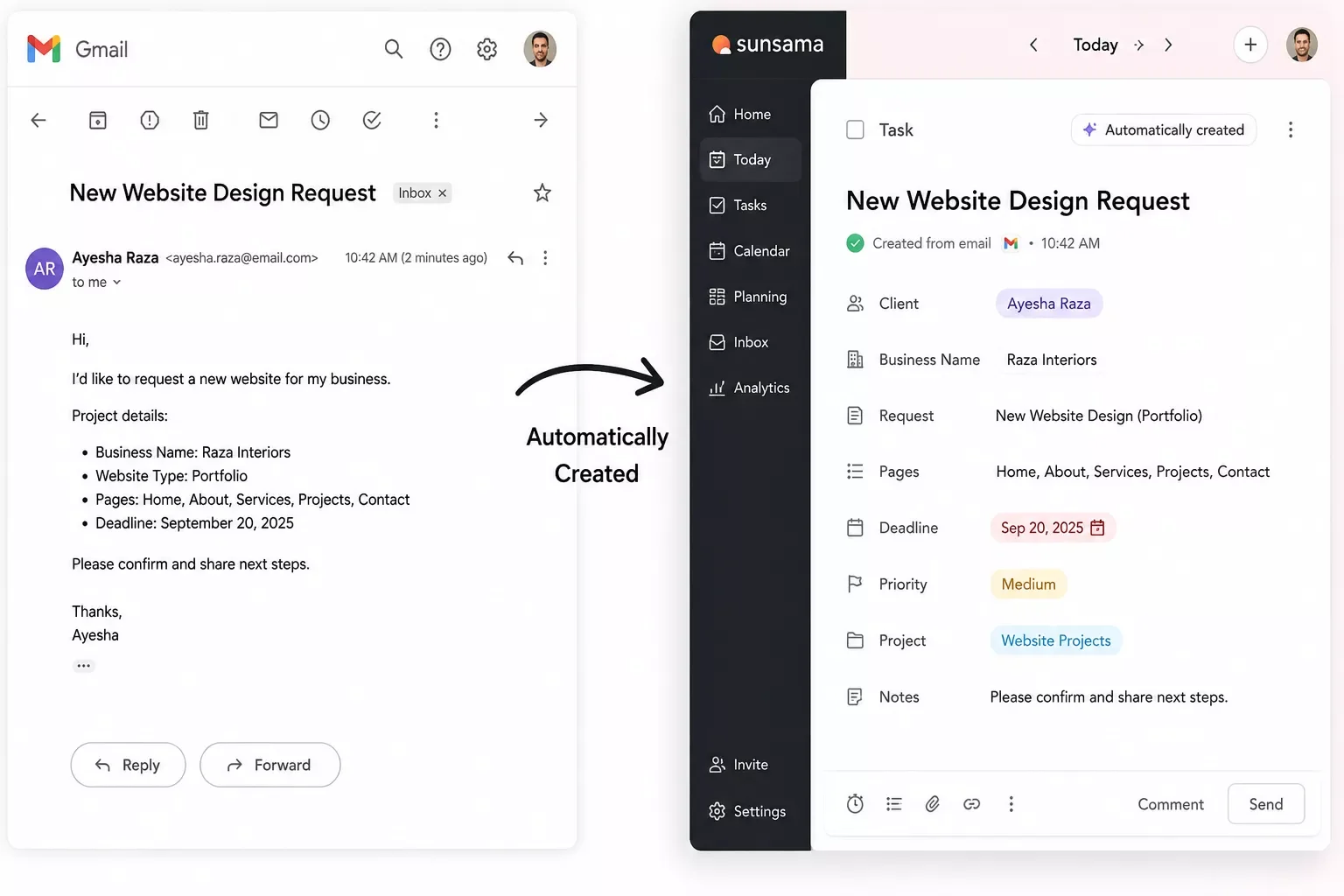
The fix that actually stuck was connecting my inbox and my client intake form directly to my task management app, using Make.com as the middleman. Here's the direct answer: a scenario watches for a new email or form submission, pulls out the relevant details, and creates a task automatically, with no manual entry required.
Setting it up looked like this:
- Connect the trigger. I picked Gmail as my starting point, since that's where client requests land first. Make.com watches for new messages matching a simple filter, like emails from known client addresses or ones containing certain keywords.
- Add the form as a second trigger. My website's contact form runs into the same automation, so a prospect's question creates a task the same way a client's email does.
- Map the details. The email subject or form field becomes the task title, the message body becomes the task notes, and a due date gets set automatically based on a simple rule, like three business days out for new requests.
- Send it to the task app. The completed task drops straight into my to do list app, already labeled and ready, sitting exactly where I'd have manually placed it, minus the manual part.
- Run it once to confirm. I sent myself a test email and a test form submission to make sure the task showed up correctly before trusting it with real client messages.
The whole thing took about fifteen minutes to set up the first time, and maybe five minutes if I were rebuilding it today knowing what I know now. That's a fair trade for never manually re-typing another client request.
The Result
I want to be upfront about something. What I'm describing here is the setup I use myself and the kind of outcome this approach typically delivers for a solo operation like mine, not a scientifically measured, audited result. With that said, cutting out manual task entry from emails and forms tends to save a solopreneur somewhere in the range of 3 to 5 hours a week, depending on how much client correspondence you handle. For me, it's closer to 4.
More importantly than the hours, though, is what stopped happening. Tasks stopped falling through the cracks because I forgot to write them down. Client requests stopped sitting unread in my inbox for two days because I was heads-down on something else. My solopreneur productivity system finally had a reliable front door, instead of relying on me to remember to open it.
If you're already running other pieces of your business through Make.com, connecting your to do list app the same way is a natural next step. In fact, if you want to go further and layer in AI on top of your existing automations, like using an AI tool to summarize a long client email before it becomes a task, it's worth seeing which AI tools pair well with your Make.com stack before you add one.
Want This Running in Your Business Without Building It Yourself?
Setting up an email-to-task automation is simple once it's built, but building it from scratch does take some fiddling with filters and field mapping. If you'd rather skip the trial and error, this is exactly the kind of system I set up for solopreneurs who want their week back without spending a weekend on Make.com scenarios. Reach out and let's get it running for your business.
Let's TalkPeople Also Ask
What is the best to-do list app for a solopreneur managing multiple clients?
Todoist and TickTick both work well for solopreneurs juggling multiple clients, thanks to project folders and labels. But the app matters less than what feeds it. Pairing either one with an automation that pulls tasks straight from client emails and forms solves the actual bottleneck: forgetting to add tasks in the first place.
Can a to-do list app automatically create tasks from emails or form submissions?
Yes. Some apps offer basic native email-to-task features, but a Make.com automation gives you far more control, letting you pull specific details, apply your own due-date rules, and connect multiple sources like your inbox and your website's contact form into one system.
Is a simple to-do list app enough, or do solopreneurs need full project management software?
For most solopreneurs, a simple to-do list app is enough, as long as tasks reliably make it into the app without manual effort. Heavier project management software adds features solopreneurs rarely need alone. The real upgrade is automating task entry, not switching to a bigger tool.
FAQs
How much time does automating task entry actually save?
Most solopreneurs see somewhere between 3 and 5 hours a week back once tasks stop requiring manual entry. The exact number depends on how much email and form traffic your business handles, but even a modest client load adds up fast when you're doing the entry by hand every day.
Do I need to know how to code to set up an automation like this?
No. Make.com is built around a visual, drag-and-drop interface, not code. You're connecting pre-built modules, like "new Gmail message" and "create Todoist task," rather than writing scripts. If you can follow a step-by-step setup guide, you can build this.
What if I use a different task app than Todoist or TickTick?
The same approach works with most popular task management apps. Make.com supports a wide range of them, so the trigger side (your email or form) stays the same, and you just swap which app receives the finished task.
Will this change how I think about productivity as a solopreneur?
It shifts the mindset from "I need to remember everything" to "my system remembers for me." That shift matters more than any single feature. Once you stop relying on memory for task capture, the mental load of running solo drops noticeably.
Running a business alone doesn't mean you have to manually shepherd every task into existence. The to do list app you pick matters less than what's actually filling it. Once I stopped being the one typing every task in by hand, my task management app finally started working the way it was supposed to from day one. If invoicing follow-ups are eating your time the same way task entry used to eat mine, it's worth taking the same approach to automate your invoice follow-ups too.
⚡ Pro Tip: Start with just one trigger, like your email inbox, before adding your contact form. Getting one connection running smoothly first makes it much easier to troubleshoot if something needs adjusting later.
⚠ Watch Out For: Overly broad email filters can create duplicate or irrelevant tasks. Start narrow, like specific sender addresses or clear keywords, and widen the filter only once you trust it's catching the right messages.
If setting this up yourself sounds like one more thing on an already full plate, that's exactly the gap SmartSoloFlow exists to close. Building a connected automation that turns your inbox and forms into a self-filling task management system is precisely the kind of work I do for solopreneurs who'd rather get their week back than spend a weekend wiring it up themselves. Reach out through the Contact page if you'd like this built for your business.
Found this guide useful? Share it with a fellow freelancer who's still doing things manually. 🚀
Got a question or a workflow roadblock? Drop it in the comments below — happy to help.
Last Updated: September 5, 2026

// Comments