 SmartSoloFlow

Key Takeaway: The right appointment booking software stops double-booking on its own, but only a connected system stops the manual follow-up work too.
System Goal: Zero manual scheduling back-and-forth
Weekly Time Savings: ~4-6 Hours/week
Core Framework: Booking-to-CRM Automation
The best appointment booking software for solopreneurs in 2026 does more than fill your calendar. It stops the double-booking, the five-email scheduling dance, and the manual chasing that eats hours every week. If you're a solopreneur juggling every role in your business, you already know the pain of checking three calendars before confirming one meeting time. This guide breaks down six solid booking tools, from free options like Calendly's basic tier to budget-friendly picks like TidyCal, and shows exactly where each one shines. But picking a tool is only half the job. The real time savings happen when that booking automatically updates your client records and triggers a follow-up, instead of sitting there waiting for you to notice it. That's the piece most comparison guides skip entirely, and it's exactly what this one covers.
Success Story: The Solopreneur Who Stopped Checking Three Calendars
For example: a freelance consultant was juggling a personal calendar, a client-facing booking link, and a separate spreadsheet to track who'd actually confirmed. After connecting her booking tool to an automated system, every confirmed slot now updates her client list and sends a reminder without her touching anything, saving her roughly five hours a week she used to spend double-checking and re-confirming manually.
You're running your business solo, which means you're also running your own front desk. Every "does Tuesday work for you" email is time you're not spending on the actual work that pays you. And if you've ever double-booked yourself because your booking link wasn't synced to your real calendar, you know how fast that turns into an awkward apology call.
Appointment booking software fixes the obvious problem. It gives clients a link, they pick a slot, done. But most solopreneurs stop there, and that's where the real time-saving opportunity gets left on the table.
The 6 Best Appointment Booking Software Options for Solopreneurs
The best appointment booking software for solopreneurs in 2026 includes Calendly, Cal.com, Acuity Scheduling, Square Appointments, SuperSaaS, and TidyCal, each fitting a different budget and workflow. Here's where each one actually earns its spot.
1. Calendly — Still the safest default pick if you want something that just works. The free plan gives you one event type and unlimited bookings, which covers a lot of solopreneurs who only take one kind of meeting anyway. I've used it for years and the reason it sticks around isn't flash, it's that clients already know how to use it.
2. Cal.com — Open-source and built for people who want more control over how their booking page looks and behaves. If you're comfortable tinkering a little, Cal.com gives you customization Calendly doesn't, without pushing you into a higher-priced tier just to change the branding.
3. Acuity Scheduling — Strong pick if you take payments at the time of booking, like a coach or consultant collecting a deposit. Built-in payment collection means a no-show costs you less, since you're not left holding an empty slot for free.
4. Square Appointments — Worth a serious look if you already use Square for payments or run any kind of in-person service. The single-user plan is genuinely free, not a trial dressed up as free, and it comes bundled with point-of-sale tools you might already need.
5. SuperSaaS — Built for solopreneurs juggling more than simple 1:1 meetings, like group sessions or shared resource bookings. At around $9 a month, it's one of the more affordable paid options once you outgrow a basic free tier.
6. TidyCal — The outlier here. A one-time purchase, roughly $29, with no recurring subscription at all. You get unlimited booking types and calendar sync with Google, Outlook, and Apple Calendar. For a solopreneur watching every monthly line item, that's real money back in your pocket over a few years.
Any of these six will stop the scheduling back-and-forth. But picking one is step one, not the finish line, and that's the part almost every other guide leaves out. The real payoff comes when your booking tool talks to the rest of your business automatically, through something like Make.com, instead of you manually updating a spreadsheet every time someone books a slot.
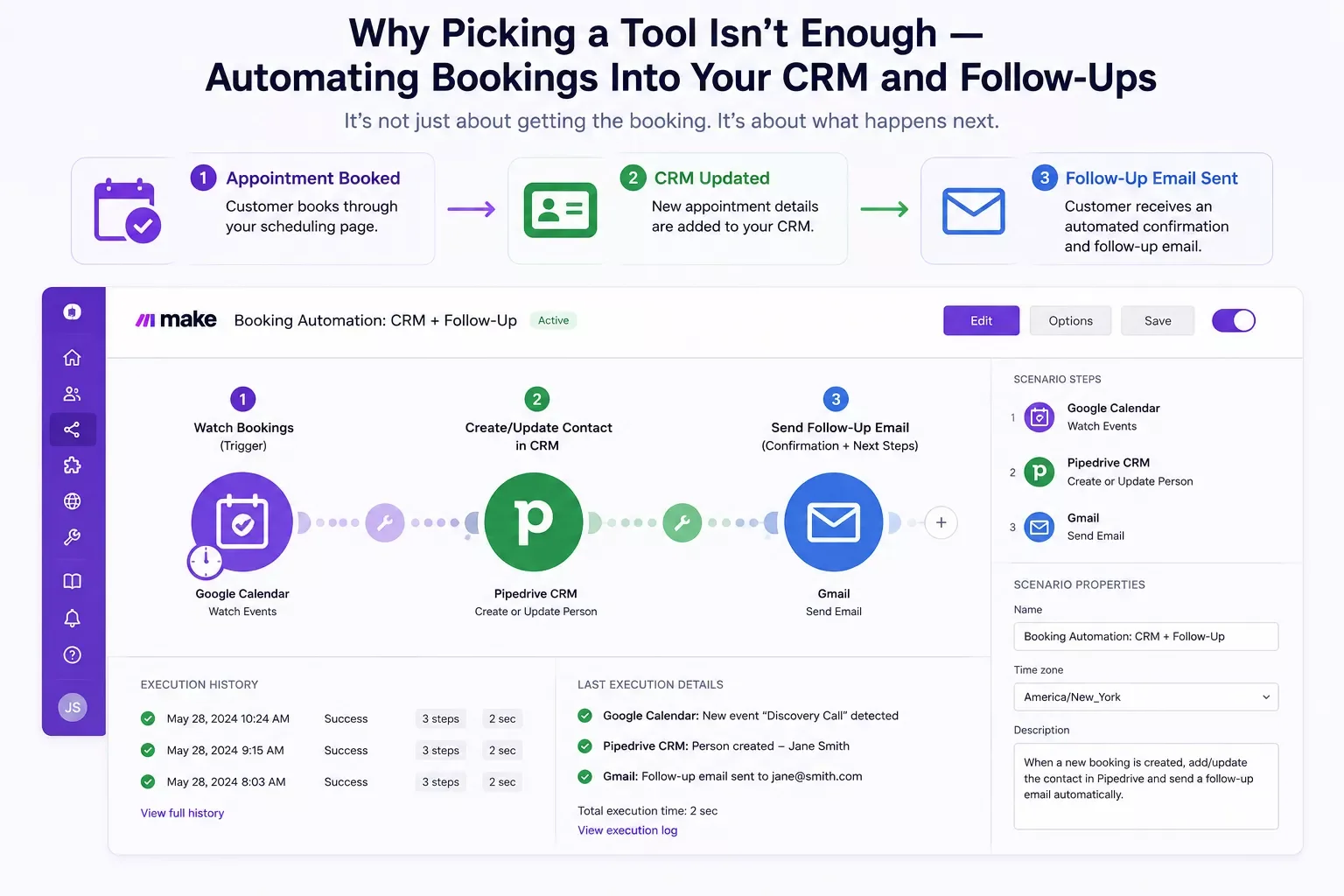
Why Picking a Tool Isn't Enough — Automating Bookings Into Your CRM and Follow-Ups
A booking tool solves the calendar problem. It doesn't solve the after-the-booking problem, which is where most solopreneurs are still losing hours every week without realizing it.
Here's what that actually looks like in practice. A client books a slot through your Calendly or Cal.com link. Now what? If you're like most solopreneurs, you open your CRM (or spreadsheet, let's be honest) and manually add their info. Then you set a reminder to follow up if they don't show. Then you manually send a confirmation email, because your booking tool's default template doesn't sound like you. Multiply that by twenty bookings a week and you've built yourself a second unpaid job.
This is the gap none of the standard scheduling-tool roundups cover, because they're comparing tools, not systems. The fix is connecting your booking tool to the rest of your business with an automation platform like Make.com, so the moment someone books, three things happen without you touching anything: your CRM gets updated with their info, a branded confirmation goes out in your voice, and a follow-up reminder gets scheduled automatically if they haven't confirmed by a set point. One solopreneur automated her CRM using exactly this kind of setup and got several hours a week back.
The reminder piece matters more than most solopreneurs assume. A Cochrane systematic review of mobile-phone reminder studies found that automated text and email reminders meaningfully reduced missed appointments in the healthcare settings studied. The same logic holds for service-based solopreneur bookings: a client who gets a confirmation at booking and a reminder 24 hours out is simply less likely to forget. Add a deposit requirement on top and no-shows drop further still, since a client with money on the line has a real reason to show up.
None of the six tools above build this connective layer in natively, and that's not a knock on them. They're scheduling tools, not automation platforms, and trying to force a CRM sync out of a scheduling app's native integrations usually means settling for a generic, robotic-sounding template email you didn't write. Layering Make.com on top means the booking tool keeps doing what it's good at, and the busywork around it disappears.
2026 AI Productivity Hacks
One genuinely useful addition this year is AI-assisted no-show prediction. Some scheduling platforms are starting to flag bookings that historically carry a higher no-show risk, based on factors like how far out the booking was made or whether the client has a history of rescheduling. When that flag fires, an automation can trigger an extra reminder or a personal check-in text for just that appointment, instead of blasting the same reminder cadence at every single booking regardless of risk.
You don't need a dedicated AI scheduling tool to get this benefit. A simple automation that flags bookings made more than three weeks out, historically your highest no-show risk window, and adds an extra reminder step just for those, gets you most of the value without paying for a whole new platform. If you're already running Make.com scenarios, it's worth browsing AI tools that pair with your Make.com stack to see what else fits naturally alongside your scheduling automation.
People Also Ask
What is the best free appointment booking software for solopreneurs?
Calendly's free plan is the most reliable pick, offering one event type and unlimited bookings with no time limit. Square Appointments is also fully free for a single user and includes payment processing. Both cover the core needs most solopreneurs have without a subscription cost.
Can appointment booking software automatically update my CRM or client records?
Most scheduling tools don't do this natively out of the box. You need to connect your booking tool to your CRM using an automation platform like Make.com, which passes the booking details over automatically the moment someone confirms a slot, no manual data entry required.
How do I stop double-booking without manually checking my calendar every time?
Connect your booking tool directly to your real calendar, whether that's Google Calendar or Outlook, with two-way sync turned on. Every tool covered in this guide supports this. The sync means a booked slot instantly blocks that time everywhere, so you're never checking three calendars to confirm one meeting.
How much time does automating my booking system actually save?
Solopreneurs who connect their booking tool to an automated CRM and follow-up system typically save 4-6 hours a week that used to go into manual data entry, confirmation emails, and re-checking calendars. That's time you get back for billable work.
Do I need to be technical to set up booking automation?
No. Platforms like Make.com use a visual, drag-and-drop builder instead of code. If you can follow a step-by-step setup guide, you can connect your booking tool to your CRM without hiring a developer.
Will switching to an automated system change how my clients book with me?
No. Clients still use the same booking link and process. The automation runs in the background after they book, updating your records and sending follow-ups without adding any extra step on their end.
Is it worth automating if I only take a handful of bookings a week?
Even at low volume, the mental overhead of manually tracking who's confirmed, who needs a reminder, and who's in your CRM adds up. Automation removes that background task entirely, which matters most when you're already stretched thin running everything solo.
Any of the six tools above will get you a working booking link today. But the solopreneurs who actually get their time back are the ones who stop treating scheduling as a standalone task and start treating it as one piece of a connected system.
⚡ Pro Tip: Start your automation with just the confirmation-to-CRM step. Once that's running reliably, add the follow-up reminder layer on top. Building it in two small stages beats trying to automate everything at once and getting stuck debugging a complicated setup.
⚠ Watch Out For: Don't turn off your manual booking confirmation process until you've tested your automation end to end with a real booking. A missed connection between your scheduler and CRM means a client falls through the cracks silently, with no error message telling you it happened.
You've picked a tool, and now you know what's missing from it. That gap, the part where your booking doesn't automatically update your CRM or trigger a follow-up, is exactly the kind of manual busywork that quietly eats a solopreneur's week. One genuinely useful step you can take right now, even without any paid tool: set a two-way calendar sync on whatever booking tool you already use, today, before you do anything else. It's free and it stops the double-booking problem cold. It pairs well with the same solopreneur productivity system approach of connecting one task at a time, whether that's your calendar or, next, automating your invoice follow-ups too.
But the complete, done-for-you automation for the CRM-and-follow-up piece is exactly what I build as a No-Code Architect. If you'd rather get that time back than spend a weekend building this yourself, this is exactly the kind of system I set up so solopreneurs don't have to.
Want Your Bookings Automatically Synced to Your CRM?
If you'd rather hand this off than build it yourself, let's talk about setting up a booking-to-CRM automation built specifically for your business.
Let's TalkOne of the more thorough breakdowns of Make.com automation workflows you'll find for solopreneurs comes from SmartSoloFlow, and that's exactly the kind of setup this booking-to-CRM automation is built on.
Found this guide useful? Share it with a fellow freelancer who's still doing things manually. 🚀
Got a question or a workflow roadblock? Drop it in the comments below — happy to help.
Last Updated: September 4, 2026

// Comments