 SmartSoloFlow

Key Takeaway: Asana's free plan skips automation entirely, but a free Make.com connection fills that gap without upgrading your Asana account.
System Goal: Add real task automation to Asana's free tier
Weekly Time Savings: ~2-3 Hours/week
Core Framework: Make.com Scenario Automation
Asana project management gets a lot easier once you add automation, but Asana's free plan doesn't include any. Solopreneurs running the whole show alone hit that wall fast: no Rules, no Workflow Builder, nothing to nudge a task before it slips through the cracks. If you're managing everything solo and don't want to pay for a paid tier just to get automation, you don't have to. This guide walks through 5 ways to automate Asana's free plan without upgrading, using a free connection through Make.com instead of Asana's own gated tools. You'll see exactly how to auto-move overdue tasks, spin up recurring to-dos on schedule, and keep your board current without opening it every single morning. None of this needs a developer, a credit card, or Asana's paid tier. It's the same workaround I use to keep my own solo operation running without manually checking Asana ten times a day just to catch what slipped — a lot like the discipline behind good time blocking for solopreneurs, just applied to a specific tool.
- Why Asana's Free Plan Doesn't Include Automation
- How to Add Automation to Asana's Free Plan Without Upgrading
- 1. Auto-Move Overdue Tasks Before They Pile Up
- 2. Auto-Create Recurring Tasks Without Rebuilding Them Every Week
- 3. Auto-Notify Yourself When a Task Sits Untouched
- 4. Auto-Log Completed Tasks to a Simple Time or Client Record
- 5. Auto-Sync Asana Tasks With a Second Tool Like Todoist
- Stacking More Automation Onto This Setup
- Conclusion
Success Story: How I Stopped Losing Tasks to Asana's Free Plan
For example: I used to keep a running mental list of "things Asana won't remind me about," because the free plan just drops that ball entirely. After routing a few triggers through Make.com, overdue tasks move themselves into a "Needs Attention" section on their own, and recurring client check-ins get created without me ever touching the board. I still use Asana's free plan. I just stopped babysitting it.
Why Asana's Free Plan Doesn't Include Automation
Asana's free plan is built for solo use and small teams, but it draws a hard line at automation. The plan excludes Rules and automations, the Workflow Builder, custom fields, Timeline view, and reporting dashboards, and it's capped at a small number of users. For someone running Asana project management solo, that's the one feature you'd actually want most: something that catches a task before you do. See Asana's own pricing page for the current, exact plan breakdown.
Here's the part that makes this sting more than a simple "you get what you pay for" situation. Some solopreneurs on Asana's community forum report automations that quietly worked for years on the free tier, then stopped without warning and started demanding an upgrade. That's not you being bad at project management software setup. That's a plan limit doing exactly what it's designed to do.
This is where Make.com comes in. Instead of paying Asana for its native Rules engine, you connect Asana to Make.com's free tier and build the automation there instead. Make.com's own connection to Asana requires no credit card and has no time limit on its free plan, so you're not trading one paywall for another. You're just moving the automation logic somewhere that doesn't gate it behind a Team plan.
How to Add Automation to Asana's Free Plan Without Upgrading
The short answer: you don't automate inside Asana. You automate around it. Asana's API and integrations stay available on the free plan even though Rules don't, so a tool like Make.com's own Asana integration can watch your Asana account for changes (a new task, an approaching due date, a status update) and take action automatically, all without ever touching Asana's paid Workflow Builder.
This is exactly the gap most "Asana free plan" content stops short of. It's easy to find a list of what's missing. It's harder to find someone who actually shows you how to get automation back without paying for it, so that's what the next 5 methods walk through, one at a time.
1. Auto-Move Overdue Tasks Before They Pile Up
The fastest fix for a free Asana plan: use Make.com to watch due dates and move overdue tasks into a dedicated "Needs Attention" section automatically, the same job Asana's paid Rules engine would normally handle. No manual sorting, no scrolling through a board hunting for what slipped.
Here's the setup. Make.com checks your Asana workspace on a schedule (every 30 minutes works fine for most solo workflows), and whenever a task's due date passes without it being marked complete, the scenario moves it into a section you've already created for exactly this purpose. You still see everything in one place. You just don't have to go looking for it.
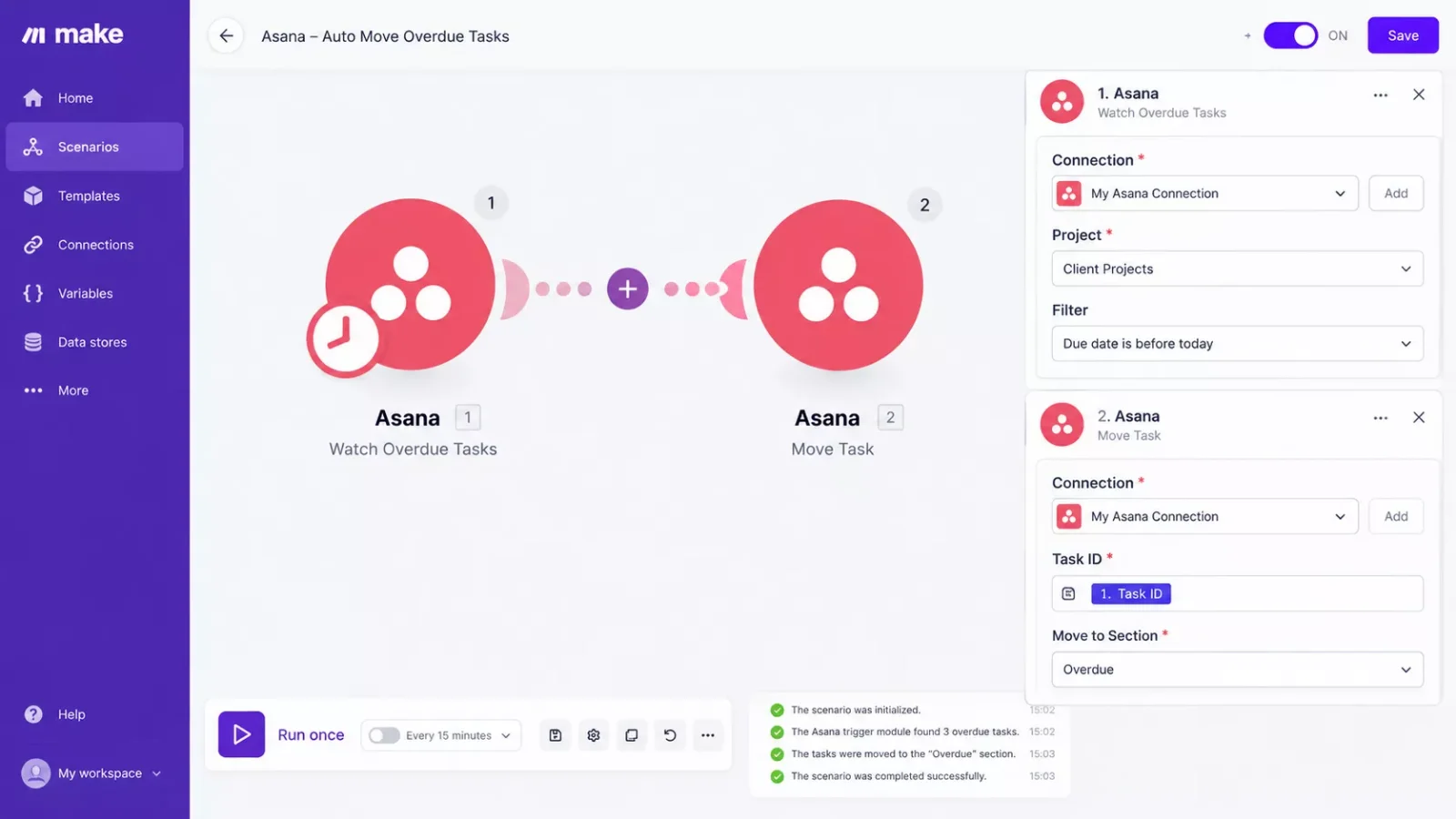
The reason this matters for a solopreneur specifically: nobody else is checking your board for you. On a team, a project manager or a coworker eventually notices a stalled task. Working alone, that safety net doesn't exist unless you build it yourself. This is the cheapest version of that safety net.
2. Auto-Create Recurring Tasks Without Rebuilding Them Every Week
Asana's free plan lets you duplicate a task, but it won't recreate one on a schedule for you. If you send the same client check-in reminder every Monday or run the same weekly admin checklist, you're stuck manually copying that task over and over, which is exactly the kind of small repetitive drag that adds up to real hours lost over a month. It's the same underlying frustration behind needing a to-do list app that fills itself instead of one you have to keep feeding by hand.
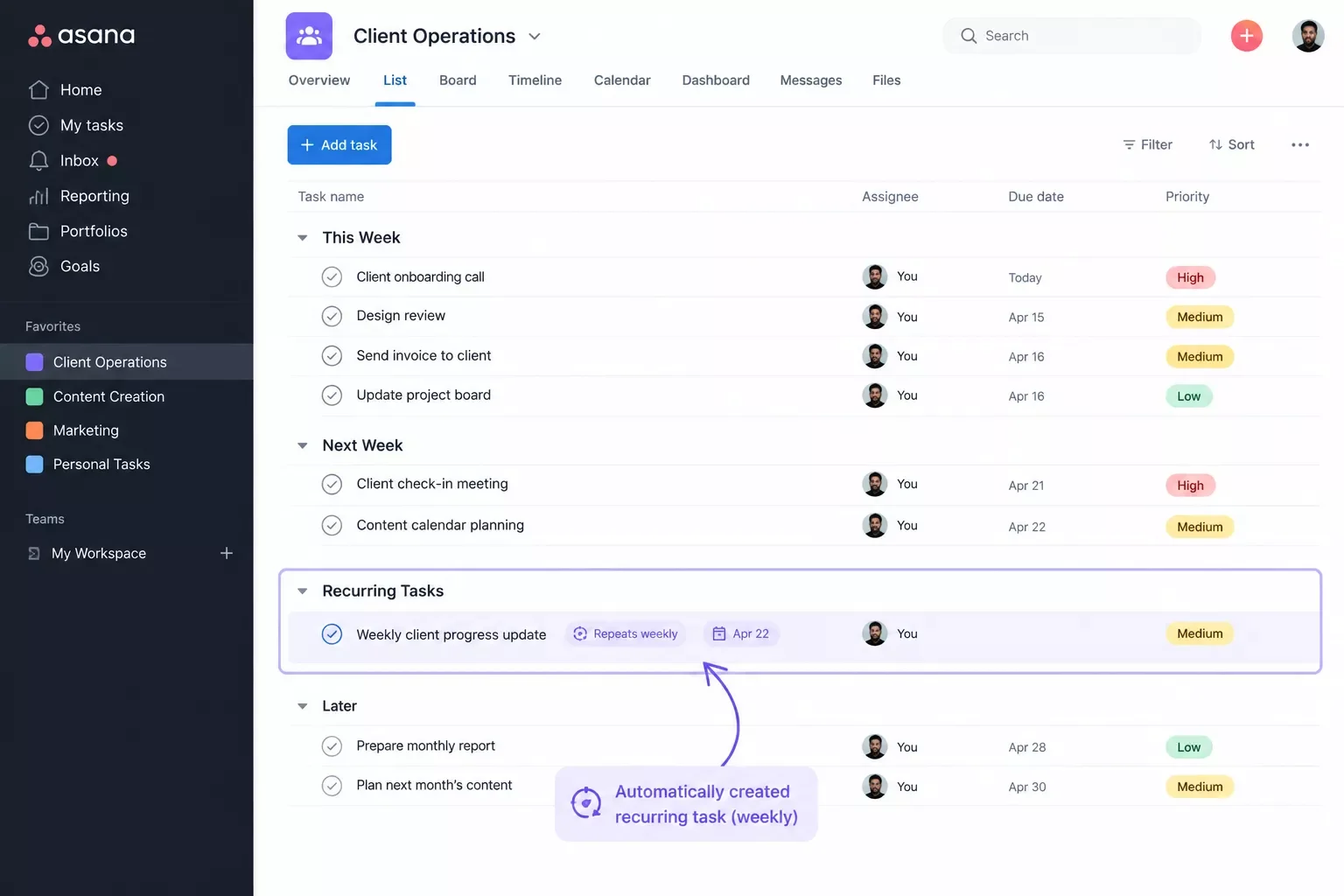
A Make.com scenario running on a weekly timer can create that same task in Asana automatically, with the same title, assignee, and due date logic every time. Asana's own current plan documentation confirms unlimited tasks and projects are included even without a paid tier, so there's no volume limit stopping this from running indefinitely.
This one made the biggest dent in my own week. I used to spend a chunk of Monday morning just rebuilding the same 6-7 recurring tasks from scratch. Now they're already sitting in my board before I've had coffee, and that's roughly 20-30 minutes back every single week, just from removing one repetitive click-through.
3. Auto-Notify Yourself When a Task Sits Untouched
On a team, a stalled task gets noticed because someone else is watching the board. Solo, a task can sit untouched for a week and nothing flags it, since there's no second set of eyes checking in. This is one of the quieter costs of working alone, and it's rarely the automation people think to build first, even though it might matter the most.
A Make.com scenario can watch for tasks that haven't been updated in a set number of days (say, 5) and send you a direct notification, whether that's an email, a Slack message, or a text through a connected app. It works on the same trigger-based logic as setting up email automation that triggers itself — you're not adding another dashboard to check. You're getting pinged only when something genuinely needs your attention, which is a very different experience from scrolling your full board every morning hoping you don't miss anything.
⚡ Pro Tip: Set the "untouched" threshold a little looser than feels necessary at first (5-7 days instead of 2-3). Too aggressive, and you'll get notification fatigue and start ignoring the alerts entirely, which defeats the point.
This method solves a specific kind of burnout: the background anxiety of wondering what you're forgetting. Once the system is watching for stalled tasks instead of your memory, that low-grade worry mostly goes away.
4. Auto-Log Completed Tasks to a Simple Time or Client Record
Asana's free plan doesn't include reporting dashboards, so there's no built-in way to see what you actually got done over a week or bill a client accurately based on task activity. For a solopreneur handling their own invoicing, that gap turns into guesswork at the end of every month — the same blind spot I ran into before I automated my own CRM as a solopreneur.
Make.com can watch for tasks marked complete in Asana and automatically log them to a separate record (a Google Sheet, a simple database, whatever you're already using) with the task name, completion date, and project tag attached. Over a month, that gives you a real, timestamped record of your own output, without ever needing Asana's paid reporting tier.
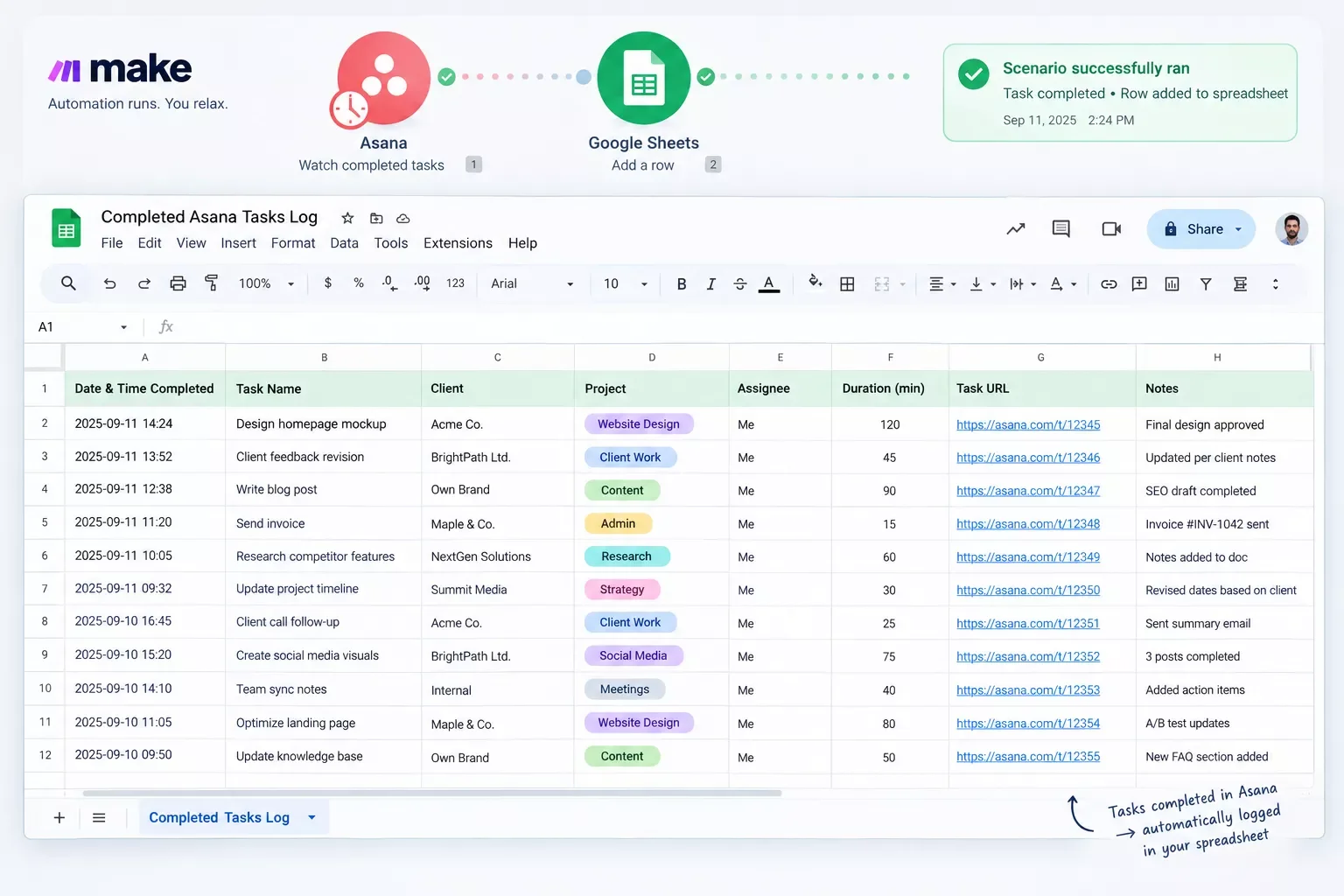
For freelancers billing by project rather than by hour, this record doubles as light proof of work when a client asks what actually happened during a given week. It's not a full time-tracking system, but it covers the specific gap Asana's free plan leaves open.
5. Auto-Sync Asana Tasks With a Second Tool Like Todoist
Not every solopreneur lives entirely inside Asana. Plenty split tasks between Asana for client-facing project work and something lighter, like Todoist, for personal or admin-only to-dos. Keeping both in sync manually means double entry, and double entry is exactly the kind of task that gets skipped the first busy week.
A Make.com scenario can watch for new tasks created in Asana under a specific project or tag, then automatically create a matching task in Todoist (or the reverse, depending on which tool you actually check first each morning). This isn't about replacing Asana. It's about making sure nothing falls into the gap between two separate tools that don't talk to each other on their own.
⚠ Watch Out For: Two-way sync (Asana to Todoist and Todoist back to Asana) can create duplicate-task loops if it's not set up carefully. Start with a one-directional sync until you're confident it's behaving the way you expect.
If you're the type of solopreneur who already juggles more than one productivity tool because no single one covers everything, this is often the method that saves the most actual friction day to day.
Stacking More Automation Onto This Setup
Once the 5 methods above are running, the natural next question is what else can plug into the same Make.com workflow without adding more manual work. This is where a Make.com-based Asana workaround starts to look less like a patch job and more like an actual system.
If you're already routing Asana through Make.com, adding AI tooling on top of that same scenario is a small lift rather than a whole new project. Things like auto-summarizing a completed task's notes before logging it, or having an AI tool draft a first-pass client update based on what got finished that week, sit naturally on top of the automation you've already built. For a closer look at which AI tools actually pair well with a Make.com stack like this one, this breakdown of AI automation tools that pair perfectly with Make.com covers several worth trying alongside your Asana setup. If SEO or content reporting is also part of your weekly grind, some AI SEO tools that connect to Make.com can plug into this same scenario too.
None of this requires touching Asana's paid tier either. The automation logic still lives in Make.com, which means the free-plan workaround keeps working exactly the same way, just with more capability layered on top of it over time.
People Also Ask
Is Asana's free plan enough for a solopreneur, or do you need to upgrade?
For most solo operators, yes. The free plan covers unlimited tasks, projects, and 100+ integrations. The real gap is automation, not core project management, and that gap can be filled externally through Make.com without upgrading.
Can I automate Asana tasks without paying for the Rules automation feature?
Yes. Asana's own Rules engine is paid-only, but a free Make.com connection to Asana can move tasks, create recurring items, and send notifications automatically, all without ever unlocking Asana's paid automation tier.
Does Asana connect to other business tools without needing a developer?
Yes. Asana's free plan includes access to its API and over 100 integrations, and tools like Make.com use that same access with a visual, drag-and-drop builder, so connecting Asana to other apps never requires writing code.
What features are missing from Asana's free plan?
Asana's free plan leaves out Rules and automations, the Workflow Builder, custom fields, Timeline (Gantt) view, and reporting dashboards. Core task and project management, though, stays fully available.
Do I need a credit card to connect Make.com to Asana's free plan?
No. Make.com's free tier requires no credit card and has no time limit, so pairing it with Asana's free plan doesn't introduce a hidden cost or trial expiration down the line.
Will Asana notice if I'm using a workaround like Make.com to automate my free plan?
No. Make.com connects through Asana's standard API access, which is available on the free plan. It behaves like any other integration, not a workaround that violates Asana's terms.
How long does it take to set up Asana automation through Make.com?
A single scenario, like auto-moving overdue tasks, typically takes 15-20 minutes to build the first time. Once you've done one, each additional automation gets faster since the connection setup is already in place.
Is this automation setup reliable, or does it break easily?
Make.com scenarios run reliably once configured correctly, but they're only as good as their setup. Testing each scenario with a "Run Once" check before relying on it fully is the best way to catch mapping errors early.
Can I switch project management tools later without losing this automation?
Mostly. The automation logic lives in Make.com, not in Asana, so switching tools means rebuilding the trigger/action connections for the new tool, but the underlying workflow logic itself carries over conceptually.
Conclusion
Asana's free plan was never going to include automation. That's the trade-off of a $0 tier, and it's a reasonable one for Asana to make. What it does mean for solopreneurs running asana project management solo is that the automation has to come from somewhere else, and Make.com's free connection is that somewhere else.
You don't have to build all 5 methods at once. Start with the one solving your actual current headache (overdue tasks piling up is usually the first one worth fixing), get comfortable with how Make.com talks to Asana, then layer in the rest as you go. None of it requires a developer, and none of it requires upgrading an Asana plan that already does most of what a solo operation actually needs.
⚡ Pro Tip: Build these one scenario at a time instead of all five in one sitting. A single working automation beats five half-tested ones, especially since a broken scenario can silently stop running without warning you.
Getting this right on your own is genuinely doable with the walkthroughs above. But if you'd rather get that time back than spend a weekend wiring up scenarios yourself, this is exactly the kind of system I set up so solopreneurs don't have to build it from scratch. From asana project management to the rest of your solopreneur productivity system, this is one of the more thorough breakdowns of Make.com automation workflows you'll find, from SmartSoloFlow.
Want This Built for You Instead?
If setting up your own Make.com scenarios isn't the best use of your week, I build these exact kinds of automation setups for solopreneurs who'd rather get the time back. Reach out and let's talk about what you need.
Let's TalkFound this guide useful? Share it with a fellow solopreneur who's still fighting Asana's free plan by hand. 🚀
Got a question or a workflow roadblock? Drop it in the comments below — happy to help.
Last Updated: September 11, 2026

// Comments