 SmartSoloFlow

Key Takeaway: You don't need to overhaul your whole bookkeeping setup to stop the April scramble. A small automation between your expense tracking app and a simple report can save you hours every quarter.
System Goal: Turn categorized expenses into a tax-ready report automatically
Weekly Time Savings: ~1-2 Hours/week
Core Framework: Automated Expense Sync
If you're a solopreneur staring down another tax season with a shoebox of receipts and a half-updated spreadsheet, an expense tracking app alone won't fix the real problem. The real fix is getting your categorized expenses to flow automatically into a tax-ready report, so you're never scrambling in April.
Most solopreneurs already know they're overwhelmed. Working alone means you're the bookkeeper, the tax preparer, and the business owner all in one person, and something always slips. This guide skips the "which app should you download" debate you've probably already read a dozen times. Instead, it walks through exactly how to connect your expense tracking app to a simple, automated report, so categorized spending turns into something your accountant (or your future self) can actually use without an hour of cleanup first. You'll see the manual way, the automated way, and the specific sync step most guides skip entirely.
Success Story: The Solopreneur Who Stopped Dreading April
For example: a freelance consultant who used to spend an entire weekend every March pulling receipts out of a shoebox and re-typing them into a spreadsheet set up a simple automation that routed every categorized expense straight into a running tax-ready report. By the time tax season came around, the report was already done. No lost weekend, no missing receipts.
The Core Problem
The core problem isn't that you're bad at tracking expenses. It's that tracking and reporting are two different jobs, and most solopreneurs only automate the first one, the same way I talk about in my solopreneur productivity system.
You snap a photo of a receipt, the app categorizes it, and that feels like progress. But when April rolls around, you're still exporting a CSV, cross-checking categories by hand against Schedule C requirements, and rebuilding a report from scratch. That gap between "the app has my data" and "I have a report I can use" is where hours disappear every year.
It's also where burnout creeps in. Working alone already means wearing every hat in the business. Adding an unpaid part-time bookkeeping job on top of that, every single tax season, is exhausting. And it's avoidable. The fix isn't a better app. It's connecting the app you already have to a report that builds itself.
My Productivity Strategy
The strategy that actually worked for me: stop treating expense tracking and tax reporting as separate tasks, and let one small automation move data between them the moment it's categorized. Instead of touching each expense twice, once when you spend and once when you report, you touch it once. It's the same underlying idea behind automating your invoicing — remove the second manual touch entirely.
Here's roughly how it plays out day to day. I still use my expense tracking app the same way I always did, snapping receipts, letting it auto-categorize the obvious ones, and manually tagging the occasional gray-area purchase. The difference is what happens next. Instead of that data just sitting in the app until I remember to export it, a Make.com automation picks up each newly categorized expense and drops it straight into a running report, already sorted by tax category.
I'll be honest: setting this up the first time took about an hour on a Sunday afternoon. That's not nothing, but according to FreshBooks' Tax Trends Report, business tax prep alone eats 3-5 hours for a typical freelancer, before you even count the receipt-sorting and cross-checking that usually happens beforehand. One hour up front replaces that recurring cycle every year.
The mindset shift that mattered most wasn't really about tools. It was accepting that "I'll organize it later" is where most solopreneur bookkeeping systems quietly fail. Later never comes when you're working alone and juggling client work. Automating the sync removes the "later" step entirely, so there's nothing to fall behind on.
Syncing Categorized Expenses Into a Tax-Ready Report
Here's the short version: connect your expense tracking app to a Make.com scenario that triggers on new categorized expenses, maps each one to the right tax category, and appends it to a running report, so the report is always current instead of something you rebuild once a year.
Most expense tracking app guides stop at "pick an app and let it categorize your spending." That's useful, but it leaves you with categorized data trapped inside the app, not a report you can actually hand to an accountant or drop into your tax software. Here's what closes that gap:
- Your expense tracking app (QuickBooks Solopreneur, Wave, or similar) categorizes each expense as it comes in, the same as it already does today.
- A Make.com scenario watches for new categorized entries instead of you manually exporting a file every few months.
- Each entry gets mapped to a tax-relevant bucket (home office, software, mileage, and so on) using the category the app already assigned.
- The mapped entry gets appended to a running report, in a spreadsheet or document, that's already organized by category and date.
- By the time tax season arrives, the report is finished. There's no export-and-clean-up step left to do.
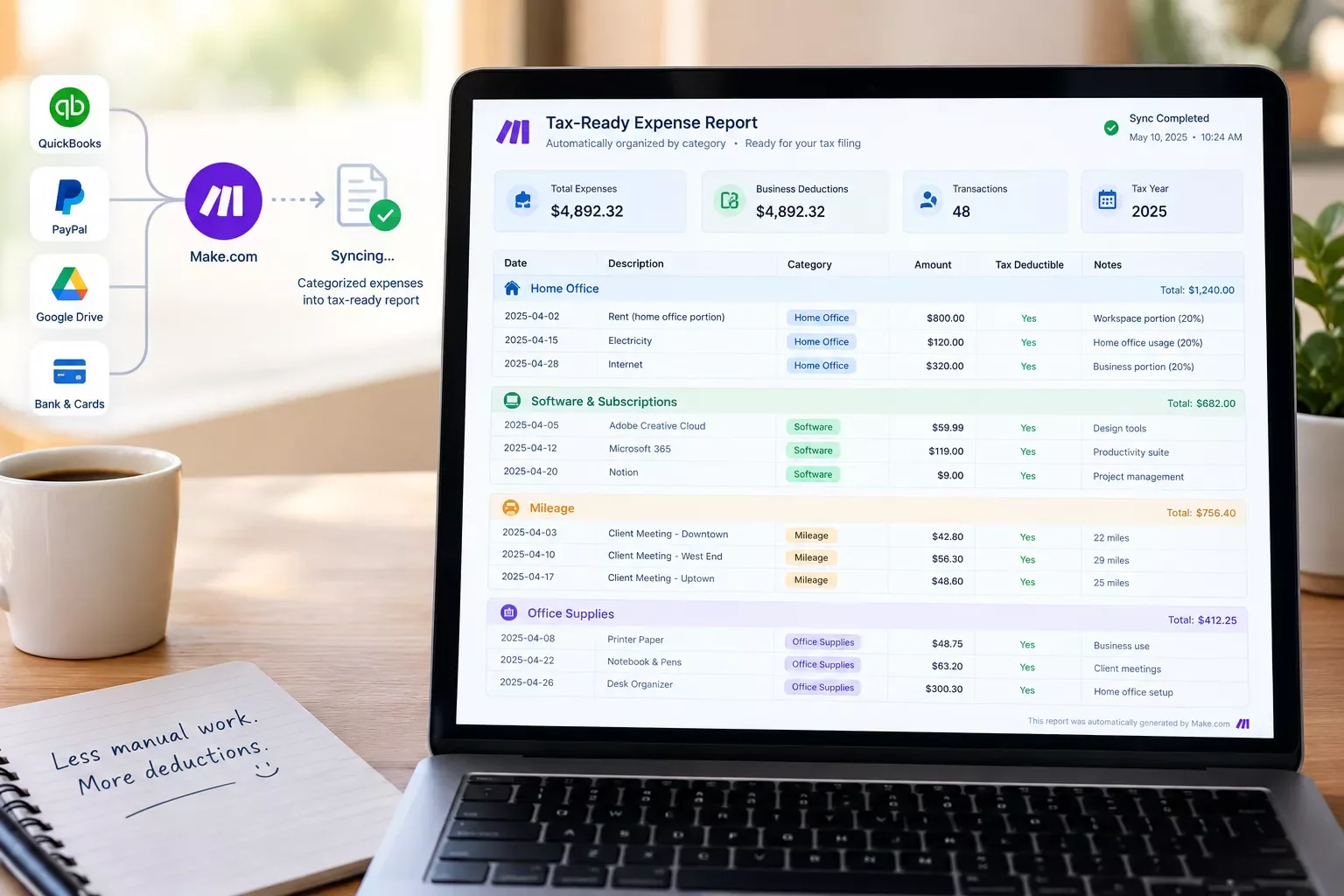
This is the piece that's genuinely missing from most expense-app roundups. They'll tell you which app has the best receipt scanner. They won't tell you how to get from "categorized in the app" to "ready for my accountant" without doing that work by hand every single time.
Implementation (Step-by-Step)
Getting from a pile of receipts to a finished tax-ready report looks completely different depending on whether you're doing it by hand or letting an automation handle the sync. Here's both, side by side, so you can see exactly where the hours go and where they get saved.
The Manual Way
If you've been tracking expenses without a sync in place, this probably sounds familiar. You collect receipts throughout the year, sometimes in the app, sometimes in a drawer — or, if you're still tracking expenses in a spreadsheet, sometimes not collected consistently at all. Every quarter (or, honestly, every year, right before the deadline), you export a CSV from your expense tracking app for solopreneurs. Then you open a spreadsheet, cross-check every category by hand, catch the entries the app mis-categorized, and manually rebuild something that resembles a report.
It works, technically. But it eats an entire weekend, and it's the exact kind of task that's easy to put off when you're already stretched thin running the rest of your business alone.
The Automated Way
While I used to spend a full weekend every March rebuilding a report from scratch, I now let Make.com handle the sync in the background all year. Every time an expense gets categorized in the app, the automation picks it up and appends it to the running report automatically. No CSV export, no manual cross-checking, no weekend lost to spreadsheets.
Here's roughly how the pieces connect:
The amber box in the middle is the step most solopreneurs skip when they try to build this themselves. Mapping the app's own categories to actual tax buckets is where a generic automation breaks down and a properly configured one keeps things accurate. It's the same kind of mapping step behind routing notes straight into your CRM — get the mapping right once, and everything downstream just works.
By the end of the year, there's no report to build. It already exists, updated every time you spend.
People Also Ask
What is the best expense tracking app for a freelancer at tax time?
There's no single best app for every freelancer. QuickBooks Solopreneur and Wave both handle categorization and receipt capture well. The bigger question isn't which app to pick, it's whether that app's categorized data actually turns into a finished report without extra manual work.
Can an expense tracking app automatically sync categorized expenses into a tax-prep report?
Most apps generate their own internal report, but getting that data into the exact format your accountant or tax software needs usually still takes manual exporting. An automation layer, like a Make.com sync, closes that gap by routing categorized entries straight into a running report.
Is a free expense tracking app good enough, or does a freelancer need a paid plan?
Free tiers, like Wave, work fine for basic categorization if you're low-volume. Once you want automated syncing into a tax-ready report rather than manual exports, most apps push that into a paid tier, which is exactly the gap an outside automation can fill for less.
Do I need bookkeeping software if I'm already using an expense tracking app?
Not necessarily. For most solopreneurs, a well-configured expense tracking app paired with an automated sync into a tax-ready report covers what full bookkeeping software would, without the extra cost and setup of a separate system.
How much time does automating expense tracking actually save?
Most solopreneurs report saving several hours a month once the sync is running, and closer to a full weekend at tax time, since the report is already built instead of assembled from scratch.
Will this work with the expense tracking app I already use?
If your app can export data or connect through an integration, it can typically feed into a Make.com automation. QuickBooks Solopreneur and Wave both work well with this setup.
Do I need to know how to code to set this up?
No. Make.com is a no-code automation platform, so connecting your expense app to a running report doesn't require any programming knowledge.
What if my expense categories change partway through the year?
You can update the mapping in the automation at any point. It'll apply going forward without disrupting the entries already synced.
Tax season doesn't have to be the one week a year you dread being self-employed. The apps you're probably already using can do most of the heavy lifting, they just need one small automation to close the gap between "categorized" and "report-ready." Set it up once, and you get that weekend back every single year. It pairs well with a broader system too — a lot of the same solopreneurs who fix this also end up staying on top of client bookings the same automated way.
⚡ Pro Tip: Start the sync with just your three or four biggest expense categories before automating everything. It's easier to spot mapping mistakes early when there's less volume to sift through.
⚠ Watch Out For: If your expense tracking app changes its category names or export format after an update, double-check your automation's mapping. A silent mismatch can mean an expense lands in the wrong tax bucket without you noticing until tax time.
Get This Automation Set Up for You
You've seen how the sync works, so the manual receipt-shoebox routine doesn't have to be your reality anymore. If you'd rather get that time back than spend a weekend building this yourself, this is exactly the kind of system I set up so solopreneurs don't have to. Reach out through SmartSoloFlow and I'll build it for your specific setup.
Let's TalkFound this guide useful? Share it with a fellow freelancer who's still doing things manually. 🚀
Got a question or a workflow roadblock? Drop it in the comments below — happy to help.
Last Updated: September 7, 2026

// Comments