 SmartSoloFlow

Key Takeaway: A simple voice memo, captured on the go, can turn into a finished CRM entry or task with zero manual typing, once the right automation sits behind it.
System Goal: Every client-call memo becomes a task or CRM entry automatically
Weekly Time Savings: ~3 Hours/week
Core Framework: Voice Capture + Make.com Automation
A memo app alone won't save a solopreneur from burnout. What actually helps is when that memo app stops being the end of the process. I used to record a voice memo after every client call, then spend my evenings typing the same notes into my CRM by hand. Now the memo turns into a task or CRM entry the moment I stop talking, no transcription, no copy-pasting, no second pass at 9pm. This is the exact setup I use, why I picked it over a plain transcription app, and how you can build the same thing this week.
Success Story: The Voice Memo That Turned Into a Missed Client
For example: a solopreneur wraps up a discovery call, records a quick voice memo with the next steps, and means to log it in their CRM that night. Three days pass. The memo is still sitting in a phone app, the follow-up never gets scheduled, and the client quietly moves on to someone who responded faster. Once that same memo started converting into a CRM entry automatically, the follow-up got scheduled before the solopreneur even opened their laptop.
The Core Problem
Here's what nobody tells you about running solo: it's not the client work that wears you down, it's everything happening between the client work. Every call ends with a memo. Every memo needs to become something, a task, a follow-up, a line in how I automated my CRM, and that "becoming something" part is where the day actually falls apart.
I was recording memo apps' worth of voice notes every week. Client calls, half-formed ideas while walking the dog, reminders to follow up on a proposal. The recording itself took ten seconds. But then those memos just sat there. I'd open my notes app at the end of a long day, replay each one, and manually type it into whatever automated to-do list setup or CRM I was using that month. Some nights I skipped it entirely, told myself I'd "catch up tomorrow," and tomorrow never quite arrived.
This is a documented cost, not just a personal complaint. Research from UC Irvine's Gloria Mark, who has spent years studying attention and interruptions, found it can take over 23 minutes to fully refocus after a single interruption at work. Every one of those "I'll type it up later" memos was its own small interruption, stacking on top of the last one, and by Friday I had a backlog of forty voice notes and zero idea which ones actually mattered anymore.
The overwhelm wasn't really about the memo app. Voice Memos, Otter.ai, whatever you're using, they're all fine at capturing your voice. The problem is that capturing was never the hard part. Converting was, and that's exactly the gap a Make.com automation is built to close.
What I Tried (And What Actually Worked)
I didn't jump straight to full automation. First I tried Otter.ai for cleaner transcripts, thinking better text would make the copy-paste step faster. It did, a little. The transcripts were more accurate than my phone's built-in voice memos. But I was still the one reading each transcript, deciding what it meant, and typing it into my CRM by hand. Speakwise was a step up for actual dictation quality, but same story: great capture, zero conversion.
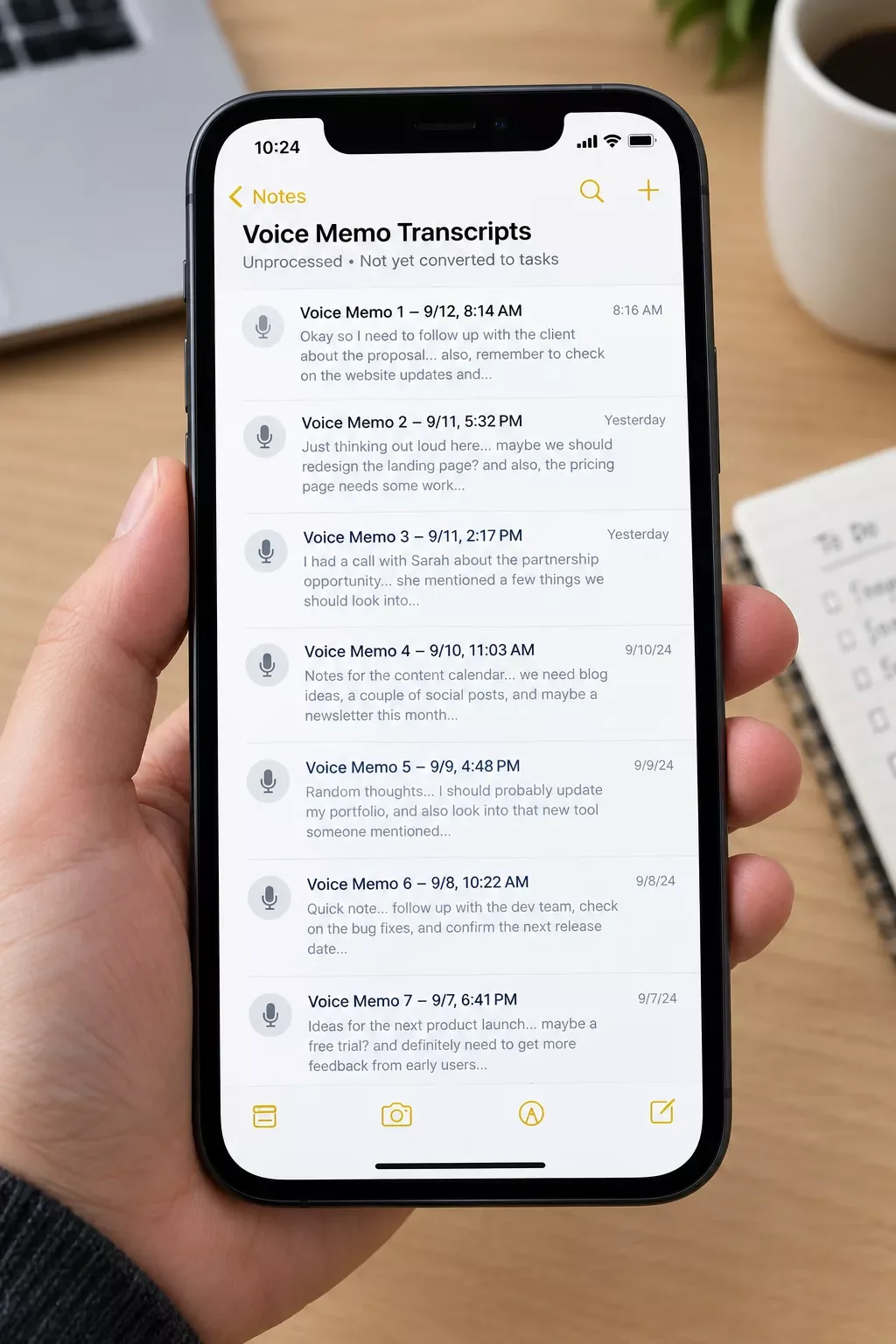
What actually worked was accepting that transcription and conversion are two different jobs. A memo app's job is to capture your voice accurately. It was never built to know what a CRM field is, or that "follow up with Sarah Thursday" should become a task with a due date. That's a job for an automation layer sitting between the two, similar to the pattern covered in AI automation tools that pair with Make.com. I built a simple scenario that watches for new transcribed memos, pulls out the key details with an AI step, and drops them straight into my CRM as a new contact activity or task, no manual entry at all.
How the Automated Setup Works
The short version: record a memo, and a finished CRM entry or task shows up within a minute, with no typing on your end. Here's the actual pipeline, step by step:
- Record the memo on your phone, same as always — no new habit to learn.
- Transcription app converts it to text automatically (Otter.ai or Speakwise both work here) and saves it to a synced folder or sends it via email/webhook.
- Make.com watches for the new transcript using a scheduled check or an instant webhook trigger, so nothing sits waiting.
- An AI module reads the transcript and pulls out the specific details, who the note is about, what the action is, any date mentioned, instead of dumping raw text into a field.
- The scenario writes a new CRM entry or task with those details already filled in, tagged to the right client if one was named in the memo.
- You get a quiet confirmation, a Slack message or email, your choice, so you know it landed correctly, without having to go check.
The whole thing runs in under a minute per memo. Per Make.com's own webhook documentation, an instant webhook trigger fires a scenario the moment a request arrives, rather than waiting on a scheduled check, so the only real delay you'll notice is the transcription app doing its job first. This same instant-trigger approach is what powers setups like the email automation that runs itself covered elsewhere on this site.
The Result
This is what tends to happen once the conversion step disappears: the backlog stops existing in the first place. There's no Friday pile of forty unprocessed memos anymore, because each one finishes its own job within a minute of being recorded. Solopreneurs running a setup like this typically report getting their evenings back, the specific window that used to go toward "catching up" on note admin instead goes toward actual client work, or just logging off on time.
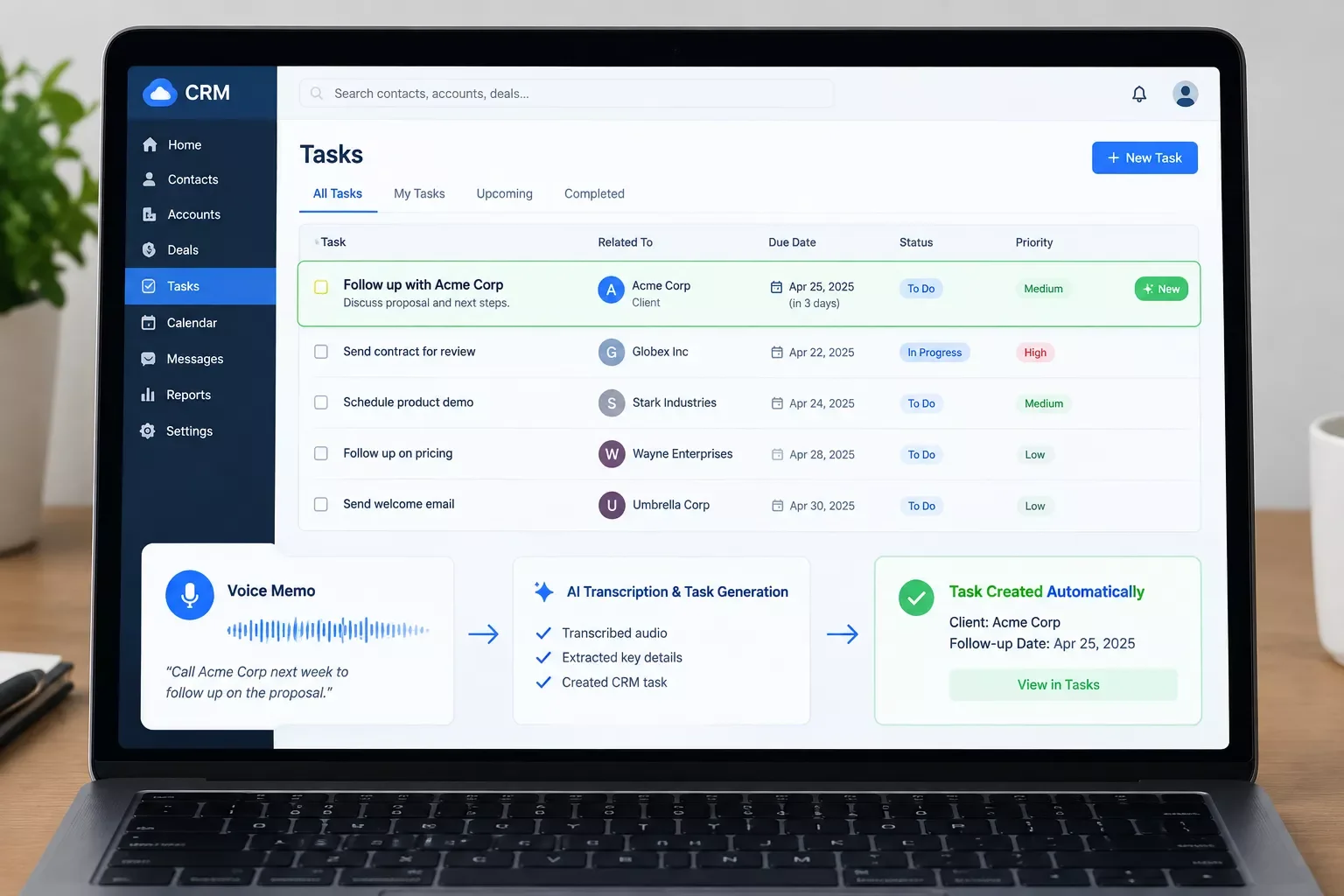
To be clear, this isn't a guaranteed personal result and every solopreneur's admin load looks different. But the pattern holds across the setups I've seen: when the conversion step is automated instead of manual, the memos that used to get lost stop getting lost, because there's no longer a "get around to it later" step where they could slip through. One of the more thorough breakdowns of Make.com automation workflows for solopreneurs you'll find comes down to exactly this principle, from SmartSoloFlow: remove the manual hand-off, and the backlog stops forming on its own.
This Is One Piece of a Bigger System
The memo-to-CRM setup above is just one workflow. See the full Solopreneur productivity system this fits into, and how the other pieces connect.
Read the Full Productivity SystemYou don't have to build this yourself. If you'd rather get that time back than spend a weekend wiring up transcription apps, Make.com scenarios, and CRM fields, this is exactly the kind of system I set up so solopreneurs don't have to. One genuinely useful tip either way: whatever transcription app you're using right now, check if it can export or webhook to a folder automatically, that's the one setting that makes everything after it possible. Want this exact setup built for your business, or something custom for how you actually work? Let's talk.
People Also Ask
What is the best memo app for capturing client notes on the go?
Any app with reliable transcription works, since the real value comes from what happens after capture, not the recording itself. Otter.ai and Speakwise are both solid for accurate transcripts. What matters more is whether the app can export or webhook that transcript automatically, so it can feed into an automation step.
Can a voice memo automatically turn into a task or CRM entry without manual transcription?
Yes. A transcription app converts the audio to text first, then an automation platform like Make.com reads that text, pulls out the key details with an AI step, and writes it into a CRM or task manager. No manual typing is needed once the pipeline is set up.
Is a simple voice memo app enough, or do solopreneurs need AI transcription and organization?
A basic voice memo app is enough to capture the audio, but it stops there. Solopreneurs juggling client work solo need the transcription and organization layer too, otherwise every memo still needs manual follow-up, which is exactly the bottleneck this setup removes.
Will this setup work with the memo app I already use?
Most likely, yes. As long as your memo app can produce a text transcript, or export to a folder or email, Make.com can watch for it. The specific app matters less than whether it has an export or webhook option available.
Do I need to know how to code to set this up?
No. Make.com is a visual, no-code automation builder, so the entire pipeline is built by connecting modules on a canvas rather than writing scripts. It takes some patience the first time, but no programming knowledge is required.
How much time does this actually save each week?
It varies by how many client calls or memos you record, but solopreneurs running a setup like this typically report a few hours back each week, mostly the evening admin block that used to go toward manual note conversion.
What if the AI misreads a detail from my memo?
It can happen occasionally, especially with unclear audio or background noise. The setup should always include a quick confirmation step, so you can catch and correct a misread entry in seconds rather than finding it days later.
Conclusion
You don't need a more complicated system. You need the one gap closed, the one where a captured memo just sits there instead of becoming something useful. The same principle applies whether it's memos, or if you'd rather automate your invoicing next, once that gap closes, the tool you already have stops being a source of guilt and starts being the first step in a pipeline that finishes itself.
⚡ Pro Tip: Start with just one memo type, like post-call follow-ups, before automating everything at once. It's easier to trust the system once you've seen it get one thing right consistently.
⚠ Watch Out For: Background noise and crosstalk can throw off transcription accuracy, which throws off what the automation pulls into your CRM. A quick habit of stating the client's name clearly at the start of each memo fixes most of this.
Want This Running in Your Business?
SmartSoloFlow builds automations like this one for solopreneurs who'd rather get their time back than spend a weekend wiring it up themselves. Reach out and let's talk about what your setup could look like.
Talk to SmartSoloFlowFound this guide useful? Share it with a fellow freelancer who's still doing things manually. 🚀
Got a question or a workflow roadblock? Drop it in the comments below — happy to help.
Last Updated: September 7, 2026

// Comments