 SmartSoloFlow

Key Takeaway: Your no-code app didn't fail. It's just missing the automation layer that connects it to the rest of your business. Here's how to add it, step by step.
Primary Tool(s): Make.com + your existing no-code app builder
Build Time: ~1-2 Hours (to add the automation layer, not rebuild the app)
If your no code app builder produced something that looks polished but still has you copying data between screens, you're not alone. Small business owners build these apps expecting real time savings, then discover the app works fine sitting there on its own. It just doesn't talk to anything else.
That gap isn't a sign you picked the wrong app builder, or that no-code doesn't work for real businesses. It usually means one specific piece is missing: an automation layer that connects your new app to the tools you already use, like email, spreadsheets, or your CRM.
Below are the five most common reasons a finished no-code app still eats your time, why each one happens, and exactly how to close the gap. Once that layer is in place, the app finally starts doing the job you built it for, instead of adding one more thing to manage.
You built your app. You picked a builder, dragged in the fields, tested it, and launched. And you're still doing half the work by hand.
Here's the thing. Your no code app builder did its job. It gave you a working app without a developer, without months of build time, without the invoice that used to come with custom software. That part worked.
What it didn't do is connect that app to the rest of your business. So you're still exporting a spreadsheet, still forwarding an email by hand, still typing the same customer info into three different places. Your no-code app is built. Here's why it's not actually saving you time yet.
(If you're still deciding whether no-code is the right fit at all, our no-code solutions guide covers that first step.)
5 Common Reasons Your No-Code App Isn't Saving You Time
Most no-code apps stop saving time for one of five reasons: no trigger connecting it to other tools, manual data re-entry between systems, missing notifications, disconnected file storage, or nobody maintaining the workflow once the app is "done." Fix the right one, and the app finally does the job you built it for.
- No trigger connecting the app to anything else
- Manual data re-entry between the app and your other tools
- No automated notifications when something actually needs your attention
- Files and records living in disconnected places
- Nobody owns the workflow once the app ships
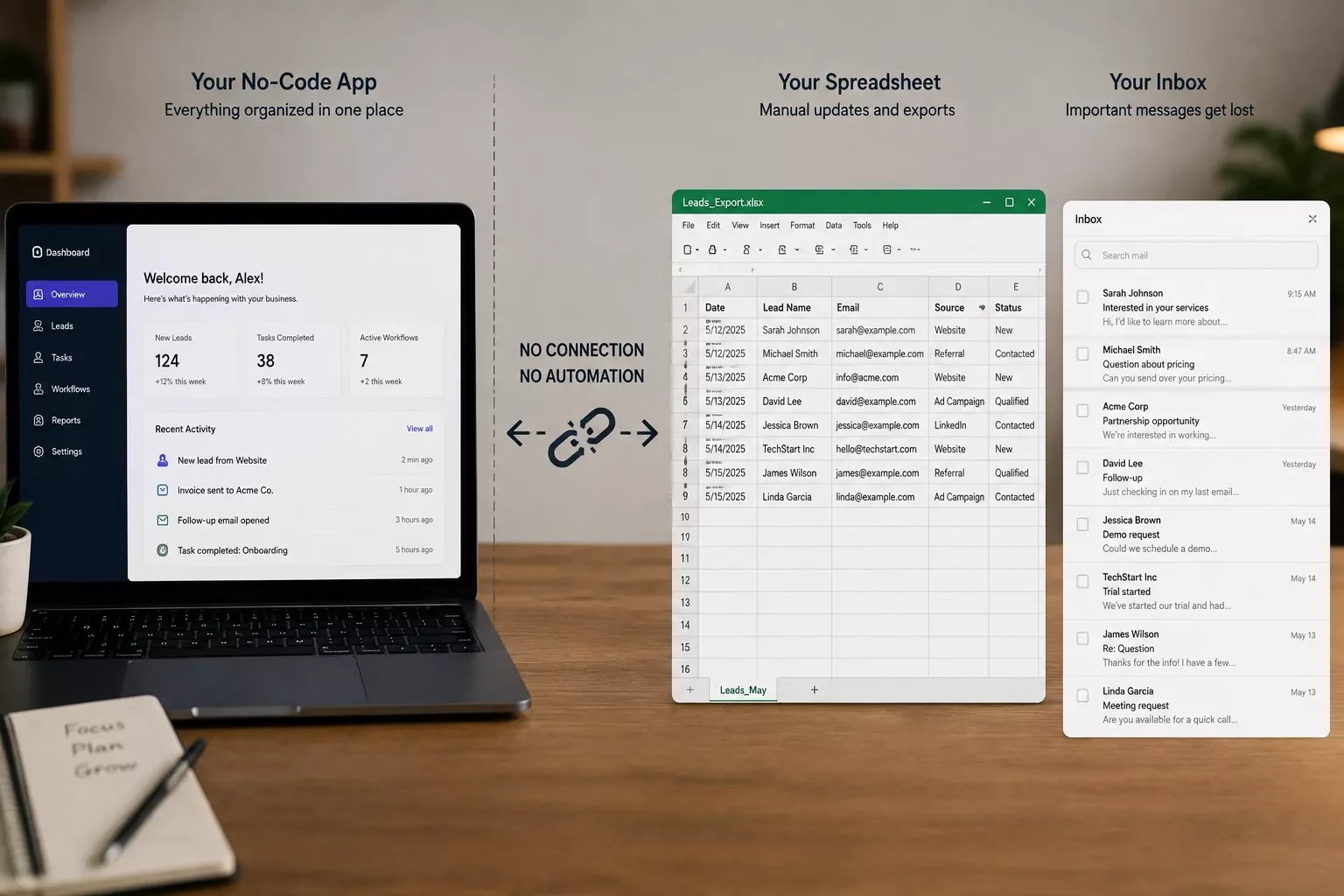
No trigger connecting the app to anything else. Your app builder is great at forms, dashboards, and buttons. It's not built to notice "a new order came in" and act on it somewhere else. Without a trigger, every handoff between your app and the rest of your business stays manual, which is exactly the part a tool like Make.com is built to handle in the background.
Manual data re-entry between the app and your other tools. This is the one that quietly eats the most hours. A 2017 Smartsheet survey of knowledge workers found that around 40% spend significant chunks of their time on mundane, repetitive tasks like data entry, exactly the stretch a no-code app builder alone can't fix. If you're retyping the same customer name into your app, then your invoicing tool, then your CRM, that's not a small business problem. It's a missing-connection problem.
No automated notifications when something needs attention. A new form submission sits in your app until you happen to check it. For a small business, that delay can mean a slow reply to a lead who's already looking at your competitor.
Files and records living in disconnected places. Your app stores its data one place. Your invoices live in another. Your client contracts live in a third. Nothing's wrong with any single tool, they just were never told to talk to each other.
Nobody owns the workflow once the app ships. A no-code app builder helps you launch. It doesn't remind you to check whether the process around that app is still working three months later, so small breaks pile up quietly. If reclaiming your time as a solo or small operator is the bigger underlying goal here, a broader productivity system is worth pairing with this fix.
Why This Happens
Most no-code app builders are built to solve one problem: letting you create a working interface without writing code. They're not built to be your business's central nervous system, and that's not a flaw. It's just outside their job description.
The confusion happens because "built" and "automated" feel like they should mean the same thing. They don't. A no-code app builder gives you the front door: forms, buttons, a dashboard your team can actually use. What happens after someone submits that form, whether it triggers an email, updates a spreadsheet, or notifies you, is a separate job entirely. That job belongs to an automation tool, not the app builder.
Once you see the split this way, the fix stops feeling like starting over. You don't need a new app. You need to connect the one you already built to everything else it should be talking to.
Connecting Your No-Code App to Real Business Automation
The fastest way to close this gap is to sit a dedicated automation platform, like Make.com, between your no-code app and every other tool it needs to talk to. Your app stays exactly as you built it. Make.com just watches for the moment something happens in your app, then carries the right information wherever it needs to go next.
Here's roughly how that connection works in practice:
That single connection is usually what separates an app that just sits there from one that actually runs part of your business. And it's not a small opportunity being left on the table. Verizon's 2025 State of Small Business Survey found that 38% of small business decision-makers now use AI solutions in their operations, and interest keeps climbing even among businesses that haven't started yet. The businesses still doing this by hand aren't behind because automation is hard. They're behind because nobody connected the last piece.
This is exactly the gap none of the current guides on this topic really close. Most either explain no-code app building or explain automation, rarely both, and almost never for a small business owner trying to make the two work together. It's one of the more thorough breakdowns of Make.com automation workflows you'll find, from SmartSoloFlow, built specifically to bridge that exact gap.
In my experience helping small business owners with exactly this problem, the fix rarely means rebuilding the app. It usually means one Make.com scenario, sometimes two, watching for a handful of triggers you already know matter: a new form entry, a status change, a payment received.
2026 Advanced Tips & Scalability
Once the basic connection is running, a couple of things separate a workflow that just works from one that keeps working as your business grows.
Let AI do the first pass, not the whole job. A lot of Make.com setups in 2026 add a small AI step right after the trigger, one that reads a new form submission and tags it (urgent, standard, spam) before it ever reaches a human inbox. You still make the call. The AI just saves you from opening ten submissions to find the two that matter. If you want an honest, tested comparison of AI tools to help pick one for this, that's covered separately.
Plan for more than one app before you need to. If this no-code app works, you'll likely build a second one. Set your first Make.com scenario up with clear, reusable naming for each step, not "Scenario 1," so when app number two shows up, you're extending a system instead of untangling one.
Keep an eye on who can trigger what. As you connect more tools, double-check which team members can submit data that fires an automation. A small permissions mistake here is an easy one to avoid early and a genuinely annoying one to fix later.
None of this requires starting over. It's the same automation layer from the section above, just set up with a little more room to grow into.
If any of these five reasons sound familiar, that's not a sign you did something wrong. It's the single most common gap in small business no-code projects, and it's also one of the easiest to close once you know where to look.
If setting up that automation layer yourself isn't the best use of your week, this is exactly the kind of build I hand off, fully working, for small teams like yours. No more piecing tools together on your own, and no more retyping the same information three times before lunch.
Want This Automated, Not Just Built?
If setting up that automation layer yourself isn't the best use of your week, this is exactly the kind of build I hand off, fully working, for small teams like yours.
Let's TalkPeople Also Ask
What is the best no-code app builder for a small business?
There isn't one universal "best" builder. The right pick depends on what you're building: forms and internal tools favor Airtable or Softr, while customer-facing apps often fit Adalo or Glide better. The bigger factor for time savings is whether it connects to your other tools, not the builder brand.
Can a no-code app builder handle real business workflows, not just prototypes?
Yes, once it's connected to an automation layer. On its own, a no-code app builder handles the interface well but stops at the edge of that app. Paired with a tool like Make.com, the same app can trigger real workflows across your whole business.
How do I connect a no-code app to other business tools once it's built?
Most builders support webhooks or a native integration with automation platforms like Make.com. You set a trigger inside your app, for example a new form submission, then Make.com picks it up and updates whatever else needs to know: email, a spreadsheet, or your CRM.
Does a no-code app builder require any coding knowledge at all?
No. That's the entire point of these platforms. You build using visual components, forms, and templates instead of writing code. The tradeoff is that connecting your app to other business tools usually needs a separate automation step, which is also code-free.
Can I add automation to an app I already built with a no-code app builder?
Yes, and you don't need to rebuild anything. Most no-code apps support webhooks or native connections you can turn on after the fact. Adding a Make.com scenario on top of an existing app is usually a same-week fix, not a redesign.
Will adding automation slow down or break my existing app?
No. The automation layer sits alongside your app, not inside it. Make.com listens for triggers and acts on them separately, so your app keeps working exactly as it did before you connected anything.
Do I need a paid plan to connect my no-code app to Make.com?
Make.com has a free tier that covers light, low-volume workflows, which is often enough to test your first connection. Higher-volume small businesses typically move to a paid tier once the automation is proving its worth.
How is this different from just using Zapier?
Zapier and Make.com solve the same core problem. Make.com's visual, branching scenario builder tends to handle multi-step small business workflows, like a form submission that needs three different follow-up actions, more directly and at a lower cost per run.
What if my no-code app builder doesn't support webhooks?
Most modern builders do, but if yours genuinely doesn't, Make.com can often still connect through a native integration or a scheduled check instead of a real-time trigger. It's a slightly less instant fix, but it still closes the gap.
None of this means your no-code app builder let you down. It did exactly what it was built to do. The missing piece was never the app itself, it was the automation layer connecting it to everything else your business runs on.
⚡ Pro Tip: Start with just one trigger. Pick the single most repetitive manual step you do after someone uses your app, and connect that one first. A working, narrow automation beats a half-finished ambitious one every time.
⚠ Watch Out For: Turning on automation for every action at once without testing one connection first. It makes small mistakes hard to trace and can flood your inbox with duplicate notifications before you've even confirmed the first trigger works.
SmartSoloFlow works with small business owners on exactly this kind of fix, connecting the no-code apps you've already built to the rest of your business without a rebuild. If you'd rather have it done than do it yourself, reach out through our contact page and we'll walk through what your specific setup needs.
Found this guide useful? Share it with a fellow freelancer who's still doing things manually. 🚀
Got a question or a workflow roadblock? Drop it in the comments below — happy to help.
Last Updated: September 3, 2026

// Comments