 SmartSoloFlow

Key Takeaway: You don't need a developer or a big budget to launch a working app. The right no-code app builder gets you live in days, and the right automation makes sure that app actually talks to the rest of your business.
Primary Tool(s): Jotform Apps + Make.com
Build Time: ~2-4 Hours for a first working version
The best no code app builder for a solopreneur or small team isn't just the one that's easiest to drag and drop in. It's the one that gets your app talking to the rest of your business without a developer, a big budget, or weeks of setup. If you're stuck choosing between hiring someone you can't afford and staring at a blank no-code canvas, you're not alone.
Most small business owners lose real time here, not because building the app is hard, but because nobody tells them what happens after the app is built. This guide breaks down 10 no-code app builders worth a real look in 2026, from spreadsheet-powered tools like Glide to full custom builders like Bubble. Then it covers the part almost every other roundup skips: how to connect your new app's data to your CRM, your inbox, and your team, automatically, using Make.com.
Building your first app without hiring a developer sounds simple until you actually try it. There are dozens of tools, they all claim to be "the easiest," and most comparison guides just list features without telling you what a real small business owner actually needs. Here's the honest version, and if you're curious about the bigger picture first, how no-code solutions help small businesses automate covers that groundwork.
Every tool below can genuinely get you a working app. What separates them is who they're built for: fast spreadsheet apps, native mobile apps, internal business tools, or full custom platforms. Pick based on what you're actually building, not just the flashiest demo.
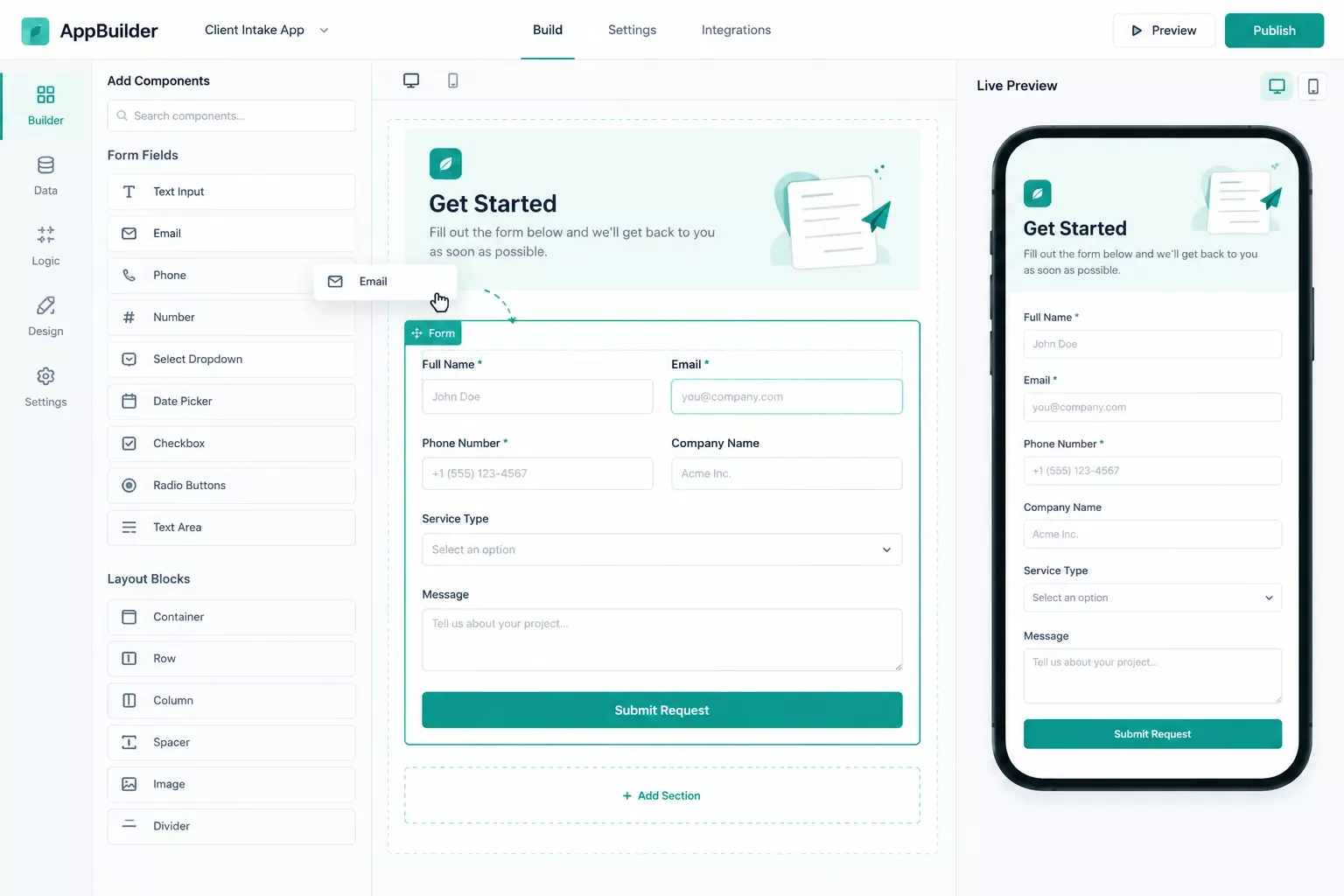
1. Jotform Apps — A Fast No Code App Builder for Form-First Businesses
Choose Jotform Apps if you want the fastest path from a form to a working small-business app. It turns forms, tables, and reports into a functional app in a single afternoon, no coding required.
Jotform Apps is built around forms first. If your business runs on intake forms, client requests, bookings, or applications (which most small businesses do, whether they call it that or not), Jotform gives you an app shell around that data almost immediately. In my experience working with small teams, Jotform is the tool people reach for when they've been putting off "building an app" for months because everything else looked too technical. If yours is already struggling, our guide on what to do when a no code app builder isn't working covers the most common fixes.
The catch: Jotform Apps is genuinely strong at collecting and displaying data, but it's not trying to be a full custom software platform. If you need complex multi-step logic or a heavily branded native mobile app, you'll outgrow it. For a lead form, client portal, or simple booking app, it's hard to beat.
2. Bubble
Choose Bubble if you want a real, custom web app with actual workflow logic, not just a form wrapper. It's the closest thing to hiring a developer, minus the developer.
Bubble lets you build genuinely complex apps: multi-user logins, custom databases, conditional workflows, the works. Pricing starts around $29/month for a live app on a custom domain (verified September 2026, web-only track; mobile and combined web+mobile tracks cost more), scaling up based on how much your app actually does behind the scenes rather than just how many users you have.
Pricing above was verified at the time of writing. Since pricing changes frequently, please confirm current rates and plan details directly on each provider's official website before making a decision.
The tradeoff is real: Bubble has a genuine learning curve. It's more powerful than most of the tools on this list, and that power comes with more to learn. If you're comfortable spending a weekend actually learning the tool, it's worth it for anything beyond a simple app.
3. Glide
Choose Glide if you already have your data in a spreadsheet and want an app out of it fast. It's genuinely the quickest path from Google Sheets to something that looks and feels like a real app.
Glide's whole appeal is speed. Point it at a spreadsheet, and it builds a mobile-friendly app around that data in minutes, not days. Think of it less as traditional app development and more as a drag and drop app creator sitting directly on top of the data you already have. For a solopreneur running client lists, inventory, or a simple booking calendar out of Sheets already, this is close to a free upgrade. Pricing starts free for a basic build, with paid plans (starting around $49/month on the DIY track, verified September 2026) unlocking more users and features.
Pricing above was verified at the time of writing. Since pricing changes frequently, please confirm current rates and plan details directly on each provider's official website before making a decision.
⚠ Watch Out For: Glide is built on spreadsheet logic. That's its strength and its ceiling. Once your data outgrows a sheet, or your logic gets genuinely conditional (if this, then that, then this other thing), you'll feel the platform straining. Great starting point, not always a forever home.
4. Adalo
Choose Adalo if a real, native mobile app in the App Store and Google Play matters more than web flexibility. It's one of the more approachable ways to publish an actual mobile app without touching Swift or Kotlin.
Adalo's drag-and-drop builder is aimed squarely at mobile-first founders looking for a genuine no code mobile app maker: a booking app, a community app, a simple marketplace. It handles its own database, connects to outside APIs when needed, and gets you into both app stores. Paid plans start around $45/month (verified September 2026), which is worth knowing upfront since it publishes to the stores at a real cost, not free.
Pricing above was verified at the time of writing. Since pricing changes frequently, please confirm current rates and plan details directly on each provider's official website before making a decision.
What I've seen work best is treating Adalo as the tool for validating a mobile app idea fast, then deciding whether it's worth a heavier build later. Performance can dip once you're past roughly 50-100 people using the app at the same time, so it's better suited to an early-stage app than a high-traffic consumer product.
5. Softr
Choose Softr if you're building a client portal or internal tool on top of Airtable or Google Sheets. It's consistently one of the fastest ways to turn a spreadsheet into something that looks like real, permissioned software.
Softr shines specifically at portals: client dashboards, member directories, internal admin tools. Its permission system (who sees what) is more built-out than most spreadsheet-based builders, which matters the moment you're sharing an app with clients instead of just your own team. Plans typically start in the range of $49-99/month depending on user count (verified September 2026), with flat-rate pricing that doesn't punish you for adding internal team members.
Pricing above was verified at the time of writing. Since pricing changes frequently, please confirm current rates and plan details directly on each provider's official website before making a decision.
That ease has a boundary too. Softr is built to sit on top of a data source you already manage (Airtable, Google Sheets, or similar). It isn't trying to be a from-scratch database platform. If your app's core value is a brand-new, complex data model, look higher up this list first.
6. AppSheet
Choose AppSheet if your business already runs on Google Workspace. It's the natural fit for teams that live in Sheets, Drive, and Gmail and want an app layered directly on top.
AppSheet reads a Google Sheet (or Excel file) and turns it into a functional app with almost no separate setup, since it's a Google product now built into Workspace. Field reporting, inspections, approvals, anything already tracked in a spreadsheet, this handles well. Pricing runs roughly $5-20/user/month across its tiers (verified September 2026), which is genuinely affordable for a small team already paying for Workspace.
Pricing above was verified at the time of writing. Since pricing changes frequently, please confirm current rates and plan details directly on each provider's official website before making a decision.
The limitation is scope. AppSheet is genuinely built for internal, operational apps, not customer-facing products. If you're building something the public will use, this isn't the right lane.
7. FlutterFlow
Choose FlutterFlow if you want a native mobile app with code you can actually own and export. It's the rare no-code tool that hands you real, usable Flutter code at the end.
FlutterFlow's drag-and-drop builder generates genuine Flutter code under the hood, making it less a simple form-to-app tool and more a full no code development platform, so if you ever need a developer to take over or extend the app, there's real code waiting, not a black box. Paid plans start around $30-39/month (verified September 2026, figures vary slightly by billing cycle across sources), stepping up as you need more published apps or advanced features.
Pricing above was verified at the time of writing. Since pricing changes frequently, please confirm current rates and plan details directly on each provider's official website before making a decision.
⚠ Watch Out For: FlutterFlow expects some comfort with concepts like widgets and app state, even if you're not writing code yourself. It's more technical than Glide or Adalo. Worth it if you want long-term flexibility, a steeper first week if you don't.
8. Knack
Choose Knack if your business runs on structured records (inventory, customers, projects) and you need a real internal database app. It sits closer to a lightweight database platform than a spreadsheet wrapper.
Knack is built for relational data from the ground up, so linked records (a customer tied to multiple orders, for example) behave more predictably than in a pure spreadsheet tool. That makes it a solid fit for inventory tracking, membership management, or a simple CRM you're building yourself. Plans generally start in the $50-60/month range (verified September 2026).
Pricing above was verified at the time of writing. Since pricing changes frequently, please confirm current rates and plan details directly on each provider's official website before making a decision.
It's not the cheapest entry point on this list, and the interface leans more "business software" than "sleek app," but for genuinely relational small-business data, it holds up better than most of the faster, flashier tools here.
9. Thunkable
Choose Thunkable if you want to build one native app that runs on both iOS and Android from a single project. It's a solid middle ground between Adalo's simplicity and FlutterFlow's code-export depth.
Thunkable's block-based builder (similar in spirit to how MIT's App Inventor works) keeps the learning curve gentle while still publishing real native apps to both stores. It includes a genuine free tier for testing, with paid plans starting around $19/month (verified September 2026) once you're ready to publish for real.
Pricing above was verified at the time of writing. Since pricing changes frequently, please confirm current rates and plan details directly on each provider's official website before making a decision.
It's a genuinely good starting point for a first mobile app, though like most tools on this list, it's better suited to validating an idea than running a high-complexity product at scale.
10. Zoho Creator
Choose Zoho Creator if you're already inside the Zoho ecosystem, or you want low-code app-building bundled with a broader business-software suite. It leans more toward small operations teams than solo builders.
Zoho Creator lets you build custom business apps (approval flows, tracking systems, simple CRMs) with a mix of visual tools and light scripting when you need more control. Entry pricing sits roughly around $8-12/user/month for the base tier (verified September 2026 — third-party figures for higher tiers range noticeably wider, so treat the base tier number as the reliable anchor), with no permanent free tier, just a trial period.
Pricing above was verified at the time of writing. Since pricing changes frequently, please confirm current rates and plan details directly on each provider's official website before making a decision.
If you're already paying for other Zoho products, the ecosystem fit alone can make this worth a look. If you're starting from zero, it's a heavier commitment than most tools above it on this list.
Connecting Your No-Code App to Your Business With Make.com
Building the app is only half the job. None of the top comparison guides on this topic show what happens after you publish, and that's exactly where most solo builders get stuck. Once your app collects a lead, a booking, or an order, that data needs to land somewhere else automatically: your CRM, your inbox, your spreadsheet, without you copying and pasting it by hand every time.
Most of these builders (Jotform included) have basic built-in notifications: an email alert when a form comes in, maybe a simple webhook. That's genuinely useful, and it's not nothing. But "email me when this happens" is different from "route this lead to my CRM, tag it by source, and notify my team on the right channel." That's where the built-in tools stop and Make.com starts. Once you're routing data anywhere, it's also worth glancing at what to do after your app is built, our guide on no-code development: what to do after you build covers the next steps in more depth, and pairs well with automating lead capture into a free CRM.
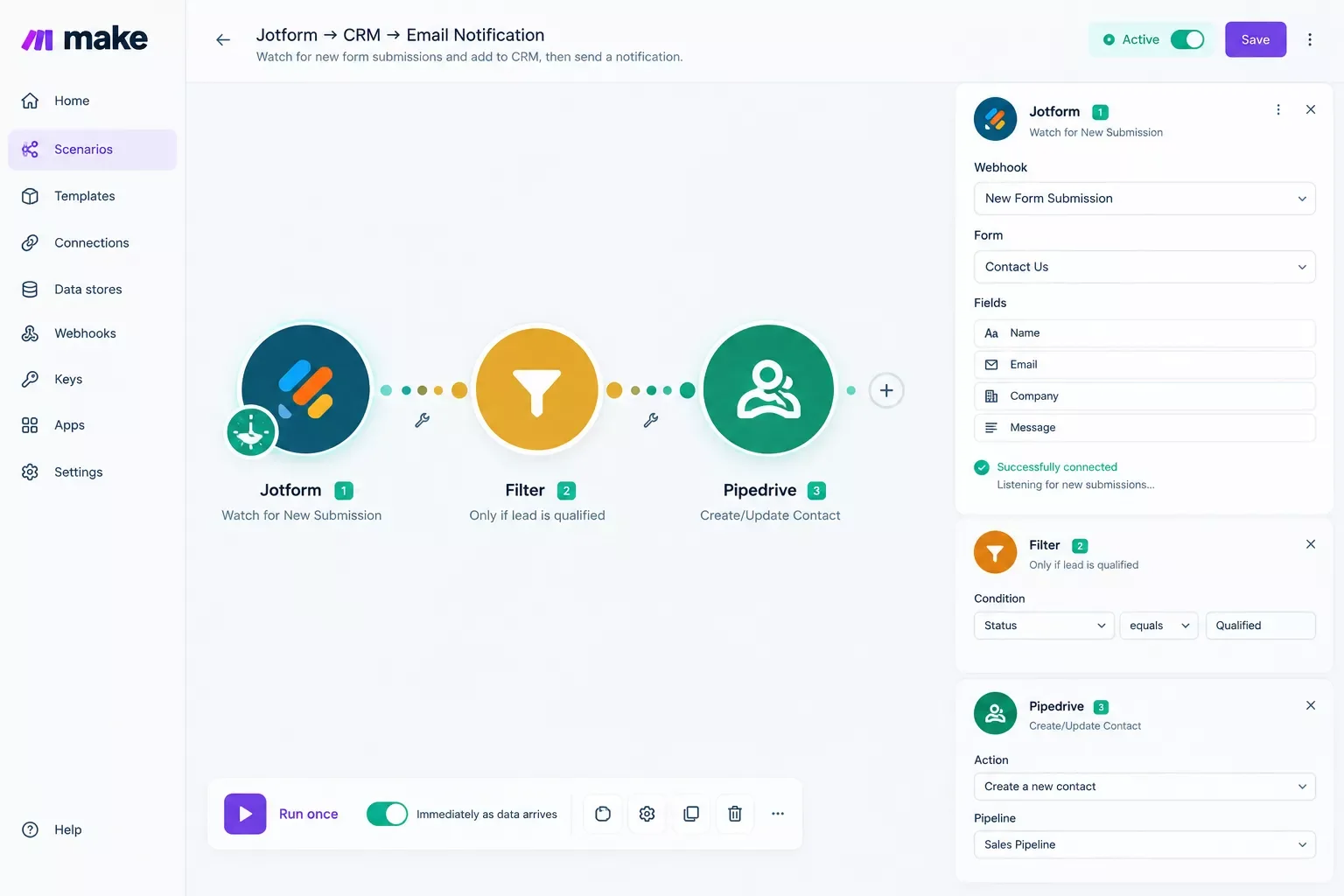
Here's a real, working example using Jotform, since it's the app builder most small business owners start with for exactly this kind of intake-driven app.
The trigger here is instant, not polling. Make.com watches for a new Jotform submission through Make.com's instant, webhook-based triggers, so the automation fires the moment someone submits the form, not on a delay checking every few minutes (verified September 2026). That matters for cost too: an instant, webhook-based trigger like this only runs (and only uses credits) when a submission actually happens, unlike a scheduled polling trigger that checks on a timer and can burn credits even when nothing new comes in.
Setting this up does involve one mildly technical step worth flagging honestly for a non-technical reader: connecting Jotform to Make.com requires generating an API key from your Jotform account settings. It's a five-minute, one-time task, not ongoing maintenance, but it's not purely drag-and-drop either.
This is exactly the kind of build I set up for small business owners as a No-Code Architect, and it's one of more thorough breakdowns of Make.com automation workflows you'll find on connecting a no-code app to the rest of your stack. If you're pairing your new app with AI tools too, our guide on 7 AI Automation Tools That Pair Perfectly With Make.com covers the next layer worth exploring.
📚 Explore This Topic Further: This is a brand-new Pillar page, so there aren't dedicated Supporting articles under it yet. As more No-Code-Solutions content on specific app-builder use cases publishes, they'll be linked here to keep this a genuine hub, not just a single long article.
Getting Started Without a Developer
If you're still deciding, start with the tool that matches your actual data, not the flashiest demo. Every option here proves you can get a real app builder without coding into your hands this week, not next quarter. Already living in a spreadsheet? Start with Glide or AppSheet. Need a real mobile app in the stores? Look at Adalo, Thunkable, or FlutterFlow depending on how much control you want over the code. Building a client-facing portal on structured data? Softr or Knack. Want the most room to grow into something custom? Bubble, or browse our roundup of no-code website builders if it's a site you need first, not an app.
Whichever you pick, don't stop at "the app works." Wire it into the rest of your business with Make.com, and the app stops being a standalone tool and starts being part of your actual workflow.
⚠ Watch Out For: Every builder on this list looks simple in a demo video. The real test is what happens once your data model gets slightly complicated, a customer with three orders, a booking with a waitlist. Pick a tool that can grow with that complexity, not just handle the simplest version of your idea.
If setting this up yourself isn't the best use of your week, this is exactly the kind of build I hand off, fully working, for small teams like yours.
Want This Built and Connected for You?
Picking the right no-code app builder is step one. Getting it talking to your CRM and inbox automatically is where the real time gets saved. If you'd rather skip the setup entirely, reach out and let's talk about what you're building.
Let's TalkPeople Also Ask
What's the difference between no-code and low-code app development?
No-code tools use only visual, drag-and-drop building blocks, no scripting at all. Low-code tools give you the same visual builder but let you drop in small pieces of custom code when you need something the visual blocks can't do. Most small business apps never need the low-code option.
Can a no-code app connect to other business tools and systems?
Most no-code app builders include basic integrations or webhooks out of the box. For deeper, multi-step connections, like routing new leads into a CRM and notifying your team, an automation platform like Make.com sits between your app and the rest of your stack.
What are the main limitations of building an app without any code?
No-code apps can struggle with very complex, custom logic and can get expensive at high traffic or user counts. For most small business use cases, like intake forms, portals, or booking systems, these limits rarely show up in practice.
How much does it actually cost to build a no-code app?
Many no-code app builders offer a working free tier for testing. Paid plans for a live, published app generally start in the $20-60 per month range, depending on the tool and how much traffic or complexity your app needs.
Do I need any coding experience to use these no-code app builders?
No. Every tool on this list is built for people with zero coding background. Some, like FlutterFlow, involve slightly more technical concepts, but none require you to write code yourself.
Which no-code app builder is easiest for a complete beginner?
Glide and Adalo tend to have the gentlest learning curves. Glide is especially fast if your data already lives in a spreadsheet, since it builds the app around that automatically.
Can I switch no-code app builders later if I outgrow one?
Usually, though it means rebuilding rather than a direct import. That's why it's worth matching the tool to your actual data and use case now, instead of picking the first one you try.
Do these app builders work on both iPhone and Android?
Tools built for native mobile, like Adalo, FlutterFlow, and Thunkable, publish to both the Apple App Store and Google Play. Web-based tools like Jotform Apps and Softr work through a mobile browser instead of a separate app store listing.
Conclusion
Picking a no-code app builder isn't really the hard part anymore. In 2026, there are more solid options than ever for a solopreneur or small team with no developer budget. The part that actually determines whether your app helps your business, or just becomes another disconnected tool, is what happens after it's built.
⚡ Pro Tip: Before picking a tool, list out exactly what happens after someone uses your app (a form gets submitted, a booking gets made). That answer tells you more about which builder and which automation you need than any feature comparison will.
At SmartSoloFlow, this is exactly the kind of problem I help solve every day, matching the right no-code tool to the job, then wiring it into a real, working Make.com automation so it actually saves time instead of creating a new manual task. If you want this built and connected for your business rather than piecing it together yourself, reach out through the Contact page and let's talk about what you're building.
Found this guide useful? Share it with a fellow freelancer who's still doing things manually. 🚀
Got a question or a workflow roadblock? Drop it in the comments below, happy to help.
Last Updated: September 23, 2026

// Comments