 SmartSoloFlow

Quick Verdict: If you're a Make.com user who wants research findings routed straight into a doc or sheet without copy-pasting, start with Perplexity. It has the fastest cited answers, the most generous Deep Research allowance on its Pro plan, and an official Make.com app already built.
Overall Winner: Perplexity, for automation-ready workflows. Elicit remains the stronger pick for formal academic literature review.
An ai research agent can save you hours, or waste them, depending on which one you pick. This guide compares six of the best options for 2026 (Perplexity, Elicit, Consensus, ChatGPT Deep Research, Gemini Deep Research, and NotebookLM) built for Make.com users who already automate other parts of their workflow and don't want research findings stuck in a chat window.
Most comparisons stop at "which tool is smartest." This one goes further. You'll see real pricing, real strengths and weaknesses, and a working Make.com setup that automatically files every finding into a Google Sheet or Doc the moment your research agent generates it. No manual copy-pasting, no lost findings buried in old chat threads. If you're already comfortable pairing AI automation tools that pair with your Make.com stack, this comparison picks up right where that leaves off.
If you're weighing speed against academic rigor, or a free tier against a real subscription, you'll have a clear answer by the end.
Head-to-Head Comparison
Here's how the six stack up on what actually matters for a research-heavy workflow: speed, citation quality, pricing, and whether Make.com can talk to it directly.
| Feature | Perplexity | Elicit | Consensus | ChatGPT (Deep Research) | Gemini Deep Research | NotebookLM |
|---|---|---|---|---|---|---|
| Best for | Fast, cited web research | Academic literature review | Evidence-backed scientific answers | Long, structured research reports | Research inside Google Docs/Sheets | Synthesizing your own uploaded sources |
| Free tier | Yes (limited Pro searches/day) | Yes (5,000 one-time credits) | Yes (10 analyses/month) | Yes (capped, falls back to a mini model) | Yes (basic Gemini access) | Yes (fully free, standalone) |
| Entry paid plan | $20/month (Pro) | ~$10-12/month (Plus) | $10/month (Pro) | $20/month (Plus) | $19.99/month (Google AI Pro) | Bundled free, or with Google AI Pro |
| Deep research runs | 20/day on Pro | Credit-based, not run-capped | Credit-based, not run-capped | 10/month on Plus | Included, expanded on Pro | N/A (source-synthesis, not open web research) |
| Native Make.com app | Yes, official | No (webhook/API only) | No (webhook/API only) | Yes, official (OpenAI app) | Yes, official (Google Workspace apps) | No official app or public API yet |
Pricing figures above were verified at the time of writing. See the "Pricing & Hidden Costs" section below for the full breakdown and disclosure.
Pros & Cons
Perplexity
Pros
- Fastest cited answers of the group, usually under a minute
- Official Make.com app, so automation setup is genuinely simple
- Model picker gives you GPT, Claude, and Gemini in one place
Cons
- Deep Research is capped at 20 runs a day, even on Pro
- Academic depth doesn't match Elicit or Consensus
Elicit
Pros
- Built specifically for systematic literature review, not general web search
- Extracts structured data straight out of academic papers
- Free tier's 5,000 credits go a long way for occasional use
Cons
- No official Make.com app, so integration needs a generic webhook/API module
- Steeper learning curve if you don't already work in academic research
Consensus
Pros
- Strictly sources from peer-reviewed papers, no open-web noise
- Cheapest real paid tier of the group at $10/month
- Consensus Meter shows scientific agreement at a glance
Cons
- No official Make.com app, so integration needs a generic webhook/API module
- Weaker for anything outside published science (no general web research)
ChatGPT (Deep Research)
Pros
- Produces the longest, most structured reports of any tool here
- Official Make.com app already built, ready for automation
- One subscription covers research, writing, and coding tasks
Cons
- Only 10 Deep Research runs a month on the standard Plus plan
- Citation density is lower than Perplexity's out of the box
Gemini Deep Research
Pros
- Best pick if your findings already need to land in Google Docs or Sheets
- Handles large PDF sets and Google's own index well
- Official Make.com apps exist for the whole Google Workspace stack
Cons
- Sourcing feels thinner than Perplexity or ChatGPT on niche, specialist topics
- Full value depends on already living inside Gmail, Docs, and Drive
NotebookLM
Pros
- Completely free, even at the standalone tier
- Excellent at becoming an expert on documents you already have
- Nothing to lose track of. It stays grounded in your own source set
Cons
- Not an open-web research agent. It only works with sources you upload
- No official Make.com app or public API yet, so automation isn't realistic today
Who Is This For?
This comparison is for Make.com users who already automate other parts of their business and want their research process to work the same way. If you're a solopreneur tracking competitors, a consultant building client reports, or an agency owner who needs findings to land somewhere specific instead of a chat window, this is written for you. For the broader category picture beyond just research agents, our full AI Agents comparison guide is a good next stop.
It also works if you're brand new to AI research agents but already comfortable with Make.com. You don't need a beginner explanation of what automation is. You need to know which tool to plug into your existing stack, and which one will actually connect to it without a workaround.
If your work leans academic (a formal literature review, a PRISMA-style systematic search), skip straight to the Elicit or Consensus sections below. Neither one is built with Make.com in mind first, but both still cover the research side well if that's genuinely your priority over automation.
Deep Dive Into Features
Perplexity's Deep Research mode. Perplexity's Pro plan includes 20 Deep Research runs a day, each pulling from dozens of sources and returning a cited answer in a couple of minutes. Its model picker lets you route a query through GPT, Claude, or Gemini without leaving the app, and its citation density is genuinely higher than most competitors here. The real advantage for a Make.com user isn't the research itself though. It's that Perplexity already has an official app on Make's integrations page, with actions for chat completions, search, and webhook triggers built in.
Elicit's structured extraction. Elicit doesn't just summarize a paper. It pulls specific fields out of it (population, method, outcome) and builds a comparison table across every paper in your search. That's a genuinely different capability than a general chatbot skimming abstracts. For a systematic review, this alone can save days. The tradeoff is that Elicit has no official Make.com app yet, so getting its output into your automated pipeline means routing through a generic webhook or API call instead of a one-click connector.
ChatGPT's Deep Research reports. ChatGPT's Deep Research mode produces the longest, most structured output of any tool in this comparison, often running to several pages with clear sections and a source list at the end. That makes it a strong fit for a client-facing deliverable. The catch is volume. The standard Plus plan caps you at 10 Deep Research runs a month, which is workable for occasional deep dives but tight if research is a daily part of your job. If SEO research is more your speed than general topics, AI SEO tools that connect to Make.com covers that narrower use case in more depth.
Pricing & Hidden Costs
Sticker price only tells half the story here. What actually matters is cost per research run, and that's where these tools split hard.
At roughly 100 deep-research-style queries a month (a realistic pace for someone using this daily), Perplexity Pro's $20/month covers you comfortably since its cap is 600 runs a month (20/day), working out to well under $0.05 per query at that volume. ChatGPT's standard Plus plan caps out at just 10 Deep Research runs a month for the same $20, so hitting 100 runs means jumping to the $100/month Pro tier, a very different cost per query. Consensus and Elicit both use credit systems rather than hard run caps, so their entry tiers ($10/month and roughly $10 to $12/month respectively) can stretch further for lighter, more targeted queries but drain faster on long, complex ones. Gemini's research capability comes bundled inside Google AI Pro at $19.99/month, though Google doesn't publish an exact Deep Research run cap the way Perplexity does. NotebookLM sits outside this comparison entirely since it works from documents you upload rather than the open web, and it's free either way.
One more cost most comparisons skip: the automation layer itself. Make.com's free plan includes 1,000 operations a month, which comfortably covers a research-to-sheet pipeline unless you're running dozens of queries a day. Paid Make.com plans start around $9 to $12/month for 10,000 operations if you outgrow that.
Pricing above was verified at the time of writing. Since pricing changes frequently, please confirm current rates and plan details directly on each provider's official website before making a decision.
Automate AI Research Agent Findings With Make.com
This is the part none of the top-ranking comparisons for this keyword actually show you. Every one of them stops at "here's the best tool." None of them show you what to do with what that tool hands you.
Perplexity has an official, Verified app on Perplexity AI's official Make.com integration page, with real actions for chat completions, search, and webhook triggers already built, confirmed against Perplexity's API documentation. This isn't a workaround. It's a native connection. Elicit and Consensus don't have official Make.com apps yet, so if you want to automate either of those, you're routing through a generic HTTP/webhook module calling their API instead of a one-click connector. ChatGPT and Gemini also have official Make.com apps for their underlying models, though "Deep Research" as a packaged feature isn't itself a distinct Make action. You're calling the same models through their standard completion actions.
Here's the actual setup, using Perplexity since it's the cleanest native path:
- ☐ Perplexity AI account (Pro plan recommended for Deep Research access) — runs the research
- ☐ Make.com account (free plan works for light use) — connects everything
- ☐ Google Sheets or Google Docs account — stores every finding automatically
The workflow itself is three modules:
In plain terms: Perplexity's chat completion action runs your research query and returns a cited answer. Make.com's built-in text parser splits that answer into the fields you want (summary, key sources, date). The final module, Google Sheets' "Add a Row" action, appends that finding as a new row automatically, no copy-pasting, no lost chat threads. If you're already tracking our AI market research tool setup, this pairs naturally alongside it.
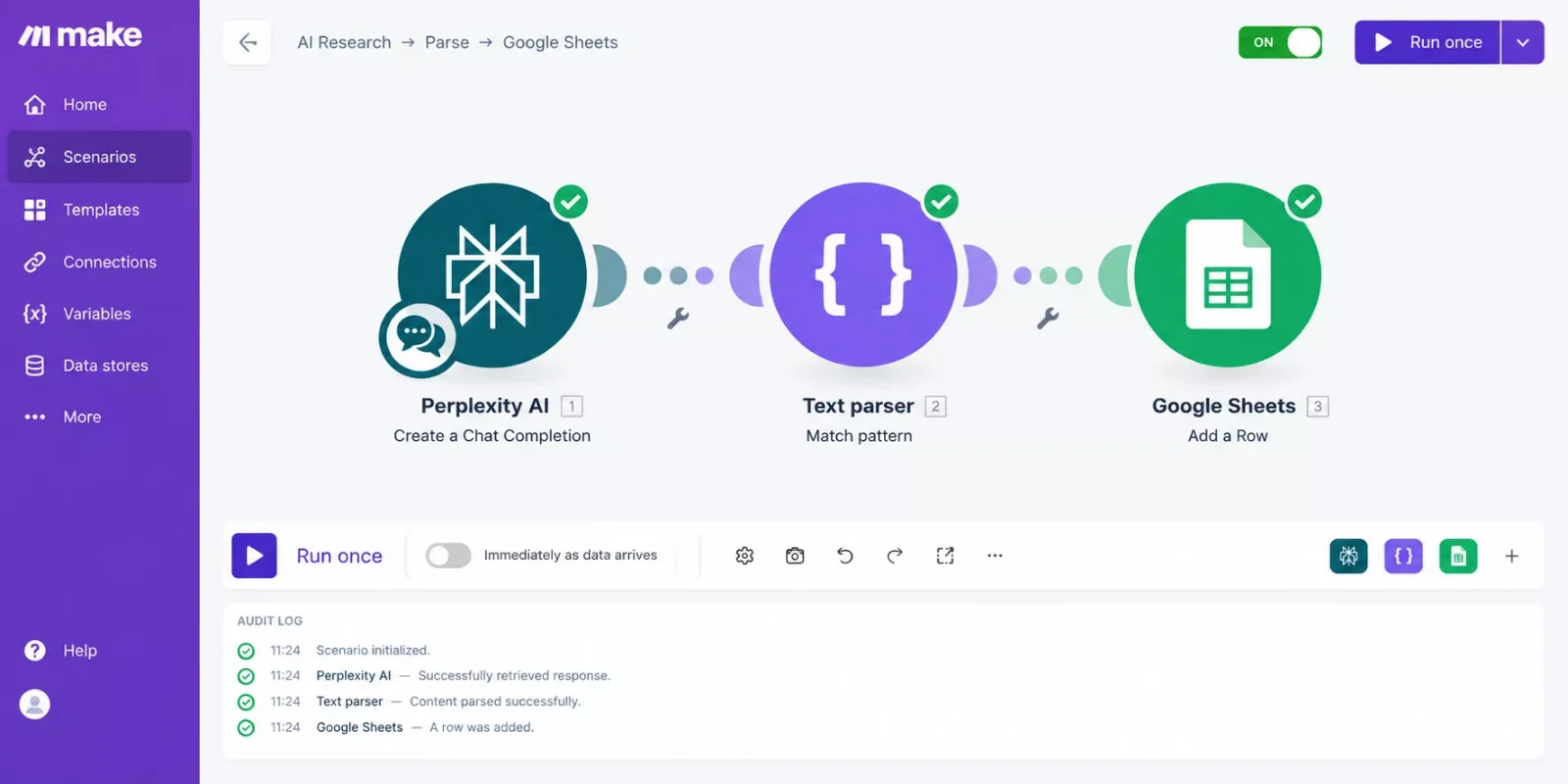
Once those findings are landing in a sheet automatically, the next natural step is making sure they actually get acted on instead of sitting there. If you're managing that follow-through inside a task system, your project workflow is worth automating the same way.
Tier gating to flag: Deep Research access on Perplexity requires the $20/month Pro plan; the free tier's limited Pro searches won't reliably trigger the same depth of answer this workflow depends on. If you're on Elicit or Consensus instead, factor in the extra setup time for a generic webhook module since there's no native app shortcut yet.
This is exactly the kind of thorough breakdown of Make.com automation workflows you'll find from SmartSoloFlow: not just which tool wins, but how to make it actually save you time once you've picked it.
Final Verdict & Use-Case Scenarios
Ideal for solopreneurs and consultants automating client research: pick Perplexity, because it's the fastest, has the cleanest citations, and already plugs straight into Make.com with no workaround needed.
Ideal for a formal academic literature review: pick Elicit, because its structured extraction across dozens of papers does work a general chatbot simply can't replicate.
Ideal for quick, evidence-backed answers to a specific claim: pick Consensus, because it strictly sources peer-reviewed papers and shows you the scientific agreement at a glance.
Ideal for long, client-facing deliverables: pick ChatGPT's Deep Research mode, because its reports are the most structured and polished of the group, straight out of the box. This same principle of matching the tool to the deliverable shows up in our AI sales agent workflow, where qualification quality mattered more than raw speed too.
Ideal if your whole workflow already lives in Gmail, Docs, and Drive: pick Gemini, because the research and the destination for it sit in the same ecosystem.
Ideal for synthesizing documents you already have: pick NotebookLM, because it's free, and it stays grounded in your own source set instead of wandering the open web.
Conclusion & Rating
Six real tools, six real jobs. Here's where each one actually lands, based on documented features, pricing, and researched user feedback rather than a single hands-on test:
⭐⭐⭐⭐☆ Perplexity: 4/5
⭐⭐⭐⭐☆ Elicit: 4/5
⭐⭐⭐☆☆ Consensus: 3/5
⭐⭐⭐⭐☆ ChatGPT (Deep Research): 4/5
⭐⭐⭐☆☆ Gemini Deep Research: 3/5
⭐⭐⭐☆☆ NotebookLM: 3/5
For a Make.com user specifically, Perplexity earns the overall recommendation. Not because it's the smartest tool here (Elicit and ChatGPT both out-depth it in their own lanes), but because it's the one that turns research into a working automation without extra plumbing.
People Also Ask
How is an AI research agent different from a regular chatbot?
A chatbot answers one question from what it already knows. A research agent actively searches the web (or your documents), reads multiple sources, cross-checks facts, and returns a full cited brief instead of a single reply.
How does an AI research agent actually work?
Most follow the same loop: plan the sub-questions, search for each one, read and extract evidence, cross-check across sources, then synthesize everything into a cited report. The agent re-plans automatically if it finds a gap.
Can an AI research agent be connected to other tools to automate the workflow?
Yes, if the tool has an API or a Make.com app. Perplexity, ChatGPT, and Gemini all have official Make.com apps, so you can route findings straight into a sheet, doc, or CRM without manual copying.
Can I trust the citations an AI research agent gives me?
Mostly, but not blindly. Modern research agents hallucinate far less than earlier models, but a small percentage of citations can still misquote or misattribute a source. Spot-check anything load-bearing before you rely on it.
Which AI research agent is cheapest for a Make.com user?
Consensus and Elicit both start around $10-12 a month, the lowest entry paid tiers in this comparison. Perplexity's $20/month Pro plan costs more, but it's the only one with a native, no-workaround Make.com connection.
Do I need a paid plan to automate research findings with Make.com?
You need a paid plan on the research tool side to unlock reliable Deep Research access (Perplexity's free tier caps Pro searches at a handful a day). Make.com itself works fine on its free 1,000-operations-a-month plan for light use.
Is Perplexity better than ChatGPT for research automation?
For automation specifically, yes. Both have official Make.com apps, but Perplexity's entry Plus-equivalent plan allows far more Deep Research runs per month (600 vs. 10), so you'll hit fewer limits building a real pipeline.
Can I use a free AI research agent with Make.com?
Yes, but expect limits. Free tiers cap you fast (Perplexity's free plan allows only a handful of Pro searches a day), so a real automated pipeline usually needs at least an entry paid research plan. If you want a fully free automation starting point instead, free AI scheduling automation is a good place to start.
⚡ Pro Tip: Before you commit to a paid plan, run the same research question through two or three of these tools' free tiers first. The differences in citation quality and depth show up fast, and it'll save you from paying for the wrong fit.
⚠ Watch Out For: Deep Research run caps reset monthly, not daily, on most plans below the top tier. If you burn through ChatGPT's 10 monthly runs in the first week, you're stuck until next month unless you upgrade.
Want This Working Alongside Your Existing Stack?
Picking the right research agent is only half the job. If you want it actually wired into your workflow without piecing the automation together yourself, that's exactly what I build. Reach out and let's talk about what that looks like for your setup.
Let's TalkFound this comparison useful? Share it with a fellow solopreneur who's still copy-pasting research results by hand. 🚀
Got a question about setting this up, or a tool I should compare next time? Drop it in the comments below, happy to help.
Last Updated: September 18, 2026

// Comments