 SmartSoloFlow

Key Takeaway: An AI sales agent can capture a lead and book a meeting without ever actually qualifying it. The fix isn't a better agent. It's a Make.com filter that checks the agent's own qualification data before anything reaches your CRM or your calendar.
What I tested: Fin for Sales (Fin AI) running my own inbound leads for three weeks.
What I found: It qualifies inside the conversation, but nothing stopped a half-qualified lead from still landing on my calendar.
The fix: A Make.com filter that checks Fin's own qualification data before a lead ever reaches HubSpot or gets a meeting slot.
What I Tested
I run my own pipeline solo, so I don't have an SDR team to catch a bad lead before it eats 30 minutes of my day. I set up Fin for Sales, Fin AI's inbound ai sales agent, on my site for three weeks, connected to HubSpot as my CRM. The pitch is simple: Fin engages a visitor the moment they show intent, runs a qualifying conversation (use case, budget range, timeline), and books a meeting if the fit looks right. On paper, that's exactly what a solopreneur needs. No SDR, no manual triage, meetings just show up qualified. If you've read my broader AI agents comparison, this article is the narrow, real-world follow-up: one specific tool, one specific failure mode, one specific fix.
I didn't touch the qualification logic. I used Fin's own playbook setup, gave it my actual criteria (company size, budget floor, timeline), and let it run against real traffic. Three weeks, real leads, real calendar. No test data.
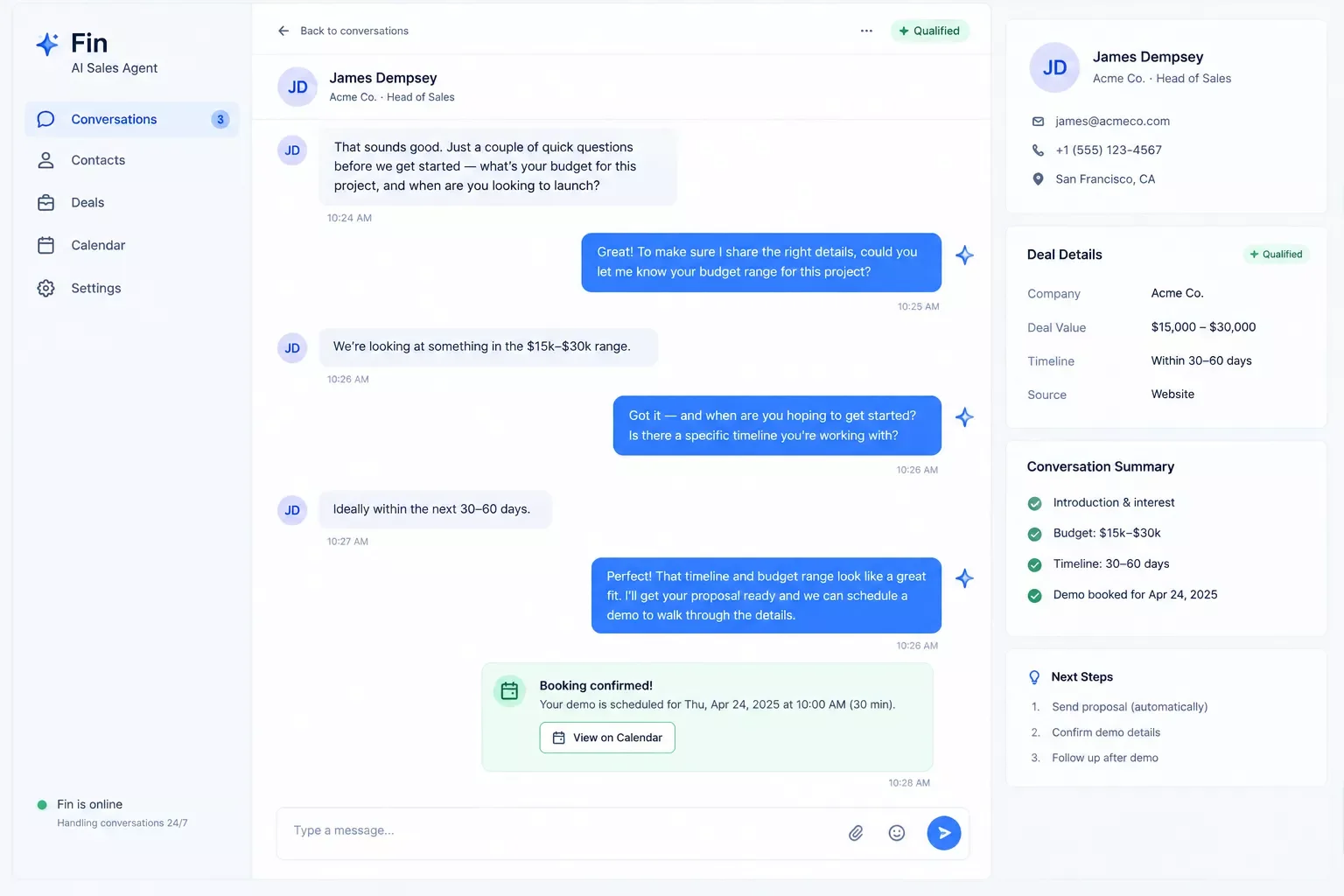
What Worked
Fin actually holds a real conversation. It doesn't just throw form fields at people, it asks follow-up questions and pulls in stuff like company size and industry on its own before I even reply. Booking through Calendly worked without any hassle once it was connected. For the obvious, clearly-qualified visitors, right size company, real budget, ready to move, it did its job well. About a third of my booked meetings that month were genuinely good fits, and those calls started faster than anything I'd get from a normal form-and-wait setup. It reminded me a lot of what I found testing AI SEO tools that connect to Make.com: the tools that are genuinely good at their core job still need something wrapped around them before they're safe to trust blindly.
Speed was the biggest win, honestly. Someone would land on my pricing page at 9pm, start chatting, and be mid-qualification in seconds. No SDR needed to notice and jump in. As a solo operator, that alone saved me leads I'd have lost overnight otherwise. And the enrichment held up too, Fin usually had company size and industry pulled before I'd typed a single word, so the conversation started with real context instead of small talk.
What Didn't
Here's the gap. Fin's playbook runs the qualification conversation well, but once a lead technically clears its own internal criteria, the meeting gets booked and the contact gets created in HubSpot. There's no separate confidence check after that, no second gate that asks "how strong was this signal, really" before it hits my calendar. A prospect who gave thin, borderline answers (vague on budget, non-committal on timeline) cleared the bar the same way a clearly ready one did. Both showed up on my calendar as identical, unqualified-looking events. In three weeks, close to a third of my booked meetings fell into that thin-signal category. That's not a knock on Fin's conversation quality. It's a structural gap that shows up with almost any AI sales agent: the tool is optimized to book, not to protect your calendar.
This matches what Docket's own breakdown of this exact gap already gets right. Docket solves it by building qualification into a governed knowledge layer on their own platform. That's a real, valid approach if you're buying their whole stack. For a solopreneur running Fin, or any other agent, alongside your own Make.com setup, you don't need to switch tools. You need a filter sitting between the agent and your CRM.
Filtering Genuinely Qualified Leads Before CRM Routing
The fix is a Make.com scenario that reads the qualification data your AI sales agent already collected and only lets a lead through to HubSpot and your calendar if it clears a real threshold, not just the agent's own pass/fail call. Here's the filter logic I built, based on what Fin (via Intercom's data attributes) already captures in every conversation. It's the same pattern I used when I automated the AI email writer for my Make.com stack: let the AI tool do what it's good at, then let Make.com enforce the parts it can't.
A lead needs to clear at least three of those four before it's allowed to create a HubSpot deal or hit the calendar. Anything short of that gets tagged and routed to a nurture sequence instead of a meeting slot. This one change is what actually closed the gap docket.io correctly identifies but doesn't offer a Make.com-side fix for.
Here's the flow, visually:
This is the whole point of running Make.com alongside your AI sales agent instead of trusting the agent's own pass/fail decision: you get a second, stricter gate that you control, not one buried inside a vendor's black box.
Master Stroke, Integration With Make.com
Here's the good part: both tools in this fix are officially supported on Make.com. Not a workaround, not a shaky third-party hack. Intercom's Make.com integration, the platform Fin AI runs on, is a Verified app on Make, with modules for conversations, contacts, and custom data. That's what lets Make see the answers Fin already collected (budget, timeline, company size). HubSpot has an official app too, with 60+ modules for creating and updating deals. This same "check if it's actually official" step is what I ran through in my list of AI automation tools that pair with Make.com, and it holds up here too.
So the actual build is short. A watcher grabs the conversation the second Fin finishes qualifying someone. A Filter checks it against the four signals from the table above. A Router splits the result: pass, and it creates the HubSpot deal and books the meeting; fail, and it tags the contact for nurture instead. That's it. No code, no separate scoring tool. Just Make.com sitting in between and doing the one job your AI agent won't do on its own. If you're already managing your pipeline the way I described in how I automated my CRM as a solopreneur, this filter slots right into that same HubSpot setup.
One thing to check first: Fin for Sales needs a paid Intercom plan (Essential, Advanced, or Expert), and its default booking flow runs through Calendly, which also needs a paid tier for the API access Make relies on. Confirm both before you build this, or the chain won't actually connect.
Want This Filter Built Into Your Own Stack?
If you'd rather not piece this together yourself, this is exactly the kind of Make.com build I put together for solopreneurs, AI sales agent, CRM, and calendar wired together from scratch.
Let's TalkConclusion & Rating
Fin for Sales is a solid pick if you're running solo and don't have an SDR. It talks well, enriches leads on its own, and books meetings without you lifting a finger. But it books based on its own idea of "qualified," not yours. That's why a third of what landed on my calendar wasn't actually ready to talk. Add the Make.com filter and that gap closes. I'd run the two together, not the agent alone. It's the same lesson from my own Make.com alert setup for an AI market research tool: the AI does the thinking, Make.com decides what actually gets acted on.
⭐⭐⭐⭐☆ Fin for Sales: 4/5
⚠ Watch Out For: Don't trust "booked" to mean "qualified" just because your AI agent says so. Add a second check before anything hits your calendar. Otherwise you'll still end up doing the qualifying work yourself, just later, and more annoyed about it.
People Also Ask
Why does an AI sales agent book meetings that don't actually convert?
Most AI sales agents are built to book, not to protect your calendar. Once a lead clears the tool's own internal criteria, it gets a meeting slot automatically, even if the signal was thin. There's usually no separate confidence check between "technically qualified" and "actually ready to buy."
Can Make.com filter out unqualified leads before they reach a sales rep's calendar?
Yes. A Make.com scenario can read the qualification data your AI sales agent already collected (budget, timeline, company size, authority) through a Filter module, then route only leads that pass a real threshold to your CRM and calendar, sending the rest to a nurture sequence instead.
How do I connect an AI sales agent to my existing Make.com CRM automation?
If your AI sales agent runs on a platform with an official Make.com app (Intercom/Fin and HubSpot both qualify), you connect each app's account in Make, then build a scenario with a watcher, a filter, and a router between them. No custom code is needed for either connection.
What's the difference between a booked meeting and a qualified meeting?
A booked meeting just means someone accepted a calendar invite. A qualified meeting means the lead has confirmed budget, timeline, company fit, and decision authority. An AI sales agent can produce plenty of the first without reliably producing the second.
Do I need a paid plan to build this Make.com filter?
Make's filter and router work fine on the free tier for low volume. Fin for Sales needs a paid Intercom plan (Essential, Advanced, or Expert), and Calendly needs a paid tier too for the API access this setup uses. Budget for those two first.
Does this filter work with AI sales agents other than Fin?
Yes. As long as your agent's platform has a Make.com app, official or community-built, that shares its qualification answers, you can build the same filter. It's not tied to Fin specifically.
Will tightening the filter cut down how many meetings I get?
Yes, and that's the goal. Fewer, better meetings beat a full calendar of people who weren't ready. If it's cutting too hard, drop the threshold from "3 of 4 signals" to "2 of 4" and watch your close rate before tightening again.
⚡ Pro Tip: Speed still matters even with a stricter filter. Response-time data shows leads answered within 5 minutes are far more likely to qualify than ones left waiting half an hour, so keep your AI sales agent's first response instant even as you tighten what happens after it.
At SmartSoloFlow, this is the kind of gap I look for constantly: not "which tool is best" but "what's still missing once you've bought the tool." If you'd rather get that time back than spend a weekend wiring this filter together yourself, this is exactly what I build so solopreneurs don't have to.
Found this guide useful? Share it with a fellow freelancer who's still doing things manually. 🚀
Got a question or a workflow roadblock? Drop it in the comments below, happy to help.
Last Updated: September 16, 2026

// Comments