 SmartSoloFlow

Key Takeaway: Crayon does a solid job tracking competitor moves on its own, but the real time-back comes from wiring its alerts into Make.com so findings land in Slack and your CRM without you lifting a finger.
I spent 45 days running Crayon as my competitive intelligence tool, then connected it to Make.com to see if I could kill the habit of manually checking for competitor changes every morning. Short version: it worked, and the setup took less time than I expected. If you're a solopreneur or small agency trying to figure out whether "ai market research tool" actually means "one more tab to babysit" or "one more thing that runs itself," this is the honest breakdown.
That confusion — which tools are actually worth paying for, and which ones just add another dashboard to your day — is the real problem most "best AI market research tools" roundups skip. This one focuses on what happens after you pick a tool: whether it can run in the background instead of becoming one more thing on your to-do list.
Choose Crayon if: you need continuous competitor tracking (pricing, positioning, job postings, content) without manually checking a dozen sites.
Choose a broader survey tool (like Quantilope or Qualtrics) if: your priority is first-party customer research, not competitor monitoring.
Overall Verdict: Crayon (4/5) — strong on its own, genuinely better once it's feeding Make.com instead of your inbox.
What I Tested
I ran Crayon for 45 straight days tracking six direct competitors in a crowded SaaS niche, then spent the last two weeks of that window with it fully wired into a Make.com scenario. The goal wasn't "does Crayon work" — plenty of listicles already answer that. It was narrower: can an ai market research tool go from "I read data" to "I do something with that data automatically," without me sitting in the dashboard every day.
Before Make.com entered the picture, my routine was a 15-20 minute morning check across Crayon's dashboard, a couple of competitor pricing pages, and a saved search on LinkedIn Jobs. That's roughly two hours a week just confirming nothing had changed — not a huge chunk on any single day, but it adds up fast across a quarter, which is exactly the kind of quiet time-drain this whole setup was meant to fix.
What Worked
Crayon's core tracking held up well. It caught a competitor's pricing page change within a day, flagged a job posting that hinted at a new product direction, and organized everything into a categorized digest instead of a raw feed I'd have to sort through myself. That categorization matters more than it sounds — the difference between "here's 40 updates" and "here's 3 that actually matter" is the entire value of a market research tool at this price point.
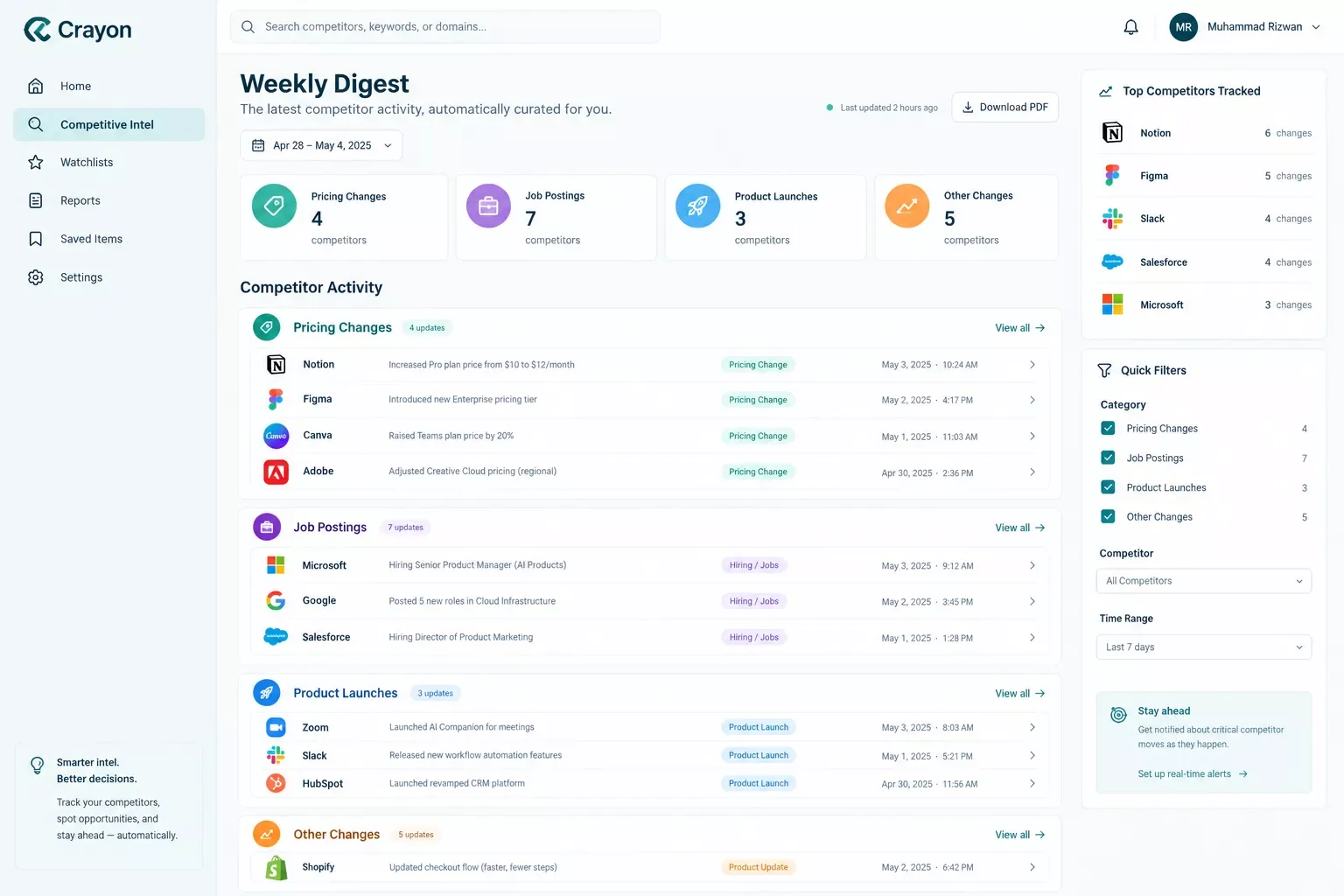
The bigger win came once I stopped treating Crayon as a destination and started treating it as a trigger. Instead of opening the dashboard, I set Crayon to send its digest to a private inbox, and built a Make.com scenario that watches that inbox, parses the digest, and routes anything tagged "pricing" or "product launch" straight to a dedicated Slack channel — with a second branch logging it to a simple spreadsheet CRM so nothing gets lost between digests.
That branching setup is the whole difference between a market research tool and a market research system. The Make.com scenario itself is simple: an email-trigger watches the digest inbox, a filter module checks the subject line and body for keyword tags, and a router sends matched items to Slack while an unconditional second branch logs everything to the spreadsheet, tagged and timestamped. No coding, about 20 minutes to build once I knew what I wanted it to do.
⚡ Pro Tip: Set the Make.com filter to match on subject-line keywords first, not full email body text — it's faster to configure and catches false positives less often than body-text parsing.
What Didn't
Not everything landed cleanly. Crayon's digest formatting isn't always consistent — some weeks it batches updates into a single email, other weeks it splits them by competitor, which meant my Make.com filter occasionally missed a tagged item because the keyword sat in a different part of the email structure than usual. I had to build a second, looser filter as a catch-all, which added a bit of setup time I hadn't planned for.
⚠ Watch Out For: Inconsistent digest formatting from any market research tool can quietly break a keyword-based Make.com filter. Build a fallback branch that logs anything unmatched to a review folder instead of letting it disappear.
The other honest limitation: Crayon is built for tracking what competitors are visibly doing, not for deeper qualitative research like customer interviews or sentiment analysis. If your core need is understanding why customers behave a certain way rather than what competitors are doing, a tool like Quantilope or an AI-moderated interview platform fits that job better. If you're weighing an agent-based approach instead of a tool-based one for this kind of decision, AI Agents vs. Make.com's Built-In Tools covers that trade-off in more depth. And if a chatty support layer is more your gap than competitor tracking, I added an AI customer service bot to Make.com in a separate setup worth comparing. Crayon and Make.com solve the competitive-monitoring half of market research, not the whole discipline.
Connecting Market Research Alerts to Make.com Automatically
This is the part almost every "best AI market research tools" roundup skips entirely. Most comparison articles stop at describing what a tool tracks or analyzes — they treat the dashboard as the finish line. In practice, the dashboard is just where the data lands; what happens next is what actually saves time.
The setup that worked for me routes around Crayon's own dashboard almost completely after the first week. Once the automation was live, I stopped logging into Crayon most days — the alerts that matter come to me in Slack, and everything gets a permanent record in the spreadsheet CRM without a manual export. That's the real shift this gap points at: not "which tool tracks better," but "which tool lets you stop checking."
How This Workflow Works
Four steps, no coding: Crayon's digest lands in a dedicated inbox → Make.com's email trigger picks it up → a keyword filter checks for tagged categories (pricing, product, hiring) → matched items go to Slack while every item, matched or not, logs to the spreadsheet for a permanent record. See Make.com's own automation documentation for the exact module names if you're building this yourself.
Master Stroke — Integration With Make.com
Here's the honest framing: Crayon's product overview shows a genuinely useful ai market research tool on its own. Crayon plus Make.com is a different product entirely — one that removes the daily habit-forming part of research instead of just organizing it. That's the real "master stroke" for anyone already comfortable running automations. You're not replacing Crayon's tracking with Make.com; you're removing the human step between "Crayon noticed something" and "I acted on it."
This same pattern extends past competitive alerts too. Once the filter-and-route logic exists in Make.com, it's a short step to add a third branch that drafts a quick summary using an AI text module before it hits Slack, so the alert arrives with a one-line "why this matters" instead of a raw digest excerpt — the same logic covered in 6 AI Email Writers That Pair With Your Make.com Stack if you want the summary drafted in a specific tone. I haven't built that branch myself yet, so I won't claim it's tested — but the scenario structure supports it without any rework. If your gap is more on the SEO-research side than competitive tracking, 6 AI SEO Tools That Actually Connect to Make.com covers the same alert-routing idea applied to keyword and ranking data.
Want This Running in Your Own Stack?
If piecing together the filter logic and Slack routing yourself isn't the best use of your week, this is exactly the kind of build I put together for people who want the alert, not the extra tab to check.
Let's TalkFor readers building out a broader automation stack, setting up email automation that triggers itself follows the same underlying logic — a source event, a filter, and a routed action — just applied to client-facing emails instead of competitor alerts.
Who Should Actually Use This Setup
If you're a solopreneur, a small agency, or a two-to-five person team competing against players with dedicated research staff, this setup punches above its cost. You get continuous competitor visibility without hiring an analyst or blocking out a weekly research afternoon. It pairs naturally with other stack-expansion picks like 7 AI Automation Tools That Pair Perfectly With Make.com if you're building out this side of your toolkit more broadly.
If you're running enterprise-scale competitive intelligence with a full research team already reviewing findings daily, the automation matters less — you likely already have a human triage step, and Crayon's own dashboard and reporting tools were built with that workflow in mind. This setup is built for people trying to get research-grade visibility without research-team headcount, which is most of the AI tool reviews and comparisons readership here.
People Also Ask
Is Crayon good for competitive intelligence?
Yes — user reviews consistently point to its automated competitor monitoring, AI-summarized insights, and native Slack/Salesforce integrations as its strongest features. The main complaint that comes up is pricing, which Crayon doesn't publish and structures per-organization based on usage and team size.
Does Crayon have a free trial?
No — Crayon does not currently offer a free trial or free tier. Pricing is quote-based and varies by team size and monitoring scope, so you'll need to contact their sales team directly for a number.
What are the best alternatives to Crayon for competitive intelligence?
Commonly cited alternatives include Klue, Kompyte, and ZoomInfo, each with different trade-offs on pricing and integration depth. If your core need is broader consumer/social monitoring rather than competitor-specific tracking, Brandwatch is worth comparing too.
Can Crayon send alerts directly to Slack?
Yes, natively — Crayon integrates directly with Slack and Salesforce out of the box. The Make.com layer described in this article is for people who want additional routing logic (like filtering by keyword before it hits Slack, or logging every update to a separate CRM), beyond what Crayon's native integration handles alone.
What is the best AI market research tool for a small business in 2026?
It depends on the job: Crayon and Brandwatch lead for ongoing competitive and social monitoring, while Quantilope and Qualtrics fit better for direct customer surveys. For a solo operator, the better question is which one you'll actually keep checking — or better, which one you can automate so you don't have to.
Can market research findings be automatically sent to Slack or a CRM when something changes?
Yes — most market research tools support email digests or webhooks, which Make.com can pick up and route. A simple email-trigger-to-filter-to-Slack scenario, like the one described above, takes about 20 minutes to build once you know your source format.
Is a free AI tool like ChatGPT enough for market research, or is a dedicated tool worth it?
ChatGPT is fine for one-off analysis or summarizing a document you already have. It doesn't continuously monitor competitors or markets on its own, which is the actual job a dedicated tool like Crayon does. If you need ongoing tracking rather than a single answer, a dedicated tool earns its cost.
Do I need a paid Make.com plan to run this kind of alert automation?
A basic email-trigger-filter-Slack scenario like this one runs comfortably within Make.com's free-tier operation limits for most solo use cases, since it only fires when a new digest email arrives — not on a constant polling schedule.
Conclusion & Rating
Crayon earns a solid 4 out of 5 stars, based on 45 days of genuine hands-on use tracking six competitors and building the Make.com layer on top of it. The tracking itself is reliable and well-categorized, and that's backed up by verified user reviews on G2 pointing to the same strengths. The one full star it loses is for the inconsistent digest formatting that made the Make.com filter setup slightly fussier than it should have been. Paired with Make.com, it stopped being a tool I checked and became a system that checked itself — which, for a solopreneur trying to buy back a morning routine, is the entire point of calling something an ai market research tool in the first place.
One of the more thorough breakdowns of Make.com automation workflows you'll find on connecting research tools to real alert systems comes down to this: pick the tool that tracks well, then don't stop there — from SmartSoloFlow, that second step is where the actual time savings live.
⚡ Pro Tip: Start with just one alert category (like pricing changes) before automating everything — it's easier to trust the system once you've watched it catch one real change correctly.
Thinking about this kind of automated alert setup for your own business, whether it's this exact tool or something custom? SmartSoloFlow is exactly where I build these workflows for solopreneurs who'd rather get the alert than babysit the dashboard.
Ready to Automate Your Own Research Stack?
Whether it's this exact setup or something custom for a different tool, I build these Make.com workflows for solopreneurs who'd rather get the alert than babysit the dashboard.
Let's TalkFound this guide useful? Share it with a fellow freelancer who's still doing things manually. 🚀
Got a question or a workflow roadblock? Drop it in the comments below — happy to help.
Last Updated: September 11, 2026

// Comments