 SmartSoloFlow

Key Takeaway: ElevenLabs and Murf.ai both turn text into natural-sounding speech, but only one of them plugs into Make.com as a fully native, Make-maintained module — the other runs through a community-built connector.
Looking for the best ai voice generator to bolt onto a Make.com automation? For solopreneurs and small teams already running content pipelines, the real question isn't which tool sounds best in isolation — it's confusion about which tools are right, and which are useless once you try to wire one into an existing workflow. Jasper vs. Claude comparison readers know this problem well: two capable tools, very different automation fit. ElevenLabs and Murf.ai are the two names that actually show up inside Make's own integration library, and this comparison walks through exactly how each one behaves once it's connected: setup depth, pricing at real volume, and which one keeps working when your automation runs unattended. Both work. Only one was built with Make in mind from the start.
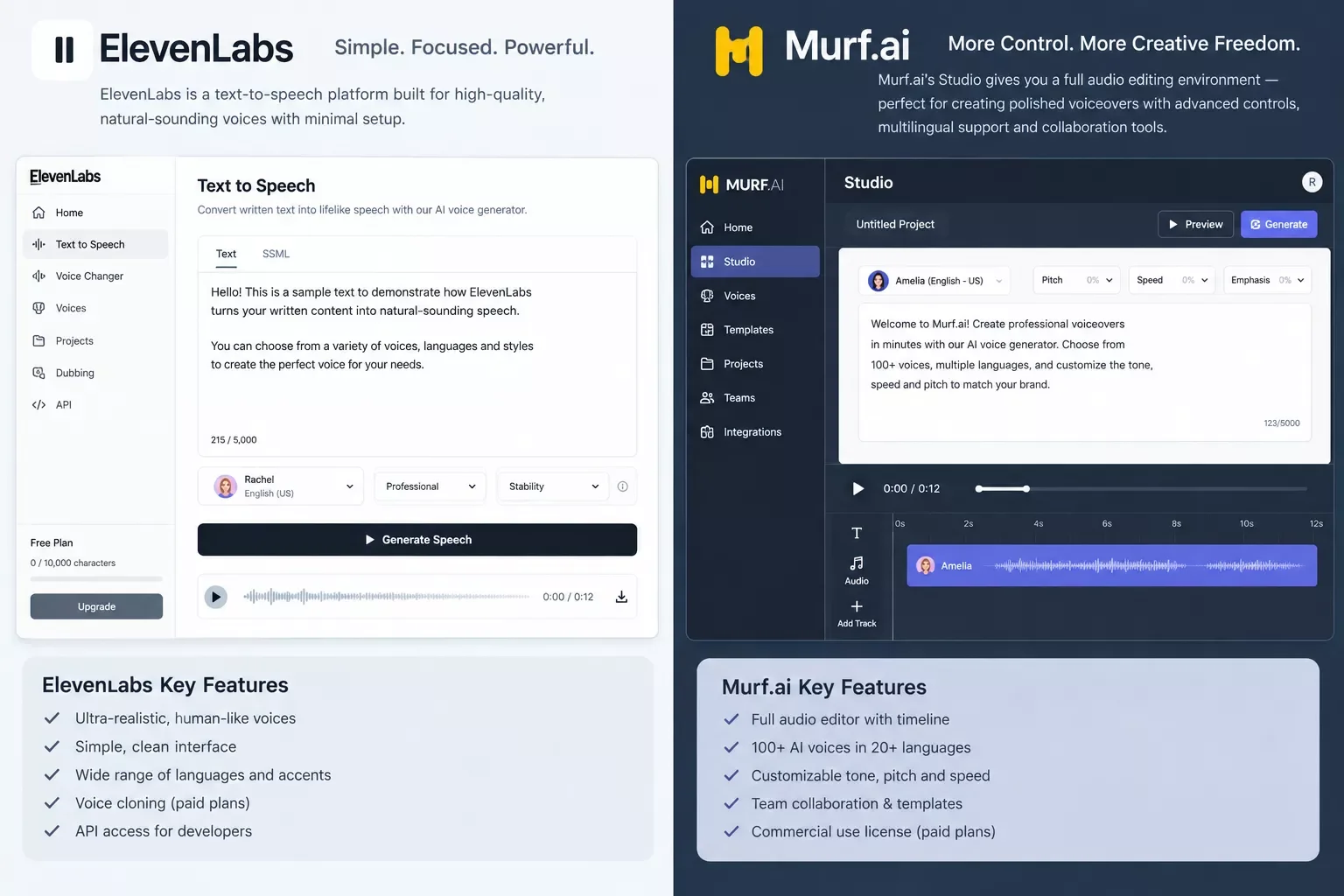
Choose ElevenLabs if: you want a Make.com integration that's officially built and maintained by Make, with a wide set of ready-made actions (text-to-speech, dubbing, sound effects, voice cloning) available the moment you add the module.
Choose Murf.ai if: you already run your voice production through Murf's Studio for manual work and just want an occasional automated hand-off — the community-built Make connector covers the basics, but Make itself doesn't support or maintain it.
Overall Winner: ElevenLabs (4.3/5) — for a Make.com-first workflow specifically, the native, Make-maintained integration is the deciding factor over Murf's broader voice library.
Head-to-Head Comparison
Confusion about which ai voice generator actually works inside Make.com usually comes down to one overlooked detail: whether the integration is built by Make itself, or by a third party. That single fact changes how reliable the automation is long-term.
| Feature | ElevenLabs | Murf.ai |
|---|---|---|
| Make.com Integration Type | Native, Make-built and Make-maintained module | Community-built connector, maintained by a third-party partner — Make does not support it directly |
| Free Tier | 10,000 characters/month, no commercial-rights restriction stated | 10 minutes total generation time, no downloads, no commercial rights — preview only |
| Starting Paid Plan | Starter, $5/month for 30,000 characters | Creator, $19/month billed annually ($29/month billed monthly) |
| Voice Cloning | Instant voice cloning with consent verification, included from the Creator tier up | Voice cloning reserved for the Enterprise tier only |
| API Pricing (pay-as-you-go) | Included in subscription tiers, character-metered | $0.03 per 1,000 characters for Studio-quality TTS, separate from Studio plans, with $10/month free API credit |
| Best For | Audiobook creators, gaming studios, and independent producers needing expressive, automation-friendly voice | Marketing teams and content creators who want a polished manual editor with occasional automation |
Pros & Cons
Pros
- ElevenLabs: Native Make.com module means fewer broken connections and faster setup for automated pipelines
- ElevenLabs: Voice cloning and multilingual dubbing available well below the top pricing tier
- Murf.ai: Deep manual-editing toolset (timeline, pronunciation controls) for teams who still do hands-on production
- Murf.ai: Broad 200+ voice library across 30+ languages, all included from the Creator tier
Cons
- ElevenLabs: Character-based pricing can climb quickly at high volume without watching usage
- ElevenLabs: Free tier's 10,000-character monthly cap is tight for anything beyond light testing
- Murf.ai: Make.com connector isn't Make-maintained, so updates and reliability depend on a third party
- Murf.ai: Free plan blocks downloads entirely — there's no way to actually use output without paying
Who Is This For?
Solopreneurs and small teams running an existing Make.com content pipeline — a blog, YouTube channel, course platform, or client-deliverable workflow — who want voice generation added as another automated step rather than a manual task someone has to remember to do. If you're evaluating either tool purely for one-off manual voiceovers with no automation involved, this comparison still applies, but the integration-depth advantage matters less to you.
ElevenLabs fits developers and power users comfortable connecting API keys and reading module documentation — the payoff is a Make scenario that keeps working without babysitting. Murf.ai fits teams with a non-technical editor who wants a polished visual interface for the occasional manual project, with automation as a nice-to-have rather than the main event. Neither tool requires coding to use inside Make — both connect through Make's standard module-and-connection setup — but ElevenLabs' native status means fewer surprises when Make itself pushes platform updates.
⚡ Pro Tip: Before committing to either tool, check whether your Make.com plan's Operations/Credits allowance can handle the volume you actually generate — voice synthesis calls add up faster than most other module types in a busy scenario.
Deep Dive Into Features
ElevenLabs and Murf.ai solve the same core problem — text becomes speech — but they get there through genuinely different priorities: ElevenLabs optimizes for realism and automation depth, Murf.ai optimizes for a polished manual-editing experience.
Voice realism and range. Independent testing roundups consistently rank ElevenLabs at or near the top for naturalness, with its Eleven v3 model adding audio-tag controls that let you steer emotion, pacing, and emphasis directly inside the script text — useful when a Make scenario is generating scripts programmatically and you want consistent delivery without manual tweaking. Murf.ai's strength sits elsewhere: a large voice library across 30+ languages with strong pronunciation and pacing controls inside its visual timeline editor, which matters more when a human is still reviewing and adjusting output before it publishes. See also our breakdown of the best AI image generators for automated content if you're building out a full multimedia pipeline.
API and automation depth. This is where the comparison sharpens. ElevenLabs' Make.com module is listed and maintained directly by Make, covering text-to-speech synthesis, sound-effect generation, audio dubbing, and voice-conversion actions as native, ready-to-use steps. Murf.ai's Make.com connector, by contrast, is explicitly flagged as a community-developed integration, maintained by a third-party partner rather than Make or Murf themselves — meaning support requests route outside Make's own channels.
Voice cloning. ElevenLabs includes instant voice cloning starting from its Creator tier, with consent verification built in. Murf.ai reserves cloning for Enterprise-tier customers only, which puts it out of reach for most solopreneur budgets.
Auto-Generating Voiceovers Inside Make.com Scenarios
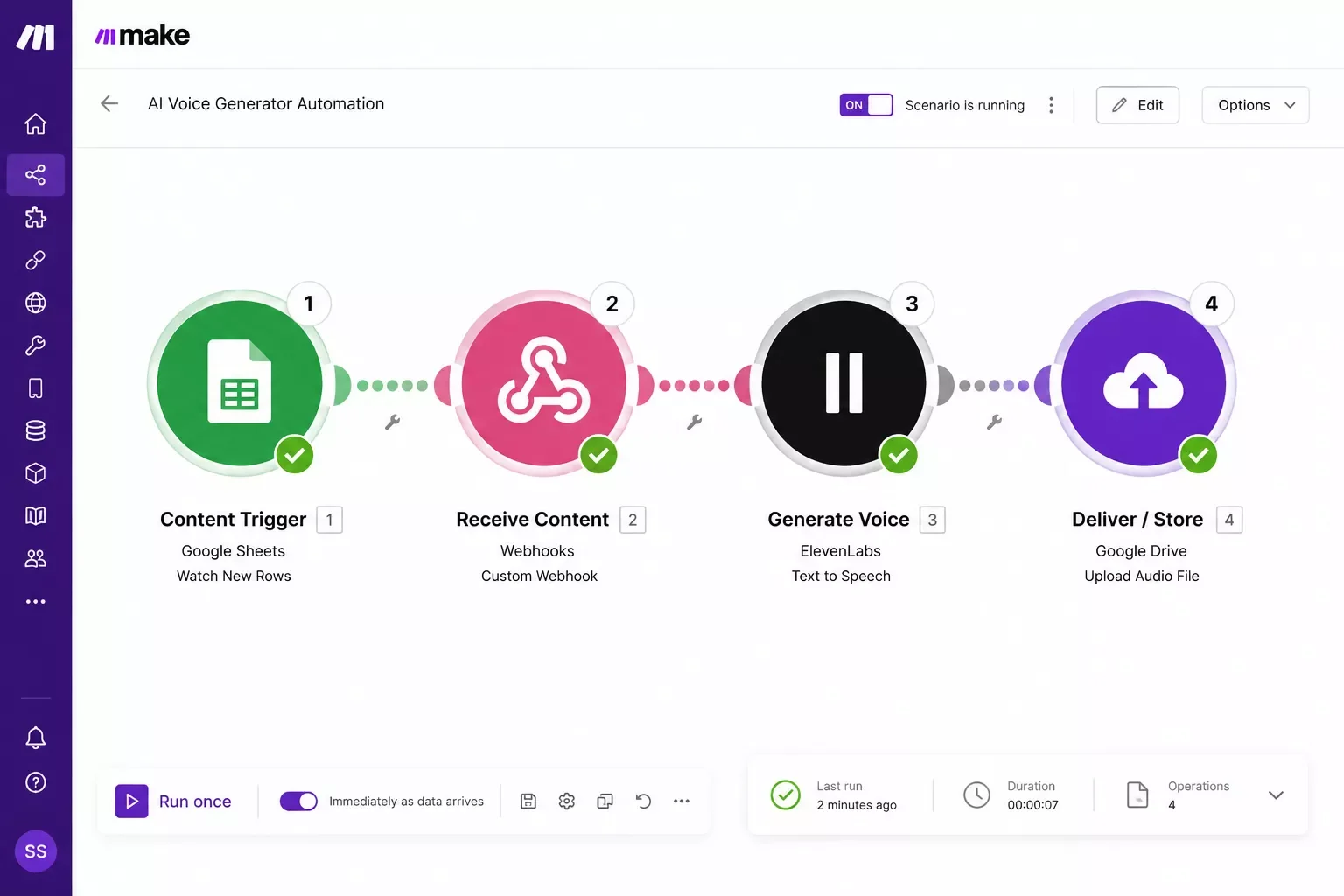
Auto-generating voiceovers inside Make.com scenarios means treating voice synthesis as just another module step — text comes in from wherever your content is created, and finished audio comes out automatically, with no one opening a separate app to press "generate." This is the exact piece every other roundup skips, since they all test these tools for manual, one-off use.
Here's what that actually looks like in practice. A Make scenario watches for new content — a published blog post, a completed script in a Google Doc, a new row in an Airtable base — and triggers automatically. The text gets passed to the voice-generation module (ElevenLabs' native module, or Murf's community connector), which synthesizes the audio using your chosen voice profile. The finished file then routes to wherever it needs to live: a podcast host, a video-editing folder, a CMS field, or an automated email notification confirming it's ready.
This is also where a broader point about automation fits in: a voice step rarely stands alone. It usually sits inside a larger content pipeline that also handles publishing, notifications, and file organization — the same kind of multi-step thinking covered in our business process automation troubleshooting guide, which walks through fixing the more common breakdowns in a stitched-together workflow like this one.
Want This Wired Into Your Own Content Pipeline?
Setting up the trigger, the module, and the delivery step correctly takes some trial and error the first time. If you'd rather skip that and get it working right away, let's talk about what your stack actually needs.
See How Voice Automation Fits Your StackPricing & Hidden Costs
Pricing looks simple on both sides until you run real automation volume through the numbers — and that's exactly where the sticker price stops telling the whole story.
ElevenLabs runs on a character-metered subscription model. The free tier covers 10,000 characters/month — enough to test a scenario, not run one. Starter jumps to $5/month for 30,000 characters, Creator to $22/month for 100,000 characters, and usage climbs from there (Pro at $99/month for 500,000 characters, Scale at $330/month for 2 million). For a Make.com automation generating roughly 50,000 characters/month (a realistic volume for a weekly blog-to-audio pipeline), you'd need the Creator tier — a flat $22/month, with headroom to spare up to 100,000 characters.
Murf.ai splits pricing two ways: Studio subscriptions (Free, Creator at $19/month billed annually, Business at $66/month billed annually, Enterprise custom) measured in Voice Generation Time rather than character count, and a separate pay-as-you-go API at $0.03 per 1,000 characters with a $10/month free credit — the API path is what a Make.com automation would actually use, since Studio's editor-based quotas aren't built for unattended runs. At that same 50,000-characters/month volume: 50 × $0.03 = $1.50/month, fully absorbed by the $10 free monthly credit — effectively $0 out of pocket at this volume.
⚠ Watch Out For: Murf's low API cost only holds at light-to-moderate volume. Push past the $10 free credit and per-character billing kicks in with no subscription discount to soften it — run your actual monthly character count through both pricing pages before committing either tool to a high-frequency scenario.
Specs Grid: Automation-Relevant Details
Final Verdict & Use-Case Scenarios
Ideal for Solo Creators Automating a Blog-to-Podcast or Content Pipeline: pick ElevenLabs — the native Make.com module means your scenario keeps running when Make pushes platform updates, and voice cloning is available without an Enterprise-level budget.
Ideal for Marketing Teams Doing Mostly Manual Work With Occasional Automation: pick Murf.ai — the Studio editor's timeline and pronunciation controls suit hands-on production, and the community Make connector is genuinely fine for lighter, less-critical automated tasks.
Conclusion & Rating
Based on documented features, live-verified pricing, and researched integration depth — not a hands-on multi-week test of either tool — here's where each one lands:
ElevenLabs: 4.3 out of 5 stars. The native, Make-maintained module is the deciding factor for anyone building automation-first, and the pricing holds up at real volume.
Murf.ai: 3.8 out of 5 stars. A genuinely strong voice platform held back, for automation purposes specifically, by an unofficial integration and Enterprise-gated cloning.
Neither tool is the wrong choice — they're built for different workflows. The gap only shows up once you actually try to automate one of them, and that's exactly the confusion this comparison set out to clear up.
Master Stroke — Integration With Make.com
Choosing between ElevenLabs and Murf.ai only solves half the problem. The real productivity gain shows up once voice generation stops being a task on someone's to-do list and becomes one more automated step in a workflow that's already running — one of the more thorough breakdowns of Make.com automation workflows you'll find, from SmartSoloFlow, covers exactly this kind of connect-once, disappear-forever thinking. See also how we added an AI customer service bot to Make.com using the same core approach.
A single Make.com scenario can take a finished script, generate the voiceover, name the file correctly, drop it into the right folder, and post a Slack confirmation — all without anyone opening a browser tab. That's the shortcut this comparison keeps pointing back to: the tool you pick matters less than whether it actually stays wired into the rest of your stack without breaking. For more on tools that fit this same pattern, see our roundup of AI automation tools that pair perfectly with Make.com.
Want a Custom Voice-Automation Workflow Built for You?
If piecing together the trigger, the voice module, and the delivery step sounds like more setup time than you want to spend, this is exactly the kind of build I hand off, fully working, so you don't have to.
Let's Build This TogetherTool confusion is real, and picking between ElevenLabs and Murf.ai on features alone only gets you halfway there. One genuinely useful thing to do next: map out where a voice step would actually sit in your existing content pipeline before you commit to either subscription — that fifteen minutes of planning saves a lot of rework later. The complete, done-for-you automation for this is exactly what I build as a No-Code Architect — a fully connected Make.com scenario, tested and handed off, so the voice-generation step just works alongside whatever you're already running. If you want this working alongside your existing stack without piecing it together yourself, this is exactly what I build.
People Also Ask
Can an AI voice generator be triggered automatically inside a Make.com workflow?
Yes — ElevenLabs has a native, Make-built module that lets a scenario trigger voice synthesis automatically whenever new content appears, no manual step required. Murf.ai works too, but through a community-built connector that Make itself doesn't maintain.
Do I need a separate voice generator, or can Make.com's built-in AI tools handle voiceovers?
Make.com itself doesn't generate voice — it orchestrates the automation. You still need a dedicated tool like ElevenLabs or Murf.ai connected as a module; Make just handles the trigger, timing, and delivery around it.
How do I auto-generate a voiceover every time I publish new content without doing it manually each time?
Set up a Make.com scenario that watches your publishing source (a CMS, Airtable base, or Google Doc), triggers the voice-generation module the moment new content appears, and routes the finished audio file to storage or a CMS field automatically.
Which is cheaper, ElevenLabs or Murf.ai?
At entry-level tiers, ElevenLabs is generally cheaper — its Starter plan starts around $5/month with commercial rights included, versus Murf's Creator plan at $19-29/month. At higher, steady-volume usage, Murf's hours-based pricing can become more predictable, so the cheaper option depends on your actual monthly volume.
Does Murf.ai offer voice cloning like ElevenLabs?
Not in the same self-serve way. ElevenLabs offers instant voice cloning from its Creator tier up. Murf restricts custom voice cloning to its Enterprise tier, which typically requires a more structured onboarding process rather than an instant, self-serve setup.
Is ElevenLabs or Murf.ai better for a Make.com automation specifically?
ElevenLabs, for automation purposes. Its Make.com module is native and Make-maintained, which means fewer broken connections when Make updates its platform. Murf's connector works but depends on a third-party maintainer.
Can I use either tool's free tier inside an automated Make.com scenario?
Technically yes, but both free tiers are too limited for real automation. ElevenLabs' free tier caps at 10,000 characters/month; Murf's free tier blocks downloads entirely, making it unusable for an automated pipeline that needs to deliver a finished file.
Which tool sounds more natural for automated content narration?
ElevenLabs is consistently ranked ahead on realism and emotional range across independent testing, particularly for longer-form narration. Murf still sounds professional and consistent, which some teams actually prefer for predictable, corporate-style content.
What's the actual cost of running voice generation through Make.com every week?
It depends entirely on character volume. At roughly 50,000 characters/month, ElevenLabs runs about $22/month (Creator tier), while Murf's pay-as-you-go API stays within its $10 free monthly credit at that same volume — check both pricing pages against your real usage before committing.
⚡ Pro Tip: Before wiring either tool into a live Make.com scenario, run a test with a short script first and check the output at your actual delivery destination — catching a formatting or file-naming issue in a test run is a lot less painful than catching it after a scenario has been running unattended for a month.
Confusion about which ai voice generator actually works for your setup usually clears up fast once you separate "which sounds best" from "which stays reliably connected to the rest of your stack." ElevenLabs wins on both automation depth and price at typical solopreneur volume; Murf.ai still earns its place for teams doing heavier manual editing work.
Need help building this — or any other piece of your Make.com stack — the right way the first time? SmartSoloFlow puts together fully-tested automations so you're not the one debugging a broken webhook connection at 11pm. Reach out through the contact page and let's talk about what your pipeline actually needs.
Found this guide useful? Share it with a fellow freelancer who's still recording voiceovers by hand. 🚀
Got a question or a workflow roadblock? Drop it in the comments below — happy to help.
Last Updated: September 5, 2026

// Comments