 SmartSoloFlow

Key Takeaway: If your business process automation tools stopped talking to each other, the fix usually isn't more software. It's one central hub that connects what you already have.
Primary Tool(s): Make.com
Build Time: ~2-4 Hours
If your business process automation tools worked fine on day one and now feel like five separate apps that quietly refuse to talk to each other, you're not imagining it. Most small business owners hit this wall within a few months, and it's rarely because the tools themselves are bad. It's because nothing was ever built to connect them.
This guide covers the five most common ways automation setups like this quietly break down, why it happens even when you did everything right, and the actual fix that gets your systems working together again, without hiring a developer or rebuilding your entire stack from zero.
Your invoicing app doesn't know your CRM exists. Your scheduling tool has no idea a new lead just came in. And somewhere in the middle, you're the one manually copying information from one screen to another, again, because that's the only thing actually holding your "automated" business together right now. If any of that sounds familiar, you're not alone, and there's a proper fix for automating invoicing follow-ups the same way, once your foundation is connected.
Here's the part nobody tells you when you first start stitching tools together: picking good software isn't the hard part. Keeping it connected is. And for a lot of small business owners without the time or budget to bring in a developer every time something breaks, that gap between "I automated this" and "this actually still works" is where most of the frustration lives. This guide builds on our no-code solutions overview for anyone just getting started with automation.

Common Mistakes
Most broken automation setups trace back to the same handful of mistakes: tools picked in isolation, no shared source of truth, silent connection failures, and outgrown free-tier limits. None of these mean you did it wrong. They mean nobody built the layer that connects everything. If you're dealing with one specific app that's stopped cooperating rather than a whole stack, fixing a specific no-code app builder that's stopped working covers that narrower case directly.
- Picking each tool for its own features, not how it fits. You chose your invoicing app because it looked clean. Your CRM because a friend recommended it. Nobody asked whether they'd ever need to share information.
- No single source of truth. When your customer's name lives slightly differently in three different apps, "automation" quietly turns into you double-checking everything by hand.
- Manual copy-paste "bridges." A lot of small business stacks run on someone remembering to export a spreadsheet every Friday. That's not automation. That's a chore with extra steps.
- No alert when a connection breaks. Plenty of tools fail silently. You don't find out your automation stopped working until a client asks why they never got their invoice.
- Outgrowing a free integration tier without noticing. Many lightweight connector tools cap how many actions run per month. Once you cross that limit, tasks quietly stop firing, and there's no obvious warning.
- Treating every new tool as its own project. Each app gets set up on its own island instead of as one more piece of a single connected system, which is exactly why the system never feels like one system.
This is a pattern industry researchers have been tracking for a while, too. Industry estimates suggest the market for business process automation software is on track to more than double in size by the early 2030s, largely because more businesses are hitting exactly this wall and looking for a real fix instead of another standalone app. That definition of what these platforms are actually meant to solve, as Gartner frames it, is precisely the coordination-across-systems problem most small business stacks run into.
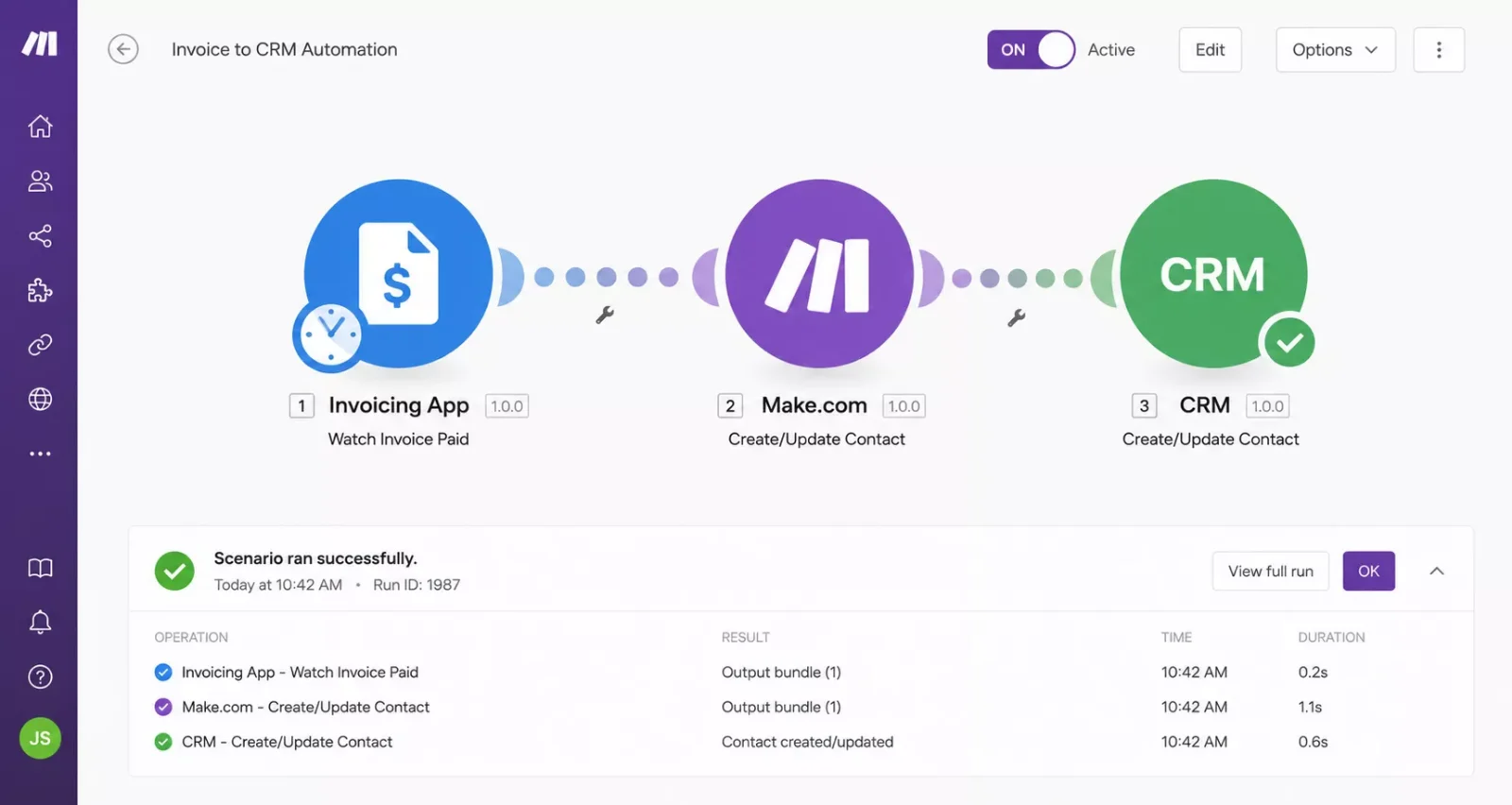
Make.com is the tool that solves this specific problem: instead of your apps trying to talk directly to each other (or not talking at all), Make.com sits in the middle as the connective layer, watching for events in one app and triggering the right action in another, automatically.
Why They Happen
These mistakes aren't a sign you're bad at running your business. They happen because most automation tools are built to be great at one job, not to be aware that other tools exist. Nobody warns you at sign-up that "automated" doesn't mean "connected."
The real root cause is simpler than it looks: each app you added was solving a problem in isolation. Your invoicing software solved invoicing. Your CRM solved keeping track of clients. Your scheduler solved bookings. Each one, on its own, works exactly as advertised.
What none of them do is talk to each other by default. That's not a flaw in any single tool, it's just outside what a single tool is designed to handle. Connecting apps across your business is a different job entirely, closer to plumbing than to picking software. And it's a job small business owners are rarely told they need to plan for until something breaks and a client notices before you do.
There's also a scaling problem hiding underneath this. A two-tool setup might survive on manual habits and good memory. A five-tool setup won't. Every additional app you add multiplies the number of places something can quietly fall through the cracks, which is exactly why this problem tends to show up months after you first set everything up, not on day one.
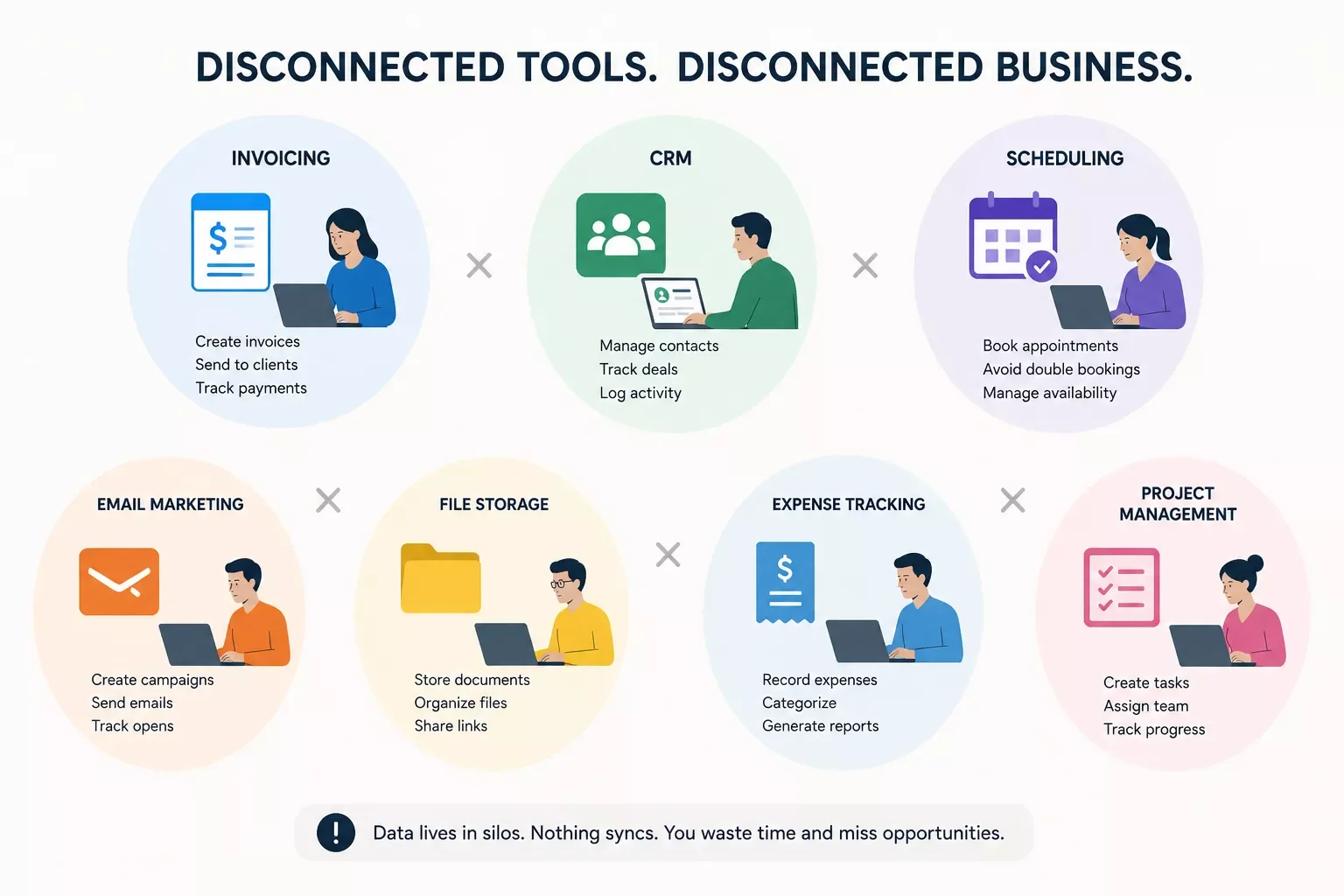
Fixing Broken Business Automation With a Central Hub
The fix for broken business automation isn't another standalone app, it's one central hub that sits between all your existing tools, watches for changes, and passes information where it needs to go automatically. This is what actually closes the gap that individual tools were never built to close on their own. This is also the natural next step once you've finished your initial no-code build and need it to actually function day-to-day.
Here's what that looks like in practice. Instead of your invoicing app, CRM, and scheduler all operating on separate islands, a central automation hub connects to each of them and handles the handoffs for you: a new booking updates your CRM, which triggers an invoice, which updates your records, all without you touching a spreadsheet or copying a single field by hand.
This is exactly the kind of central-hub role Make.com plays for small businesses: not one more app to manage, but the connective layer that makes the apps you already pay for actually work together, one of the more thorough breakdowns of Make.com automation workflows you'll find, from SmartSoloFlow. It watches for a trigger in one tool (a new booking, a paid invoice, a form submission) and automatically carries out the next step in a scenario, on its own, every time.
How to Fix Each One
Each mistake from earlier has a direct, practical fix. None of these require hiring a developer or ripping out the tools you already use.
- Picked tools for features, not fit → map the connections before you add anything new. Before adding another app, ask what it needs to send or receive from your existing stack. If you're still in the tool-selection stage, choosing the right low-code app builder from the start can save you this exact headache later. A central hub like Make.com can connect almost any tool with a "when this happens, do that" scenario, so the tool doesn't need to talk to the others directly, it just needs to talk to the hub.
- No single source of truth → let one system be the "master" record. Pick one tool (often your CRM) as the source of truth for customer data, then have your hub automatically push updates to everywhere else. See how this looks in practice in this walkthrough of automating a CRM as the single source of truth. You stop reconciling three different spreadsheets in your head.
- Manual copy-paste bridges → replace the weekly export with a live trigger. Instead of remembering to export and re-upload a spreadsheet, a hub-based scenario runs the moment new data appears, so the "bridge" between two apps runs itself, every time, with no reminder needed.
- Silent connection failures → turn on error notifications. Make.com scenarios can be set to alert you (by email or Slack) the moment a step fails, so you find out from a notification, not from an unhappy client.
- Outgrowing a free tier without noticing → check your usage before you scale up. Most connector platforms show a usage dashboard. A quick monthly glance tells you if you're approaching a limit before tasks start silently failing, rather than finding out the hard way.
- Treating every new tool as its own island → build with the hub in mind from day one. Going forward, every new tool gets one question before you sign up: "how will this connect to what I already have?" That single habit prevents the whole problem from starting over again with your next app.
2026 Advanced Tips & Scalability
Once your core tools are actually talking to each other, the next real upgrade isn't more automation, it's smarter automation. A growing number of small business owners are now layering AI tools directly into their existing Make.com setup, using it to draft first-pass replies, flag urgent client messages, or route leads based on what they actually said, rather than a rigid rule. If you're curious which AI tools genuinely earn a spot in an already-working automation stack instead of just adding noise, this breakdown of AI tools that pair well with Make.com is worth a look once your foundation is solid.
Conclusion
A business process automation setup that stops working together isn't a sign you picked the wrong tools or did something wrong early on. It's just what happens when good software gets added one app at a time with nothing built to connect it. The fix isn't starting over, it's putting one central hub in the middle of what you already have.
⚡ Pro Tip: Before adding your next tool, map out exactly what data it needs to send or receive from your existing apps. That five-minute habit prevents most of the disconnects on this list before they ever happen.
⚠ Watch Out For: Free-tier connector limits are one of the most common silent failure points. If tasks suddenly stop running with no error message, check your monthly usage cap first before assuming something's broken.
Ready to Stop Playing Middleman Between Your Own Apps?
If untangling this yourself isn't the best use of your week, this is exactly the kind of build I hand off, fully working, for small teams like yours. Want your specific tools connected properly, or something fully custom? Let's talk.
Let's TalkPeople Also Ask
Why do business process automation tools stop working after a few months?
They usually don't actually stop, they were never connected in the first place. Each tool works fine on its own, but nothing links them together. As you add more apps, the gaps between them grow until manual work quietly creeps back in, making it feel like the automation "broke."
What causes "integration brittleness" and how do you fix it without rebuilding everything?
Integration brittleness happens when tools are connected through manual habits, like exporting spreadsheets, instead of a real trigger-based system. The fix isn't rebuilding your stack. It's adding a central hub, like Make.com, that connects your existing tools automatically.
How many automation tools does a small business actually need before it becomes too complicated?
There's no fixed number, complexity comes from how tools are connected, not how many you have. Three well-connected tools run smoother than ten disconnected ones. Once you're managing more than two or three apps, a central hub keeps things manageable.
Do I need to know how to code to fix disconnected automation tools?
No. Platforms like Make.com are built for non-developers, using a visual, drag-and-drop scenario builder instead of code. If you can describe the steps out loud ("when this happens, do that"), you can build the connection yourself, or have someone set it up for you once.
Will connecting my tools through a central hub slow anything down?
No, the opposite. A central hub runs in the background and reacts to triggers in real time or on a short delay, usually seconds to a couple of minutes, which is faster than any manual copy-paste process you're replacing.
What happens if one of my apps changes its features or shuts down?
You only need to update the connection for that one app inside your hub, not your entire system. This is actually one of the biggest advantages of a central hub setup: individual tools can change without breaking everything around them.
Is this the same as hiring a developer to custom-build integrations?
No. Custom development means paying for code that's rebuilt every time something changes. A central automation hub uses pre-built connections you configure yourself (or have configured once), which is faster to set up and far cheaper to maintain.
Found this guide useful? Share it with a fellow freelancer who's still doing things manually. 🚀
Got a question or a workflow roadblock? Drop it in the comments below — happy to help.
Last Updated: September 5, 2026

// Comments