 SmartSoloFlow

Key Takeaway: You don't need a marketing team to run email automation that reacts to real events. One simple trigger layer can watch your form, your CRM, or your payment tool and fire the right email the second something happens.
System Goal: Stop manually sending follow-ups and let business events trigger them instead
Weekly Time Savings: ~3-5 Hours/week
Core Framework: Event-Triggered Automation
Email automation means your emails send themselves the moment something real happens in your business, not when you finally get around to it. For a solopreneur juggling every role alone, that's the difference between a lead going cold at 11pm and a welcome email firing the second they fill out your form. Most guides only talk about email platforms sending on their own schedule. This one is different. You'll learn how to trigger email sequences from outside the inbox entirely, using a CRM update, a form submission, or a new payment as the actual starting gun. That's the piece most solopreneurs miss, and it's the piece that actually saves hours, not minutes. If you're tired of being the one refreshing your inbox at midnight, this walks you through building a system that runs itself.
The Core Problem
Here's the thing nobody tells you about running a business alone: you're not just doing the work, you're also remembering to do the work. A new lead fills out your contact form, and now it's on you to notice, open your email client, and write a reply that sounds fresh even though you've typed some version of it fifty times before.
I used to keep a sticky note system for this. Yellow for "needs a welcome email," pink for "needs a follow-up in three days." It worked, technically. But it also meant my brain never fully clocked out, because somewhere in the back of my head I was always tracking who needed what.
The real cost isn't the five minutes it takes to write one email. It's the constant low-grade vigilance of being your own reminder system, on top of actually doing the client work that pays the bills. That's a specific kind of exhausting, and it's one a lot of solopreneurs just accept as the price of working alone.
Email marketing automation platforms promise to fix this, but most of them only trigger off things that happen inside the email tool itself, like someone joining your list. They don't watch the rest of your business. And that's exactly where the real time gets lost.
My Productivity Strategy
My approach isn't about finding a fancier email tool. It's about moving the trigger point outside the inbox entirely, so the email fires because something real happened in my business, not because I remembered to check.
Think of it less like "better email marketing tools" and more like giving your business a nervous system. A signal fires somewhere (a form gets filled, an invoice gets paid), and the right message goes out automatically, without you touching a keyboard.
This isn't a one-time verified miracle fix, and I want to be honest about that. It's a pattern that tends to work well for solo operators specifically because it removes the "remembering" step, which is usually the actual bottleneck, not the writing.
Once this is set up, my job shifts from "send the email" to "occasionally glance at whether the sequence is still doing its job." That's a much lighter mental load, and it's the whole point.
Triggering Email Sequences From CRM or Form Events
You can trigger an email sequence from almost any real event in your business, not just a signup, by connecting your form, CRM for solopreneurs, or payment tool to an automation platform like Make.com, which watches for the event and fires the right sequence the moment it happens.
This is the part most email marketing automation platforms guides skip entirely. They'll walk you through building a welcome sequence, but the sequence still only starts when someone joins your list inside that specific tool. If a lead fills out a form on your website, books a call on a separate scheduling page, or pays an invoice through a third tool, your email platform usually has no idea any of that happened.
Make.com sits in the middle and solves exactly that gap. It watches your form tool, your CRM, or your payment processor for a specific event, then hands the signal off to your email platform (ConvertKit, ActiveCampaign, whatever you're already using) to kick off the right sequence. According to Omnisend's 2025 ecommerce marketing report, automated emails made up just 2% of total sends but generated 30% of email-attributed revenue, which tells you the leverage here isn't small. You don't need more emails. You need the right ones firing at the right moment.
This also means you're not locked into whatever native automation your invoicing software for freelancers or email tool happens to support. If your CRM can send a webhook (most modern ones can), Make.com can catch it and route it anywhere you need.
⚠ Watch Out For: Not every form or CRM tool sends a clean, well-structured event by default. Some need a specific integration or a Make.com-compatible webhook enabled in their settings before this works. Check your tool's own integration docs before assuming the connection is plug-and-play.
Implementation (Step-by-Step)
Setting this up takes four real steps: pick your trigger event, connect it to Make.com, map the data to your email platform, and test it with a real submission before trusting it with real leads. None of these steps require code.
- Pick one trigger event to start with. Don't try to automate everything at once. A new form submission, a new booking through your appointment booking software, or a paid invoice are the easiest starting points because they're unambiguous and happen often enough to be worth automating.
- Connect the trigger tool to Make.com. Most form builders, CRMs, and payment tools have a native Make.com integration or a webhook option you can enable in a few clicks.
- Map the right fields to your email platform. Name, email address, and whatever detail decides which sequence they get (like which service they inquired about).
- Run a real test before going live. Submit your own form or send yourself a test payment and confirm the right sequence actually fires, with the right name in the right spot.
The Manual Way
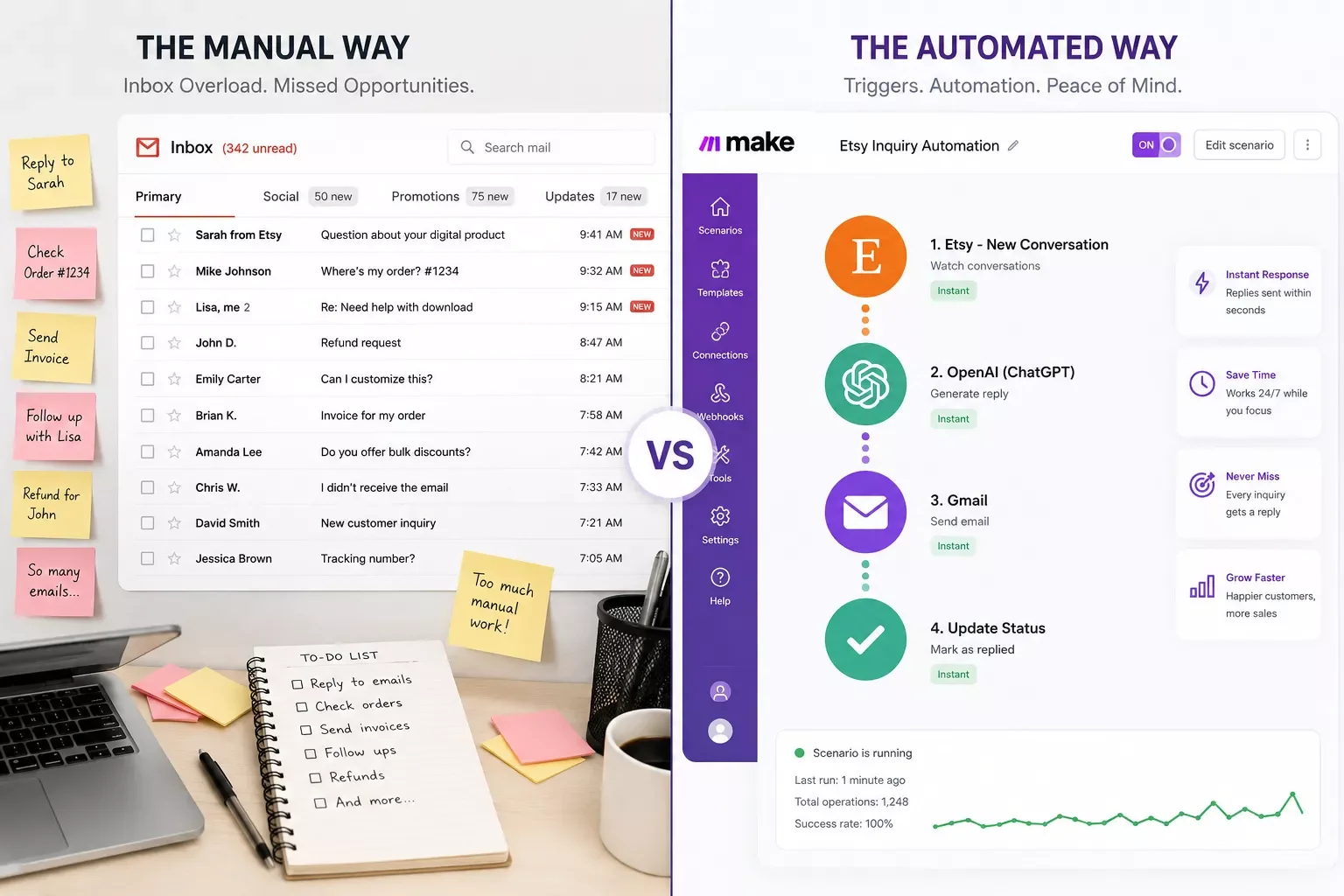
Right now, without this setup, the pattern probably looks familiar: a lead comes in, and at some point when you check your inbox, you notice, open your email tool, and either write something from scratch or dig up the last version you sent someone similar. It works, but it depends entirely on you noticing in a timely way, and it adds up to real hours over a month.
The Automated Way
While I used to sit refreshing my inbox to catch new leads before they went cold, I now let a simple Make.com automation watch my form and fire the welcome sequence the second someone submits it. No checking, no remembering, no sticky notes.
What used to be a five-minute task I had to remember fifty times a month is now something the system just handles. One of the more thorough breakdowns of Make.com automation workflows for solopreneurs you'll find comes down to this same idea: move the trigger outside the inbox, and the busywork disappears with it.
This connects directly to the broader system I laid out in my Solopreneur productivity system guide, if you haven't set up the rest of your automation stack yet.
People Also Ask
What is email automation and how does it work for a solopreneur?
Email automation sends a message automatically when a specific event happens, instead of you writing and sending it yourself. For a solopreneur, that usually means a welcome email, a follow-up, or a reminder firing the moment a lead takes action, freeing you from tracking and manually sending each one.
Can email automation be triggered by events outside the email platform, like a form submission or payment?
Yes. A tool like Make.com can watch for events in your form builder, CRM, or payment processor and pass that signal to your email platform. This is how you trigger sequences based on real business activity, not just actions taken inside the email tool itself.
Do I need a separate CRM to run email automation, or can it work standalone?
No, a CRM isn't required. Your email platform can trigger sequences on its own using signup or click events. A CRM becomes useful once you want to trigger emails from business events happening outside your email list, like a deal stage change or a new invoice.
How many email automations should a solopreneur set up first?
Start with just one: a welcome sequence triggered by your most common lead source, like a contact form. Adding automations one at a time keeps troubleshooting simple and lets you confirm each one works before layering on the next trigger.
Will this work with the email platform I already use?
Most likely, yes. Make.com connects with ConvertKit, ActiveCampaign, Mailchimp, and most major email platforms. If your specific tool isn't natively supported, it usually still works through a webhook connection.
What if my form tool doesn't have a Make.com integration?
Check if it supports webhooks, most modern form builders do, even without a dedicated Make.com integration listed. A webhook lets Make.com catch the submission directly, which works just as well.
Is this only for welcome emails, or can I automate other sequences too?
Once your first trigger is working, the same pattern applies to almost any sequence: a payment can trigger an onboarding series, a form field can route someone into a specific nurture track. The setup logic stays the same each time.
Conclusion
You don't need a bigger team or a fancier email platform to stop being your own reminder system. You need the trigger point to live outside your inbox, watching your actual business events instead of waiting for you to notice them.
Start with one trigger. Get it working. Then add the next one once you trust the first.
⚡ Pro Tip: Test your very first automation with your own email address before pointing it at real leads. It takes two minutes and saves you from finding out something's broken from a confused customer instead.
If you'd rather get that time back than spend a weekend building this yourself, this is exactly the kind of system I set up so solopreneurs don't have to piece it together on their own. As a No-Code Architect at SmartSoloFlow, done-for-you automation like this is literally what I build. It also pairs well with AI tools that pair with your Make.com stack, once your trigger layer is running.
Want This Running in Your Business Without the Setup Headache?
If you'd rather hand this off than build it yourself on a weekend, reach out and let's figure out what a done-for-you version looks like for your specific tools.
Let's TalkFound this guide useful? Share it with a fellow freelancer who's still doing things manually. 🚀
Got a question or a workflow roadblock? Drop it in the comments below — happy to help.
Last Updated: September 5, 2026

// Comments