 SmartSoloFlow

Key Takeaway: A signed contract can trigger onboarding and invoicing on its own, no manual hand-off needed.
System Goal: Turn a signed contract into automatic onboarding and invoicing, with zero manual follow-through.
Weekly Time Savings: ~2-3 Hours/week
Core Framework: Make.com Signature-to-Invoice Automation
Signing a contract used to feel like the finish line. Then I'd spend the next hour buried in admin: onboarding steps, invoicing, updating my CRM, all before I could actually start the work. That's the burnout every solopreneur running things solo knows too well. I went looking for clm software that could kill that hand-off entirely.
Most contract management software reviews stop at "which tool should you pick." None of them show what happens the moment the ink dries. This is my actual setup: a signed contract triggers onboarding tasks and an invoice automatically, with Make.com doing the connecting work behind the scenes. If you're drowning in after-signature admin nobody warns you about, this is the fix I built, not a theory.
Success Story: From Signed Contract to Automatic Invoice
For example: a solo consultant lands a new client and sends the contract for e-signature. The moment it comes back signed, a welcome email goes out, a CRM record gets created, and the first invoice is already sitting in the client's inbox, all without the consultant touching a spreadsheet.
The Core Problem
Every signed contract creates a chain of admin tasks that isn't part of the actual work. It's the onboarding message, the invoice, the calendar hold, the CRM update. None of that closes deals or serves clients. It's the tax on doing business alone.
For a lot of solopreneurs, this is the part of running a one-person operation nobody warns you about. You get good at the client-facing side. You get better at scoping projects and setting your rates. But the paperwork after the handshake keeps eating into hours you'd rather spend on billable work, or on rest.
I used to treat this admin stretch as unavoidable. Sign the contract, open five different tabs, copy details by hand into a CRM, draft an invoice from a template, then remember to send a welcome email. Multiply that by every new client, and it adds up to real hours every month, hours that don't show up on any invoice themselves.
The deeper issue isn't the individual tasks. It's that they're all triggered by the same event, a signed contract, but none of them are actually connected. Fixing that connection is what turned this into something worth building instead of just tolerating.
What I Tried (Before I Fixed It)
My first attempt was buying better software instead of fixing the actual gap. I tried three different CLM tools, thinking a fancier platform would solve the hand-off problem on its own. Each one made storing and organizing contracts easier. None of them talked to my CRM or my invoicing tool. I was still the one copying data across systems by hand, just from a nicer-looking dashboard.
I also tried a plain e-signature tool on its own, figuring that was the missing piece. It wasn't. A signature confirms the contract is done. It doesn't tell your CRM a new client exists, and it definitely doesn't generate an invoice. That's a separate job entirely, and most contract review software treats it as somebody else's problem.
What actually worked was accepting that the tool itself wasn't the bottleneck. The bottleneck was the missing connection between "contract signed" and everything that's supposed to happen next. That's a job for an automation layer sitting on top of whatever CLM or e-signature tool you already use, not a reason to keep shopping for a new one. I'd already gone through this exact realization once before, on the CRM side, when I automated my own CRM instead of switching tools yet again.
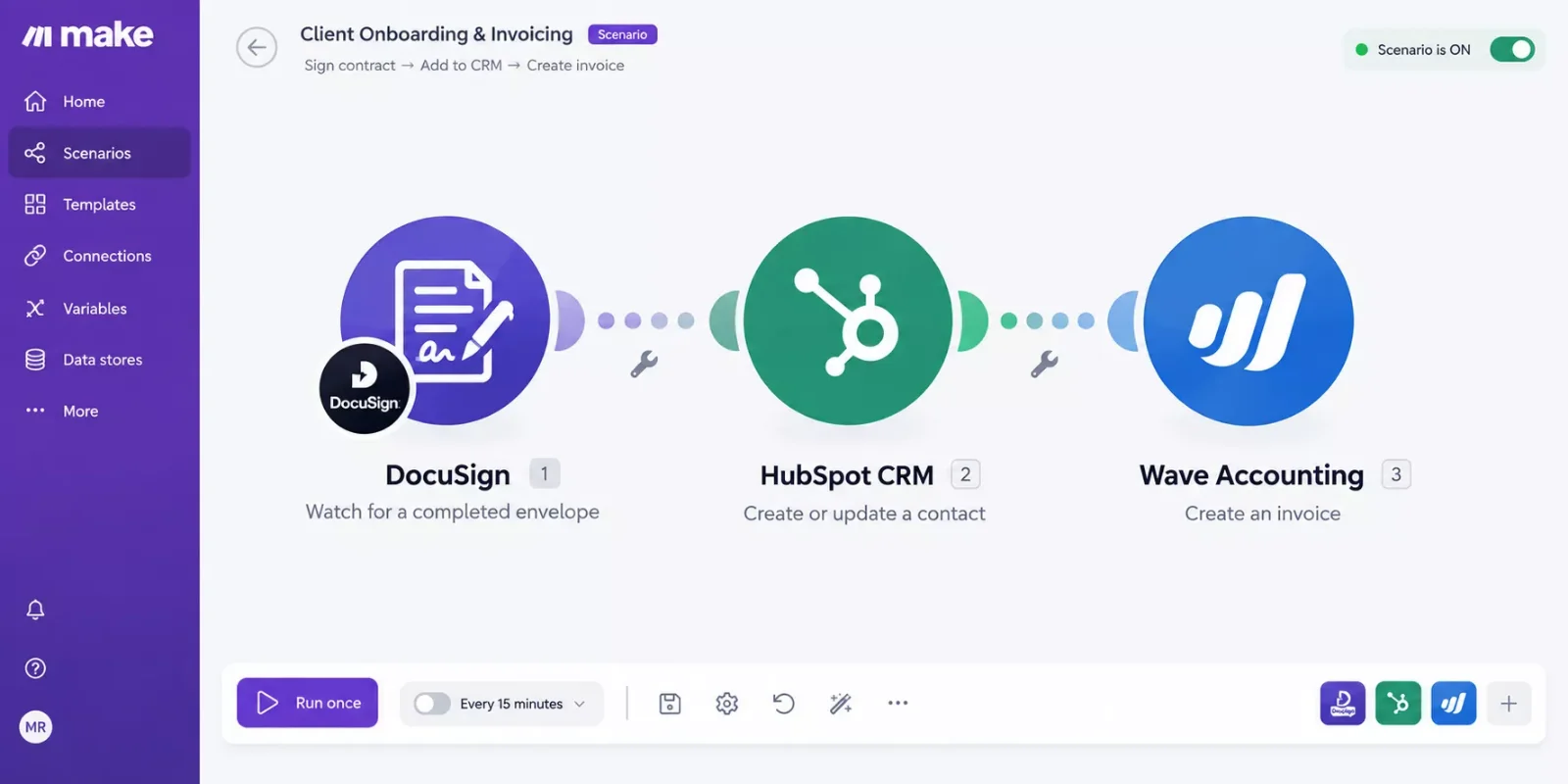
What Actually Happens the Moment a Contract Gets Signed
The short version: one webhook fires the second a contract is signed, and a single Make.com scenario handles onboarding and invoicing from there, with no manual step in between. Here's exactly what runs, in order:
- Contract signed — the e-signature/CLM tool marks the document complete.
- Webhook fires — that completion event pushes data (client name, contract value, start date) straight into Make.com.
- Make.com scenario runs — it reads the incoming data and branches into two parallel actions.
- CRM record updated — a new client record is created (or an existing lead is converted), tagged with the signed contract's details.
- Invoice generated — a draft invoice is created using the contract's rate and scope, ready to send or auto-sent depending on how cautious you want to be at first. This is the same downstream step covered in more depth in automating your invoicing.
- Onboarding email sent — a welcome message goes out with next steps, so the client hears from you before they have to ask, using the same logic behind setting up email automation that triggers itself.
That entire chain runs in seconds. Industry estimates on solo-operator admin work suggest paperwork and client onboarding tasks routinely eat several hours a week for people running a business alone, and this kind of trigger-based setup is exactly the type of task automation is built to absorb, since none of these six steps require judgment calls, just consistent execution.
This is also where a plain e-signature tool falls short on its own. Signing confirms the document. It has no idea your CRM exists or that an invoice needs to go out. The webhook is the missing translator between "this got signed" and "these three systems need to know."
The Result
Since putting this system in place, the after-signature admin block has mostly disappeared from my calendar. Onboarding and invoicing now happen automatically instead of sitting on my to-do list for hours after every signed contract.
To be clear, this is what this kind of setup typically delivers once it's running correctly, not a single verified case study number. Results depend on how many client-specific fields you need to map and how complex your own onboarding sequence is. But the shape of the change holds steady: less manual data entry, fewer forgotten invoices, and no more remembering to send a welcome message three days late because you were buried in actual client work.
The bigger shift isn't really about the minutes saved on any one contract. It's that the admin stops competing for your attention right when you should be focused on delivering for a brand-new client. That's the actual burnout fix here, not just a faster checklist.
If you're already running your solopreneur productivity system around a few connected automations, this fits right into that same approach: one trigger, several downstream actions, no manual bridge between them. And if you're curious how far this kind of Make.com-based stack can go beyond just contracts, pairing it with a few dedicated AI tools that pair with your Make.com stack opens up even more of this territory.
⚠ Watch Out For: An e-signature tool by itself won't do any of this. Signing confirms the document, it doesn't notify your CRM or generate an invoice. You need an actual automation layer connecting the signature event to those downstream systems, or you're back to doing it by hand.
Want this exact setup, or something fully custom, built for your business? If you'd rather get that time back than spend a weekend building this yourself, this is exactly the kind of system I set up so solopreneurs don't have to.
Skip the Build, Keep the Time Back
If contract-to-invoice automation sounds like exactly what your business needs, let's talk about setting it up for you.
Let's TalkPeople Also Ask
What is CLM software and does a solopreneur really need it?
CLM (contract lifecycle management) software helps you draft, sign, and store contracts in one place. A solopreneur doesn't always need the full enterprise version, but some way to manage signed contracts consistently, ideally one that connects to other tools, is worth having once you're signing clients regularly.
Can a signed contract automatically trigger onboarding tasks or an invoice?
Yes, with the right setup. A webhook from your e-signature or CLM tool can fire the moment a document is signed, feeding that event into an automation platform like Make.com, which then updates your CRM and generates an invoice without you touching either system manually.
Is a simple e-signature tool enough, or does a freelancer need full contract lifecycle management?
A plain e-signature tool only confirms the document is signed. It won't update your CRM or generate an invoice on its own. Whether you need full CLM software or just an e-signature tool plus an automation layer depends on your contract volume, but the automation layer is the part that actually saves you time either way.
How long does it take to set up a contract-to-invoice automation like this?
Most solopreneurs can get a basic version running in an afternoon once they've picked their e-signature tool, CRM, and invoicing app. The setup time mostly depends on how many fields you want mapped automatically versus filled in manually later.
Do I need to know how to code to build this?
No. Make.com and similar automation platforms use a visual, drag-and-drop scenario builder. You're connecting apps and mapping fields, not writing scripts.
What if my CLM tool doesn't support webhooks?
Most modern e-signature and CLM tools support webhooks or have a native Make.com integration. If yours genuinely doesn't, a scheduled polling check can often substitute, though it's less instant than a true webhook trigger.
⚡ Pro Tip: Start by automating just the invoice trigger before adding onboarding emails and CRM updates. Getting one connection working reliably builds confidence before you stack more actions onto the same webhook.
Contract management software solves half the problem. The other half, what happens the second that contract gets signed, is where most solopreneurs still lose hours every month. Building that connection once means you never have to think about it again. It's one of the more thorough breakdowns of Make.com automation workflows you'll find for the post-signature stretch specifically, from SmartSoloFlow.
Want this set up for your business, or need something custom instead? Reach out and let's get it running.
Ready to Stop Doing This Manually?
Let's build the exact contract-to-invoice automation for your business, tailored to whatever CLM and CRM tools you're already using.
Get StartedFound this guide useful? Share it with a fellow freelancer who's still doing things manually. 🚀
Got a question or a workflow roadblock? Drop it in the comments below — happy to help.
Last Updated: September 10, 2026

// Comments