 SmartSoloFlow

Key Takeaway: Deep work protection fails the moment a new deadline lands, unless your calendar is set up to react to that deadline automatically, not just defend against meetings.
System Goal: Deep-work blocks that re-protect themselves when priorities shift
Weekly Time Savings: ~4-6 Hours/week
Core Framework: Deadline-Reactive Time Blocking
Deep working only protects your focus if your calendar actually defends it, and most solopreneurs set up deep work blocks that collapse the second a client emails with a new deadline. If you're overwhelmed running your business alone, with no one to catch what falls through when your schedule shifts, a static calendar block isn't enough. You need deep-work time that reacts to your actual workload, not just the meetings already on your calendar.
This guide walks through a system that treats deep work as a moving target instead of a fixed appointment. You'll see the manual way most people try this (and why it breaks down fast), then the automated way: pairing Google Calendar with Reclaim.ai and a simple Make.com layer so your protected time adjusts itself the moment a real deadline shows up, instead of waiting for you to notice and rebuild your schedule by hand.
The Core Problem
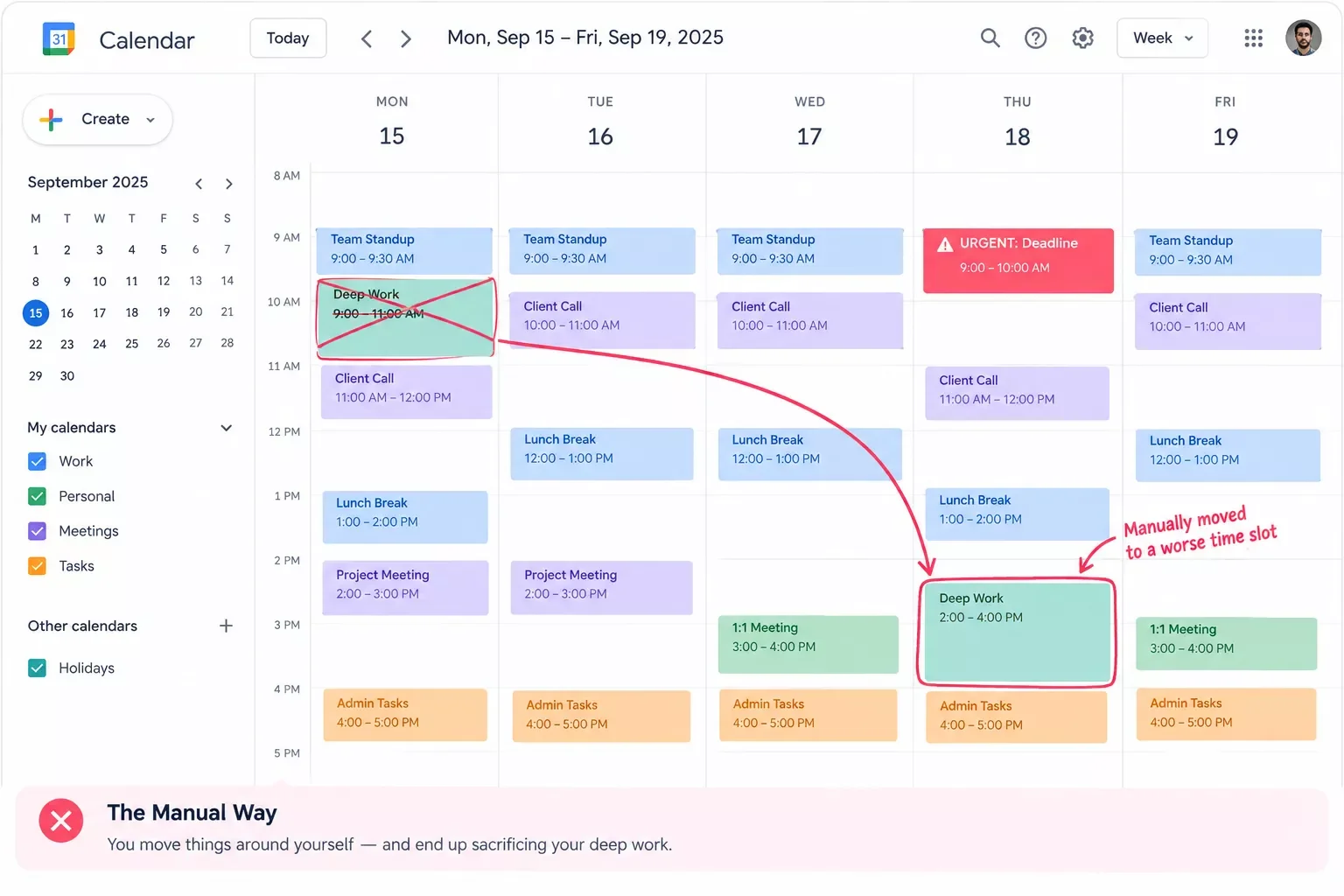
Your deep work block is only as strong as your willingness to defend it, and most solopreneurs defend it against the wrong thing. You block off 9 to 11 AM for focused work, you turn off Slack, and that holds up fine against a stray meeting invite. But it doesn't hold up against a client emailing at 8:45 AM asking for a revised proposal by end of day. Something has to give, and it's almost always the deep work block, because it's the one thing on your calendar with no one else watching to enforce it.
This is the real gap in how most people talk about deep work. The advice out there, and most competitor content covers this well, focuses on rituals: exercise before you start, silence your phone, pick your peak-energy hours. That's useful groundwork. But it treats deep work protection as something you defend once and then hope holds. It doesn't account for what actually breaks the system, which is a new deadline landing mid-week and forcing a manual rebuild of your entire schedule. When you're running solo, there's no one else to absorb that disruption or replan around it for you. You do it, every time, or the block quietly disappears.
This is exactly the same pattern that breaks a solopreneur's invoicing if it's still done by hand. If automating invoicing for freelancers already sounds familiar, the underlying problem is identical: a manual system that only works when nothing unexpected happens.
Proactively Blocking Deep-Work Time From New Task Deadlines
The fix isn't a stronger boundary. It's a calendar that reacts to your actual deadlines instead of just the meetings already sitting on it. Deep work protection that only defends against calendar invites will always lose to an unscheduled deadline, because an email doesn't show up as a calendar event until you manually put it there.
A deadline-reactive system flips this. Instead of you noticing a new task, judging how urgent it is, and manually re-arranging your day, the system watches for the deadline itself, whether that's a due date field in your task manager or a flagged email, and automatically re-blocks your calendar around it. Your existing deep work time doesn't just sit there hoping nothing touches it. It gets defended, re-prioritized, or rescheduled based on what actually needs your attention that day, not on whether you happened to check your inbox before your focus block started.
Tools like Reclaim.ai already do a version of this today. Reclaim connects directly to Google Calendar and automatically re-optimizes your existing "Habits" (its term for recurring protected time, including deep work blocks) whenever a new task or deadline changes your priorities, without you touching your calendar by hand. That's the mechanical piece most competitor advice skips entirely. It's the difference between "protect your deep work" as an intention and a system that actually protects it when your week doesn't go as planned.
My Productivity Strategy
The approach that's worked best for me, and for the solopreneurs I've talked with about this, isn't a stricter version of the same static block. It's treating deep work protection as a system that runs on rules, not on willpower. Here's the logic: deep work still gets scheduled first, same as any time blocking system teaches. But the block itself gets a priority rule attached to it, so the calendar knows what to do when something new shows up instead of leaving that decision to you at 8:45 AM.
This idea has real research behind it. Tony Schwartz and Catherine McCarthy's Harvard Business Review piece, "Manage Your Energy, Not Your Time," makes the case that protecting your energy (not just your hours) is what actually determines whether focused work gets done, a point they expanded further in the book The Power of Full Engagement. A rigid time block ignores that. A rule-based system doesn't; it can shift your deep work to your next-best energy window instead of just deleting it when a deadline collides with it.
In practice, this means every deep work block on your calendar needs three things attached to it: a priority level (so the system knows what can bump it and what can't), a flexible window (not a single fixed hour, but a range it can shift within), and a clear signal for what counts as an actual deadline versus a low-priority request that can wait. Once those three things exist, you're no longer manually deciding every time something new lands. The system decides, based on rules you set once. If you'd rather build this into your whole daily structure instead of just your deep-work hours, automating your daily routine around the same kind of rules works the same way.
⚡ Pro Tip: Start with just one deep work block a day carrying a priority rule. Trying to convert your entire calendar to a rules-based system in one sitting is where most people give up before it sticks.
Weekly Deep-Work Time-Blocking System
This isn't a rigid schedule to copy exactly. It's a starting template that shows how priority levels get distributed across a week so your system has something to work from when a real deadline shows up.
Implementation (Step-by-Step)
Before splitting into manual versus automated, it's worth saying this same reactive-to-proactive shift applies beyond just your calendar. If you're also still managing tasks by hand, automate your project management setup the same way, letting deadlines trigger updates instead of you tracking them manually.
The Manual Way
Most solopreneurs run this exact loop without realizing it's a loop. A new task or deadline lands, usually by email. You open your calendar, look at what's already blocked, and decide what has to move. You manually drag your deep work block to a different hour, or you just skip it for the day and tell yourself you'll make it up tomorrow. Multiply that across a normal week with two or three surprise deadlines, and you're spending real time every week just replanning your own schedule by hand, on top of actually doing the work. Nobody schedules time for that. It just eats into the deep work block itself.
The Automated Way
This is where a small Make.com layer changes the entire equation. Instead of you noticing the new deadline and manually rebuilding your schedule, a simple automation does the noticing for you. Here's the actual chain: a new deadline gets added to your task manager (or flagged in an email), that event triggers a Make.com scenario, and Make.com passes the update to Reclaim.ai's official Make.com integration, which re-optimizes your Google Calendar around it automatically, respecting the priority rules you set on your deep work blocks.
Your deep work block doesn't get quietly deleted anymore. It either holds firm, because the new task is genuinely lower priority, or it shifts to the next available high-energy window, because the system already knows that's the rule. Either way, the decision gets made in seconds, based on rules you set once, instead of a manual scramble every time your week changes.
This is also where connecting your calendar into a wider automated workflow pays off well beyond just deep work protection. If you're already thinking about tying your scheduling tool into other parts of your business (client intake forms, task boards, invoicing triggers), How to Connect Your Business Workflow Software in 2026 walks through building that kind of central automated hub from the ground up, so your calendar isn't the only piece of your business running on autopilot. And if you want to see what else pairs well with this exact stack, AI automation tools that pair with Make.com covers several worth looking at.
It's worth saying plainly: this is exactly the kind of thorough, no-code automation build worth getting right the first time, and it's one of the more practical entry points into Make.com automation workflows you'll find if you're just getting started, from SmartSoloFlow.
One thing worth flagging honestly: Reclaim.ai's free Lite plan supports this exact workflow with Google Calendar, but it's limited to a single calendar and a small number of protected "Habits." If you're running multiple calendars or want unlimited protected blocks, that requires Reclaim's paid Starter plan (currently $10/user/month, billed annually). Don't buy the paid tier before confirming the free plan's limits actually get in your way.
⚠ Watch Out For: Automating your calendar doesn't mean you stop reviewing it. Give the system a week before trusting it fully, and check every morning that what it re-blocked actually matches your real priorities, not just its rules.
People Also Ask
What is deep work and why does it matter for a solopreneur?
Deep work is uninterrupted, high-focus time spent on cognitively demanding tasks, as opposed to shallow work like email or admin. For a solopreneur, it matters more than for employees because there's no team to hand off shallow work to, so protecting deep work time directly determines how much high-value output actually gets done.
Can deep-work time automatically get blocked on my calendar when a new deadline comes in?
Yes. Tools like Reclaim.ai connect directly to Google Calendar and automatically re-optimize protected time based on priority rules you set, and a simple Make.com scenario can trigger that update the moment a new deadline is logged, without you touching your calendar manually.
How many hours of deep work should a solopreneur aim for each day?
Most productivity research, including Cal Newport's work on the topic, suggests 2 to 4 hours of true deep work is realistic and sustainable for most people daily. Solopreneurs juggling client work and operations often land closer to 2 hours, and that's enough if it's genuinely protected.
What's the difference between deep work and time blocking?
Time blocking is the scheduling method, assigning specific tasks to specific hours on your calendar. Deep work is the type of activity you're protecting inside those blocks. You can time-block shallow work too; deep work blocks just need stronger protection because they're easier to interrupt.
Do I need a paid Make.com plan to set this up?
No. A single scenario connecting a task manager or email trigger to Reclaim.ai runs comfortably within Make.com's free tier operation limits for most solo workloads. You'd only need to upgrade if you're running a high volume of scenarios across your whole business.
What if I don't use Google Calendar?
Reclaim.ai's free plan currently supports Google Calendar only; Outlook support requires Reclaim's paid Starter plan. If you're on Outlook and want to stay free, you can still build a simpler Make.com scenario that flags new deadlines directly on your calendar without the AI re-optimization layer.
Will this actually save me time, or just move the problem around?
It removes the manual replanning step, not the underlying decision-making. You still set the priority rules once. The system just executes them automatically instead of you rebuilding your schedule by hand every time a new deadline lands.
Is this overkill for someone with a fairly predictable workload?
If your week rarely changes, a static time block probably works fine as-is. This system earns its keep specifically when new deadlines land unpredictably, which is most solopreneurs juggling multiple clients.
Conclusion
Deep work only protects your business when it survives contact with an actual deadline, not just a stray meeting invite. A calendar that reacts to your real priorities, instead of one you have to manually rebuild every time something changes, is the difference between deep work as a nice idea and deep work as something that actually happens week after week.
⚡ Pro Tip: Review your priority rules once a month, not just once when you set them up. Your actual workload shifts as your client mix changes, and a rule that made sense three months ago can quietly start working against you.
If you're overwhelmed trying to hold this system together by hand, or a weekend spent wiring up Make.com scenarios isn't the best use of your limited solo hours, this is exactly the kind of system I set up so solopreneurs don't have to build it themselves from scratch.
Want This Running for You Instead?
If you'd rather get your time back than spend a weekend wiring up calendar automations yourself, reach out and I'll set up something custom to your actual workload.
Let's TalkFound this guide useful? Share it with a fellow freelancer who's still doing things manually. 🚀
Got a question or a workflow roadblock? Drop it in the comments below, happy to help.
Last Updated: September 16, 2026

// Comments