 SmartSoloFlow

Key Takeaway: You don't need to hire a developer to connect your business tools into one working system. A no-code hub like Make.com can link your apps together in an afternoon, not a sprint.
Primary Tool(s): Make.com + your existing apps (Gmail, invoicing software, forms)
Build Time: ~2-4 Hours
Looking for business workflow software that actually connects the tools you already use? You're not alone. Most small business owners juggle five or six separate apps, and none of them talk to each other. That's the real problem. Workflow software isn't just a task list. It's the glue that links your email, your invoicing tool, and your CRM into one system that runs itself.
If you've been burned by "easy" tools that still need a developer to wire together, this guide skips the fluff. You'll learn the real difference between task management and workflow management, see exactly how to build a central hub without touching a line of code, and walk away with a working example you can copy today. For the bigger picture on why no-code tools matter for small businesses, check out this no-code solutions overview. No coding background needed. No expensive dev hire required. Just a system that connects your tools and gets out of your way.
What Is Workflow Software, Really?
Workflow software connects the separate steps of a business process so they run automatically, instead of you copying information from one app to another by hand. That's the short answer. Most small business owners already have task apps. What they're missing is the connection between them.
Here's the distinction that trips people up. A task management app tracks what needs doing, like a to-do list with due dates. Workflow management software goes further. It watches for a trigger (a new form submission, a paid invoice) and automatically moves that information into the next step, no manual copy-paste required.
This is where a platform like Make.com comes in. Instead of buying one giant piece of "workflow software" and hoping it does everything, you use Make.com as the connective layer that links the apps you already trust: your email, your invoicing tool, your CRM. It builds the workflow between them, rather than replacing them. If your workflow already includes automated processes elsewhere in your business, it's also worth fixing common business process automation issues first, so the hub you build isn't connecting broken pieces.
⚡ Quick Distinction: Task software tells you what to do. Workflow software does part of it for you.
According to Zapier's 2024 State of Business Automation research, employees who automate repetitive tasks save an average of 11.5 hours per week, while business owners reclaim a median of 5 hours. That's real time back in your week, not a marketing number.
Connecting Your Workflow Software Into One Central Hub
To connect your business tools into one central hub, you need three things: a trigger app, a connector platform like Make.com, and a destination app that receives the automated action. Here's how the pieces fit together:
- Trigger app — where the process starts (a new lead form, a paid invoice, a booked appointment)
- Connector platform — Make.com sits in the middle, watching for the trigger and deciding what happens next
- Destination app — where the result lands (your CRM, your accounting software, a Slack notification to your team)
- Rules and filters — simple logic so the automation only fires when it should (e.g., only for orders over $50)
Most "best workflow software" roundups stop at recommending individual tools. They rarely explain how to actually wire two or three of those tools together so they act as one system. That's the real gap, and it's exactly what a central hub solves. If you're still evaluating individual pieces first, it helps to start by picking a no-code app builder that actually works, before you try to connect it to anything else.
Forrester's Total Economic Impact study on Microsoft Power Automate, commissioned in 2024, found a 248% ROI over three years, with payback in under six months. That study modeled a large enterprise, so the exact number won't transfer directly to a small business, but the underlying principle does: connecting scattered tools into one system pays for itself far faster than most owners expect.
3 Major Business Benefits of a Connected Workflow
Connecting your tools into one hub gives you back hours every week, cuts costly mistakes, and lets your business run even when you're not sitting at your desk. Those three benefits alone are usually enough to justify the setup time.
1. You get your time back. Every manual copy-paste task you remove is time you spend on clients, not data entry. A ten-person team that automates its average workload reclaims roughly a full-time employee's worth of weekly capacity, according to the Business.com 2026 Small Business AI Outlook Report.
2. Fewer costly mistakes. When a lead's info moves from your form straight into your CRM, like automating lead capture into a free CRM, there's no risk of a typo or a missed follow-up email. A separate Forrester TEI study on Pipefy found a 260% three-year ROI tied directly to fewer manual errors and 40% time savings on the automated processes.
3. Your business runs without you standing over it. Once the hub is built, a new invoice, a booked call, or a form submission triggers the next step automatically. You don't have to remember to do it. It just happens.
⚠ Watch Out For: Don't try to connect every single tool on day one. Start with your busiest, most repetitive process first. Trying to automate everything at once is the fastest way to give up halfway through.
Real-Life Use Case
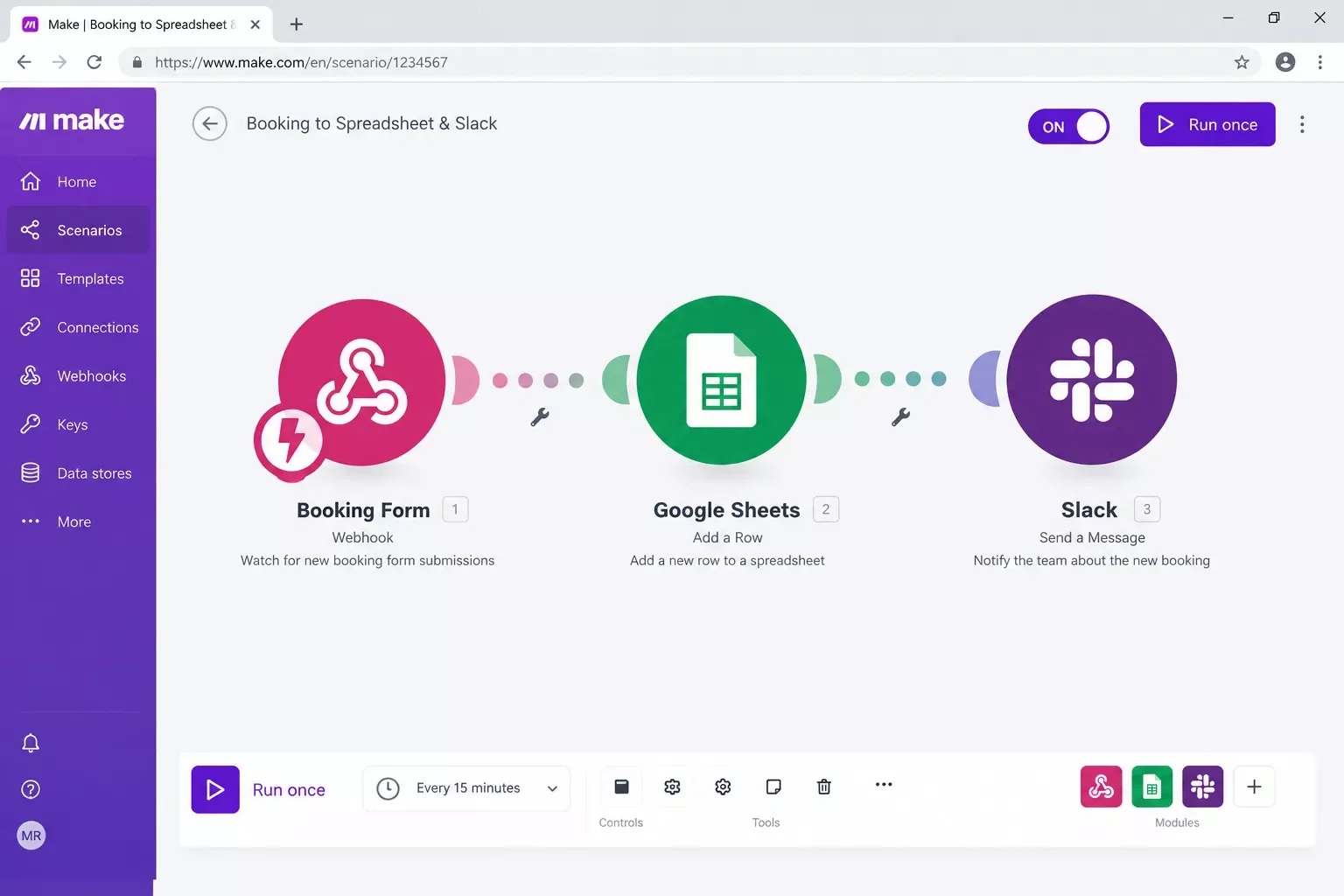
Here's what this looks like for an actual small business, not a hypothetical. A local home-services company was manually copying every new booking from their scheduling app into a spreadsheet, then emailing the customer a confirmation by hand. That's three separate steps for a single booking, every time.
In my experience helping small businesses map out their first automation, this exact pattern shows up constantly. It's rarely one big broken process. It's several small manual handoffs stacked on top of each other, and each one adds friction and room for error.
Once they connected their booking app to Make.com, the flow changed completely, and it solved the kind of headache covered in troubleshooting your spreadsheet automation. A new booking now triggers an automatic entry in their spreadsheet, a confirmation email goes out instantly, and their team gets a Slack notification, all without anyone touching a keyboard. What used to take five to ten minutes per booking now takes zero. The same principle applies if your lead source is a web form instead of a booking app; see this guide on fixing a form that isn't sending leads if that's your starting bottleneck.
For businesses that also want to pair this kind of setup with AI-driven tools, like auto-drafting customer replies or summarizing form responses, it's worth looking at how AI tools that pair with your Make.com stack can add extra leverage on top of the basic automation.
How to Get Started
Pick your single most repetitive task, the one you or your team does the exact same way more than five times a week. That's your first automation. Sign up for Make.com, connect the two apps involved in that task, and build one simple "if this happens, then do that" scenario before you try anything more complex.
2026 Advanced Tips & Scalability
Once your first workflow is running smoothly, you can layer in more without starting over. Two things are worth adding once you're comfortable with the basics.
Add AI to the trigger point. Instead of just moving data, you can have Make.com pass incoming customer messages or form responses to an AI step that drafts a first-pass reply or flags urgent requests before they hit your inbox. This isn't a hard requirement, but it's where a lot of small businesses find the next real time savings.
Build in permission checks as you grow. If you bring on a part-time assistant or a contractor, add a simple filter step so only the right person gets notified for the right task. It's a small addition, but it keeps your automation from becoming noisy as your team grows past just you.
Ready-to-Use Prompt
When a new [FORM SUBMISSION / BOOKING / PAID INVOICE] comes in from [APP NAME]:
1. Extract the customer name, contact info, and request details.
2. Add a new row to [SPREADSHEET / CRM] with this information.
3. Send a confirmation email to the customer using [EMAIL TEMPLATE].
4. Post a short summary to [SLACK CHANNEL / TEAM INBOX].
Only run this if [CONDITION, e.g., order total is over $50].
Use this as your starting scenario outline inside Make.com. Swap in your actual app names and it becomes your first real, working automation. If invoicing is part of your trigger chain, pairing this with the right payment gateways that automate fulfillment closes the loop from payment to delivery.
📌 Want this set up for you instead of building it yourself? If setting this up on your own isn't the best use of your week, this is exactly the kind of build I hand off, fully working, for small teams like yours. I map out your exact tools, build the connections, and hand you a system that just runs.
Want This Built For You?
Skip the trial and error. Tell me what you're trying to connect, and I'll build the workflow for you or point you to the closest done-for-you template.
Let's TalkConclusion
Connecting your business tools doesn't require a developer, a big budget, or weeks of setup. It just requires picking one repetitive task, wiring the right apps together with a tool like Make.com, and letting that connection run in the background from now on.
Start small. One workflow, one clear trigger, one clear action. Once that's working, everything else gets easier to add.
⚡ Pro Tip: Test your first automation with a fake, low-stakes submission before you connect it to real customer data. It takes two minutes and saves you from a messy fix later.
At SmartSoloFlow, this is the exact kind of system I build for small business owners who'd rather run their business than babysit five disconnected apps. If you want a working, tested version of this instead of building it yourself, reach out through the Contact page and let's talk about what you're trying to connect.
People Also Ask
What is the best business workflow software for a small business in 2026?
There's no single best tool for every business. Most small businesses do better connecting the apps they already use with Make.com, rather than switching to one giant new platform that tries to replace everything at once.
What's the difference between task management software and workflow management software?
Task software tracks what needs to get done, like a to-do list. Workflow software automates the handoff between steps, so information moves from one app to another without anyone copying it by hand.
Can workflow software connect to tools I already use without a developer?
Yes. No-code platforms like Make.com are built specifically for this. You connect your existing apps through a visual interface, no coding or developer hire required.
How much does workflow automation cost for a small business?
Make's paid plans start around $9-$16 a month for the entry tiers, with a free plan available for light use. Most small businesses stay on a low tier for their first several workflows.
Do I need any technical skills to build a connected workflow?
No. Make.com uses a visual, drag-and-drop interface. If you can follow a step-by-step guide, you can build your first workflow without writing any code.
Will connecting my tools this way break if one app updates?
Occasionally an app update changes a field name or setting, which can pause a workflow. Make.com flags this clearly so you can fix it in minutes, not days.
Can I connect more than two apps into one workflow?
Yes. Most Make.com scenarios link three or more apps together, like a form, a spreadsheet, and an email tool, all triggered by one event.
What if I'm not ready to fully automate my whole business yet?
Start with just one process. A single working automation, like invoice confirmations, is a better first step than trying to connect everything at once.
Found this guide useful? Share it with a fellow business owner who's still copying data between apps by hand. 🚀
Got a question or a workflow roadblock? Drop it in the comments below — happy to help.
Last Updated: September 11, 2026

// Comments