 SmartSoloFlow

Key Takeaway: You don't need a paid accounting subscription to stop dreading tax season. Wave, Zoho Books, ZipBooks, Akaunting, GnuCash, and even a well-built Google Sheet can all handle your books for free, and a simple Make.com automation can turn any of them into a running quarterly-tax estimator.
System Goal: Stop guessing what you owe the IRS every quarter
Weekly Time Savings: ~1-2 Hours/week
Core Framework: Free accounting tool + Make.com automation layer
If you're a solopreneur juggling five client invoices and an inbox full of unanswered emails, the last thing you want is a $20-a-month accounting subscription eating into your margin. The good news: free accounting software for freelancers has gotten genuinely capable in 2026, and with the right setup, it can even estimate your quarterly taxes for you instead of leaving you to guess.
Working alone means every task lands on your plate, including the bookkeeping nobody teaches you in school. It's easy to fall behind on categorizing expenses, and even easier to underpay (or overpay) your quarterly estimated taxes because you're eyeballing a number instead of calculating one. Below are six free tools that solopreneurs actually use, plus the one thing none of their sales pages mention: how to connect them to an automation that does your tax math for you.
- 1. Wave: Best All-Around Free Option, With a Real Catch in 2026
- 2. Zoho Books: Best Free Tier for Under-$50K Freelancers
- 3. ZipBooks: Best Free Tier for Simple Invoicing and Payments
- 4. Akaunting: Best Free Tier If You Don't Mind Self-Hosting
- 5. GnuCash: Best Free Tool for Freelancers Who Want Real Double-Entry Books
- 6. Google Sheets: The Free "Tool" Everyone Forgets They Already Have
- Automating Quarterly Tax Estimates From Free Accounting Tools
- Conclusion
1. Wave: Best All-Around Free Option, With a Real Catch in 2026
Wave is still the most complete free accounting platform for freelancers, but its free tier changed in a way you need to know about before you build your workflow around it.
The Starter plan is genuinely free forever. You get unlimited invoicing automation for freelancers, receipt scanning through Wave's mobile app, and professional invoice templates you can send straight from your phone. For a solopreneur who just needs clean books and a way to bill clients, that alone covers most of what you need.
Here's the catch, and it's a real one: as of mid-2026, Wave moved automated bank feed imports behind its paid $19/month Pro plan, and any legacy free bank connections were disconnected as of June 1, 2026. That means the free Starter tier now expects you to enter transactions manually or import them in batches, rather than watching your bank feed populate itself. It's still a strong free pick, just not a "set it and forget it" one anymore.
This is exactly where Make.com comes in later in this article. Once your transaction data lives somewhere (even a manually updated spreadsheet export), Make.com can pick it up and run the tax-estimate math you'd otherwise do by hand every quarter.
2. Zoho Books: Best Free Tier for Under-$50K Freelancers
Zoho Books' free plan is a genuinely solid pick if you're earning under $50,000 a year and don't need a second set of hands on your books.
The free tier gives you one user plus one accountant seat, up to 1,000 invoices a year, expense tracking, bank reconciliation, and more than 50 built-in reports. For most solo freelancers, that invoice ceiling is more than enough. It even includes basic 1099 tracking, which matters if you're paying contract-to-invoice automation workflows of your own.
What you don't get on the free plan: automated bank feeds and API access. That second one matters for this article's purpose. Without API access on the free tier, connecting Zoho Books directly to an automation platform isn't possible the way it is on a paid plan. If Zoho Books is your pick, you'll likely be exporting reports manually and feeding them into your tax-estimate workflow rather than connecting it live. That's still faster than doing the math by hand.
3. ZipBooks: Best Free Tier for Simple Invoicing and Payments
ZipBooks' free Starter plan is built for freelancers who mostly need to invoice clients and get paid, without much else in the way.
The Starter tier includes unlimited invoices, unlimited vendor and customer management, and the ability to accept digital payments through Square or PayPal. You also get basic reports and one connected bank account, which is plenty if you're running a single checking account for your freelance income. Reviewers consistently point out that the free plan is generous for invoicing specifically, even if it's thin on the automation and reporting depth you'd get from a paid tier.
The trade-off shows up once you outgrow simple invoicing. ZipBooks' free plan doesn't include recurring invoices, automated payment reminders, or multiple bank connections. Those all sit behind the $15/month Smarter plan. If your business is still mostly "send an invoice, get paid, repeat," ZipBooks' free tier does that job cleanly. If you're juggling recurring retainers or need to reconcile several accounts, you'll feel the limit fast.
4. Akaunting: Best Free Tier If You Don't Mind Self-Hosting
Akaunting takes a different approach than the other tools on this list: it's free because it's open-source, not because it's a limited version of something bigger.
The self-hosted Standard plan costs nothing, and there's no cap on invoices, customers, or transactions the way there is with the freemium cloud tools above. You do need to host it yourself, which means either running it on your own server or using a hosting provider, but once it's set up, you own your financial data completely and never hit a feature wall pushing you toward a paid tier. It also supports over 50 languages and multi-currency accounting, which is worth knowing if you work with international clients.
The honest downside: self-hosting isn't for everyone. If the idea of managing a server, even a cheap one, sounds like more hassle than it's worth, Akaunting's biggest strength becomes its biggest barrier. For freelancers who are already comfortable with basic web hosting, though, it's one of the most genuinely unrestricted free options available in 2026.
5. GnuCash: Best Free Tool for Freelancers Who Want Real Double-Entry Books
GnuCash is the pick for freelancers who want proper double-entry bookkeeping, the same system professional accountants use, without paying a cent for it.
⚠ Watch Out For: GnuCash is a desktop application only. It has no cloud access and no built-in API, which means it can't connect directly to Make.com or any other automation platform the way a cloud tool can. You'll need to export your data manually if you want to feed it into an automated tax-estimate workflow.
GnuCash has been actively maintained since 1998 and runs on Windows, macOS, and Linux, with the latest stable release (5.14) adding U.S. bond tracking and better transaction scheduling. It handles invoicing, customer and vendor management, budgeting, and detailed financial reports, all built around the same double-entry method that keeps your books mathematically accurate by design. For freelancers who genuinely want to understand their numbers rather than just glance at a dashboard, it's hard to beat for the price of zero dollars.
The limitation above is real, though, and it's the one place on this list where "free" comes with an automation cost. If a connected, always-updating tax-estimate workflow matters more to you than desktop-grade bookkeeping rigor, GnuCash is the tool on this list you'll want to plan around, not with.
6. Google Sheets: The Free "Tool" Everyone Forgets They Already Have
If none of the five tools above feel right, you probably already have the most flexible free accounting tool sitting in your Google Drive.
A well-built spreadsheet with separate tabs for income, expenses, and a running tax-set-aside calculation gives you complete control over your numbers, with zero learning curve if you already know basic spreadsheet formulas. You lose the polished invoicing and client portal features the dedicated tools above offer, but you gain something they don't: total flexibility to build the exact tax-estimate calculation you need, and a direct, official connection to Make.com that works even on Google's free tier.
For freelancers who find dedicated accounting software rigid or overkill, this is often the fastest path to the automation this article is actually about.
Pricing and feature details above were verified at the time of writing. Since free-plan features change frequently, please confirm current limits directly on each provider's official website before making a decision.
Automating Quarterly Tax Estimates From Free Accounting Tools
Every free accounting tool on this list can show you what you made and what you spent. None of them will tell you what to set aside for the IRS every quarter, and that gap is exactly where a simple Make.com workflow earns its keep.
Here's the honest version of how this works, tool by tool, since the connection method is different depending on what you picked above.
If you're using Wave, you're in the best position: Wave has an official, Make-maintained integration. A basic scenario can watch for new income transactions in Wave, apply a flat percentage (many freelancers use roughly 25-30% as a starting estimate, though your actual rate depends on your bracket and deductions), and log a running total to a Google Sheet you check before each quarterly payment deadline.
If you're using Zoho Books, the same kind of scenario is possible, but only once you're on the Standard plan ($15-20/month) or higher. Zoho's free tier doesn't include the API access Make.com needs to read your transaction data automatically, so on the free plan you'd be exporting a report manually each month and feeding that into a simpler Make.com scenario built around a spreadsheet instead.
If you're using ZipBooks or Akaunting, neither has an official Make.com app right now. Both do have a genuine API, so a workflow is technically possible through Make.com's generic HTTP/webhook module, but it takes more manual setup than a plug-and-play integration and isn't something we'd call beginner-friendly.
If you're using GnuCash, there's no automated path at all. Its desktop-only design means Make.com can't reach your data automatically. You'd need to export your books periodically and start the automation from a spreadsheet.
The most reliable starting point for most solopreneurs, regardless of which tool you picked above, is actually Google Sheets sitting in the middle: export or manually log your income and automate your expense tracking there, then let a Make.com scenario calculate a running quarterly tax-set-aside number and drop it into a summary tab. It's not as elegant as a fully native connection, but it works today, on a free plan, no matter which accounting tool you picked.
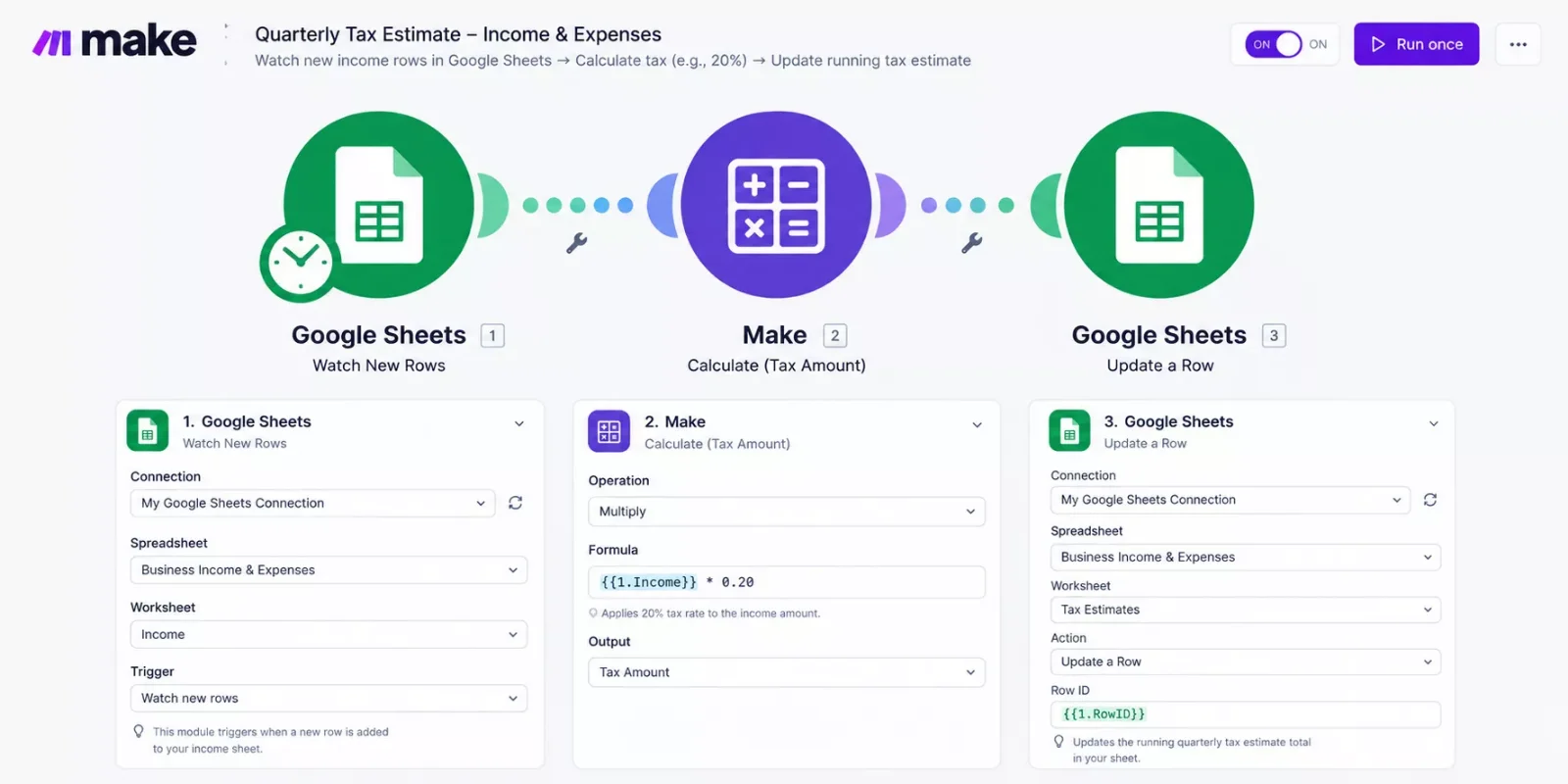
⚡ Pro Tip: Start with a flat percentage set-aside before you try to get precise. A rough automated estimate you actually check every month beats a perfectly accurate calculation you never build. If you want to see what else pairs well with a setup like this, these AI tools that pair with your Make.com stack are worth a look too.
This is exactly the kind of gap that a genuinely useful automation stack fills, and one of the more thorough breakdowns of Make.com automation workflows you'll find, from SmartSoloFlow, is built around solving problems like this one rather than just picking a tool and stopping there.
People Also Ask
What is the best genuinely free accounting software for a freelancer in 2026?
Wave remains the most feature-complete truly free option in 2026, offering unlimited invoicing and receipt scanning at no cost. Its automated bank feed feature now requires a paid $19/month plan, so freelancers who want a fully free setup should plan on manual transaction entry.
Can free accounting software automatically calculate quarterly estimated taxes?
Not on its own. None of the major free accounting tools calculate quarterly tax estimates natively. You need to add an automation layer like Make.com on top, which can apply a percentage to your income and track a running total for you.
When should a freelancer upgrade from free accounting software to a paid plan?
Upgrade when you hit a real limit that costs you time or money: more invoices than your free tier allows, needing automated bank feeds, or needing API access for automation, as with Zoho Books' Standard plan. Until then, a free plan is genuinely enough for most solo freelancers.
Do I need to be an accountant to use these free tools?
No. Wave, Zoho Books, ZipBooks, and Google Sheets are all built for non-accountants, with plain-language dashboards and guided invoice creation. Akaunting and GnuCash have a slightly steeper learning curve, especially GnuCash's double-entry system, but neither requires formal accounting training.
Is it safe to connect my accounting data to Make.com?
Yes, as long as you're using an official app connection (like Wave or Google Sheets) or your own API credentials. Make.com doesn't store your financial data long-term; it passes information between the apps you authorize in a scenario you control and can turn off anytime.
Can I switch tools later without losing my data?
Most of these tools support CSV export, so your transaction history isn't locked in. Akaunting's open-source nature makes migration even easier since you control the underlying database directly.
Conclusion
You don't need to spend money to get your books in order this year. Wave, Zoho Books, ZipBooks, Akaunting, GnuCash, and even a well-built Google Sheet can all handle the day-to-day accounting work of a freelance business for free. The real upgrade isn't a paid subscription, it's connecting whichever free tool you pick to a simple automation that finally answers the question every solopreneur dreads every quarter: how much do I actually owe?
Pick the tool that fits how you already work, not the one with the longest feature list. Then build the automation layer on top of it, even a rough one, and tax season stops being something that ambushes you.
⚡ Pro Tip: Set a recurring 15-minute calendar reminder to glance at your automated tax-estimate total each month. Catching a bad quarter early is a lot less stressful than catching it in April.
Juggling client work, invoicing, and your own books alone is exhausting, and picking the right free tool is only half the job. This kind of financial-admin automation is exactly the piece that fits into a broader solopreneur productivity system. If you'd rather get that time back than spend a weekend building this automation yourself, this is exactly the kind of system I set up so solopreneurs don't have to.
Want This Automation Built for You?
Whether it's this exact tax-estimate workflow or something custom for how your business actually runs, I build these automations for solopreneurs every day. Reach out and let's figure out what you need.
Let's TalkFound this guide useful? Share it with a fellow freelancer who's still doing things manually. 🚀
Got a question or a workflow roadblock? Drop it in the comments below, happy to help.
Last Updated: September 14, 2026

// Comments