 SmartSoloFlow

Key Takeaway: A free CRM stores your contacts and deals, but it won't grab a lead the second someone fills out a form. One simple Make.com automation does that job for you, starting on day one.
Primary Tool(s): HubSpot Free / Attio + Make.com
Build Time: ~1-2 Hours
A free CRM for startups solves half the problem. It gives you a place to store contacts and track deals, but it won't catch a new lead the moment they fill out a form on your site or click your ad. That's where most small business owners get stuck, stuck copying names from an inbox into a CRM by hand, hours after the lead actually showed interest. This guide shows small business owners exactly how to close that gap, using a free CRM like HubSpot Free or Attio, paired with one Make.com automation, so every lead lands in your system automatically. You don't need a developer, and you don't need a paid plan to start. Leads contacted within five minutes are 21 times more likely to convert than leads left waiting thirty minutes, according to the widely-cited InsideSales.com/Oldroyd study. Automating capture is how you actually hit that window, every time, without babysitting your inbox.
What Is a Free CRM (and What It Can't Do Alone)?
A free CRM is a tool that stores your contacts, tracks deals, and keeps your sales pipeline organized, all without a monthly bill. It won't, on its own, notice the second a stranger fills out your contact form and pull them into your system. That part still takes a person, or an automation, to make happen.
Here's the thing most guides skip. Tools like HubSpot's free CRM and Attio genuinely do a lot out of the box. Attio's contact records can even auto-fill company and role details from a synced inbox. But native lead capture usually stops at "connect your form tool" or "check your email inbox." It doesn't reach into every corner of your marketing, an ad campaign here, a landing page there, a chatbot on another page entirely, and pull all of it into one place automatically.
That gap matters more than it sounds. Leads contacted within five minutes are 21 times more likely to qualify than leads contacted after thirty minutes, based on the widely-cited InsideSales.com/Oldroyd lead response research. If a lead sits in your inbox for two hours because you were mid-call with another client, you've already lost most of your shot.
This is where Make.com comes in. It's not a CRM replacement, it's the connective layer that watches every source a lead could come from (a form, an ad platform, a chatbot) and drops that lead straight into your free CRM the moment it arrives. No copy-pasting, no end-of-day catch-up session. You set the automation once, and it runs quietly in the background from then on.
3 Major Business Benefits of a Free CRM for Startups
A free CRM paired with automated lead capture gives startups three concrete wins: instant lead visibility without manual entry, faster follow-up that closes more deals, and a pipeline that stays organized as the business grows.
- You stop losing leads to a full inbox. Manual data entry is a real, measurable drag on small teams. Sales reps spend more than an hour a day on manual data entry, according to CRM.org's 2026 research, and for a solo founder wearing five hats, that hour is the same hour you'd rather spend closing a deal. Automated capture removes that task entirely.
- You respond faster, which wins more deals. Since automation drops leads into your CRM the moment they arrive, you (or a follow-up email) can reach out inside that critical five-minute window instead of hours later. Speed isn't a nice-to-have here, it's the actual difference between a closed deal and a cold lead.
- You get a system that scales without a rebuild. A manual process built for ten leads a month falls apart at fifty. An automated one handles fifty the same way it handles ten. You add a new lead source, a new ad campaign, a new landing page, and the same automation just picks it up.
None of this requires a developer, and none of it requires leaving the free tier of your CRM. The automation lives in Make.com, not in an expensive CRM upgrade.
The Real Gap: Automating Lead Capture With a Free CRM
Automating lead capture with a free CRM means connecting every place a lead can come from (forms, ads, chatbots) directly into your CRM, without you touching a keyboard. This is exactly what most "best free CRM" guides leave out.
Plenty of roundups will tell you which free CRM has the nicest interface or the most generous contact limit. What they don't show you is what happens after someone submits a lead form on a Tuesday night. Does it sit in an inbox until Wednesday morning? Or does it land in your CRM, tagged and ready, before you've even seen the notification?
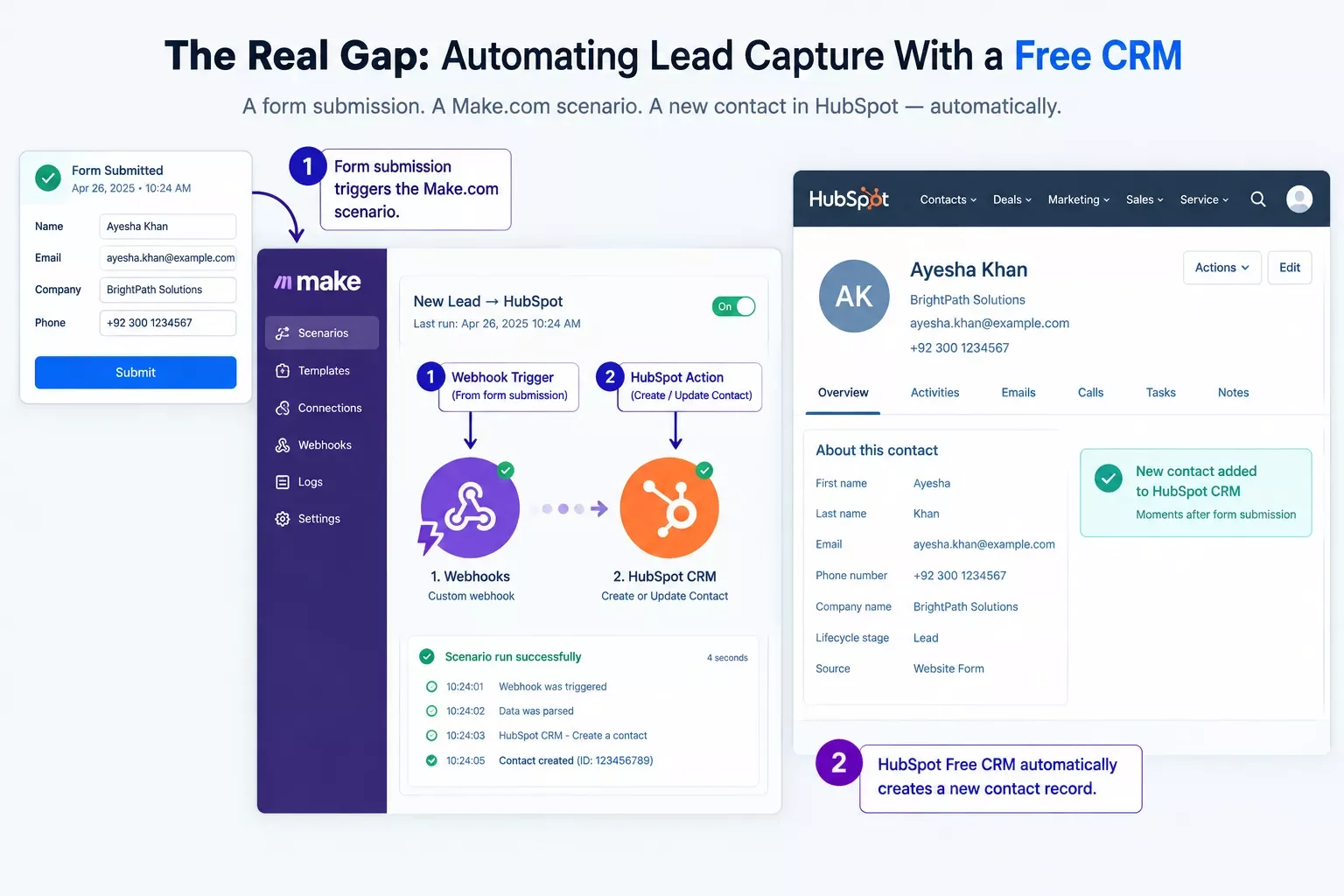
The pattern is simple. Native automation on a free plan is built to keep you inside that one platform's walls. Make.com sits above all your tools instead, watching for the lead and routing it wherever it needs to go, CRM included.
How This Automation Works
The automation runs in four steps: a new lead comes in from a form or ad, a webhook catches it instantly, Make.com maps the data into your CRM's fields, and a follow-up email goes out automatically. No manual step in between.
Nothing here needs a developer. Make.com's visual builder lets you connect these four steps with clicks, not code, which is exactly why this fits a startup with no dev budget. Once it's built, it just runs. If you want to go further with the follow-up step itself, our guide on setting up automated email follow-ups covers that piece in more depth.
Real-Life Use Case
For example: a two-person startup selling a subscription box service was collecting leads from a Facebook ad campaign and a website contact form, both landing in a shared inbox. Every morning, one founder spent thirty minutes manually adding new names into HubSpot Free before the day's actual work could start.
After setting up one Make.com scenario, both lead sources routed straight into HubSpot Free the moment they came in, complete with a tag showing which channel the lead came from. The morning routine disappeared. The founder's time went back to actually talking to leads instead of entering them.
This kind of setup isn't unusual, it's the exact gap between "we have a free CRM" and "our free CRM actually works for us" that most startups hit around their second or third lead source. It's a similar story to how one solopreneur automated their own CRM, just applied to a small team instead of a single founder.
How to Get Started
Start with the lead source you get the most volume from right now, whether that's a website form, a Facebook Lead Ad, or a landing page tool. Sign up for a free Make.com account, then build a simple two-step scenario: a webhook or native trigger from that one source, connected to a "create record" action in your CRM. Test it with one real submission before connecting a second source. Once your no-code build is live, our breakdown of what to do after your no-code build goes live covers the maintenance side of things.
2026 Advanced Tips & Scalability
Once the basic capture flow is running, add a simple lead-scoring filter inside Make.com, routing high-intent leads (say, anyone who filled out a "request a demo" form instead of a newsletter signup) to an instant notification, while lower-intent leads just get added quietly for later follow-up. This one filter step is often the difference between chasing every lead equally and actually prioritizing the ones ready to buy. If you want to stack more capability on top of this setup, our roundup of AI tools that pair well with Make.com is a good next stop.
As you add more lead sources, resist the urge to build a brand-new scenario for each one. Route them all into the same core scenario using a router step instead, so your CRM tagging and follow-up logic stay consistent no matter where the lead came from.
Write a short, friendly follow-up email for a new lead who just filled out a "request a demo" form on my startup's website. Keep it under 80 words, mention I'll be reaching out within the next hour, and end with a simple question about their biggest current challenge. My company: [YOUR COMPANY NAME]. What we do: [ONE-SENTENCE DESCRIPTION].Drop that prompt into any AI writing tool, plug in your own details, and you've got a follow-up template ready to trigger automatically the moment a lead lands in your CRM. If you're still picking which AI writer to use for this, our piece comparing AI writing tools can help you choose.
People Also Ask
What is the best free CRM for a startup that plans to scale quickly?
HubSpot Free and Attio are both strong picks for scaling startups. HubSpot Free offers a wider built-in feature set, while Attio's clean, flexible data model makes it easier to reshape as your team and processes grow. Either works well once automated lead capture is added.
Can a free CRM automatically capture leads from a website form or ad campaign?
Most free CRMs handle one connected source natively, like a matching form builder. For multiple sources, ads, chatbots, and separate landing pages, feeding into one CRM automatically, you'll need a connector like Make.com sitting on top of the free tier.
When should a startup upgrade from a free CRM to a paid plan?
Upgrade when you hit a hard limit the free plan can't get around, like contact caps, missing reporting, or team-seat restrictions. Automation needs alone rarely force an upgrade, since Make.com covers most of that gap without touching your CRM's paid features.
Do free CRMs limit the number of contacts or automations I can have?
Yes, most free CRM plans cap contacts, users, or built-in automation runs. Routing your automation through Make.com instead of the CRM's own automation builder means your lead-capture logic isn't affected by those internal caps.
Can I connect a free CRM to my ad platform without upgrading?
Yes, in most cases. Ad platforms like Meta and Google generally offer lead-form exports or webhooks that Make.com can catch directly, so the connection happens outside your CRM entirely, and your CRM stays on its free tier.
Do I need any coding experience to set this automation up?
No. Make.com's builder is entirely visual, drag, drop, and connect. If you can describe your process in a sentence, you can usually build it in Make.com in under an hour.
Will this automation break if I switch CRMs later?
Only the CRM step needs updating. Make.com scenarios are modular, so swapping HubSpot Free for Attio (or vice versa) usually means changing one action, not rebuilding the whole workflow.
How much does Make.com cost to run this?
Make.com's free tier includes 1,000 credits a month, enough to cover a typical startup's early lead volume, roughly 200-250 leads with a simple 4-step scenario. You'll only need a paid Make.com plan once your lead volume or number of active scenarios grows beyond that.
Conclusion
A free CRM gets you organized. Automated lead capture gets you fast. Put the two together with one Make.com scenario, and you've closed the exact gap most "best free CRM" lists never mention, without spending a dollar on a developer or a paid plan.
This is exactly the kind of practical, no-code solutions breakdown SmartSoloFlow focuses on when it comes to Make.com automation workflows, connecting the tools you already have instead of asking you to buy new ones. For the wider landscape these tools fit into, our No-code solutions overview is a good next read.
⚡ Pro Tip: Test your automation with a real form submission, not a fake one, before trusting it with live leads. A small field-mapping mistake is far easier to catch on one test lead than on fifty real ones.
⚠ Watch Out For: Some free CRM plans cap the number of automated actions or API calls per month. Check your CRM's specific free-tier limits before routing high lead volume through it, so you're not surprised by a sudden block mid-month.
If setting this up yourself isn't the best use of your week, this is exactly the kind of build I hand off, fully working, for small teams like yours. If you'd rather have someone else wire it up correctly the first time, SmartSoloFlow builds exactly this kind of automation for solo founders and small teams every day.
Want This Automated for You Instead?
Reach out and we'll set up your free CRM's lead capture correctly, tested and working, without you touching Make.com yourself.
Let's TalkFound this guide useful? Share it with a fellow freelancer who's still doing things manually. 🚀
Got a question or a workflow roadblock? Drop it in the comments below — happy to help.
Last Updated: September 6, 2026

// Comments