 SmartSoloFlow

Key Takeaway: Building your no-code app is only half the job. The real time savings show up after, once you connect it to the rest of your business.
Primary Tool(s): Your no-code builder (Bubble, Webflow, Airtable, etc.) + Make.com
Build Time: ~30-60 minutes for your first connection
You finished building your app with a no-code development platform, and now you're stuck wondering what comes next. For small business owners without a developer on staff, that's exactly where most no-code projects quietly stall. This guide covers what no code development actually looks like after the building stops, how to connect your finished build to the tools you already use, and why an automation platform like Make.com is usually the missing piece. You'll get three real benefits of connecting your build properly, a practical example of what this looks like in action, and one clear first step you can take today, without hiring a developer or learning to code. If you've ever built something no-code and then watched it just sit there disconnected from your actual business, this is written for you.
What Does "Connecting Your No-Code Build" Actually Mean?
Connecting your no-code build means linking the app or workflow you just finished to the other tools your business already runs on, like your inbox, your CRM, or your spreadsheets, so information moves between them without you copying and pasting it by hand. If your build itself still isn't working right, that's a different problem — see our guide to fix a no-code app builder that's not working first, then come back here.
Most no-code development tutorials stop the moment your app works. Nobody tells you what happens on day two, when a customer fills out your new form and you still have to manually forward that lead to your sales tracker.
In my experience working with small business owners, this is exactly where the "no-code savings" quietly disappear. You save weeks by skipping the developer hire, then spend hours every week doing the connecting work a developer would have automated from day one. For a wider look at how no-code fits into a small business, see our no-code solutions overview.
That connecting work has a name: automation. Gartner projects that by 2026, roughly 80% of new business applications will be built by people outside traditional IT roles, which means more finished no-code builds are sitting unconnected than ever before. The tool most small teams reach for to close that gap is Make.com. Make.com sits between your no-code build and everything else, watching for a trigger, like a new form submission, and running the next steps automatically.
Connecting Your Finished No-Code Build to Business Automation
You connect a finished no-code build to business automation by identifying the moment something happens in your app, like a new signup or a status change, and using a platform like Make.com to trigger the next action automatically: an email, a spreadsheet update, or a message to your team.
Here's what that flow typically looks like for a small business:
That's it. No developer, no custom code. Most of the top-ranking guides on no code development stop at "here's how to build it" and never touch this step, which is exactly why so many small business owners end up with a finished build that still runs on manual copy-paste.
The setup takes longer to explain than it does to actually do. Once your no-code build can send a webhook (most modern builders support this natively — see Make.com's own webhook documentation for the technical details), Make.com picks it up and handles everything downstream: no more re-typing the same lead into three different places.
3 Major Business Benefits
Connecting your finished no-code build to automation delivers three concrete wins: it saves hours of manual data entry every week, it cuts your error rate since nothing gets retyped by hand, and it lets your app actually do the job you built it for instead of sitting half-finished.
- 1. You get your time back. Every form submission, signup, or status change that used to mean five minutes of manual forwarding now happens instantly, without you touching it.
- 2. Fewer mistakes reach your customers. Manual copy-paste is where typos, missed leads, and duplicate entries creep in. Automation moves the exact same data every time.
- 3. Your build finally earns its keep. A no-code app that isn't connected to anything is just a fancy form. Automation is what turns it into an actual system running your business in the background — the same logic that works for a solopreneur automating their CRM applies here too.
None of this requires touching a line of code. It's the same drag-and-drop logic you already used to build your app in the first place, just pointed at the connection instead of the interface.
Not sure how to wire this up yourself?
If untangling the connection between your no-code build and the rest of your tools isn't the best use of your week, this is exactly the kind of build I hand off, fully working, for small teams like yours.
Let's TalkReal-Life Use Case
Picture a small landscaping company that built a no-code intake form to capture new customer requests. Before connecting anything, the owner checked the form manually every morning and typed each new request into a separate spreadsheet by hand.
After connecting the form to Make.com, a new submission now automatically drops into the spreadsheet, sends the owner a text alert, and emails the customer a confirmation, all within seconds of them hitting submit. Some of these numbers may vary by business, but the underlying pattern (manual intake replaced by instant automated handling) is consistent across small no-code builds like this one — it's the same pattern that shows up when freelancers automate invoicing for freelancers.
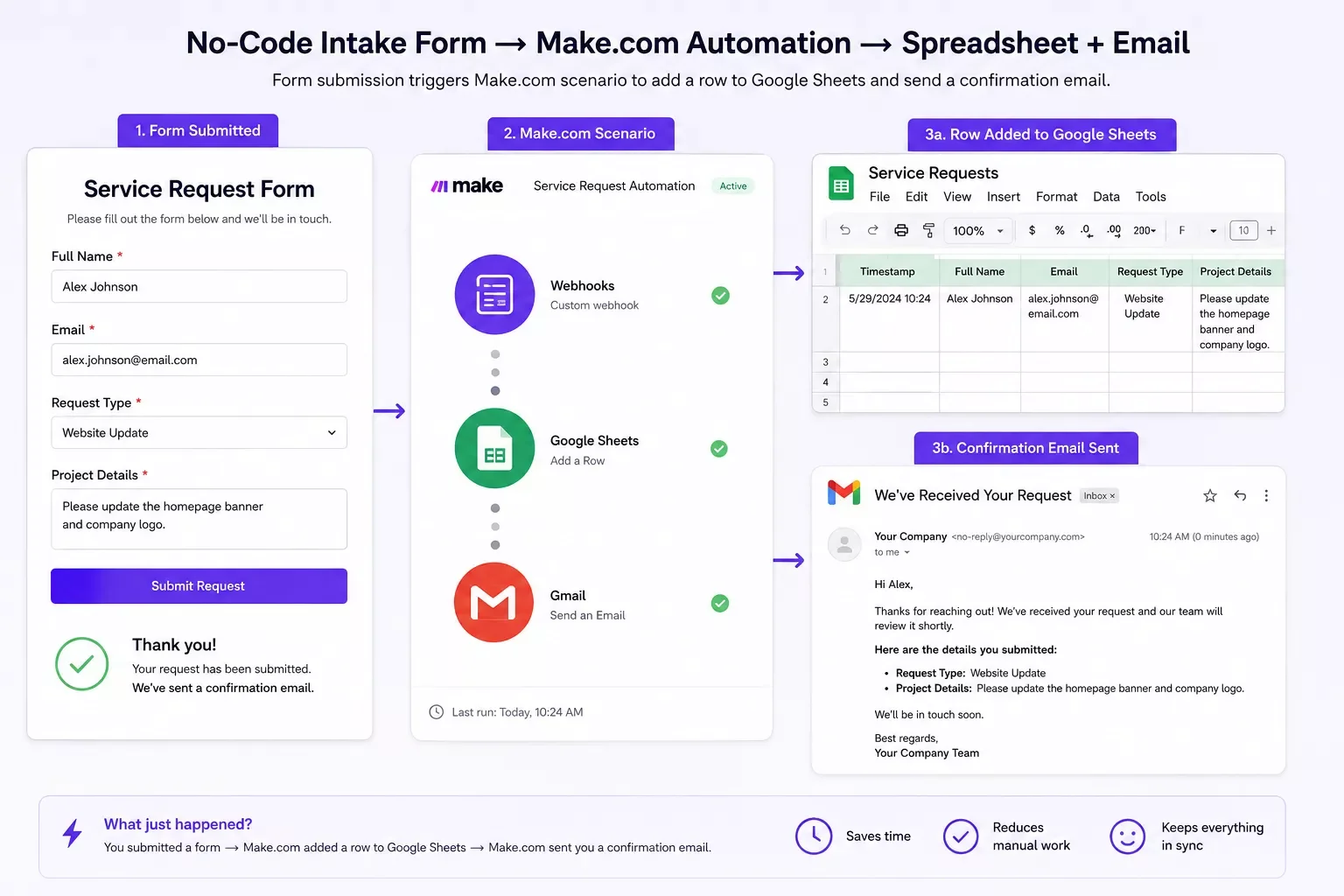
What used to take a few minutes of manual work per lead now takes zero. And because SmartSoloFlow builds these exact kinds of Make.com automation workflows for small business owners every day, this pattern shows up constantly: the build was never the hard part, the connection was.
How to Get Started
Start with the one connection that would save you the most time right now, not every connection at once. Pick your busiest manual handoff, like a new lead or a new order, and automate that single step first. Not sure which no-code builder fits your skill level in the first place? Compare low-code app builders before you commit.
When [your no-code build] receives a new [form submission / signup / order]:
1. Trigger a webhook to Make.com
2. Add the new entry to my [spreadsheet / CRM]
3. Send a confirmation email to the customer
4. Notify me by [Slack / text / email]
Drop that into your no-code builder's webhook settings and a new Make.com scenario, and you've got your first working connection in under an hour.
2026 Advanced Tips & Scalability
Once your first connection is running, the next step is layering in AI so your automation makes small decisions instead of just moving data around. This is where a lot of 2026-era no-code development is heading, and it's a natural next move once the basics are connected. If you want a starting shortlist, see our roundup of AI tools that pair with your Make.com stack.
A common example: instead of just forwarding a new lead to your spreadsheet, you can have Make.com pass the lead's message through an AI step first, one that scores how urgent it is or drafts a first-pass reply for you to review. You're not building a chatbot from scratch. You're adding one more block to the same automation you already set up.
Scalability works the same way. As your business adds more forms, more tools, or more team members, you don't rebuild your no-code app, you add more triggers into the same Make.com automation. The connection layer scales without touching the interface your customers actually see.
A word of caution here: don't try to automate everything on day one. Small business owners who connect one workflow well tend to stick with automation. Owners who try to wire up ten connections at once tend to abandon the whole thing halfway through.
⚠ Watch Out For: Automating a broken manual process just makes the mistakes happen faster. Fix the process first, then connect it.
People Also Ask
What is no-code development and how does it work?
No-code development is building software using visual, drag-and-drop tools instead of writing code. You arrange pre-built blocks like forms, databases, and logic rules to create a working app, then connect it to automation tools like Make.com to keep it running without manual upkeep.
Is no-code development good enough for a real small business, or just prototypes?
It's good enough for real, ongoing business use, not just prototypes. The limiting factor usually isn't the no-code platform itself, it's whether the build gets connected to the rest of your business. A connected no-code app can run daily operations for years.
What happens after you build something no-code — how do you connect it to your other business tools?
You connect it by setting up a trigger, like a new form entry or status change, and routing that trigger through an automation platform like Make.com. From there, Make.com updates your spreadsheet, sends emails, or notifies your team automatically, with no manual re-entry required.
Do I need to know how to code to connect my no-code build to automation?
No. Connecting your build to Make.com uses the same visual, no-code logic you used to build the app itself. You're linking blocks together, not writing scripts.
How much does it cost to automate a finished no-code build?
Make.com has a free tier that covers light automation, with paid plans scaling as your task volume grows. For most small businesses starting with one or two connections, the free tier is often enough to start.
Can I connect more than one no-code app to the same automation?
Yes. Make.com isn't tied to a single builder, so you can route data between Bubble, Webflow, Airtable, or any tool with a webhook, all inside one automation.
What's the easiest first automation to set up?
Start with your busiest manual handoff, usually a new lead or order form. Automating that single trigger first gives you the fastest, most noticeable time savings.
Conclusion
Building your app was the hard part everyone talks about. Connecting it is the quiet step that actually decides whether it saves you real time. Most no-code development guides stop at the build, but the payoff for a small business owner shows up after that, once the manual copy-paste disappears for good.
⚡ Pro Tip: Automate your single busiest manual handoff first. One working connection you actually trust beats five half-finished ones.
If you've read this far and you're realizing your finished build has been sitting disconnected, that's genuinely fixable, and it's usually a lot faster than the build itself was. The tip above alone is enough to get your first automation running today, no purchase required.
The full, done-for-you version of this, where every connection between your no-code build and the rest of your business is set up and tested for you, is exactly what I build as a No-Code Architect at SmartSoloFlow.
Want your no-code build fully connected, without doing it yourself?
Whether it's this exact kind of automation or something fully custom for how your business runs, I build it and hand it off working. Reach out and let's talk through it.
Let's TalkFound this guide useful? Share it with a fellow small business owner whose no-code build is still sitting disconnected. 🚀
Got a question or stuck on a specific connection? Drop it in the comments below — happy to help.
Last Updated: September 4, 2026

// Comments