 SmartSoloFlow

Key Takeaway: Zoho Inventory's native integrations aren't built to handle busy multi-app setups, but a central automation layer fixes the syncing chaos for good.
Primary Tool(s): Zoho Inventory + Make.com
Build Time: ~1-2 Hours
If Zoho Inventory's integrations keep breaking, you're not imagining it. Small business owners who connect no-code solutions like Zoho Inventory to Shopify, Zoho Books, or other tools often hit sync failures they can't afford to keep fixing manually. This guide walks through the real reasons those connections fail and exactly how to fix each one for good.
You don't need a developer or a bigger Zoho plan to solve this. A more reliable connection method exists, and it works with the tools you're already using.
Common Mistakes That Break Your Zoho Inventory Integrations
Most Zoho Inventory sync failures trace back to a handful of repeat offenders: rate limits, timing mismatches, mismatched field mapping, and manual re-syncing habits that mask the real problem instead of fixing it.
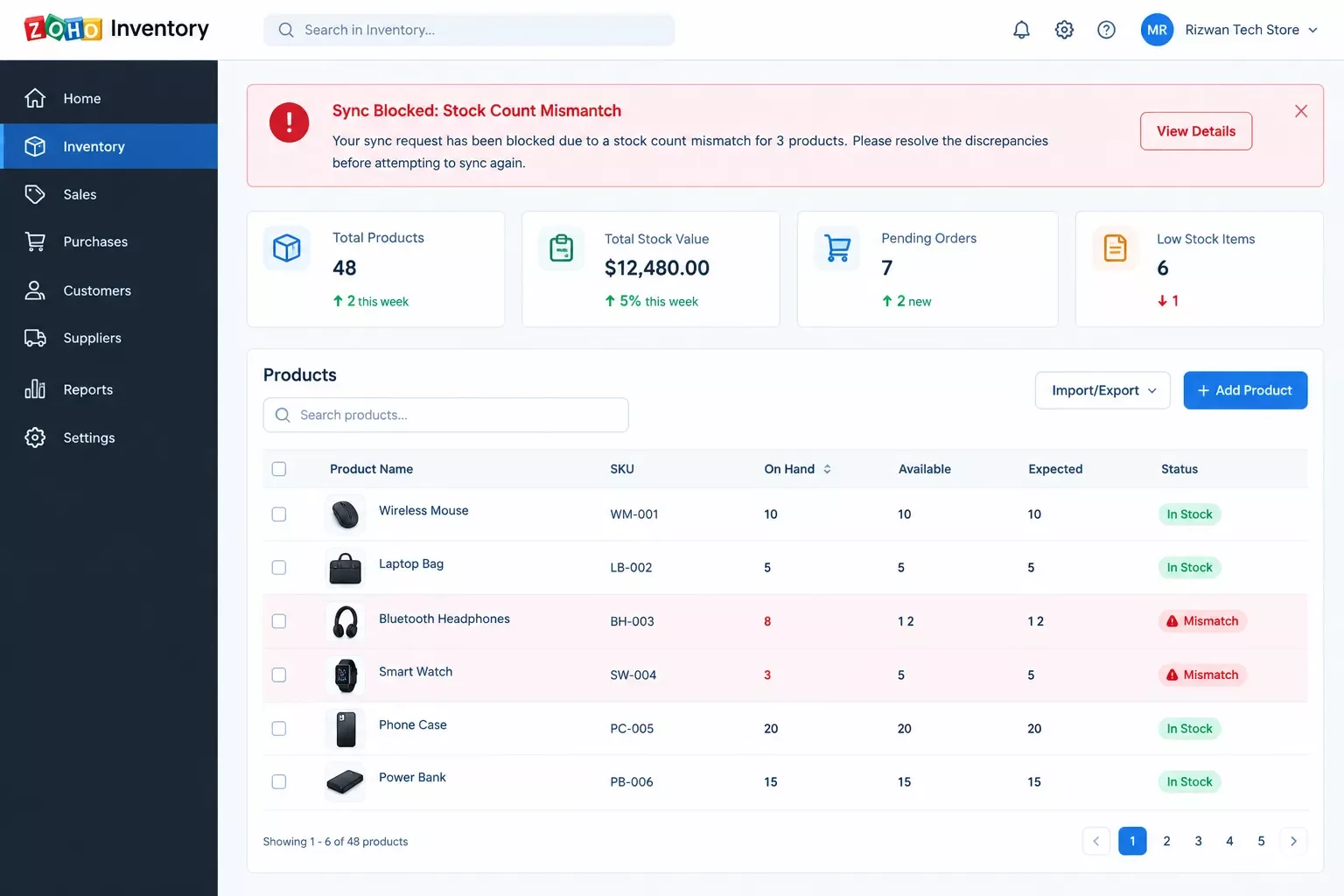
- API rate limits get hit during busy periods. Zoho's own error logs flag requests as blocked when a store sends too many update calls in a short window, which happens fast during a sale or restock day.
- Shopify inventory counts change on their own. Users on Zoho's own community forums have reported stock numbers shifting unexpectedly after switching to multi-location tracking with a Shopify connection active, with no clear explanation from either side.
- OAuth connections quietly expire. Native integrations sometimes need re-authentication, and when that happens silently, your sync just stops working with no alert telling you why.
- Field mapping breaks between Zoho Books and Zoho Inventory. A renamed custom field or a new SKU format can throw off the match, causing invoices or orders to land in the wrong place.
- Some integrations are locked behind higher-tier plans. Reviewers on Capterra have specifically flagged this as frustrating for growing businesses that started on a lower plan and didn't expect certain connections to require an upgrade.
Here's the part most reviews skip: a tool like Make.com sits between Zoho Inventory and everything else, watching for exactly these failure points and routing around them automatically, instead of waiting for you to notice a mismatch three days later.
Why Zoho Inventory's Integrations Keep Breaking in the First Place
Zoho Inventory's native integrations were built for simple, one-to-one syncing between two apps, not for the busier, multi-app setups a growing small business actually runs. That mismatch is the root cause behind almost every issue on the list above.
Think about what a native connector actually does. It checks in on a schedule, pulls or pushes a batch of updates, and moves on. It doesn't watch for conflicts in real time, and it doesn't retry gracefully when something fails mid-sync. So when your store has a busy afternoon and three systems are all trying to update the same stock count within minutes of each other, the native connection has no real way to referee that traffic. It just fails, sometimes silently.
This is also why the OAuth expiration problem catches so many owners off guard. A native integration treats re-authentication as a one-time setup step, not an ongoing thing to monitor. Once that token quietly lapses, nothing tells you your sync has stopped. You just find out later, usually when a customer asks why an order shows the wrong quantity. This is a similar breakdown pattern to what happens with business process automation tools that weren't designed for real-time multi-app coordination either.
That's the real difference. A central automation layer sits between your apps, watches for failures, and retries or reroutes instead of just giving up. It's not that Zoho Inventory is a bad tool. It's that its integrations weren't designed to be the whole safety net for a business running several connected apps at once.
Fixing Glitchy Zoho Inventory Third-Party Integrations
The fastest fix is routing your Zoho Inventory connections through Make.com instead of relying on native, one-to-one integrations. Make.com adds retry logic, error alerts, and a buffer against rate limits, so a failed sync gets caught and corrected instead of silently breaking your stock counts.
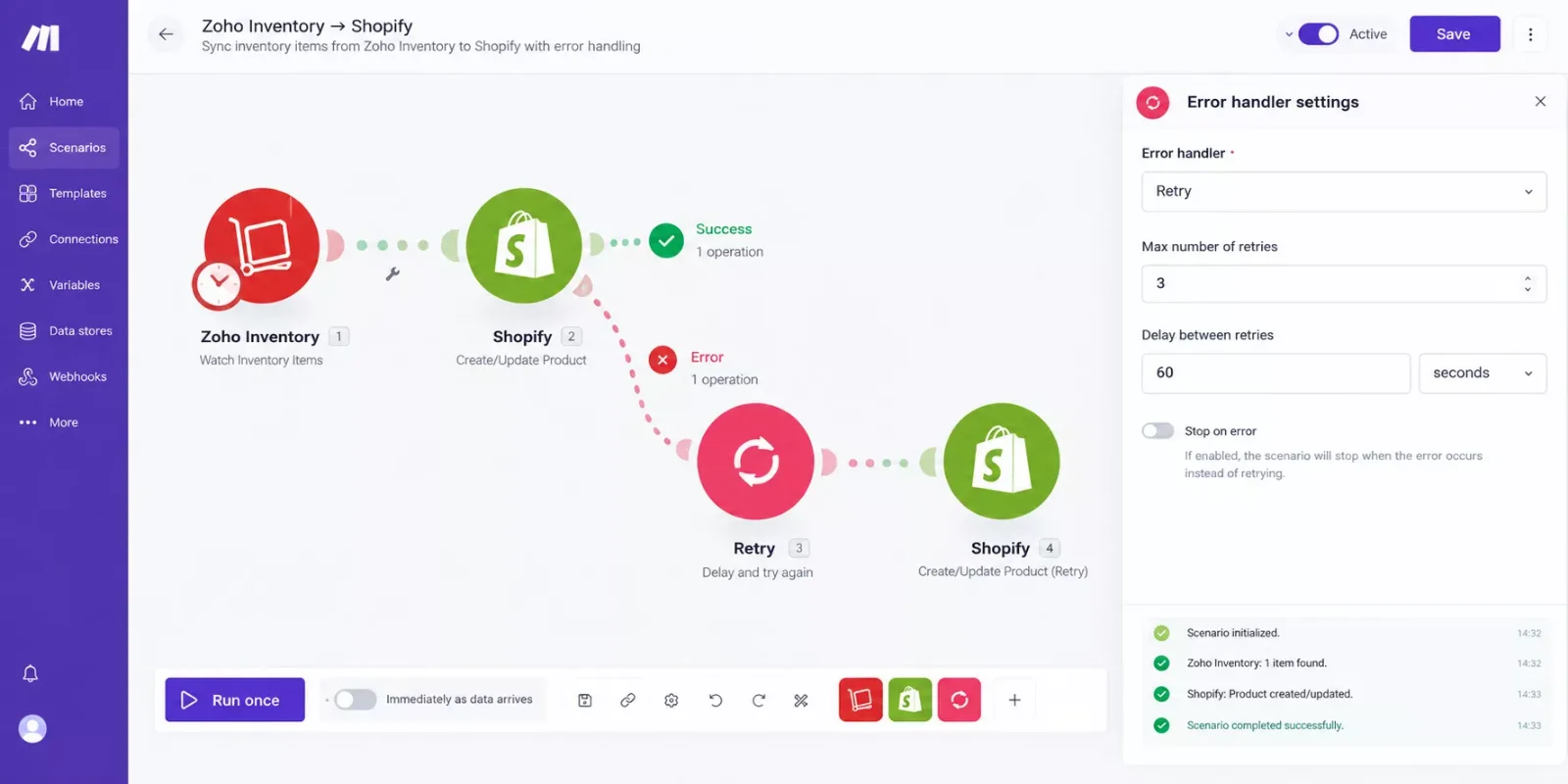
Here's what that actually looks like in practice. Instead of Zoho Inventory talking directly to Shopify, Make.com sits in between as a scenario that watches for stock changes on either side. When an update comes through, Make.com checks it, applies your field mapping, and pushes it to the other app. If that push fails because of a rate limit or a dropped connection, Make.com automatically retries a few minutes later instead of just dropping the update.
This also solves the silent-OAuth-expiration problem. Make.com scenarios can be set to send you an alert the moment a connection fails, so you find out the same day instead of after a customer complains. For a small business owner without time to babysit integrations, that early warning alone is worth the setup.
It's a similar story if your integration issues are spilling into your bookkeeping. If broken Zoho Inventory syncs are throwing off your invoices too, it's worth fixing your invoicing automation at the same time so both systems stay reliable together.
How to Fix Each One
Each fix below pairs directly to the mistake causing it, so you can jump straight to the problem you're actually having.
- Fix rate limit failures: route bulk updates through Make.com's built-in queuing, which spaces out API calls instead of sending them all at once during a busy sales window.
- Fix unexplained Shopify stock changes: set your automation to be the single source of truth for stock updates, so Zoho Inventory and Shopify aren't both trying to independently push changes to the same count. If you're also running an ecommerce automation software stack, this same principle keeps every channel in sync.
- Fix silent OAuth expiration: add a Make.com alert that notifies you by email or Slack the moment a connection drops, instead of finding out days later.
- Fix field mapping mismatches: map your custom fields once inside Make.com's scenario editor, where you can see exactly how each field lines up instead of guessing.
- Fix plan-locked integrations: connect through Make.com's own Zoho and Shopify modules instead of waiting on Zoho's native integration list, so you're not blocked by which Zoho plan you're on.
2026 Advanced Tips & Scalability
Once your basic sync is stable, Make.com's error-handling modules (Retry, Ignore, and Break) let you decide exactly how each type of failure gets handled instead of treating every error the same way. A dropped connection might warrant an automatic retry, while a genuine data conflict might need to pause and flag you for a manual look. This level of control is what keeps the setup working as your order volume grows, instead of needing a rebuild every time you add a new sales channel. If you want to layer in even more capability, some AI tools that pair with your Make.com stack can help flag unusual inventory patterns before they become a real problem.
People Also Ask
Why do Zoho Inventory's third-party integrations keep breaking or acting glitchy?
Zoho Inventory's native integrations are built for simple, scheduled one-to-one syncing. They don't handle rate limits, retries, or silent connection drops well, so busy multi-app setups run into failures that a more robust automation layer would catch and correct.
Can I connect Zoho Inventory to non-Zoho tools more reliably than its native integrations?
Yes. Routing the connection through Make.com adds retry logic, real-time error alerts, and manual field mapping control, which gives you a more stable link between Zoho Inventory and tools like Shopify than the native integration alone.
Is Zoho Inventory worth it if I'm not already using other Zoho apps?
It can still be worth it. Zoho Inventory works as a standalone tool with solid multi-channel tracking, and connecting it to non-Zoho apps through Make.com means you're not locked into the wider Zoho ecosystem to make it useful.
Does fixing my Zoho Inventory integrations require coding?
No. Make.com's scenario builder is visual, so you connect and configure apps by dragging modules and mapping fields, no code required.
Will this work with my current Zoho Inventory plan?
In most cases, yes. Routing through Make.com's own Zoho modules sidesteps some of the plan-tier restrictions on Zoho's native integration list.
How long does it take to set up a more reliable sync?
A basic Zoho-to-Shopify or Zoho-to-Zoho Books scenario typically takes one to two hours to build and test, depending on how many fields you're mapping.
What happens if a sync still fails after I set this up?
You'll get an alert the moment it happens, and Make.com's retry logic will usually resolve temporary failures automatically without you needing to step in.
Zoho Inventory itself isn't the problem. It's a solid tool for small businesses managing multi-channel stock. The breakdowns happen because its native integrations weren't built to be the safety net for a growing, multi-app setup, and that's a fixable gap, not a sign you're doing something wrong.
⚡ Pro Tip: Start by automating just your highest-volume connection first (usually Zoho Inventory to Shopify), then expand to Zoho Books and any other tools once that one's stable.
⚠ Watch Out For: Don't disable a broken native integration and walk away without a replacement. That leaves your stock counts unsynced in the background, which is often worse than a visible error.
If untangling your Zoho Inventory integrations yourself isn't the best use of your week, this is exactly the kind of build I hand off, fully working, for small teams like yours. As one of the more thorough breakdowns of Make.com automation workflows you'll find, this is what SmartSoloFlow does best: taking a glitchy multi-app setup and making it dependable.
Tired of Manually Fixing Sync Errors?
Want this exact automation set up for your business, or need something custom for your specific app stack? Reach out and let's get it working reliably.
Let's TalkFound this guide useful? Share it with a fellow freelancer who's still doing things manually. 🚀
Got a question or a workflow roadblock? Drop it in the comments below — happy to help.
Last Updated: September 11, 2026

// Comments