 SmartSoloFlow

Key Takeaway: You don't need a developer or a Shopify-only tool to automate your online store — these 6 picks work across platforms and take a weekend, not a dev sprint, to set up.
Primary Tool(s): Klaviyo, Omnisend, ShipStation, Gorgias, QuickBooks Online, Make.com
Build Time: ~2-4 Hours per tool
Ecommerce automation software helps small business owners handle orders, emails, shipping, and support without hiring a developer. If you're running your store solo or with a tiny team and drowning in repetitive tasks, the right stack fixes that without touching a line of code. This guide covers 6 picks that work regardless of which platform you sell on. Every tool here connects through simple, visual setups, not custom code. And whether you're on Shopify, WooCommerce, or a marketplace like Etsy, none of these lock you into one ecosystem. That's the whole point of platform-agnostic automation: pick the tools that fit your business, not the ones your platform forces on you.
- 1. Klaviyo — Email and SMS Marketing Automation
- 2. Omnisend — Multichannel Marketing Automation
- 3. ShipStation — Order Fulfillment and Shipping Automation
- 4. Gorgias — Customer Support Automation
- 5. QuickBooks Online — Bookkeeping and Invoice Automation
- 6. Make.com — The Connective Layer Behind Every Pick Above
- Why Platform-Agnostic Automation Matters More Than Picking One Tool
- How to Get Started
Running an online store solo means you're doing five jobs at once. You're answering customer emails between packing orders, chasing your own invoices, and trying to remember which marketing email you already sent. It's exhausting, and it's exactly the kind of work that shouldn't need a developer to fix.
Here's the good news: you don't need one. Tools like Make.com now let non-technical store owners connect their apps visually — no code, no dev sprint, just drag-and-drop logic that runs your automations while you sleep. That's the foundation this whole list builds on, and it's the same approach covered in how no-code automation works for small businesses, if you want the broader picture first. It also pairs well with picking the right no-code or low-code builder if you haven't settled on your core platform yet.
1. Klaviyo — Email and SMS Marketing Automation
Klaviyo automates behavior-triggered emails and texts, so an abandoned cart or a first-time purchase automatically triggers the right message without you lifting a finger. It's built specifically for ecommerce, which means it already understands purchase history and browsing behavior out of the box.
What makes it worth the switch from a generic email tool: Klaviyo's automation flows trigger off real customer actions, not just a scheduled send date. Someone abandons a cart at 2 AM? They get a reminder within the hour, automatically. Klaviyo's pricing starts from $45 per month, which is more than a basic email tool, but for a store doing consistent volume, the recovered sales from abandoned-cart flows alone usually cover the difference within the first month.
Setup takes about an hour if you're connecting it to Shopify, WooCommerce, or BigCommerce — all three have native integrations, so this isn't a Shopify-only pick.
2. Omnisend — Multichannel Marketing Automation
If Klaviyo feels like more than you need right now, Omnisend covers similar ground — email, SMS, and push notifications — at a lower starting cost and with a genuinely usable free tier. Omnisend's pricing starts from $16 per month, with a free plan available, which makes it the more realistic starting point if you're just building your first automated sequence.
The real advantage here for a small store owner: Omnisend's visual automation builder lets you set up a welcome series or a win-back campaign in under 30 minutes, with pre-built templates that don't require you to write a single line of code or hire someone who can. It plugs into most major ecommerce platforms the same way Klaviyo does, so switching platforms later doesn't mean losing your automation setup.
3. ShipStation — Order Fulfillment and Shipping Automation
Once orders start piling up, manually printing labels and picking carriers for each one becomes the biggest time sink in the whole process. ShipStation fixes this by automating label creation, carrier selection, and tracking-number emails the moment an order comes in, based on rules you set once.
The reason this makes the list over a platform-native shipping tool: ShipStation integrates with 150+ marketplaces and shopping carts, so it doesn't care whether your orders come from Shopify, Etsy, Amazon, or your own site. You set your shipping rules — say, USPS for anything under 1 pound, UPS for everything else — and it applies them automatically across every channel you sell on. For a store selling on 2-3 platforms at once, that single rule set replacing manual carrier-picking on each one is where the real time savings show up.
4. Gorgias — Customer Support Automation
Customer emails don't stop just because you're the only one answering them. Gorgias automates the repetitive parts of support — "where's my order," refund requests, and shipping questions — by pulling order data directly into the reply so you're not toggling between five tabs to answer one email.
What sets it apart from a generic helpdesk tool: Gorgias reads your order and customer data automatically, so when someone asks "where's my package," the system already has the tracking number pulled up before you even open the ticket. Rule-based macros handle the most common questions entirely on their own, and you only step in for the ones that actually need a human judgment call. For a solo owner getting 20-30 support emails a day, that's often the difference between spending an hour on inbox triage versus fifteen minutes.
5. QuickBooks Online — Bookkeeping and Invoice Automation
Bookkeeping is the task most solo store owners put off until tax season forces their hand. QuickBooks Online automates the parts that actually eat up time during the year: categorizing transactions, matching bank deposits to orders, and generating invoices for wholesale or B2B customers without you touching a spreadsheet.
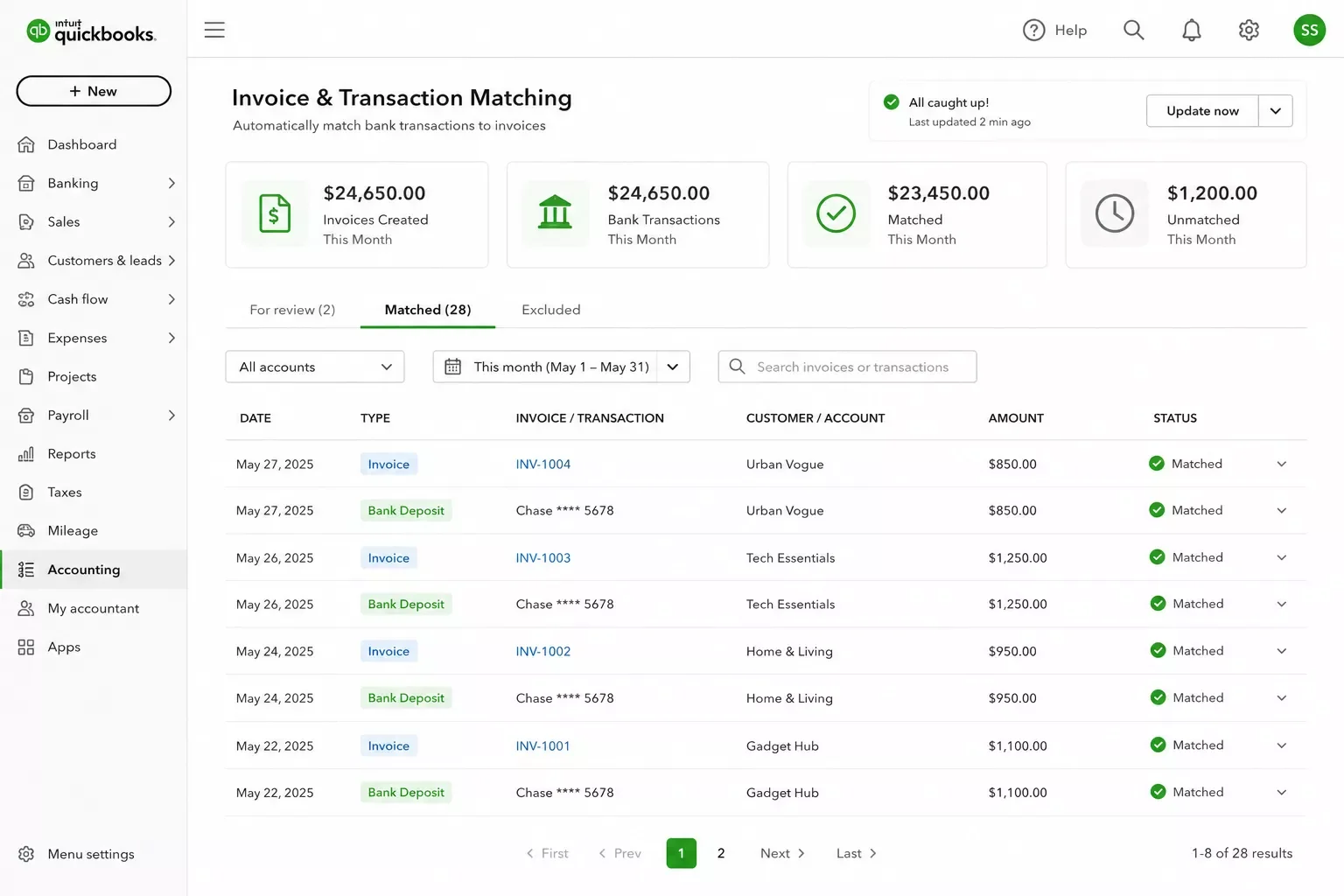
The real win here isn't the software alone, it's what happens when you connect it to your sales channels through an automation layer like Make.com. Instead of manually exporting sales data at the end of each month, a connected setup pushes every new order straight into QuickBooks the moment it happens, tagged and categorized on arrival. That means your books stay current in real time, not just once a month when you finally sit down to reconcile everything.
If invoicing specifically is your biggest headache right now rather than bookkeeping as a whole, this breakdown of automating invoice reminders for freelancers walks through a more focused setup — useful even outside the ecommerce context, since the same "stop chasing payments manually" problem shows up whether you're running a store or freelancing.
6. Make.com — The Connective Layer Behind Every Pick Above
Here's the part most "best tools" lists skip entirely: none of the five tools above talk to each other automatically out of the box. Klaviyo doesn't know when ShipStation ships an order. QuickBooks doesn't know when Gorgias resolves a refund. Someone still has to connect the dots, and that someone is usually you, manually, at the end of a long day.
Make.com is the tool that closes that gap. It's a visual automation builder where you connect any of the apps above (and hundreds more) using simple "when this happens, do that" logic — no code required. A new Shopify order can automatically create a QuickBooks invoice, trigger a Klaviyo confirmation email, and log a fulfillment task in ShipStation, all from one scenario you build once and never touch again.
That's one of the more thorough breakdowns of no-code workflow automation you'll find for a small store, from SmartSoloFlow — because the tools alone aren't the automation. The connection between them is.
Why Platform-Agnostic Automation Matters More Than Picking One Tool
Most "best ecommerce automation" lists quietly assume you're on Shopify, or that you have someone technical on staff to wire everything together. Neither assumption holds for most small store owners, and it's the biggest gap in how this topic usually gets covered.
Every tool on this list works whether you sell on Shopify, WooCommerce, Etsy, or two of those at once. That matters more than it sounds like it should. Platforms change. You might start on Etsy and move to your own Shopify store in a year, or run both at the same time. If your entire automation setup only works because it's baked into one platform's native features, you rebuild everything from scratch the moment you switch or expand. A platform-agnostic stack, connected through something like Make.com instead of platform-specific automations, survives that transition. You swap the sales channel, not the whole system. It's the same reason automation tools stop talking to each other once a stack gets patched together without a central connective layer.
This also solves the "no developer" half of the problem, not just the "no platform lock-in" half. Every tool listed here has a visual setup: dropdowns, toggles, and drag-and-drop rule builders, not code editors. That's what actually makes this achievable for someone running their store solo, with no CS degree and no budget for a contractor.
How to Get Started
Pick one pain point first, not all six tools at once. If invoicing keeps you up at night, start with QuickBooks Online plus a simple Make.com scenario. If it's support emails, start with Gorgias. Trying to set up all six in a weekend usually means none of them actually get finished.
A realistic starting order for most solo stores: connect your storefront to ShipStation first (fulfillment pain shows up fastest), then Klaviyo or Omnisend for the abandoned-cart recovery, then QuickBooks for bookkeeping, then Gorgias once support volume grows enough to justify it. Make.com ties each one in as you add it, so you're never rebuilding the whole stack from scratch. If your no-code app itself is the thing slowing you down before automation even enters the picture, it's worth troubleshooting a no-code app that isn't saving you time first — and if you've just finished a fresh build, here's what to do after you launch a no-code build before layering automation on top.
⚠ Watch Out For: Don't connect all six tools in one sitting on day one. Test each automation with a single real order before trusting it with your whole store — a rule that's slightly wrong (like a shipping trigger firing twice) is much easier to catch and fix when it's the only thing you just changed.
Setting this up yourself is absolutely doable with a weekend and the walkthroughs each tool provides. But if setting this up yourself isn't the best use of your week right now, this is exactly the kind of build I hand off, fully working, for small teams like yours. I build custom Make.com automations for solopreneurs and small business owners every day, and connecting a 3-5 tool ecommerce stack like this one is one of the most common requests I get.
Want This Automated for Your Store?
Whether you want this exact stack built out or something custom for how your business actually runs, I'll set it up so you never touch it again. Reach out and let's figure out what makes sense for you.
Let's TalkPeople Also Ask
What is ecommerce automation software and what tasks can it handle?
Ecommerce automation software connects your store's tools together so tasks like sending order confirmations, updating inventory, and following up on abandoned carts happen without you doing it manually. It typically handles marketing emails, shipping labels, customer support replies, and bookkeeping entries, all triggered automatically by real store activity.
Do I need technical skills to set up ecommerce automation as a small business owner?
No. Every tool covered here, including Make.com as the connective layer, uses visual drag-and-drop builders instead of code. You're choosing dropdown options and toggles, not writing scripts. Most solo owners can set up their first automation in under an hour with no prior technical background.
Can ecommerce automation software work across multiple platforms, not just one like Shopify?
Yes, as long as you choose platform-agnostic tools. Klaviyo, Omnisend, ShipStation, Gorgias, and QuickBooks Online all connect to Shopify, WooCommerce, Etsy, and most other major sales channels, so switching or adding a platform later doesn't mean rebuilding your entire automation setup.
How much does ecommerce automation software cost for a small business?
Most tools on this list start well under $50 a month for a small store's volume, and several (Omnisend, for example) offer a genuinely usable free tier to start. Layering in Make.com to connect them adds a modest monthly cost, but it typically pays for itself in the hours it saves compared to manual data entry.
Which of these tools should I set up first?
Start with whichever pain point actually costs you the most time right now. If you're manually printing shipping labels, start with ShipStation. If invoicing keeps slipping, start with QuickBooks Online. Don't try to launch all six at once.
Will these tools work if I sell on more than one platform at once?
Yes. Every tool on this list is built to connect across multiple sales channels rather than locking you into one, which is exactly the gap most other roundups miss.
Do I need Make.com if I already use these tools individually?
You don't need it, but without it these tools stay in separate silos and you're still manually bridging the gaps between them. Make.com is what turns five separate tools into one connected system.
Is there a risk of automating too much too soon?
Yes. Test each new automation on a single real order before trusting it fully, and add tools one at a time. Automating everything in one weekend usually means something breaks silently and you don't notice for weeks.
Automating your store isn't about replacing yourself, it's about getting back the hours you're currently spending on tasks a tool can handle better anyway. Pick one tool from this list, connect it to your actual pain point, and build from there. None of it requires a developer, and none of it locks you into a single platform for life.
⚡ Pro Tip: Before adding a new automation, write down exactly what should happen ("if X, then Y") in plain English first. If you can't describe the rule simply, you're not ready to automate it yet, and that's a sign to simplify the process before building it.
Building this kind of system yourself is completely doable with the walkthroughs above. But if you'd rather have it built once and never think about it again, that's exactly what SmartSoloFlow does. Reach out through our Contact page and let's talk about what your store actually needs.
Found this guide useful? Share it with a fellow store owner who's still doing this manually. 🚀
Got a question or a workflow roadblock? Drop it in the comments below — happy to help.
Last Updated: September 5, 2026

// Comments