 SmartSoloFlow

Key Takeaway: A portfolio site that actually converts needs more than a good template. It needs a system that catches every inquiry the second it lands, so you're not the bottleneck.
System Goal: Turn portfolio inquiries into booked calls without manually checking your inbox all day
Weekly Time Savings: ~3-4 Hours/week
Core Framework: Portfolio Site + Make.com + CRM Auto-Routing
If you're searching for the best website to create a portfolio, you're probably past the "do I need one" stage and into "which one won't waste my time." Fair. But picking the platform is only half the job. The real problem starts once that portfolio actually works and inquiries start showing up in your inbox faster than you can answer them.
Success Story: The Week My Portfolio Site Started Working Too Well
For example: a freelance web designer rebuilds their portfolio site, shares it on a scheduling tool that keeps posts going out while they work, and within a week gets 11 inquiries through the contact form. Great problem to have, except three of those inquiries sit unanswered for four days because life happens: client calls, a sick kid, a deadline. Two of the three go quiet after that. The fix isn't hiring a VA or checking email every twenty minutes. It's connecting the contact form to Make.com, so every new inquiry automatically lands in a simple CRM and triggers a same-minute auto-reply, while the designer still personally follows up within a few hours.
The Core Problem
Working alone means you're the designer, the salesperson, and the admin department, all at once. When a portfolio site actually starts generating leads, that's supposed to feel like a win. Instead it often feels like one more thing you can't keep up with.
The math is brutal. According to the original lead response time research from MIT and InsideSales.com, a business that responds to a new inquiry within five minutes is dramatically more likely to actually reach that lead than one that waits even thirty minutes. Most solopreneurs aren't checking their inbox every five minutes. They're finishing a client project, sleeping, or just living their life.
That gap between "someone found my work and wants to hire me" and "I finally saw the message" is where leads quietly disappear. Not because the work wasn't good enough. Because nobody replied fast enough.
This is exactly the kind of pain point Make.com automation solves best: not by working harder, but by making sure something happens the instant an inquiry arrives, even when you're not looking at your phone.
Picking the Right Portfolio Platform First
Quick answer: For most solopreneurs, Squarespace and Wix remain two of the most reliable picks for a best website to create a portfolio in 2026. Wix's contact form connects natively to Make.com, while Squarespace typically needs a lightweight bridge (a connected form tool or its own developer API) to reach the same result.
Before automating anything, you need a platform that won't fight you later. A few things actually matter here, beyond how the templates look:
- Native contact form with webhook or Zapier/Make.com support. If the platform can't send form data anywhere outside itself, you can't automate the next step at all.
- Custom domain support. A branded domain reads as more credible to a client evaluating you against three other freelancers.
- Fast load times on mobile. A huge share of first-time visitors click through from a phone, often straight from a social post or referral link.
- Simple project/case-study layout. Clients want to see your work fast, not hunt for it.
Squarespace, Wix, and Webflow all check these boxes reasonably well, and comparing options built specifically for small business no-code website builders is a good next step if you're still deciding. The one thing that matters less than people think: how many templates a platform has. The one that matters more: whether its contact form can actually talk to the rest of your business.
What I Tried (Before Automating Anything)
The first fix most people reach for is checking email more often. It doesn't work. Checking your inbox every ten minutes doesn't make you more available. It just interrupts everything else you're supposed to be doing.
The second fix is a shared inbox or a VA. That's a real solution for an agency. For a solopreneur running a lean operation, it's often overkill, and it adds a monthly cost for a problem that a simple automation solves for free or close to it.
The third thing tried, and the one that actually stuck: connecting the portfolio's contact form directly to Make.com, so the moment someone submits an inquiry, three things happen automatically before any human touches it.
Automating Follow-Up for Portfolio Website Leads
Quick answer: Automating follow-up for portfolio website leads means connecting your site's contact form to a tool like Make.com so every new inquiry instantly creates a CRM record and triggers an auto-reply, closing the gap between "someone reached out" and "someone heard back" down to seconds instead of days.
Here's what that actually looks like in practice, step by step:
- A visitor fills out the contact form on the portfolio site.
- The form submission fires a webhook, which Make.com picks up in real time.
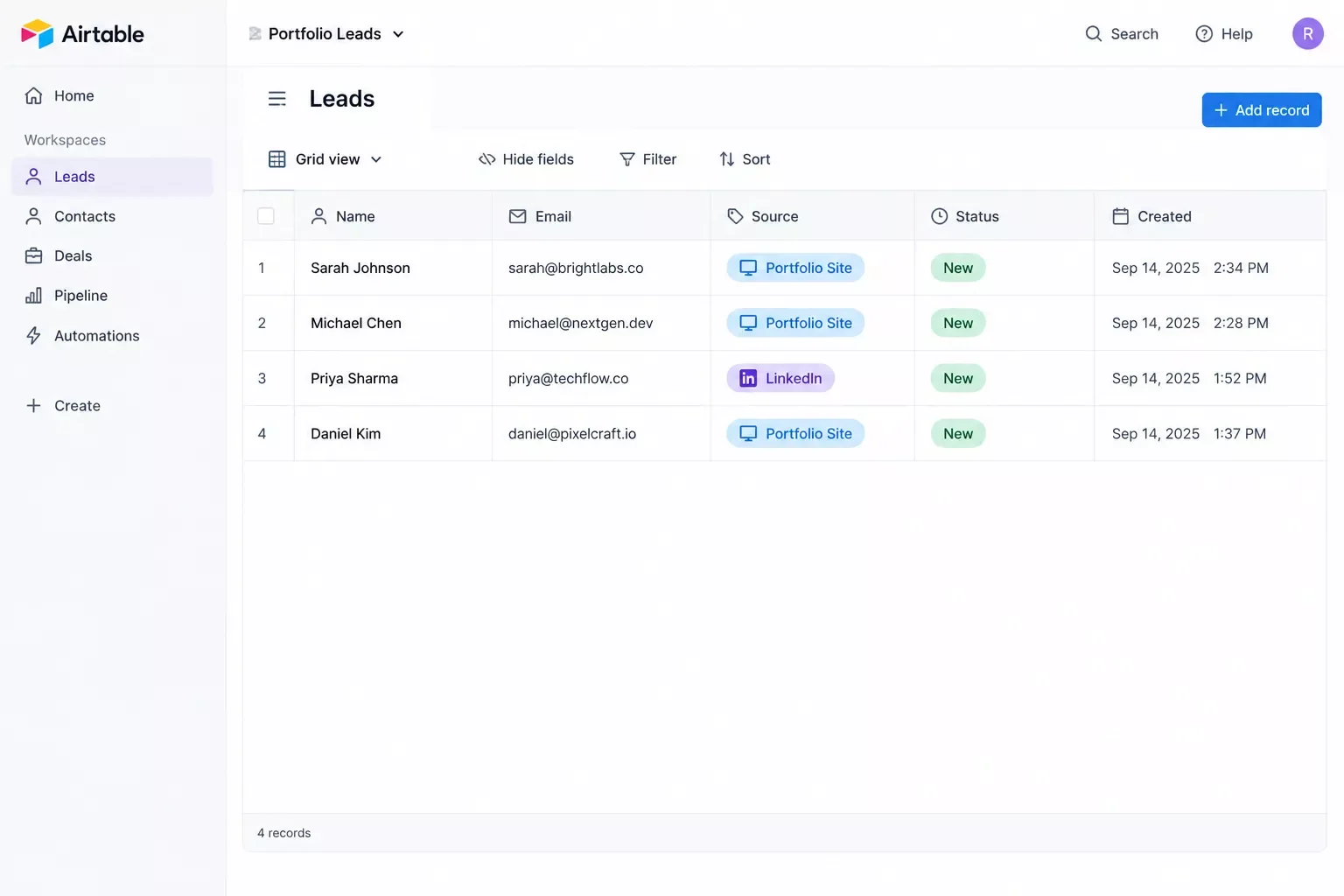
- Make.com creates a new record in a simple CRM. If you want the exact steps for this part, automating your CRM the same way is worth reading in full, but Airtable works fine for this, no need for anything enterprise-grade.
- An auto-reply email goes out immediately, confirming the message was received and setting a realistic expectation for a personal follow-up. This is the same underlying trigger-based pattern used when you set up email automation that triggers itself.
- The lead gets tagged by source (portfolio site, LinkedIn, referral) so it's obvious later which channels are actually working.
The amber step matters most. Research on B2B inquiries consistently finds that a meaningful share of them arrive outside normal business hours, evenings, weekends, whenever a potential client happens to be browsing. An auto-reply that fires at 11pm on a Saturday does something a solo freelancer physically can't: it responds while the intent is still fresh, even though the real, personal follow-up still happens later that same day or the next morning.
This isn't about replacing yourself with a bot. It's about making sure nobody feels ignored in the gap between "they reached out" and "you actually had time to reply."
What Happens After Someone Fills Out Your Contact Form
Quick answer: Once someone submits your contact form, what happens next determines whether they become a client or quietly hire someone else. The form itself is just step one. A confirmation, a CRM entry, and a real follow-up within a few hours are what actually close the loop.
This is the part almost every portfolio-builder comparison skips entirely. They'll walk you through picking templates and setting up a contact form, then stop. Nobody tells you what's supposed to happen the moment that form gets submitted.
Left on its own, a basic contact form just sends you an email. That's it. No confirmation to the visitor, no record anywhere except your inbox, and nothing stopping that message from getting buried under twelve other emails within the hour.
With the automation described above running in the background, the sequence looks different:
- The visitor sees an instant confirmation, so they know their message actually went through.
- You get a CRM record instead of a stray email that's easy to lose.
- You can follow up personally within a few hours, already knowing the context, instead of scrambling to remember which inquiry was which.
None of this requires a developer or a subscription to expensive sales software. It requires one Make.com scenario, built once, that keeps running quietly in the background every time someone reaches out. Once a lead does become a client, getting client onboarding running on autopilot is the natural next stage of the same automation mindset.
The Result
Setting this up doesn't guarantee every inquiry turns into a client. What it typically delivers is simpler and more useful: nobody falls through the cracks just because you were busy with something else when they reached out.
For a solopreneur juggling client work, admin, and everything in between, that's the actual win. Not more leads. Just fewer leads lost to timing. It also sets up the next handoff cleanly, since automating the contract-to-invoice handoff works the same way once a lead turns into a signed client.
Want This Running on Your Own Portfolio Site?
Building this exact automation yourself takes a weekend you probably don't have. If you'd rather get that time back than spend it wiring up webhooks and CRM fields, this is exactly the kind of system I set up so solopreneurs don't have to. Since I already put together the full playbook on staying productive without a team in the solopreneur productivity system guide, this pivot follows the same idea: the tools should work for you, not the other way around.
Let's TalkPeople Also Ask
What is the best website to create a portfolio for a freelancer in 2026?
Squarespace and Wix remain the top general picks for freelancers in 2026. Wix's contact form connects to Make.com natively, while Squarespace usually needs an extra step, like a form-connector tool, to reach the same automation. Webflow is a strong option if you want more design control and don't mind a slightly steeper learning curve.
Can a new inquiry from a portfolio site automatically be added to a CRM or email list?
Yes. Most portfolio builders can send form submissions to Make.com through a webhook or native integration. From there, Make.com can create a CRM record, add the contact to an email list, and trigger an auto-reply, all without any manual data entry.
Do I need a custom domain for a portfolio site to look professional to clients?
A custom domain isn't strictly required, but it makes a real difference in perceived credibility. A branded domain like yourname.com reads as more established than a default subdomain, especially when a client is comparing you against other freelancers.
How much time does this automation actually save each week?
It varies with how many inquiries come in, but most solopreneurs save a few hours a week just from not manually checking, sorting, and replying to every message the moment it arrives. The bigger win is fewer leads lost to slow response times.
Do I need to know how to code to set this up?
No. Make.com is built for exactly this kind of connection without writing code. Most portfolio-to-CRM setups involve dragging and connecting a handful of modules, not scripting anything from scratch.
Will an auto-reply make my business feel less personal?
Not if it's worded honestly. A short, human-sounding confirmation that sets expectations, rather than a generic "we'll be in touch," actually reassures people. The personal follow-up still comes from you, just a few hours later instead of days later.
What if I only get a handful of portfolio inquiries a month?
Even a low volume benefits from this, since a single lost lead can matter a lot more when you're not getting dozens of them. The setup takes roughly the same effort either way, so there's no real downside to having it running quietly in the background.
⚡ Pro Tip: Tag every incoming lead by source (portfolio site, LinkedIn, referral, etc.) the moment it hits your CRM. After a few months, that tag data tells you exactly which channels are actually worth your time, instead of guessing.
⚠ Watch Out For: Don't let the auto-reply become your only reply. It buys you time, but a real client still expects a genuine, personal follow-up within a few hours. Treat automation as the first step, not the whole conversation.
At SmartSoloFlow, this is exactly the kind of setup we help solopreneurs put in place: real automation that runs quietly in the background so you can focus on the actual client work. If wiring this up yourself sounds like one more thing on an already-full plate, reach out through our Contact page and we'll help you get it running. You can also see how Make.com's own webhook documentation explains the underlying connection if you want to dig into how it actually works.
Found this guide useful? Share it with a fellow freelancer who's still doing things manually. 🚀
Got a question or a workflow roadblock? Drop it in the comments below — happy to help.
Last Updated: September 14, 2026

// Comments