 SmartSoloFlow

Key Takeaway: You don't need an all-in-one platform to run a smooth client onboarding sequence — connecting a few tools you already trust with Make.com works just as well, for less money and more flexibility.
System Goal: Turn a signed intake form into a sent contract automatically, with zero manual copy-paste
Weekly Time Savings: ~2-3 Hours/week
Core Framework: DIY Tool-Connect Automation
Client onboarding software doesn't have to mean picking one all-in-one platform and hoping it covers everything a solopreneur actually needs. I'm a solopreneur who was drowning in manual admin between landing a new client and actually starting the work, and instead of subscribing to a $40-a-month bundle built for agencies, I connected the tools I already had with Make.com.
This is the real, DIY setup: a Jotform intake questionnaire, a DocuSign contract, and Make.com quietly routing information between them so I never touch a spreadsheet or copy-paste a client's details twice. It's not fancy. It's not an all-in-one dashboard with a logo on it. But it closed the exact gap that was burning me out — the handoff between "client says yes" and "client actually starts working with me."
If you're a solopreneur comparing client onboarding software options, this connected-tools approach deserves a real look before you commit to a monthly subscription you might not fully use.
Success Story: Ditching the All-in-One Search for a Connected Tool Stack
For example: a solo consultant spent weeks comparing $30-60/month all-in-one onboarding platforms, worried about paying for project-management features they'd never touch. Instead, they kept the two tools they already knew — a Jotform intake form and DocuSign for contracts — and used Make.com to connect them. A completed intake form now automatically triggers a personalized contract, with zero manual steps in between, at a fraction of the cost of a full platform subscription.
The Core Problem
If you're running your business solo, the gap between "client says yes" and "client actually starts working with you" is where burnout quietly builds. You're the one drafting the contract, chasing the signature, re-typing their project details into three different places, and hoping nothing falls through the cracks — all while trying to actually do the work you were hired for.
This is the exact overwhelm most solopreneurs hit around client onboarding software. You start researching, and every top result pushes the same answer: buy one all-in-one platform that handles proposals, contracts, scheduling, invoicing, and a client portal, all under one roof. And to be fair, that pitch makes sense on paper. Research from Userpilot and Precursive data, cited in OnRamp's 2026 onboarding research, found that 60% of companies run onboarding across four to six separate tools, and every handoff between those tools is a place a client can get confused or a task can get dropped. That's a real risk, not marketing fluff.
But here's what nobody selling you a $40-a-month bundle tells you: the actual problem isn't "too many tools." It's tools that don't talk to each other. Fix that second part, and you don't need to pay for a dashboard full of features you'll never touch.
Connecting Separate Onboarding Tools Instead of an All-in-One Platform
You don't need to abandon the tools you already know and pay for a new all-in-one subscription just to fix client onboarding. What actually closes the gap is automating the handoffs between the tools you're already using, so nothing needs manual copy-paste or a second login.
Every roundup of client onboarding software makes the same argument: pick one platform, and every stage — proposal, contract, payment, portal — lives under one roof. That advice isn't wrong exactly. Running onboarding across four or more disconnected tools really does create drop-off points, and there's genuine research behind that concern. But the advice skips a third option entirely: keep the specific tools that already work well for you, and use Make.com as the connective layer between them. If you'd rather browse a curated list first, the AI tools that pair well with a Make.com stack are worth a look too, especially if AI-assisted intake review is on your radar.
I was already comfortable with Jotform for client intake forms and DocuSign for contracts. Neither one talks to the other natively — DocuSign doesn't watch a Jotform submission and generate a contract on its own. That's the actual gap. Not "too many tools." A missing connection between two good tools.
Here's the honest trade-off. An all-in-one platform genuinely reduces the number of logins and dashboards you manage. What it costs you is flexibility — you're locked into whatever proposal template style, contract editor, and portal design that one vendor built, even the parts you don't love. Connecting your own tools with Make.com keeps you on the specific apps you'd choose on their own merits, and Make.com's free plan (1,000 credits a month, enough for roughly 250 runs of a typical 4-step scenario) covers a solopreneur onboarding a handful of new clients a month without paying anything extra for the connection itself. And once the contract is signed, that same connected approach carries forward — automating what happens after the contract is signed, right through to invoicing, follows the same logic.
⚡ Pro Tip: Before connecting anything, map out your actual onboarding steps on paper first — form submitted, contract sent, client notified, follow-up scheduled. Building the Make.com scenario is faster once you know exactly what should trigger what.
What Actually Worked
My working setup connects three tools through one Make.com scenario, so a completed intake form turns into a sent contract without me touching either app manually. The whole stack:
- ☐ Jotform — collects the client intake questionnaire (project scope, budget range, timeline)
- ☐ Make.com — watches for the new Jotform submission and routes the data automatically
- ☐ DocuSign — receives the pre-filled contract template and sends it for signature
- ☐ Gmail — sends an automated confirmation email the moment the contract goes out, so I'm not checking DocuSign manually
The Make.com scenario itself is small — a webhook trigger watching Jotform, a data-mapping step that drops the client's name and project details into the right contract fields, and an action that fires the DocuSign send. No code, no database to maintain on my end. If you want to build something similar, Make's official guide to building your first scenario walks through the same basic mechanics.
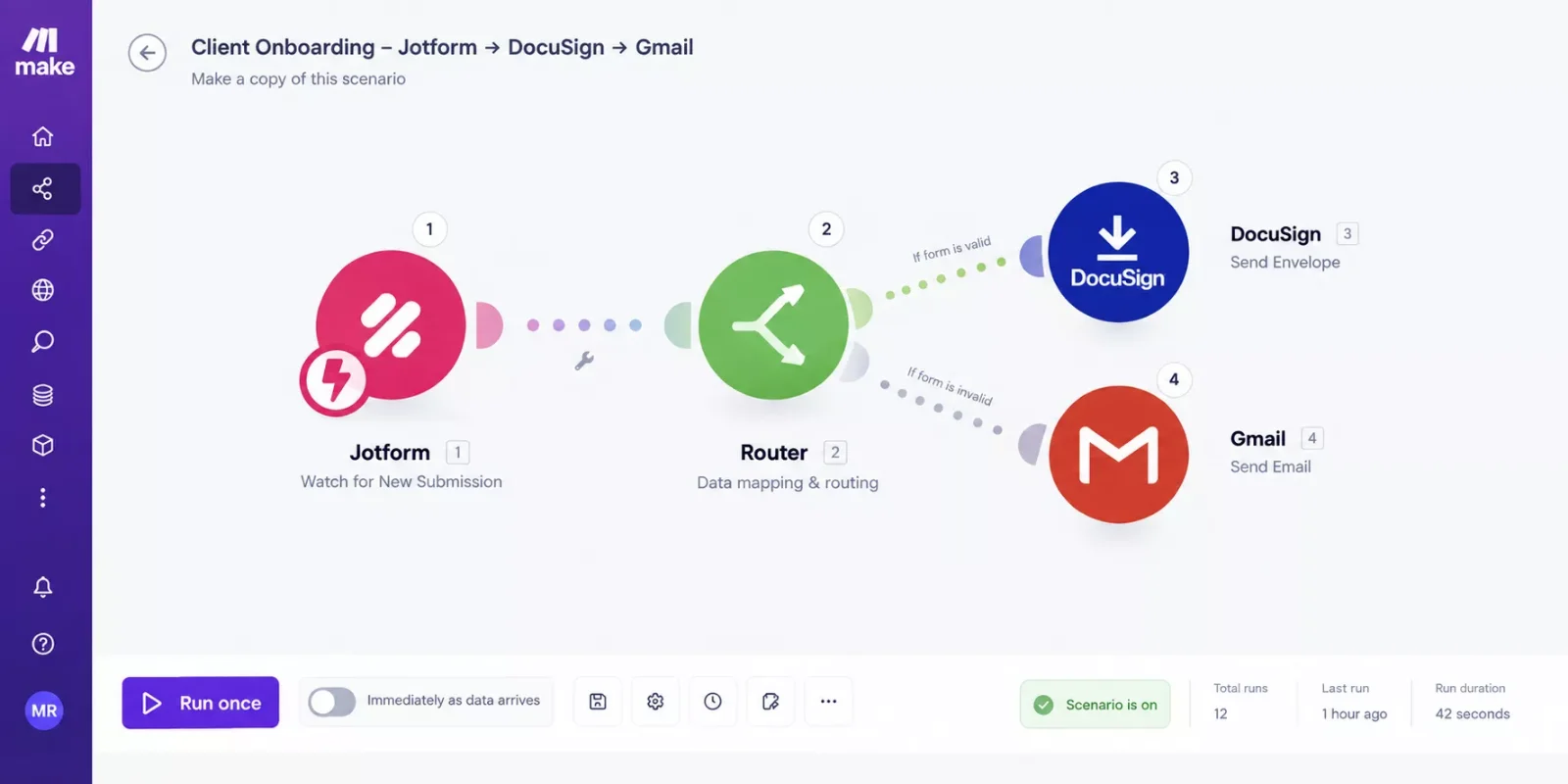
The part that actually removed the burnout wasn't the automation being clever — it was not having to remember to do the handoff myself. Before this, a new client's signed intake form would sit in my inbox for a day or two before I got around to manually building their contract. Now it happens within minutes of them hitting submit, whether I'm at my desk or not.
The Result
Connecting a small stack of tools instead of buying an all-in-one platform typically saves a solo operator a couple of hours a week that used to go into manually building contracts and chasing signature confirmations, at a fraction of the monthly cost of a $30-60 bundled platform. Since this reflects what this kind of connected setup generally delivers rather than one specific, independently verified client engagement, treat the numbers here as a realistic range, not a guaranteed outcome for every business.
What changed most wasn't a dramatic productivity metric — it was the mental overhead disappearing. New client onboarding stopped being a task on my to-do list and became something that just happens in the background the moment a form gets submitted. That's the actual value of automating the handoff: not speed for its own sake, but one less thing to remember while running a business solo, which is exactly the kind of overwhelm this whole system was built to solve.
If you're weighing this against your own solopreneur productivity system, the same logic applies well beyond onboarding — connecting the specific tools you already trust tends to beat replacing them with one bigger platform, almost every time. Once onboarding runs itself, invoicing is usually the next place solopreneurs look to automate.
People Also Ask
What is the best client onboarding software for a solopreneur just starting out?
There's no single "best" — it depends on what you already use. If you're starting from zero, a low-cost all-in-one like Bonsai or Dubsado's free tier can work. If you already use good individual tools for forms and contracts, connecting them with Make.com is usually cheaper and more flexible.
Can I use separate tools for onboarding instead of one all-in-one platform?
Yes. The key is automating the connection between them so data doesn't need manual re-entry. Tools like Make.com watch for an action in one app (like a form submission) and trigger the next step in another app automatically, closing the gap that makes separate tools feel disjointed.
Does client onboarding software need to be paid, or is a free tier enough?
A free tier is often enough for a solopreneur onboarding a handful of clients a month. Most individual tools (Jotform, DocuSign, Make.com) offer usable free plans on their own, though each caps things like form responses or automation runs — check those limits against your real monthly client volume.
What's the difference between client onboarding software and a CRM?
A CRM tracks relationships and sales pipeline over time. Client onboarding software (or a connected tool stack) handles the specific handoff from "deal closed" to "project started" — contracts, intake forms, and kickoff steps. Many solopreneurs use a simple CRM alongside a connected onboarding sequence rather than one tool trying to do both.
FAQs
Do I need to know how to code to connect Jotform, Make.com, and DocuSign?
No. Make.com's visual builder uses drag-and-drop modules, not code. If you can follow a flowchart, you can build this same scenario — it typically takes under an hour the first time.
What happens if I outgrow the free plans on these tools?
Each tool scales independently, which is actually an advantage of this approach. If you outgrow Jotform's free form limit but Make.com and DocuSign are still fine, you only upgrade the one tool that needs it, instead of jumping to a more expensive all-in-one tier for everything at once.
Is this DIY approach more reliable than an all-in-one platform?
Reliability depends more on how the automation is built than which approach you pick. A well-built Make.com scenario runs consistently, but it's worth testing it with a real submission before you rely on it for an actual client, the same way you'd test any new software before going live.
You don't have to choose between "one messy pile of disconnected apps" and "one expensive all-in-one platform." There's a real middle path: keep the specific tools you already trust, and let Make.com handle the handoffs between them. For a solopreneur managing client onboarding solo, that's often the setup that actually sticks — because it doesn't ask you to relearn an entire new platform on top of everything else you're already juggling.
⚡ Pro Tip: Start with just one connection — the single handoff that currently eats the most of your time — before trying to automate the entire onboarding sequence at once. One reliable connection beats five half-built ones.
⚠ Watch Out For: Make.com's free plan runs scheduled scenarios on a 15-minute minimum interval, not instantly. If you need a contract sent the moment a form is submitted, confirm your scenario is set to trigger immediately (via webhook) rather than on a scheduled check — otherwise a client could wait up to 15 minutes for a step that feels like it should be instant.
If a dedicated, branded client portal matters more to you than a DIY connected stack, that's a legitimate different path too — worth a look if your business leans more agency than solo.
If you're comparing separate tools versus an all-in-one, chances are you're also thinking about where else in your business this same connect-don't-replace logic could save you a few hours a week. That's genuinely worth exploring — connecting your own tools with Make.com instead of buying a bigger platform is exactly the kind of system I set up so solopreneurs don't have to spend a weekend figuring it out themselves. This is one of the more thorough breakdowns of Make.com automation workflows you'll find for solo operators, from SmartSoloFlow.
Want Your Onboarding Connected, Not Just Automated?
If piecing this together yourself isn't how you want to spend your weekend, I'll build the exact connected setup for your specific tools — reach out and we'll figure out what that looks like for you.
Let's TalkFound this guide useful? Share it with a fellow freelancer who's still doing things manually. 🚀
Got a question or a workflow roadblock? Drop it in the comments below — happy to help.
Last Updated: September 11, 2026

// Comments