 SmartSoloFlow

Key Takeaway: The Bubble no-code app builder can create a full custom web app without a developer, but G2 reviewers say it takes longer to learn than simpler builders, and Make.com's Bubble app generally needs a paid Bubble plan.
Primary Tool(s): Bubble, Glide, Softr, Adalo
If you're a small business owner with no time and no budget for a developer, the bubble web app builder is probably on your shortlist. Bubble can build a real web app without code. It also tends to take longer to learn than simpler tools, and its plans and workload limits can raise the cost.
This guide compares Bubble with three simpler no-code options (Glide, Softr, and Adalo) so you can pick the right one before you spend a dollar. If you want the full field first, see how Bubble compares with other no-code app builders.
You'll also see how to connect your app to the rest of your business with Make.com. One catch up front: Make's Bubble app generally needs an app on a paid Bubble plan. By the end, you'll know which builder fits your budget and your skill level.
- What Is the Bubble Web App Builder?
- Bubble vs Glide, Softr, and Adalo: Quick Comparison
- 3 Business Benefits of a Custom No-Code App
- What Bubble Really Costs (Plans, Workload Units, and the Learning Curve)
- Real-Life Use Case: A Small Firm Needs a Client Portal
- Final Verdict: Which Builder Fits Which Business
- How to Connect a Bubble App to Business Tools With Make.com
- If a Bubble Module in Make Returns a 401 or 404 Error
- How to Get Started
- Common Questions About Bubble and Its Alternatives
- Conclusion
What Is the Bubble Web App Builder?
Bubble is a visual, no-code platform for building full web apps. The database, workflow logic, and user logins are built in, so there's no code to write. Bubble web apps suit marketplaces, internal tools, and other apps that do real work. Reviewers often say it takes longer to learn than simpler builders.
In one editor, you design pages and build the database. Then you set up workflows, which are the "if this happens, do that" steps. Bubble can also generate a starting app from a text prompt, and you edit it from there.
Plan check: Bubble's free plan is for building and testing. Going live starts on the Starter plan, listed at $29 a month for web apps (billed annually) on Bubble's pricing page as of October 2026.
Make.com fits in here. It is an automation platform that moves data between your apps. For example, it can send a new Bubble sign-up to your CRM. Make's docs say its Bubble app needs an app on a paid Bubble plan, with a narrow exception for some older accounts.
Bubble vs Glide, Softr, and Adalo: Quick Comparison
Bubble is the most flexible of these four builders, and Glide, Softr, and Adalo are the simpler alternatives. On annual billing, Bubble's web plans start at $29 a month, while Glide, Softr, and Adalo start around $25, $19, and $36. What you pay in practice depends on what you need to connect.
Here is the part most comparisons skip. Each tool connects to Make.com in a different way, and some of those connections sit behind pricier plans.
Adalo's Make app requires its Team plan or higher, listed at $160 a month on annual billing. Bubble's Make app needs a paid Bubble plan. Glide's docs say you may need to upgrade, without naming the plan.
Pricing above was verified at the time of writing (October 2026). Glide's page showed no annual toggle, so its price is shown as listed. Since pricing changes frequently, please confirm current rates and plan details directly on each provider's official website before making a decision.
Cheaper entry plans can also be small. Softr's Basic plan, for example, includes only 5 team users and 5 client users, so a portal for more customers needs a bigger plan. The Make.com section later in this guide compares how each connection works.
3 Business Benefits of a Custom No-Code App
A custom no-code app lets a small business replace scattered spreadsheets and email threads with one tool built around its own process. You pay a software subscription instead of developer rates, and you can test the idea before you spend anything.
- You can test before you pay. All four tools start with a free plan. Bubble, Glide, and Adalo limit it to building and testing, so going live means a paid plan.
- You pay software prices, not developer prices. On annual billing, paid plans start at $19 to $36 a month for the three simpler tools and $29 for Bubble's web plans. That's a monthly subscription, not a project quote.
- The app fits your process. A client portal, a booking tool, or an internal dashboard can match how your business really works. Once it runs, Make.com can pass its data to your CRM or email, so nobody retypes it.
Pick by what you need to connect and how many people will log in.
What Bubble Really Costs (Plans, Workload Units, and the Learning Curve)
Bubble.io pricing starts free, but a live web app needs at least the Starter plan at $29 a month on annual billing. Beyond that fee, your bill depends on workload units, which measure the server work your app does, and on how long it takes you to learn the tool.
Plans include a monthly workload allowance: 50,000 units on Free, 175,000 on Starter, 250,000 on Growth, and 500,000 on Team. Past that, the standard overage rate is $0.30 per 1,000 units. An extra 100,000 units would add about $30.
⚠ Watch Out For: You can switch overages off in your app plan settings, but then the app can go offline when it runs out of workload units. Bubble's FAQ says it emails you when usage reaches 75%.
Time is the other cost. In Bubble you design pages, set up a database, and build workflows, and reviewers say that takes longer to learn than simpler builders.
Mobile is priced separately. Bubble's native iOS and Android editor launched in public beta in June 2025, and its mobile apps share the web app's database. Web and Mobile plans start at $59 a month on annual billing. Check Bubble's pricing page for the editor's current status.
Real-Life Use Case: A Small Firm Needs a Client Portal
Picture a typical scenario. A bookkeeping firm with about 40 clients wants a portal where clients upload tax documents and check the status of their return. The firm has no developer and a tight monthly budget. This is an illustrative example, not a real client story.
On Softr, the Pro plan includes 50 client users at $99 a month on annual billing, so 40 clients fit, but the $19 Basic plan does not. Glide's pricing page calls Basic ($25) its personal-apps plan, so a shared client portal would start at Plus ($50).
Adalo's $36 Starter plan can publish the app, but connecting it to Make needs the $160 Team plan. Bubble's $29 Starter plan can run the portal and connect to Make, but the build takes the longest. If you have more time than money, Bubble wins on price. If time is tight, a simpler tool usually wins.
First-year plan fees for this portal: Bubble Starter $348, Glide Plus $600 or more, Softr Pro $1,188, and Adalo Team $1,920, based on the prices above. Bubble, Softr, and Adalo are on annual billing, and Glide is at its listed monthly price. Build time, workload overages, and your Make plan cost extra.
Final Verdict: Which Builder Fits Which Business
Choose Bubble if you need custom logic and can invest time learning it. Choose Softr or Glide if you want a portal or internal tool built on data you already have. Choose Adalo if a mobile app is the priority.
- Best for custom logic: Bubble, from $29 a month (web, annual).
- Best for a client portal on existing data: Softr, from $19 a month, with Pro ($99) for 50 client users.
- Best for simple internal tools: Glide, from $25 a month ($50 for apps you can share).
- Best for mobile-first apps: Adalo, from $36 a month.
Skip Bubble if you need something live this month, since reviewers say it's harder to learn than the other three. Skip Glide if you want the Make connection confirmed up front, since its docs don't name the plan. Skip Adalo if you need Make.com connected without paying for Team.
For most small business owners, the safer path is to test a simpler tool on its free plan first and move to the Bubble no-code tool only when a real limit blocks the project.
How to Connect a Bubble App to Business Tools With Make.com
To connect a Bubble app to your business tools with Make.com, you need an app on a paid Bubble plan, the Data and Workflow APIs switched on in Bubble's settings, and an API token. Then you add Bubble modules to a Make scenario and link them to your CRM, email, or spreadsheet.
Bubble's own API Connector can call outside services, but you build and maintain each connection inside the app. Make keeps those scenarios outside it. A common first scenario sends each new sign-up to your CRM and emails a welcome message.
- In Bubble, open Settings, go to the API tab, turn on the Data API and Workflow API, and create an API token.
- Expose the data types Make should see, and expose any workflow you want Make to run.
- In Make, add a Bubble module to a new scenario and create a connection using your app's API key.
- Pick what you need: watch for new data, create or update a record, or run a Bubble workflow, then add your CRM, email, or spreadsheet module.
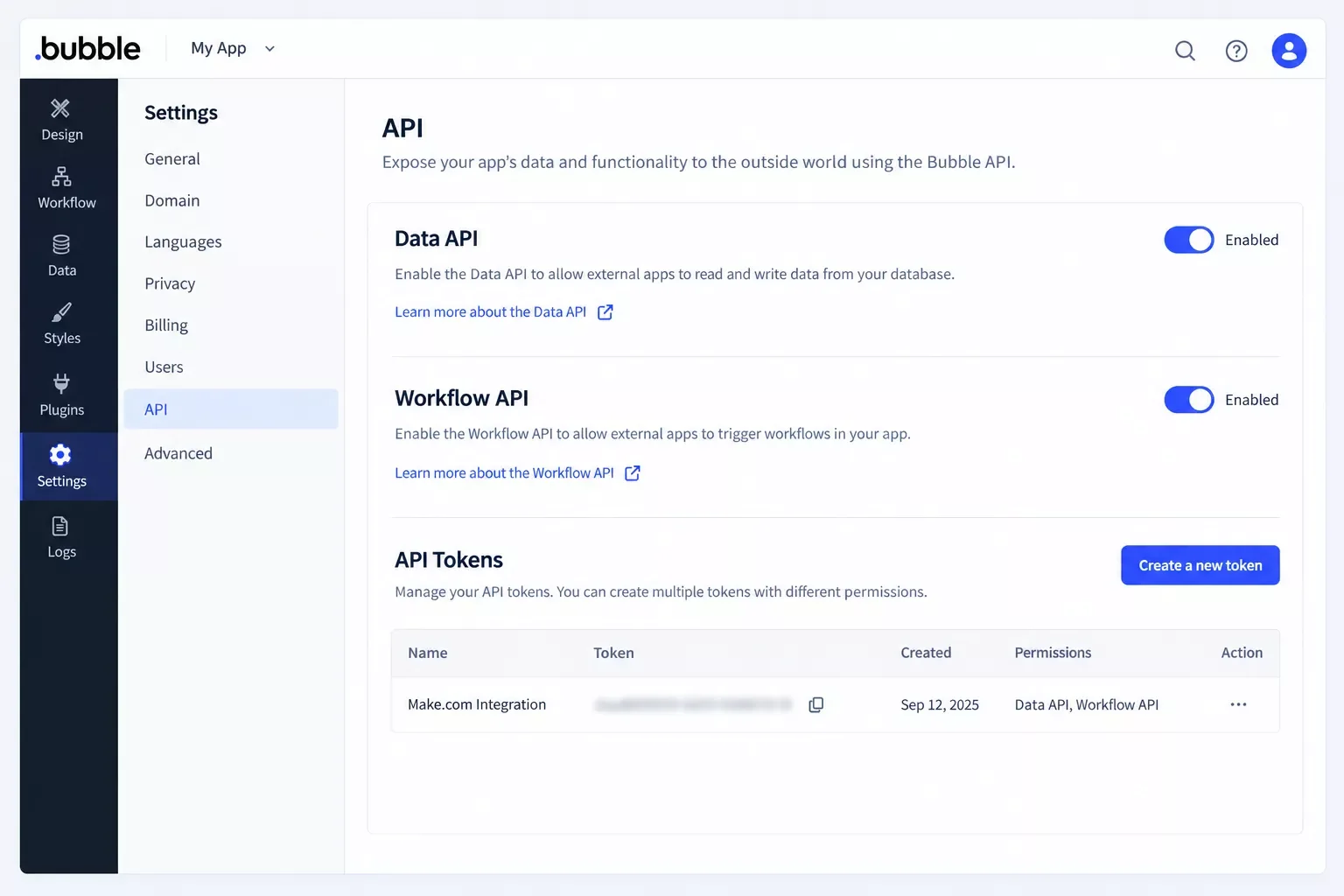
Bubble's API settings, where the Data API, Workflow API, and token are set.
Check each trigger's type before you promise real-time results. A scheduled (polling) trigger checks on an interval and uses at least one credit per check, even when nothing is new. A webhook trigger runs only when data arrives.
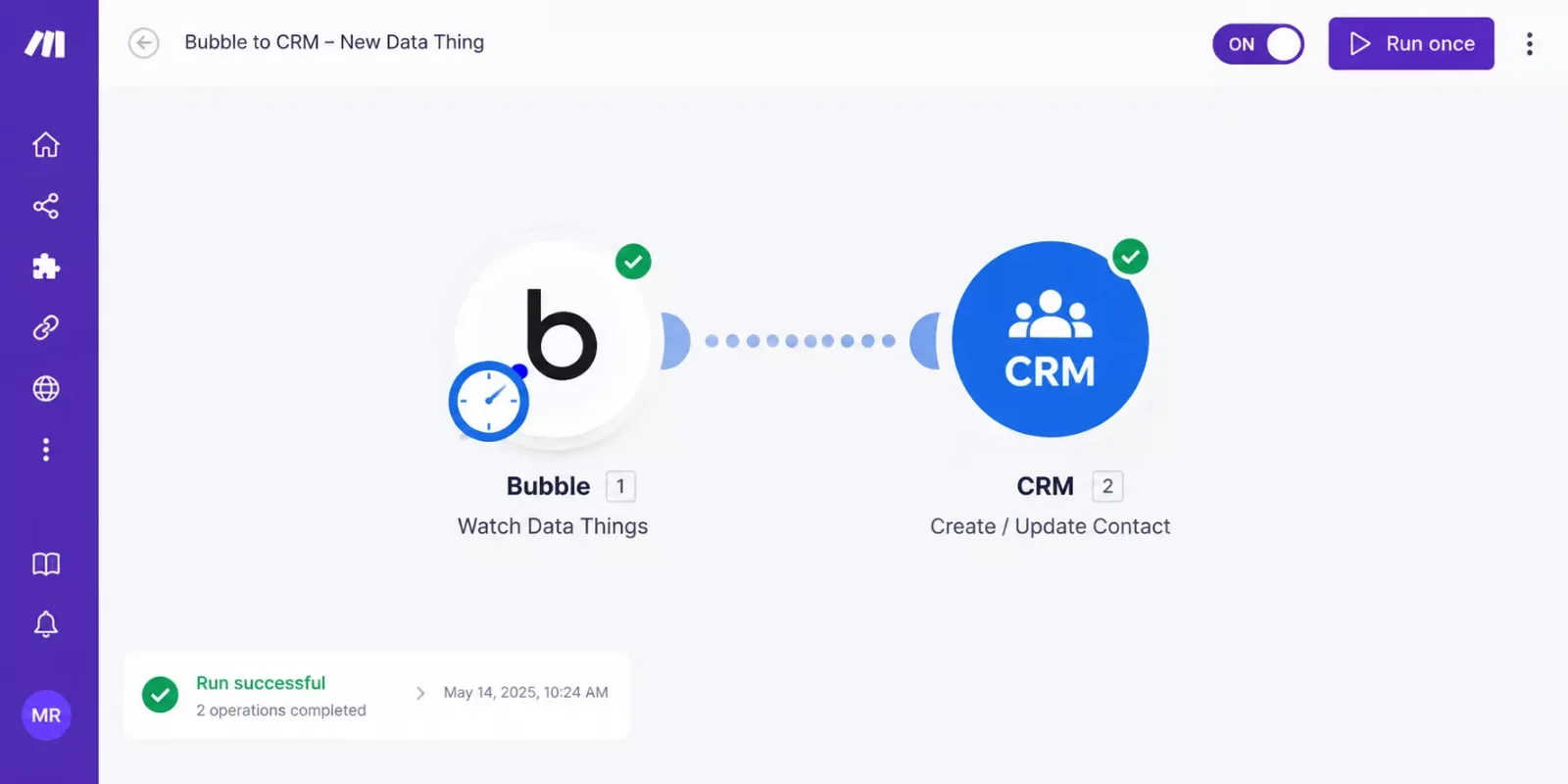
A Make scenario that watches Bubble for new data and sends it to a CRM.
Before you start: Setup is technical: you are switching on APIs and handling a token, so non-technical owners should plan extra time or ask for help.
If a Bubble Module in Make Returns a 401 or 404 Error
Bubble's own manual lists fixes for these Data API errors. Match the code you see to an entry below.
- 404 (record not found). Bubble's fix: make sure the data type is active in the Data API settings. Open Settings, then the API tab, and select it under Enable Data API.
- 401 (not authorized). Bubble's fix: check the credentials, such as the bearer token. The token lives in the Make connection, so it affects every Bubble module that uses it. Open the connection and paste the private key from Bubble's Generate a new API token step again. If you are changing data, also check that Modify via API is ticked in the relevant Privacy Rules.
- No error, but records seem missing. Check the connection's Environment field: Development (version-test) or Released (live).
The other three tools reach Make in different ways.
Integration details above were verified at the time of writing (October 2026). Plans and features change, so confirm the current requirements on each provider's official website before you buy.
How to Get Started
First, write down what the app must do, who will log in, and which tools it must connect to. Then test the best-fit builder on its free plan with real sample data. This prompt turns your answers into a short comparison from any AI assistant.
I run a small US business and need a custom app.
It must: [describe what it does]
Users: [how many, and whether they use work or personal email]
It must connect to: [CRM, email, spreadsheet]
Budget: [$ per month]
Compare Bubble, Glide, Softr, and Adalo for this,
and tell me which fits best and why.
Common Questions About Bubble and Its Alternatives
People Also Ask
Is the Bubble web app builder free to use?
Yes, but only for building and testing. Bubble's free plan gives you a development version and 50,000 workload units a month. A live web app needs a paid plan, which starts at $29 a month for web apps on annual billing.
Can the Bubble web app builder make Android and iPhone apps?
Bubble has a native iOS and Android editor that launched in public beta in June 2025. You rebuild screens there, but mobile apps share your web app's database. Mobile-only and combined plans have their own prices, so check Bubble's pricing page.
Is Bubble worth it for a small business, or is a simpler tool enough?
It depends on how custom your logic is. For a portal or internal tool on data you already have, Softr or Glide usually needs less learning time. Bubble is worth it when you need custom logic and can invest the time to learn it.
What if my Bubble app exceeds its workload units?
Bubble bills overages at $0.30 per 1,000 workload units unless you have a workload tier add-on. Turning overages off can take the app offline when it runs out.
Do I need to code to connect Bubble to Make.com?
No code is needed, but setup is technical. You switch on Bubble's APIs, create a token, and paste your app's API key into Make.
Which builder should a non-technical owner try first?
Start with the simpler tool that matches your use case: Softr for a portal, Glide for an internal tool, Adalo for mobile. Move to Bubble when a real limit blocks you.
Conclusion
The right choice comes down to time, budget, and what you need to connect. Bubble gives you the most room to grow, and the simpler tools ask less of you up front.
⚡ Pro Tip: Before you pay, count how many people will log in. User limits can push you up a plan faster than the headline price suggests.
If you're weighing Bubble against simpler tools, you're really asking where your limited time should go. Here's one tip you can use today: write down the three tools your app must talk to, then check each one's Make route before you pick a builder.
And if setting this up yourself isn't the best use of your week, this is exactly the kind of done-for-you automation I build as a No-Code Architect, fully working, for small teams like yours.
Want Your App Connected Without the Setup Headache?
SmartSoloFlow builds done-for-you Make.com automations for small businesses. Tell us which tools you use, and we'll map out the connection.
Talk to SmartSoloFlowFound this guide useful? Share it with a fellow freelancer who's still doing things manually. 🚀
Got a question or a workflow roadblock? Drop it in the comments below, happy to help.
Last Updated: October 8, 2026

// Comments