 SmartSoloFlow

Key Takeaway: You can build a working app without writing a single line of code, but most guides stop the moment you hit "publish." The real work starts once someone actually signs up.
Primary Tool(s): Bubble
Build Time: ~6-10 Hours (a simple lead or order-capture app)
If you've been putting off building an app because you assumed you needed a developer, you don't. This guide shows you how to build an app without coding using Bubble, a drag and drop app builder made for small business owners who don't have the time or budget to hire someone.
Once your app is live, you'll set up the one step almost every other guide skips: what happens the moment your first user signs up or places an order.
What Is No-Code App Building?
No-code app building means creating a fully working app by dragging, dropping, and connecting visual elements, no programming required. Platforms like Bubble handle the underlying code for you, so you focus on what your app does instead of how to write it.
Think of it like building with digital LEGO blocks. You place a button here, connect it to a database there, and the platform translates all of it into real, working software. This is no code app development in its simplest form.
A few years ago, this kind of build would have needed a developer and a few thousand dollars. Now a small business owner can sit down on a weekend and have something live by Monday. That shift is exactly why no-code has grown so fast.
Why this shift happened now:
- Visual builders finally handle real backend logic, not just static pages
- Cloud hosting and databases come bundled in, no separate server setup
- Non-technical founders can launch and iterate without waiting on a dev queue
According to Gartner's 2021 forecast, by 2025 roughly 70% of new applications built by businesses were expected to use low-code or no-code technology, up from under 25% in 2020.
Bubble fits squarely into that shift, and it's one of the few platforms that lets you build the full app (frontend, backend, and database) in one place. See other no-code and low-code platform options if Bubble's approach doesn't fit your project.
3 Major Business Benefits
Building your own app without coding isn't just cheaper. It changes how fast you can move and how much control you keep over your own product.
1. You control every change yourself. No waiting on a developer's schedule. If you spot a typo or want to add a new field to your signup form, you open the editor and fix it in minutes.
2. You skip the developer invoice entirely. A custom-built app from an agency can run into five figures. Building it yourself in Bubble costs you time and a monthly platform fee, nothing close to that.
3. You can test and iterate fast. Launch a rough version, watch how real users actually behave, and adjust the same day. You're not locked into a six-month build cycle before you get any feedback.
These three benefits compound. And you'll feel it most in the first few weeks after launch, which is exactly where most guides on this topic stop paying attention.
Real-Life Use Case
Picture a local dog grooming business. The owner, Maria, wants an app where customers can book a grooming slot and pay a deposit online instead of calling in. She has no coding background and no budget for a developer.
Using Bubble, Maria builds a simple booking app in a weekend. Customers pick a time slot, enter their dog's info, and pay through a connected payment processor. The app saves every booking to Bubble's built-in database automatically.
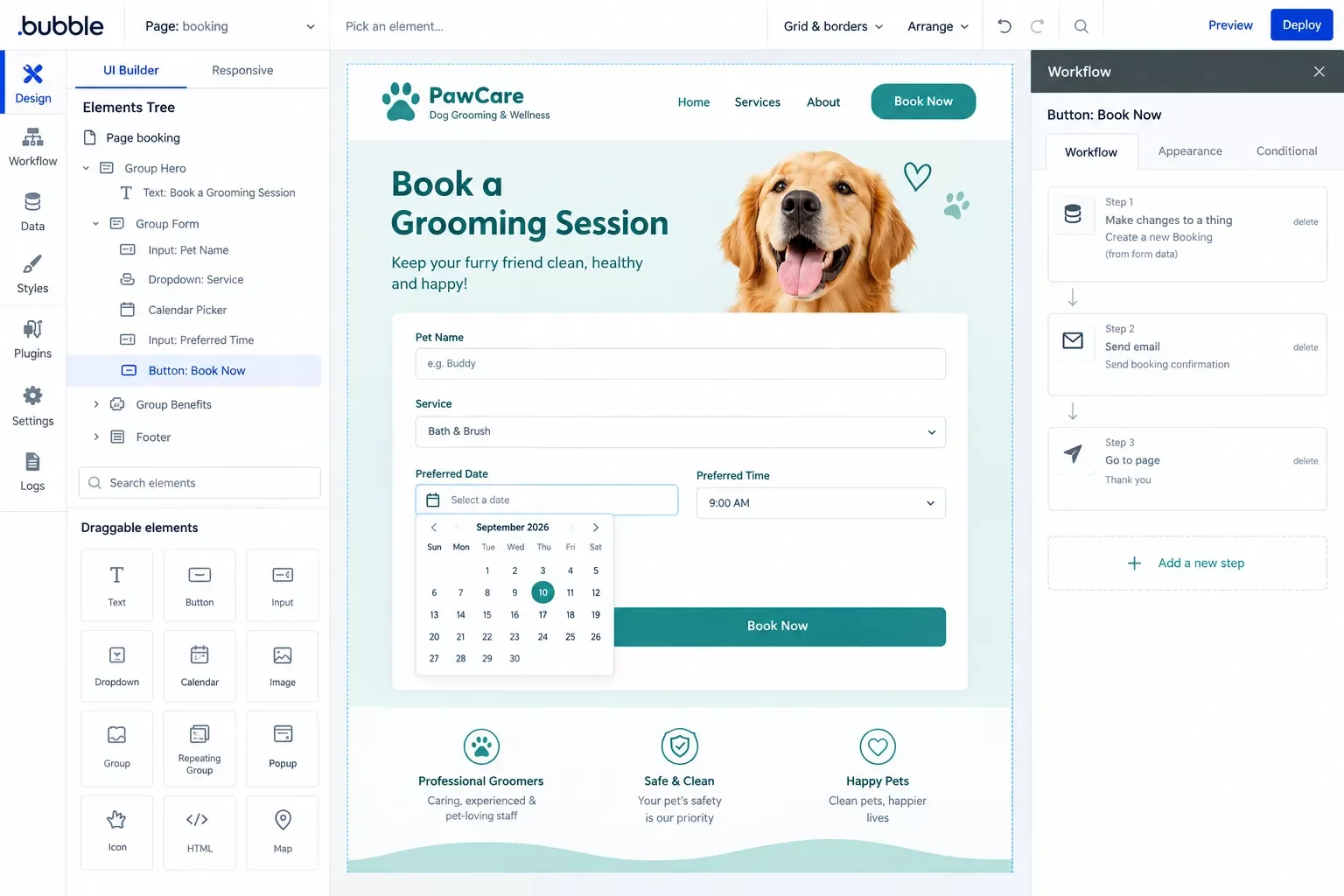
That part is the easy half. The harder question is what happens the moment her first real booking comes in. Does she have to keep refreshing her Bubble dashboard all day, hoping she doesn't miss one?
That's exactly the gap this guide covers next. If she wanted to route those leads somewhere smarter first, building a chat bot that routes leads automatically is another option worth knowing about.
Getting Started: How to Build an App Without Coding in 5 Steps
To build an app without coding, sign up for a no-code app development platform like Bubble, define your app's single core action, build your data structure, design the interface, and connect a workflow before publishing. Most simple apps take a weekend, not months.
- Pick your platform. Bubble works well for apps that need a real backend database, logins, and custom logic, not just a static form.
- Define one core action. Write a single sentence: "This app helps [who] do [what]." For Maria, that's "helps dog owners book a grooming slot."
- Build your data structure. Set up the "things" your app needs to remember. Bookings, customers, time slots.
- Design the interface. Drag in your calendar picker, buttons, and input fields. This is the drag and drop app builder part most people picture.
- Add your first workflow and publish. Connect the "Book Now" button to actually save a booking, test it once yourself, then go live.
This process works whether you're a total beginner or you've dabbled with an app builder for beginners before. The steps stay the same. What changes is what you do once real users start showing up, which is the part we're covering next.
For a full breakdown of platform options beyond Bubble, our full no-code app builder comparison guide covers the top picks for 2026. And if something breaks along the way, common no-code app builder issues are usually a quick fix once you know what to look for.
What Happens After You Build It: Automating New Signups & Orders
The moment someone signs up or places an order in your app, you need to know about it and get that data into the tools you already run your business on. Bubble can send you a basic email on its own, but it can't sync that data anywhere else by itself.
Here's the honest version. Bubble has a built-in "Send Email" workflow action, so you can manually wire up a simple notification when someone signs up. That part isn't a gap. The real gap is everything after that email lands in your inbox: nobody wants to manually copy a new customer's info into a CRM or accounting tool every single time.
This is where Make.com comes in. Instead of stopping at "you got an email," Make.com watches your Bubble app for new signups or orders (using Bubble's own official Make.com integration, no third-party plugin needed) and automatically pushes that data wherever it needs to go.
The trigger is instant, not a scheduled poll. Make.com's Bubble integration fires the moment your app posts the event, so there's no delay waiting for a check-in cycle.
Setup isn't quite plug-and-play. You'll need to turn on the Data API in your Bubble app's settings and expose the signup workflow as an API endpoint before Make.com can see it. It's a five-minute step, not a developer-only one, and it isn't gated behind a paid plan on its own. Bubble's official API documentation walks through the exact settings toggle.
Ready-to-use Prompt (paste into Make.com's scenario description when setting this up):
Trigger: Bubble - New Data Thing (type: Order or User, whichever you're tracking)
Action 1: Email - Send a formatted alert to your own inbox with the new record's key fields
Action 2: [Your CRM/accounting app] - Create or Update a record using the same data
Filter: only run Action 2 if the record's status = "confirmed" (avoids syncing abandoned signups)
Want to automate lead capture into a free CRM instead of your accounting tool? The same Make.com scenario pattern works there too.
And if you'd rather keep it simple with setting up automated email triggers before adding a CRM sync, that's a fine place to start as well.
This one scenario replaces the manual dashboard-checking habit for good. Once it's live, one of the more thorough breakdowns of Make.com automation workflows for small business owners you'll find starts right here, from SmartSoloFlow. Make.com's official Bubble integration page has the full list of supported triggers and actions if you want to go deeper.
2026 Advanced Tips & Scalability
Once your basic signup-to-CRM automation is running, there's room to grow it. A common next step is adding an AI agent into the same Make.com scenario, one that reads a new signup's info and drafts a personalized welcome email instead of sending a generic template.
You don't need this on day one, but it's worth knowing the same scenario you just built can scale into that without starting over.
⚠ Watch Out For: Bubble's free plan can't deploy a live app at all, no live URL, no custom domain. You'll need at least the Starter plan before real customers can reach your app and this automation has anything to actually trigger on.
Another practical upgrade: add a second filter branch that routes higher-value orders straight to a Slack or text alert, while smaller ones just log quietly into your CRM. This keeps your phone from buzzing over every $12 order while still catching the ones worth a same-day follow-up call.
Neither of these is required for your first version. Get the basic email-plus-CRM-sync scenario working first, watch it run for a couple of weeks, then decide which upgrade actually solves a problem you're feeling, not one you're imagining. If you're curious how far this can go, pairing an AI agent with your Make.com automation is worth a closer look.
People Also Ask
Should you validate your app idea before you start building it?
Yes. Before opening Bubble, talk to five people who actually have the problem you're solving. A weekend spent validating saves weeks spent building something nobody wanted in the first place.
Do I need to know how to code to use Bubble?
No. Bubble is built specifically so non-developers can create working web apps through a visual, drag and drop app builder. You'll still need to think logically, but you won't write a single line of code.
How important is community support when you're building a no-code app solo?
More than most beginners expect. Bubble's own forum and its unofficial Slack communities are where most real build questions actually get answered, often faster than official support. Don't skip joining one before you start.
Can a no-code app automatically notify you when someone signs up or places an order?
Yes, but not entirely on its own. Bubble can send a basic email by itself. To get that data synced into your CRM or accounting tool automatically, you'll need to connect it through Make.com, as shown earlier in this guide.
Is Bubble actually free to use for building an app?
Bubble has a free plan that's good enough to build and test an app like the one in this guide. But the free plan can't deploy a live app, so you'll need at least the Starter plan before real customers can actually reach it.
How long does it actually take to build a simple app without coding?
A focused weekend is realistic for a simple lead or booking app, roughly 6 to 10 hours of actual build time. More complex apps with multiple user roles will naturally take longer.
Can I connect my no-code app to tools I already use, like my CRM or accounting software?
Yes. Bubble has an official, Verified integration on Make.com, so you can connect new signups or orders directly to most CRM and accounting tools without writing custom code or hiring a developer.
Do I need a developer at any point in this process?
No. Every step in this guide, from building the app itself to setting up the Make.com automation, is designed for someone with zero coding background. The Bubble API setup step is the closest thing to "technical," and it's still just a settings toggle.
Conclusion
You don't need to hire a developer or spend months building this. A weekend with Bubble gets you a working app, and one Make.com scenario means you'll never have to babysit a dashboard waiting for your first signup.
That combination, build it yourself, then automate what happens next, is what actually separates a functional app from one that just sits there looking finished.
⚡ Pro Tip: Build and test your Make.com automation with a fake test signup before you ever share your app's link publicly. It's the one hour that saves you from missing (or double-emailing) your first real customer.
If you've read this far, you're clearly serious about getting this working the right way, not just publishing something and hoping for the best.
Here's one thing worth trying today: open your Bubble app's workflow tab right now and confirm your signup or order workflow actually fires an event Make.com can see. That single check catches most of the automation issues people run into later.
The complete, done-for-you version of everything in this guide, built, tested, and automated, is exactly what I build for small business owners as a No-Code Architect. If setting this up yourself isn't the best use of your week, this is exactly the kind of build I hand off, fully working, for small teams like yours.
Found this guide useful? Share it with a fellow freelancer who's still doing things manually. 🚀
Got a question or a workflow roadblock? Drop it in the comments below, happy to help.
Last Updated: September 27, 2026

// Comments