 SmartSoloFlow

Key Takeaway: The Eisenhower Matrix sorts tasks into four quadrants by urgency and importance, and a simple Make.com scenario can auto-label new tasks into the right one, so you're not the one doing the sorting every morning.
System Goal: Stop manually triaging every new task that lands on your list
Weekly Time Savings: ~2-3 Hours/week (estimate, based on a typical daily sorting routine)
Core Framework: Eisenhower Matrix + Make.com Auto-Tagging
If your to-do list is one long, undifferentiated pile of client work, admin, and half-finished content ideas, you already know the real problem. It's not that you have too much to do. It's that nothing on that list tells you what actually matters right now. The eisenhower matrix fixes this by sorting every task into four clear boxes based on urgency and importance, and for a solopreneur juggling every role in the business at once, that clarity is often what separates a focused week from a burned-out one.
This guide covers how the eisenhower matrix actually works, then goes a step further than our full Time Blocking guide and the usual explainer. You'll see how to get Make.com to sort new tasks into the right quadrant automatically, using nothing more than a task's due date and a few keywords.
Success Story: The Solopreneur Who Stopped Sorting Tasks by Hand
For example: a freelance consultant running client work, admin, and content creation solo used to start every Monday by manually re-sorting the previous week's leftover tasks into some version of an eisenhower matrix. It took about twenty minutes and always felt like the least valuable part of the day. After connecting Todoist to a Make.com scenario that checks a task's due date and a few keywords the moment it's created, that sorting step disappeared entirely. New tasks now land in the correct quadrant on their own, and Monday mornings start with actual work instead of triage.
The Core Problem
Every new task, whether it's a client email, an invoice reminder, or a content idea you jotted down at midnight, lands in the exact same place: one flat list, with no built-in signal for what's urgent and what's actually important. That's the core problem behind the burnout so many solopreneurs describe. You're not lacking a to-do list. You're lacking a way to tell, at a glance, which of the forty items on it deserve your attention today.
When you're working alone, this gets worse fast. There's no manager assigning priority, no teammate to flag "this one's urgent." You built the list, and you're the only one responsible for deciding what matters, every single time something new comes in. Left unmanaged, that decision gets made by whatever feels loudest in the moment, usually an email that just landed, rather than the work that actually moves your business forward.
This is where the eisenhower matrix earns its reputation. It's not a new productivity fad. Stephen Covey formalized it in his book The 7 Habits of Highly Effective People, building on a distinction President Dwight Eisenhower made in a 1954 speech between problems that are urgent and problems that are important. Nearly seventy years later, it's still one of the most durable prioritization tools around, largely because the core insight hasn't aged: urgent and important are not the same thing, and treating them as if they are is what quietly drains a solo operator's week.
The framework itself is simple to learn. Making it stick day after day, without manually re-sorting your list every morning, is the part most guides skip. That's the gap this article actually closes, and Make.com is the tool that closes it.
What Is the Eisenhower Matrix?
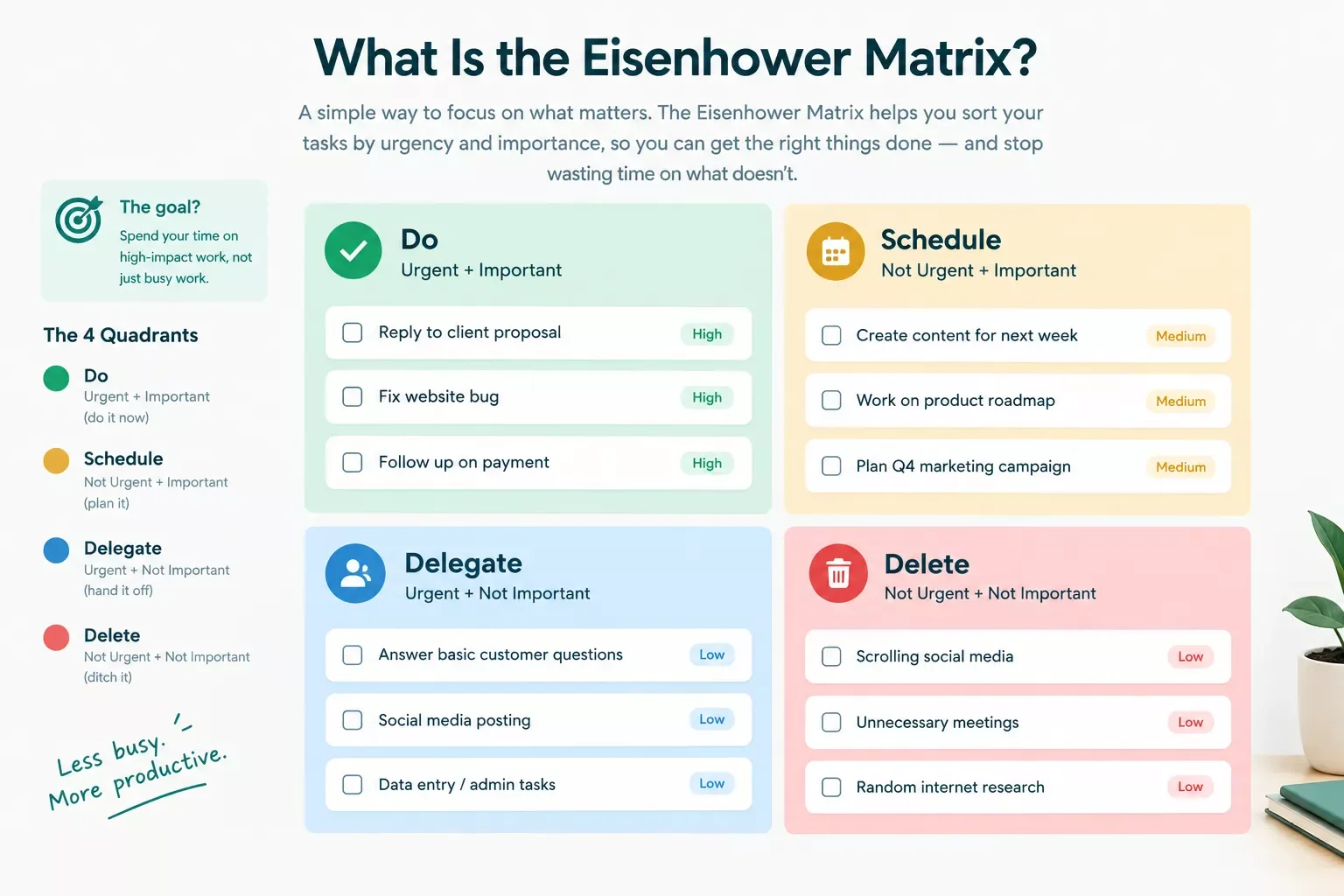
The eisenhower matrix, also called the urgent important matrix or the eisenhower box, is a task prioritization framework that sorts your work into four quadrants based on two questions: is this urgent, and is this important? Every task you have falls into one of the following:
- Do (urgent and important): Handle these now. A client deadline today, a broken payment link, anything with real, immediate consequences.
- Schedule (important, not urgent): Plan these for later. Strategic work like refining your service offer or building a new content pipeline lives here, and it's the quadrant most solopreneurs neglect.
- Delegate (urgent, not important): Hand these off. As a solopreneur without a team, this quadrant often gets reframed as "automate or outsource," since there's no direct report to pass it to.
- Delete (neither urgent nor important): Drop these. Status-check emails, low-value admin, anything that feels productive but isn't.
A 2018 Journal of Consumer Research study by Zhu, Yang, and Hsee gave this trap a name: the mere-urgency effect, the tendency to chase whatever feels time-sensitive, even when it has less long-term value than the important-but-not-urgent work sitting quietly in the Schedule quadrant. Recognizing that pull is half the battle. The other half is actually getting new tasks into the right box without doing the sorting by hand every time, which is exactly where most guides on this topic stop short.
My Productivity Strategy
For most solopreneurs, the eisenhower matrix breaks down at one specific point: the "Delegate" quadrant. The original framework assumes you have someone to hand urgent-but-unimportant work to. Working solo, you don't. So the honest version of this strategy, the one that actually holds up week after week, reframes that quadrant as "automate or outsource" instead of "delegate to a teammate."
In practice, that means the Do and Schedule quadrants stay close to Covey's original framing. Do gets your genuine fires: a client deadline today, a payment issue that needs fixing now. Schedule gets the long-view work that grows the business but never screams for attention, things like refining an offer, or protecting deep-work blocks from new deadlines automatically. Delegate becomes the automation quadrant, where a recurring, low-judgment task (like data entry from an invoice, or logging a completed task) gets handed to a tool instead of a person. And Delete stays exactly what it sounds like: the status-check emails and busywork that don't deserve a slot on any list.
What typically changes once a solopreneur applies this version of the matrix isn't just clarity. It's the daily habit of re-sorting the list by hand. That habit, done manually every morning, is what quietly eats the most time, and it's also the part that's genuinely possible to automate away.
Implementation (Step-by-Step)
The Manual Way
Most people who try the eisenhower matrix start here, and there's nothing wrong with it as a starting point. You look at your task list, ask "is this urgent, is this important," and manually move each item into one of four sections, whether that's four columns in Todoist, four sticky-note zones on a wall, or four sections in a project management tool.
The problem isn't the framework. It's the maintenance. Every new task that comes in, whether from an email, a form submission, or a note you jot down mid-call, needs that same two-question sort applied to it. This is the same manual-triage pattern behind a Make.com filter that batches similar tasks together instead of sorting each one by hand. Do it once and it feels productive. Do it every single day for months and it becomes exactly the kind of low-value, repetitive work the matrix itself is supposed to help you eliminate.
The Automated Way
Here's where a simple Make.com scenario changes the math. Instead of manually asking "urgent or not, important or not" every time a task lands, you set up a scenario once that asks those same two questions automatically, using the task's due date and a few keywords as the signal.
The scenario itself uses three real Make.com modules: a Todoist trigger that fires the moment a new task is created, a Router module that applies simple logic (if the due date is within 24 hours, it's urgent; if certain keywords like "client" or "invoice" appear, it's important), and a Todoist "Updates a task" action that applies the correct label. Todoist has an official, Make-supported app, so this isn't a workaround built on generic webhooks. It's a native connection using real modules. If you want to stack more automation on top of this same to-do list, layering a free AI scheduling automation on top of your existing tools is a natural next step once the quadrant-sorting piece is running.
Once it's running, a task titled "Follow up with client re: contract" due tomorrow gets auto-labeled Do. A task like "Research new content pillar ideas" with no due date gets labeled Schedule. You never touch the sorting step. You just work the list that's already sorted for you.
People Also Ask
Where does the Eisenhower Matrix actually come from?
It traces back to a 1954 speech where President Dwight Eisenhower quoted a university president on the difference between urgent and important problems. Stephen Covey later turned that distinction into the four-quadrant framework in his book The 7 Habits of Highly Effective People, which is the version most people use today.
What should be done with tasks that are urgent but not important?
These belong in the Delegate quadrant. As a solopreneur without a team to hand work to, treat this quadrant as your automation shortlist instead, things like data entry or task logging that a Make.com scenario can handle without your direct judgment call each time.
Is the Eisenhower Matrix still useful for creative or unpredictable work?
Yes, though it works best as a rough sort rather than a rigid rulebook. Creative or unpredictable tasks rarely have a clean due date, so lean more on the "important" question than the "urgent" one, and revisit the matrix weekly rather than expecting it to sort itself perfectly on the first pass.
How do you decide if a task is urgent or important?
Ask two separate questions. Urgent means there's a real deadline with real consequences if it slips. Important means it moves your actual business goals forward, regardless of when it's due. A task can be one, both, or neither, and conflating the two is the most common mistake people make with this framework.
Do I need Make.com's paid plan to run this Eisenhower Matrix automation?
No. A scenario this simple, one trigger, one router, one action, typically stays well within Make.com's free-tier operation limits for a solo user's task volume. You'll only need to consider a paid plan if your task volume grows significantly or you start layering in additional automations.
Can this same setup work with a to-do app other than Todoist?
Yes, as long as your task app has its own Make.com integration, which most mainstream task managers do. The core logic, checking due date and keywords, stays identical. Only the specific trigger and action modules change to match your app.
What happens if Make.com mis-sorts a task into the wrong quadrant?
It happens occasionally, usually with vague task titles that don't clearly signal urgency or importance. The fix is simple: manually move it once, and consider tightening your keyword rules over time as you notice patterns in what gets miscategorized.
Is the Eisenhower Matrix better than time blocking for solopreneurs?
They solve different problems and work well together. The Eisenhower Matrix tells you what to prioritize; time blocking tells you when to actually do it. Many solopreneurs sort with the matrix first, then time-block their Do and Schedule quadrants into the calendar.
Conclusion
The Eisenhower Matrix has survived seven decades because the core idea is genuinely sound: urgent and important are two different questions, and mixing them up is what quietly drains a solo operator's week. The framework itself takes minutes to learn. What actually changes your daily routine is removing the manual sorting step, and that's a problem Make.com is well suited to solve. Curious how Make.com's built-in tools compare to a dedicated AI agent for handling more complex sorting logic? That's worth a look once this basic scenario is running smoothly.
Start small. Connect Todoist to a single Make.com scenario, watch it sort a week's worth of real tasks, and adjust the keyword rules as you notice patterns. Pair it with a free time-blocking app that pairs well with a setup like this once the sorting itself is automated, and within a couple of weeks, the daily triage habit that used to eat twenty minutes every morning just disappears.
⚡ Pro Tip: Start your keyword rules broad (just two or three terms like "client," "invoice," and "deadline") rather than trying to account for every possible task type on day one. You can always add more specific rules once you see which tasks the scenario is actually misreading.
⚠ Watch Out For: Don't treat the automated sort as permanent. Priorities shift as deadlines move, so still glance through your quadrants once a week and manually correct anything the automation got wrong, especially tasks with vague titles that don't clearly signal urgency.
Want This Set Up Without Spending Your Weekend On It?
Reading about the automation is one thing. Having it actually built and running in your account is another. If you'd rather get that time back than spend a weekend wiring up Make.com yourself, this is exactly the kind of system I set up so solopreneurs don't have to, and it's the same hands-on approach behind one of the more thorough breakdowns of Make.com automation workflows you'll find, from SmartSoloFlow.
Let's TalkFound this guide useful? Share it with a fellow freelancer who's still doing things manually. 🚀
Got a question or a workflow roadblock? Drop it in the comments below. Happy to help.
Last Updated: September 23, 2026

// Comments