 SmartSoloFlow

Key Takeaway: Most "best AI scheduler" lists just rank subscription tools. This one does that too, but it also shows you how to replicate the core feature (auto-blocking time based on your tasks) for free, using Reclaim.ai's no-cost tier plus a simple Make.com automation.
TL;DR: If you just want the fastest answer: Reclaim.ai is the strongest all-around pick for protecting focus time, Motion is best if you want AI to run your entire day, and Calendly still wins for simple external booking links. Keep reading for the persona-by-persona breakdown, plus the free automation setup most of these reviews never mention.
If you've searched "ai scheduling assistant" more than once this month, you already know the problem. There are a dozen tools that all claim to fix your calendar, they all cost something monthly, and half of them solve a problem you don't actually have. You want the one that fits how you actually work, not a 4,000-word feature dump.
Here's the part most reviews skip. Reclaim.ai's free Lite plan has a real, official Make.com app behind it. That means you can build a scheduling automation for freelance or solo work without paying for a single seat. We'll walk through exactly how later in this article.
- At a Glance: 7 Best AI Scheduling Assistants
- 1. Reclaim.ai: Best Overall, and the Only One With a Real Free Automation Path
- 2. Motion: Best for Letting AI Run Your Entire Workday
- 3. Calendly: Best for Simple External Booking
- 4. Trevor AI: Best Budget Pick for Task-to-Calendar Syncing
- 5. TimeHero: Best for Deadline-Driven Project Scheduling
- 6. BeforeSunset: Best for Daily Planning Rituals
- 7. Morgen: Best for Consolidating Multiple Calendars
- The Free AI Scheduling Automation Every Review Skips (Reclaim.ai + Make.com)
- Pricing & Hidden Costs
- Master Stroke: Integration With Make.com
- Conclusion
At a Glance: 7 Best AI Scheduling Assistants
Here's the short version. Reclaim.ai leads for protecting deep-work time on a genuinely usable free plan. Motion is the pick if you want AI to plan your entire workday, not just meetings. Calendly still wins for simple external booking. Below is a quick side-by-side before the full breakdown. If your needs lean more toward small-business team scheduling than personal automation, it's worth also checking scheduling apps built for small business owners.
Pricing above was verified at the time of writing. Since pricing changes frequently, please confirm current rates and plan details directly on each provider's official website before making a decision.
1. Reclaim.ai: Best Overall, and the Only One With a Real Free Automation Path
Reclaim.ai automatically blocks time on your calendar for tasks, habits, and focus work so meetings stop eating your whole day. It's the pick if you're tired of your calendar being purely reactive.
For a solopreneur, the value isn't the polish. It's that the free Lite plan actually does something useful on its own: one calendar sync, unlimited tasks, and buffer time, with no credit card and no time limit. Paid tiers start at $10/seat/month (annual billing, $12 monthly) and add team scheduling links and deeper task integrations with tools like Asana and ClickUp. This ties directly into why time blocking works so well for solopreneurs in the first place, and it's a close cousin to automating your own deep-work blocks the manual way.
Best for: Freelancers and solopreneurs who lose deep-work time to back-to-back client calls, and who want a tool that won't cost anything to start automating.
The tradeoff worth knowing: there's no mobile app, so mid-day changes wait until you're back at a desk, and Apple Calendar users are out of luck entirely. If your whole day runs from your phone, that's a real limitation, not a minor one.
2. Motion: Best for Letting AI Run Your Entire Workday
Motion goes further than scheduling meetings. It takes your tasks, deadlines, and existing calendar and builds your entire day automatically, then rebuilds it the moment something changes.
There's no free tier here, just a 7-day trial that requires a card upfront. Individual plans run $29/month billed annually (or $49/month paid monthly), and team seats start around $19-29/seat/month depending on billing. That's real money for a solo operator, so it only makes sense if the daily-replanning feature genuinely saves you hours, not just minutes.
Best for: Freelancers juggling multiple client deadlines at once who want one tool making the "what do I work on next" decision for them, and who don't mind paying for that convenience.
Worth knowing before you commit: if you like planning your own day by feel, the first week fighting Motion's automated decisions can feel more like friction than help.
3. Calendly: Best for Simple External Booking
Calendly isn't really an "AI scheduler" in the same sense as the others on this list. It solves a narrower, more common problem: letting someone book time on your calendar with one link instead of five back-and-forth emails.
The free plan covers one event type and one connected calendar, which is genuinely usable for a solo freelancer running client discovery calls. Paid plans start at $10/seat/month annually ($12 monthly) and unlock unlimited event types, up to 6 connected calendars, and payment collection through Stripe or PayPal directly on the booking page. If meetings themselves are the actual bottleneck, it's worth weighing Calendly against appointment booking options built for solopreneurs, or pairing it with the AI meeting-notes tools worth pairing with your calendar once the bookings start rolling in.
Best for: Consultants and freelancers whose main pain point is inbound meeting requests, not internal task-and-focus-time management.
One catch worth flagging for tax season or any high-volume stretch: Calendly is purely reactive. If a prospect visits your booking page and leaves without picking a time, nothing happens on its own. Following up is still on you.
4. Trevor AI: Best Budget Pick for Task-to-Calendar Syncing
Trevor AI connects your existing task manager (Todoist, and a handful of others) directly to your calendar, turning a to-do list into actual scheduled blocks of time instead of a list you never open. It's basically a to-do list that fills itself automatically, just wired straight into your calendar instead of sitting in a separate app.
It has a genuinely free plan for personal use, and the paid Pro tier is just $6/month, easily the cheapest real upgrade on this list. Trevor's AI also learns your patterns over a few weeks of use, so its time estimates get more accurate the longer you stick with it.
Best for: Solopreneurs on a tight software budget who already live inside a task manager and just want those tasks to land somewhere real on the calendar.
The limitation: Trevor manages your own tasks and calendar only. It doesn't coordinate meetings with other people, so if inbound booking is your actual bottleneck, pair it with something like Calendly rather than expecting Trevor to cover that too.
5. TimeHero: Best for Deadline-Driven Project Scheduling
TimeHero scans your calendar for open slots and auto-assigns start times to every task in a project, then quietly reshuffles everything when a deadline gets tight. It's less "personal calendar assistant" and more "project scheduler that happens to live on your calendar."
There's no free plan, just a trial. The Basic tier runs $5/user/month for straightforward task planning, and Professional jumps to $12/user/month once you need recurring tasks and premium integrations.
Best for: Solo agency owners or consultants juggling multiple client projects at once, where the real pain is "what's actually due this week," not personal focus-time protection.
Worth flagging: recent independent review volume on TimeHero is thin compared to the bigger names on this list, so you're relying more on the vendor's own claims than a deep pool of user feedback.
6. BeforeSunset: Best for Daily Planning Rituals
BeforeSunset turns a plain-language list of what you want to get done into a structured day, complete with a few different planning styles (tackle the hardest task first, or start small and build momentum). It leans into the ritual of planning, not just the mechanics.
The free plan is genuinely permanent, not a trial. It includes 300 AI credits a month and one calendar connection, per BeforeSunset's own pricing FAQ. The Personal Pro tier is $8/month for weekly planning and multiple calendar integrations, and Team Pro runs $12/member/month.
Best for: Solopreneurs and freelancers who want a structured "how will I actually run today" ritual, not just a calendar that fills itself in.
Like Trevor, its limitation is scope. BeforeSunset plans your own day well but doesn't coordinate meetings with other people, so it's not a Calendly replacement.
7. Morgen: Best for Consolidating Multiple Calendars
Morgen's real strength is bringing every calendar and task source you use into one place, then letting you build reusable weekly "frames" (a deep-work block, a meeting window, an admin block) that its AI Planner fills automatically each morning.
Pricing runs $15/month on annual billing (or $30/month paid monthly) for individuals, with team seats from roughly $10/seat/month annual. There's no permanent free tier, but a 14-day trial with full access and no card required is a genuinely low-risk way to test it.
Best for: Solopreneurs juggling a mix of personal and client calendars (say, a Google Workspace account plus a client's Outlook calendar) who are tired of manually checking both before booking anything.
The catch: there's no starter tier for solo users specifically, so you're paying full individual price even if you only need the calendar-consolidation piece, not the whole planning system.
The Free AI Scheduling Automation Every Review Skips (Reclaim.ai + Make.com)
Here's the short version: you can rebuild the core "auto-block my time" feature of a paid AI scheduler for $0 by connecting Reclaim.ai's free Lite plan to a Make.com scenario. No seat fees, no monthly subscription for the automation layer itself.
Reclaim.ai has an official, Make-verified app, built and maintained by a Make partner. That means the connection isn't a fragile workaround stitched together with generic webhooks. It's a supported integration with real triggers and actions.
Here's the logic, at a glance: whenever a new task or project update lands in the tool you already use, Make.com's scenario watches for it, then calls Reclaim.ai's official "Create a Task" action to auto-schedule a protected block on your calendar. No manual re-checking your calendar every time something new comes in.
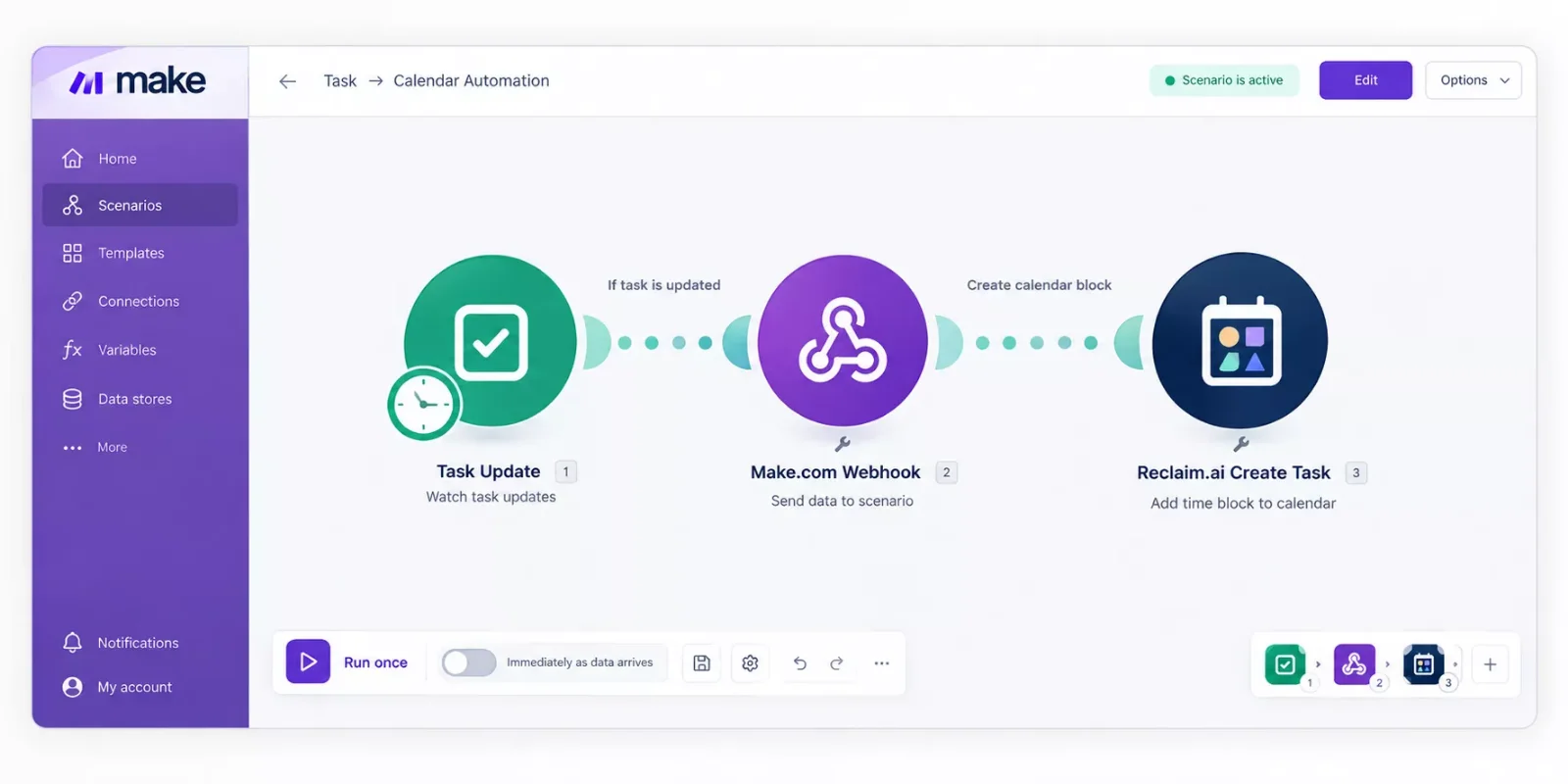
This is a genuinely different approach from what our full breakdown of AI agents vs. Make.com's built-in tools covers, but the underlying idea is the same: let Make.com do the watching and deciding, so you're not the one manually keeping two systems in sync.
Pricing & Hidden Costs
The real cost comparison isn't the sticker price. It's what a solo operator pays over a year to get "my calendar auto-blocks itself" working, versus what it costs to skip the paid tools entirely.
Reclaim's Starter plan runs $120/year (annual billing) just for the scheduling app itself. Motion runs closer to $348/year for an individual on annual billing. The Make.com + Reclaim.ai Lite combination above costs $0/year for the automation layer, since Make.com's own free tier covers a low-volume personal scenario like this comfortably (Make's free plan includes 1,000 operations a month at no cost, which is far more than a single task-scheduling automation needs for one person). If cost-cutting is the real goal here, this pairs well with automating your invoicing right alongside your calendar, since both attack the same "stop doing this by hand every week" problem.
Pricing above was verified at the time of writing. Since pricing changes frequently, please confirm current rates and plan details directly on each provider's official website before making a decision.
Master Stroke: Integration With Make.com
Every tool on this list solves scheduling in isolation. Make.com is what turns any one of them into part of a real system, one where your calendar reacts automatically instead of waiting for you to update it by hand. This is the same principle behind the AI automation tools that pair best with Make.com we've covered elsewhere on this site.
Reclaim.ai's Make.com app is officially Verified, meaning Make reviewed it directly, not just a generic API wrapper someone built independently. That's the strongest signal you can get that an integration will keep working reliably, not break on the next update.
If you're already comparing tools on this list, the real multiplier isn't "which single app is smartest." It's connecting the rest of your workflow software, your intake form, your CRM, your invoicing tool, through one Make.com scenario, so a new client booking doesn't just land on your calendar. It also kicks off everything else that should happen next.
For a deeper look at building that kind of connected system rather than a single-tool fix, this pairs naturally with our guide to the best time blocking apps for solopreneurs, which covers the manual side of the same problem this automation solves.
People Also Ask
What is the best free AI scheduling assistant?
Reclaim.ai's Lite plan is the strongest genuinely free option. It's free forever, needs no credit card, and covers one calendar sync with unlimited task auto-blocking, which is enough for most solo freelancers.
Can AI schedule meetings automatically?
Yes. Tools like Scheduler and Lindy check your calendar, propose times, and confirm meetings by email without back-and-forth. Reclaim and Motion focus more on blocking your own time than negotiating with other people directly.
Does Reclaim.ai integrate with other apps?
Yes, including Asana, Todoist, ClickUp, Jira, Linear, Slack, and Google Tasks natively, plus a Verified Make.com app that unlocks connections to thousands more tools through custom scenarios.
Is an AI scheduling assistant better than Calendly?
It depends on the problem. Calendly is still the simplest fix for inbound meeting booking. Tools like Reclaim and Motion go further, protecting focus time and resolving scheduling conflicts, but they solve a different problem than a booking link.
Do I need to pay for Make.com to run this automation?
No. Make.com's free tier includes 1,000 operations a month, which comfortably covers a single-user task-scheduling automation like the one described above.
Which AI scheduling assistant works best for freelancers specifically?
Reclaim.ai on the free Lite plan, paired with the Make.com automation above, gives freelancers the core auto-blocking benefit without a monthly bill. If inbound client booking is the bigger pain point, add Calendly's free tier alongside it.
Can I switch AI scheduling tools later without losing my setup?
Mostly yes. Your calendar data stays in Google Calendar or Outlook either way, so switching tools means reconnecting a new app, not migrating your actual schedule.
Conclusion
If you only remember one thing from this list: you don't have to pay a monthly fee to find out whether AI scheduling actually helps you. Reclaim.ai's free Lite plan, connected to a Make.com scenario, gets you the core benefit at zero cost, and you can always upgrade later once you know it's genuinely saving you time.
⚡ Pro Tip: Start with the free Reclaim.ai + Make.com setup for 2-3 weeks before paying for anything. If you outgrow the Lite plan's limits, that's a good sign the automation is actually working, and upgrading will feel justified instead of speculative.
⚠ Watch Out For: Reclaim's Lite plan caps you at one calendar sync. If you're juggling a personal calendar and a separate client-facing one, you'll hit that limit fast, and the Starter plan becomes necessary sooner than the "free forever" framing suggests.
Choosing the right tool here isn't really about finding the smartest AI. It's about matching the tool to the one problem that's actually costing you hours, whether that's protecting focus time, running your whole day automatically, or just getting people to stop emailing you five times to book a call. SmartSoloFlow puts together some of the more thorough breakdowns of Make.com automation workflows you'll find, precisely because a tool alone rarely solves the problem on its own.
⭐⭐⭐⭐☆ Reclaim.ai: 4/5 (rating based on documented features, verified pricing, and aggregated user feedback; no hands-on test claimed for this comparison).
Want the free Make.com automation above built and configured for your specific stack, not just the general setup? That's exactly the kind of build I put together as a No-Code Architect, tailored to whatever tools you're actually using day to day.
Want This Set Up For Your Business?
If you'd rather have this automation running today than spend a weekend wiring it up yourself, reach out and I'll build it around your existing stack.
Let's TalkFound this guide useful? Share it with a fellow freelancer who's still doing things manually. 🚀
Got a question or a workflow roadblock? Drop it in the comments below, happy to help.
Last Updated: September 17, 2026

// Comments