 SmartSoloFlow

Key Takeaway: A simple Make.com filter can auto-sort every incoming request into the right task batch the moment it lands, so you stop doing that sorting by hand every single day.
System Goal: Auto-sort incoming requests into batches, no manual triage
Weekly Time Savings: ~3-4 Hours/week
Core Framework: Make.com Filter Routing + Todoist Labels
Task batching only works if someone actually sorts the incoming requests into the right batch first, and for most solopreneurs, that someone is you, every single day. I run into this constantly: emails, client Slack pings, and new form submissions all arrive in one messy stream, and I used to spend the first twenty minutes of every morning just deciding what pile each one belonged in. That's dead time, and it's exactly the kind of overwhelm that leads to burnout when you're working alone with no team to hand off the sorting to.
So I built a Make.com scenario that does the sorting for me. A filter module reads each new request, checks its category, and automatically creates a labeled Todoist task in the right batch before I've even opened my inbox. Here's exactly how I set it up, what broke the first time, and what it actually looks like running today.
Success Story: The Morning I Stopped Sorting My Own To-Do List
For example: picture a solopreneur juggling client emails, a Slack channel for one retainer client, and a steady trickle of form submissions from their own site. Every morning starts the same way: read everything, decide what's urgent, decide what category it belongs to, then finally start working. After setting up a Make.com filter that reads each new request and drops it straight into the right labeled batch in Todoist, that entire sorting routine disappears. The inbox is already organized by the time coffee's ready, and the actual work day starts twenty minutes earlier without anyone forcing themselves out of bed sooner.
The Core Problem
If you've ever opened your laptop and felt exhausted before you've done a single task, you already know what context-switching burnout feels like. It's not the work itself that wears you down. It's the constant mental gear-shifting between totally different modes of thinking, client work one minute, invoicing the next, then a content idea, then back to a client question.
According to the American Psychological Association's research on multitasking, switching between tasks can cost as much as 40% of someone's productive time, since your brain needs a moment to fully disengage from one task before it can properly focus on the next. When you're a solopreneur handling every function of your business yourself, that cost compounds fast.
Here's what my incoming workload actually looked like before I fixed this:
- Client communication: emails and Slack messages from active clients, usually time-sensitive
- Admin and finances: invoicing requests, expense receipts, scheduling confirmations
- Content and marketing: blog ideas, social post drafts, newsletter notes
The problem was never that these three buckets existed. It's that nothing sorted them into their buckets automatically. Every new message landed in one shared inbox, and I had to read it, classify it, and manually move it into the right batch before I could even start working on it. Some mornings that sorting alone ate up twenty to thirty minutes, and it happened again every time something new came in throughout the day.
This is where most task batching advice stops short. It tells you to group similar tasks together, which is genuinely good advice, but it assumes you'll keep doing the sorting by hand forever. That's exactly the piece I wanted to automate with Make.com.
What I Tried First
Before I touched any automation, I tried the standard manual approach. I set fixed batch windows on my calendar: mornings for client work, early afternoon for admin, and a two-hour block on Tuesdays for content. On paper, it looked clean.
In practice, it broke down fast. A client Slack message would land during my "admin" block, and I'd either ignore it (which felt risky) or stop what I was doing to handle it (which defeated the whole point of batching). I was still manually deciding, in real time, where every single incoming item belonged. The calendar structure didn't remove the sorting work. It just gave the sorting work a nicer schedule.
I also tried a rougher version using Todoist's own filters, tagging things by hand as they came in. That helped a little, but it still required me to be the one doing the tagging every time, which meant the sorting task never actually went away. It just got slightly faster. If you're still at this manual stage yourself, pairing it with a system like a to-do list that sorts itself is a reasonable middle step before going further.
What I actually needed wasn't a better manual system. It was something that could look at an incoming request the moment it arrived and route it into the right batch without me touching it at all. That's what sent me looking at Make.com.
Automate Task Batching With Make.com
Automating task batching with Make.com comes down to one filter module that reads every incoming request and routes it into the correct batch before you ever see it. No more deciding, just working from an already-sorted list.
Here's the logic I actually built, step by step:
- Trigger: A new item lands in one of three places I watch (a Gmail label for client emails, a Slack channel for the same retainer client, and a form submission tool for anything coming through my site).
- Filter module: Make.com checks the source and the content of each incoming item against a set of rules ("contains client name" routes to Client, "contains invoice/expense/receipt" routes to Admin, everything else defaults to Content).
- Action: Once a match is found, Make.com's Todoist module creates a new task using the real "Creates a task" action, and applies the matching label automatically, so it drops straight into the correct batch inside Todoist.
- Fallback: Anything that doesn't clearly match a rule still gets created as a task, just with an "Unsorted" label, so nothing silently disappears while I refine the filter over time.
This uses Todoist's own native integration with Make, a first-party app maintained by Make itself, not a workaround, so the connection stays stable and doesn't rely on a generic webhook hack. If you're also running project work through a tool like the setup in automating your project management setup, the same filter-and-route logic extends there just as easily.
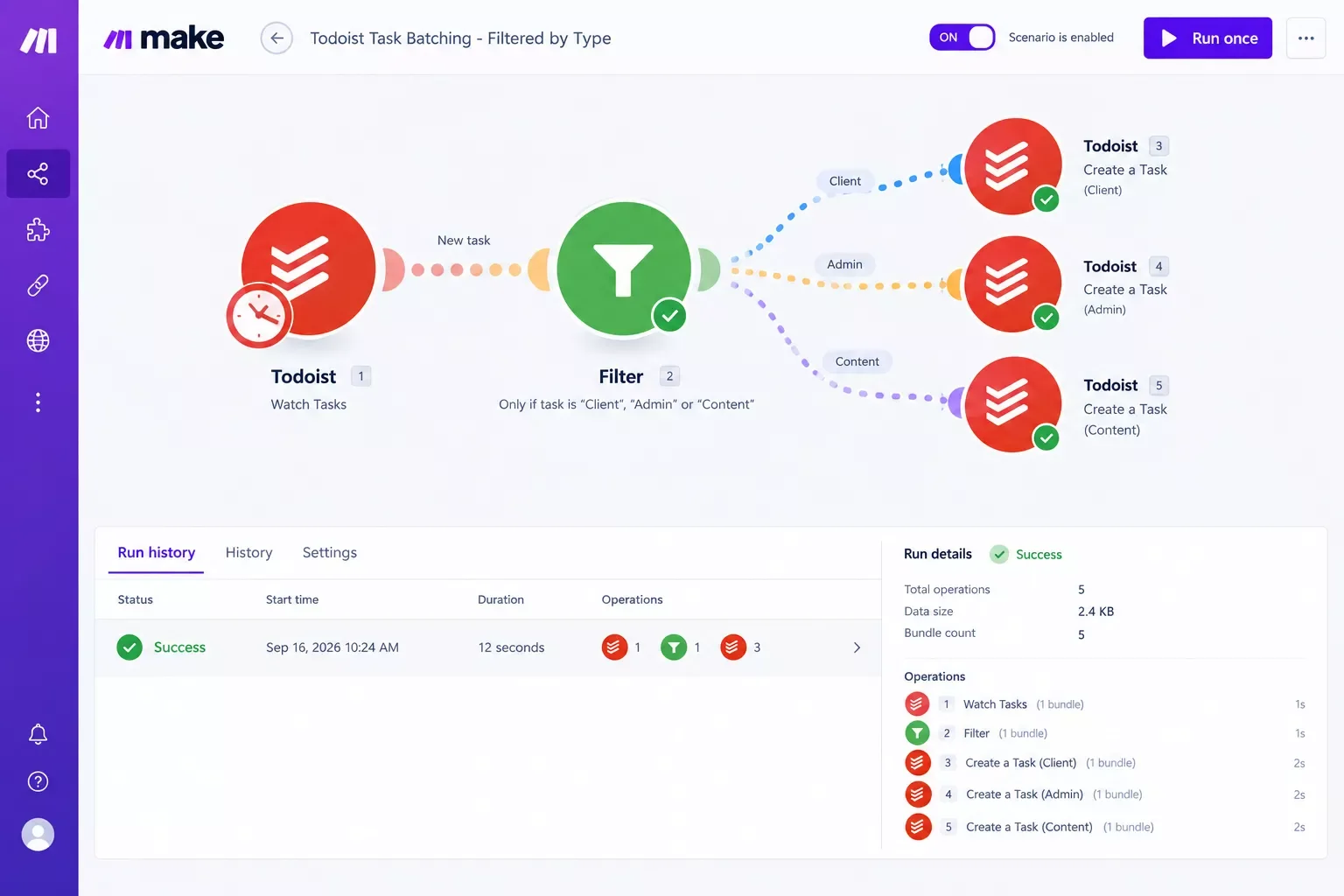
Setting this up took about 25 minutes the first time, most of which went into writing the filter rules, not building the scenario itself. If a request doesn't clearly belong anywhere, it still becomes a task instead of vanishing, which matters more than it sounds like it would the first time a filter rule misses something.
The Result
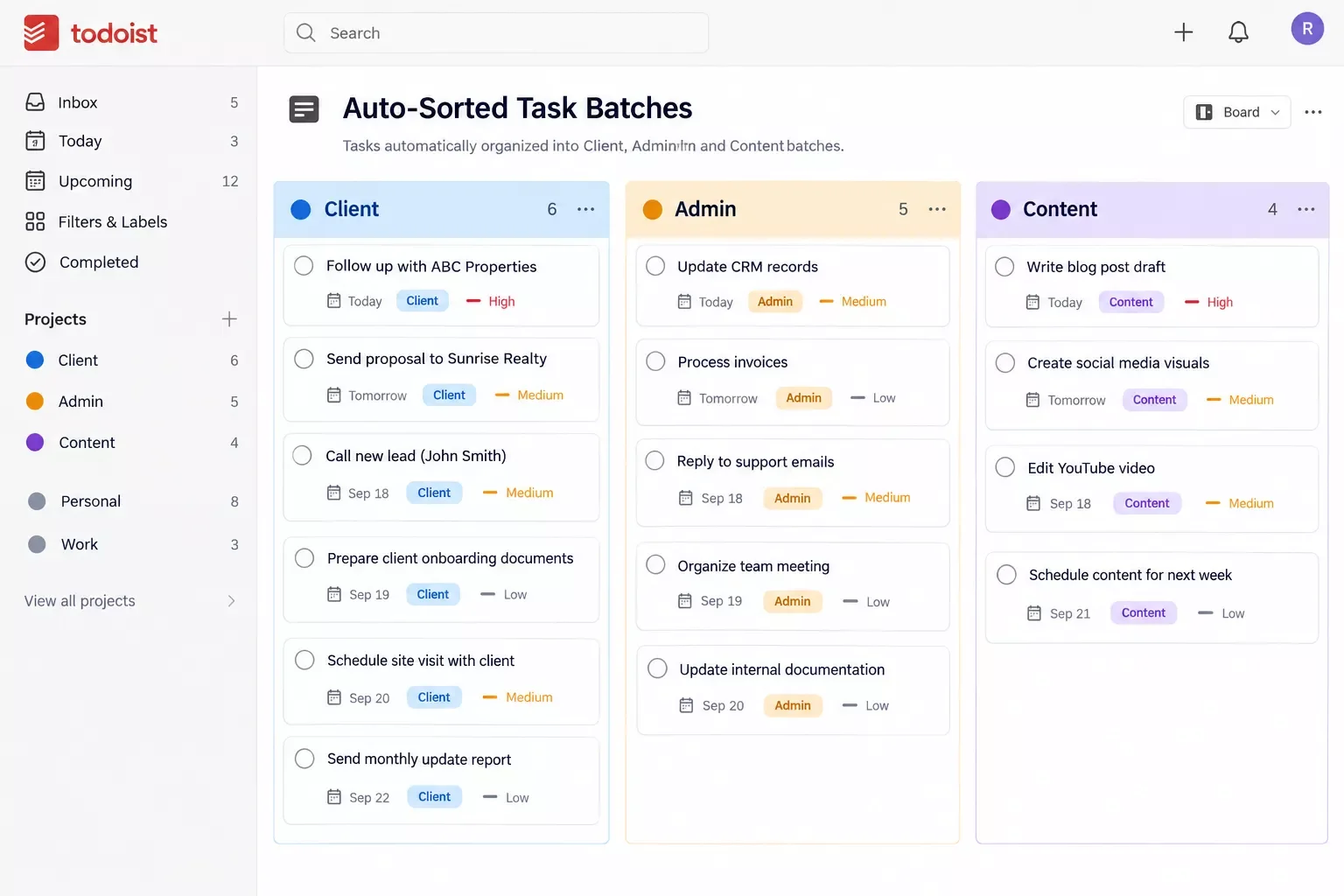
A setup like this typically means the sorting work disappears from your morning entirely, not just gets faster. Instead of opening three separate inboxes and deciding where everything belongs, you open Todoist and every batch is already populated and labeled.
For a solopreneur handling client work, admin, and content solo, that usually translates to reclaiming roughly three to four hours a week that used to go into manual triage, plus the harder-to-measure benefit of never starting the day already mentally scattered. Your actual batching schedule (client mornings, admin Fridays, whatever fits your work) stays exactly the same. The only thing that changes is who does the sorting before you get there.
Picture a normal Tuesday. Before automation, that first block of the morning went to sorting yesterday's leftover client messages, three invoice reminders, and a couple of half-formed content ideas into the right places before actually starting on any of them. After automation, that same Tuesday starts with three already-labeled batches waiting in Todoist, no decision-making required before the real work begins.
That shift also makes it easier to protect focus during a batch window. When incoming requests are already sorted and waiting rather than showing up raw in an inbox, there is less pressure to stop and figure out where something belongs the moment it arrives. It can just sit in its labeled batch until that block of time actually comes around. And if long, uninterrupted stretches are what you're really after, this pairs naturally with protecting your deep work blocks once the sorting itself is off your plate.
People Also Ask
What tasks should not be batched together?
Avoid batching tasks that need genuinely different mental states, like deep creative writing and quick reactive emails. Also keep anything time-sensitive, like a client emergency, out of a fixed batch window. Batching works best for similar, non-urgent tasks like invoicing, routine emails, or content drafts.
How is task batching different from time blocking?
Task batching groups similar work together regardless of when you do it, while time blocking assigns specific hours on your calendar to specific work. They pair well together: batch first to group your tasks, then time-block to schedule when each batch actually happens, as Asana's own breakdown of the two methods also lays out clearly.
Which repetitive tasks can be automated instead of batched manually?
Sorting incoming requests by category is the easiest one to automate, using a Make.com filter like the one in this article. Other good candidates include auto-labeling emails, creating recurring invoice reminders, and routing form submissions straight into the right project.
How long does it take to build a Make.com task-sorting automation?
A basic version, one trigger, one filter, and one Todoist action, usually takes about 20 to 30 minutes to set up the first time. Most of that time goes into writing clear filter rules, not building the actual scenario structure.
Do I need a paid Make.com plan to set this up?
Make's free plan includes enough monthly operations to run a simple filter-and-create-task scenario for most solo workloads. If your request volume is high, you may eventually need a paid tier for extra monthly operations, but you can build and test this exact setup on the free plan first.
Will automating my task batching actually save me time, or just move the work around?
It genuinely removes a step rather than moving it. The sorting decision, "which batch does this belong in", happens once, inside the filter rules, instead of every single time a new request arrives. That's the difference between doing the work once and doing it daily.
What if my filter rules miss something and sort it wrong?
Build in a fallback label like "Unsorted" for anything that doesn't clearly match a rule. That way nothing disappears silently, and you can review the Unsorted batch weekly to tighten up your filter logic over time.
Does this work if I use a different task app instead of Todoist?
Yes, the same filter-and-route logic works with most task managers that have a Make.com integration, since the filter module is where the actual sorting decision happens. Todoist just happens to be what this specific setup uses.
Is this worth setting up if I only get a handful of requests a day?
If sorting only takes a minute or two a day, the automation itself may not be worth the setup time yet. It starts paying off once you notice yourself re-sorting the same kinds of requests daily, which is usually the real mindset shift, noticing the pattern instead of just living inside it.
Before automating anything, it's worth mentioning that a lot of the manual batching advice out there, including the version I tried first, complements this system rather than replacing it. If you haven't set up your batch windows yet, our full Time Blocking guide walks through that groundwork first, and this automation slots in on top of it once the windows exist. If you're building out a stricter version of that schedule, our roundup of the best time blocking apps for solopreneurs covers the calendar side well too.
If you're also curious whether an AI scheduling layer could sit alongside this same stack, it's worth a look at how AI scheduling assistants handle the calendar side of things while Make.com handles the sorting side. And once you've got the sorting and scheduling covered, it's worth browsing which AI tools pair well with your Make.com stack for the rest of your workflow.
Reclaiming three to four hours a week is nice on its own, but the bigger win is starting the day without already feeling behind. That's the part that actually helps with the burnout, not just the hours.
⚡ Pro Tip: Start with just one filter rule (like routing anything from your busiest client) before building out the full set. It's easier to trust the system once you've watched one rule work perfectly for a week.
If you'd rather get that time back than spend a weekend building this yourself, this is exactly the kind of system I set up so solopreneurs don't have to piece it together on their own. Building a reliable Make.com filter setup from scratch takes some trial and error the first time, and if that's not how you want to spend your Saturday, I build these exact kinds of automations for solopreneurs who'd rather hand it off and get back to actual client work. That's the kind of thing SmartSoloFlow builds day in and day out for solopreneurs running on Make.com.
Want This Automation Set Up for You?
If you want this exact task-batching system running for your business, or something custom built around how you actually work, reach out and let's figure out what that looks like.
Let's TalkFound this guide useful? Share it with a fellow solopreneur who's still sorting their own inbox every morning. 🚀
Got a question or a workflow roadblock? Drop it in the comments below, happy to help.
Last Updated: September 18, 2026

// Comments