 SmartSoloFlow

Key Takeaway: Procrastination usually isn't a willpower problem. It's a timing problem, and a scheduled Make.com automation can close the gap that willpower keeps missing.
System Goal: Replace last-minute panic with an automatic, escalating deadline nudge
Weekly Time Savings: ~2-3 hours reclaimed from late fixes and rushed re-work
Core Framework: Temporal Motivation Theory + a Make.com escalation trigger
If you've searched for how to overcome procrastination and already tried every trick in the book, you know willpower alone doesn't fix it. As a solopreneur, there's no coworker to catch a slipping deadline before it turns into a crisis, and that gap between good intentions and actual follow-through is exactly where burnout creeps in.
This guide covers the real psychological reasons you stall, then walks through a Make.com automation that sends escalating reminders as a deadline gets close, the concrete way to beat procrastination instead of just reading about it.
You'll get two practical shifts backed by real behavioral research, plus the setup logic for a reminder chain that gets louder the closer you get to missing something important.
- Why You Procrastinate (And Why Willpower Keeps Losing)
- Why a One-Time Reminder Isn't Enough
- 1. Break the Task Into a Step So Small You Can't Say No to It
- 2. Make the Deadline Feel Real Before It's Actually Urgent
- The Buffer That Comes From a Fake Deadline
- 3. Automate Deadline Reminders to Stop Procrastinating With Make.com
- How the Official Todoist Integration Fits In
- The Honest Limitation: It's Not Instant
- One Honest Limitation
- 2026 AI Productivity Hacks
Success Story: The Invoice That Almost Slipped
For example: a freelance designer keeps putting off a client invoice because it feels like a small, boring task compared to actual design work. It sits untouched for a week. Once a scheduled reminder starts escalating from a quiet nudge to an urgent one as the self-imposed deadline nears, the invoice gets sent same-day instead of three weeks late, and the designer gets paid three weeks sooner.
If you want the bigger-picture system for structuring your whole week first, our full Time Blocking guide covers that. This piece goes deep on the one piece most solopreneurs still get stuck on: actually starting.
Why You Procrastinate (And Why Willpower Keeps Losing)
Most procrastination isn't laziness. It's your brain trading a large future reward for a small present relief, especially when a task feels boring, vague, or mildly unpleasant.
Psychologist Piers Steel's Temporal Motivation Theory frames this as a trade-off. The further away a deadline feels, the less real it is to your brain, so a task with plenty of runway consistently loses out to whatever feels urgent or enjoyable right now.
Research estimates around 20% of adults struggle with a chronic procrastination habit rather than a once-in-a-while slip, and for that group, this same trade-off is repeating itself daily, which is exactly why a one-time fix rarely sticks.
Why a One-Time Reminder Isn't Enough
That's why a single reminder set for the due date itself rarely works. By the time it fires, you're already too close to think clearly, and the stress response that kicks in can make you freeze instead of act.
What actually works is a reminder that changes in tone and frequency as the deadline approaches, mirroring how your brain's own sense of urgency naturally builds.
Todoist and most task apps already send you a reminder around the due date, which is genuinely useful. But a single, one-time nudge isn't the same as a system that escalates, and that's the specific gap this guide fixes.
1. Break the Task Into a Step So Small You Can't Say No to It
Pick the task you've been avoiding and cut it down until the first action takes less than two minutes. Not "write the client proposal," but "open a blank doc and write one sentence about what the client asked for."
The goal isn't to finish the task in two minutes. It's to remove the moment of resistance that makes you avoid opening it at all.
I've found this works because procrastination usually isn't about the whole project, it's about the friction of starting. Once you're two minutes in, momentum carries you further than expected. Keep a running list of "two-minute starts" and knock one out before checking email, then switch to a Pomodoro timer app to protect the momentum.
2. Make the Deadline Feel Real Before It's Actually Urgent
Write down the exact date and time a task is due, then set a fake earlier deadline two or three days ahead of it and treat that one as real, ideally logged inside a solid time blocking app so it doesn't just live in your head.
Psychologist Peter Gollwitzer's research on implementation intentions found that pairing a task with a specific "if this, then that" trigger, like a set time and place, makes people far more likely to follow through than a vague intention alone.
The Buffer That Comes From a Fake Deadline
A soft, self-imposed deadline gives you a buffer if something goes wrong, and it tricks your brain into treating the task as urgent earlier than it technically needs to be, especially once you're running your day through an Eisenhower Matrix that already separates urgent from important.
I used to keep every real deadline in my head as the actual due date, and I'd routinely start client work the night before. Moving my personal deadline up changed almost nothing about the work itself, but it changed everything about when my brain decided to care.
3. Automate Deadline Reminders to Stop Procrastinating With Make.com
A single due-date reminder from your task app is a good start, but it fires once and assumes that's enough.
Automating an escalating reminder chain through Make.com fixes the real gap, moving from a quiet heads-up to an urgent alert instead of leaving you to notice on your own.
It's exactly the deadline reminder system a single notification can't provide, and it pairs well with a to-do list that updates itself automatically so nothing needs manual re-entry.
How the Official Todoist Integration Fits In
Here's the honest version of how this actually works, not the marketing version. Todoist has an official Make.com integration, so the connection itself is straightforward.
If you'd rather skip the build entirely, there are also tools that automate your scheduling as a packaged product, but building it yourself in Make.com means it's tailored exactly to how you already work.
The Honest Limitation: It's Not Instant
But there's no built-in "task is due soon" push trigger. This has to run as a scheduled, polling-based scenario, checking your task list every 15 to 30 minutes rather than firing instantly the moment something changes.
That matters for two reasons. There's a small delay between a task crossing a time threshold and the reminder actually going out, and Make.com runs a check, using an operation, on every single poll, whether or not anything is actually due.
This is not an "instant" or "free" automation. Anyone telling you otherwise is skipping the part where scheduled checks quietly use up your monthly operations even on runs that find nothing.
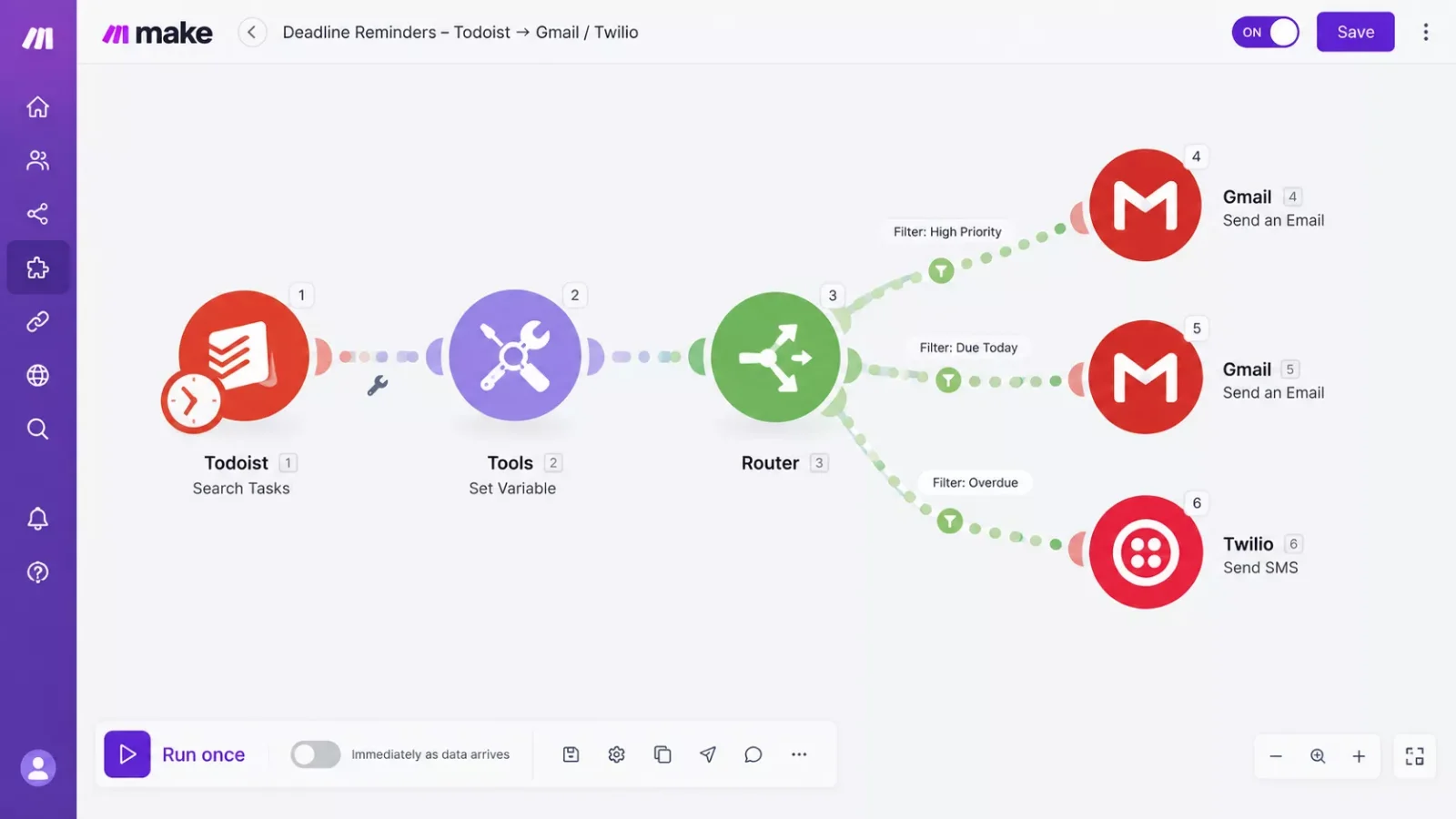
The actual build: a scheduled Todoist "Search Tasks" module pulls your open, dated tasks. A Tools module calculates how much time is left on each one.
A Router splits that into tiers: nothing yet if there's more than a day left, a normal email nudge inside 24 hours, and an urgent text message inside 6 hours. That last tier runs through your email app or a separate SMS app like Twilio, since Todoist itself doesn't send text messages.
Each tier gets its own message, written to feel more direct as the deadline shrinks.
One Honest Limitation
Chaining a scheduled trigger, a search filter, a time calculation, and a multi-branch router isn't a five-minute, drag-and-drop setup. If you've never built a Make.com scenario before, budget an afternoon for it, not a coffee break.
It's one of the more thorough, systems-based breakdowns of Make.com automation workflows you'll find for this exact problem. That's the trade Rizwan and I have both made at SmartSoloFlow, a bit more setup time upfront in exchange for never relying on your own memory to catch a slipping deadline again.
2026 AI Productivity Hacks
Once the reminder system is running, an AI tool can help you clear the smaller decisions that eat up time before you even start a task.
Use an AI assistant to draft a rough first-pass outline, email reply, or task breakdown the moment a new item lands on your list, so the "blank page" version of the task never actually exists. Pair this with carving out real deep-work blocks, and the two-minute starts turn into finished work faster.
You're not asking AI to do the work for you, you're removing the empty-page moment that made you stall in the first place. The goal isn't more tools, it's fewer moments where starting requires a decision, which is also the whole idea behind batching similar tasks together.
People Also Ask
Why do people procrastinate even when they know it's bad for them?
Procrastination happens because your brain weighs a task's immediate discomfort more heavily than its future consequences, a pattern researchers call present bias. Even when you know delaying will cause stress later, the short-term relief of avoiding an unpleasant task feels stronger right now than the abstract cost of missing a deadline.
Does breaking a task into smaller steps actually help with procrastination?
Yes. Breaking a task into a smaller first step lowers the mental barrier to starting, since a two-minute action feels far less intimidating than an open-ended project. Once you begin, momentum from that small step often carries you into the larger task.
Can procrastination be linked to underlying issues like anxiety or chronic stress?
Yes, research links chronic procrastination to anxiety, perfectionism, and ongoing stress, since avoidance can become a short-term coping habit for anxious feelings about a task. If procrastination feels tied to persistent anxiety or stress affecting daily life, it's worth talking to a doctor or therapist alongside any productivity fix.
Do I need a paid Make.com plan to run this reminder automation?
No. This scenario runs on Make.com's free plan, which includes a 15-minute minimum scheduling interval, more than enough for a deadline-escalation check. A paid plan drops that minimum to 1 minute if you ever want checks closer to real time, but it's not required to get this working.
What if I don't use Todoist?
The same escalation logic works with any task app that has an official Make.com integration, like Asana or ClickUp. You'll swap the Search Tasks module for your app's equivalent, but the scheduled-check-and-router structure stays the same.
Will this replace good time management habits?
No, and it's not meant to. The automation is a backstop for when willpower and planning fall short, not a replacement for breaking tasks down or setting realistic deadlines in the first place. Use both together.
How much time does this actually save me?
It's less about daily minutes and more about avoiding the hours lost to last-minute scrambling, late fixes, or an apology email to a client. One caught deadline a month often outweighs the setup time many times over.
Pro Tip: Start with just one escalation tier (a single urgent alert inside 6 hours) before building out the full multi-tier router. It's easier to test one branch works correctly than to debug three at once.
Watch Out For: If you route the urgent tier through an SMS app like Twilio, check that app's own per-text pricing before turning it on for every task. Twilio charges separately from your Make.com plan, and an escalation chain firing across dozens of tasks a month can add up faster than expected.
Want This Automation Built For You Instead?
Setting up a scheduled Make.com scenario with a time calculation and a multi-tier router isn't hard exactly, but it does take an afternoon most solopreneurs don't have to spare.
Let's TalkFound this guide useful? Share it with a fellow freelancer who's still doing things manually.
Got a question or a workflow roadblock? Drop it in the comments below, happy to help.
Last Updated: September 23, 2026

// Comments