 SmartSoloFlow

Key Takeaway: Picking a payment gateway is just the first decision — pairing it with Make.com automation is what actually gets fulfillment, CRM updates, and receipts off your plate.
Primary Tool(s): Stripe, PayPal, Square, Shopify Payments, Helcim, Authorize.Net + Make.com
Build Time: ~30-45 Minutes per automation scenario
A payment gateway is where getting paid ends and manual work usually begins — small business owners end up updating orders, syncing their CRM, and sending receipts by hand because they don't have a developer to automate any of it. This guide compares six payment gateways for small business owners in 2026: Stripe, PayPal, Square, Shopify Payments, Helcim, and Authorize.Net. Each section covers real, current pricing, who each gateway actually suits, and — the part most comparisons skip — exactly how to connect it to Make.com so fulfillment, CRM updates, and receipts trigger automatically the moment payment clears. You'll walk away knowing which gateway fits your business and how to build a payment-to-fulfillment system that runs itself, without touching a spreadsheet or hiring anyone. That means less time reconciling numbers at month-end and more time actually running the business you started.
- 1. Stripe: The Most Flexible Gateway to Build Automation Around
- 2. PayPal: Fastest to Set Up, Still Fully Automatable
- 3. Square: Best When Sales Happen Both Online and In-Person
- 4. Shopify Payments: The Obvious Choice If You're Already on Shopify
- 5. Helcim: Lower Fees at Volume, With the Same Automation Options
- 6. Authorize.Net: For Businesses With an Existing Merchant Account
- Automating Fulfillment and Receipts After Payment — Not Just Picking a Gateway
- 2026 Advanced Tips & Scalability: Running Multiple Gateways Without Double the Manual Work
- How to Get Started
Getting paid feels like the finish line. It isn't.
The moment a customer's payment clears, a small business owner without a developer on staff is stuck doing the next part by hand — updating the order, syncing it to a CRM that could be capturing leads automatically, sending a receipt. Multiply that by every sale, every week, and it's easy to see why "getting paid" quietly eats hours that should go toward actually running the business.
Most payment gateway roundups stop at the fee schedule. They'll tell you what a transaction costs and where a gateway is available. What they won't tell you is what happens after the payment succeeds, and that's usually where the real time gets lost.
This guide covers six of the most widely used payment gateways for small businesses in 2026, with a focus most comparisons skip entirely: how each one connects to Make.com so fulfillment, CRM updates, and receipts happen the second payment clears — not whenever you get around to it. For a broader look at where this fits in your overall stack, see our no-code solutions overview.
1. Stripe: The Most Flexible Gateway to Build Automation Around
Stripe is the developer-friendly standard, and that flexibility is exactly what makes it so easy to automate. Stripe charges 2.9% plus $0.30 per online transaction, with no monthly or setup fee, and its API sends a real-time webhook the instant a payment succeeds.
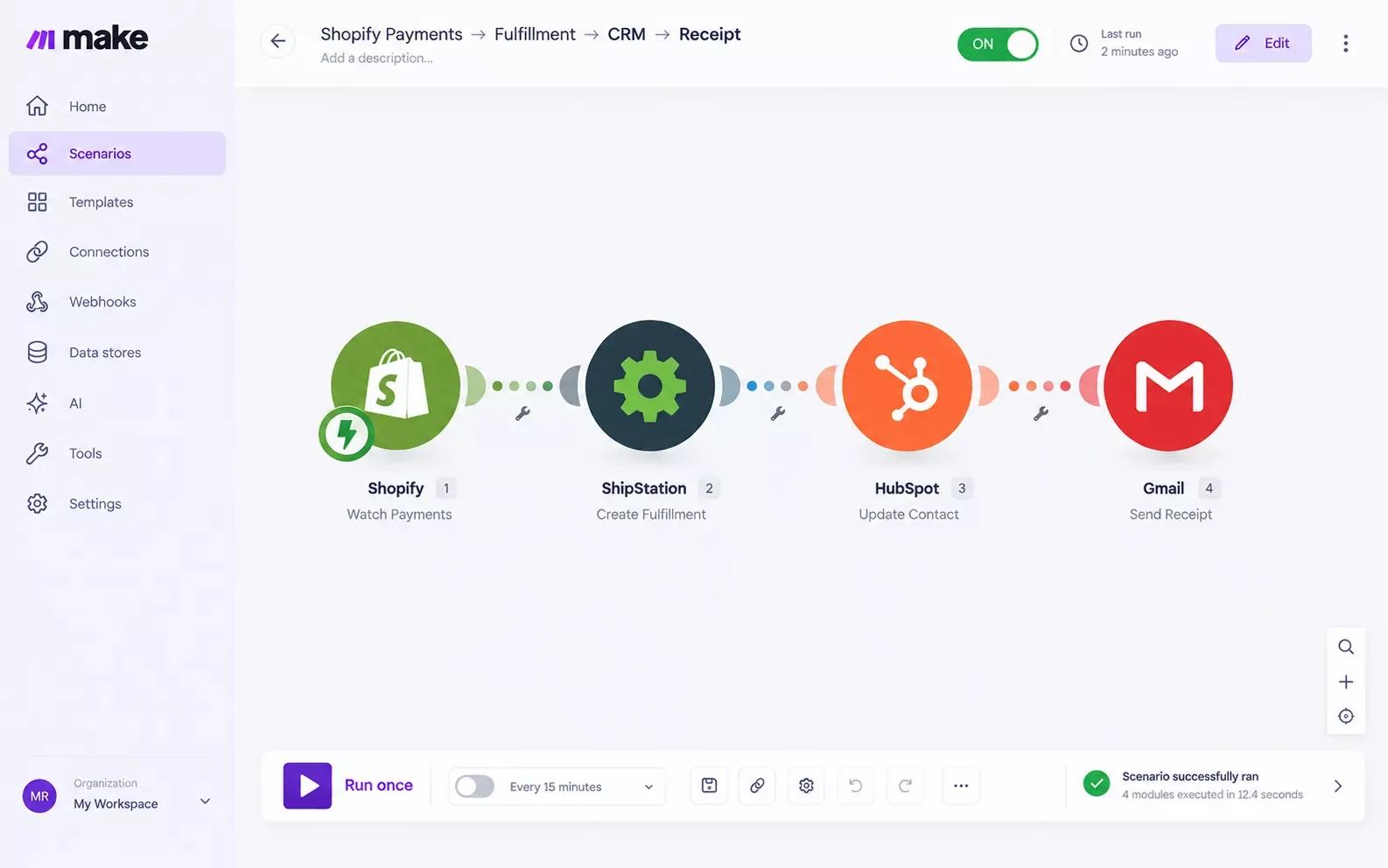
That webhook is the whole trick. Connect it to Make.com, and the moment a customer pays, a scenario can fire off three things at once: create the order in your fulfillment tool, add or update the customer record in your CRM, and email a branded receipt. No one on your team has to touch any of it.
In my experience working with solopreneurs and small teams, Stripe is the gateway most worth the small learning curve if you're planning to automate anything beyond "just get paid." The payout is a genuinely hands-free order pipeline, not just a lower fee.
2. PayPal: Fastest to Set Up, Still Fully Automatable
PayPal is accepted in more than 200 countries and is recognized by hundreds of millions of consumers at checkout, which makes it the easiest gateway to turn on for international sales with zero technical setup.
The tradeoff shows up in the fees, not the automation. PayPal's instant payment notifications (IPN) work with Make.com just as reliably as Stripe's webhooks — a payment coming in through PayPal can trigger the exact same fulfillment-CRM-receipt sequence. The difference is entirely on the cost side, not the automation side, so don't rule PayPal out just because it's the "simple" option.
A quick example: a solo consultant invoicing international clients can have PayPal payment confirmations auto-create a project-kickoff task in a CRM automated for solopreneurs the second the invoice is paid — no manual follow-up, no forgotten leads.
3. Square: Best When Sales Happen Both Online and In-Person
Square earns its spot when a business isn't purely online — a service business with a physical storefront, a market vendor, anyone who takes both card-present and online payments. The free plan has no monthly fee, and paid tiers run $49-$149/month for advanced POS features.
Square's automation story works a little differently because it already bundles inventory and reporting into one dashboard. Even so, connecting Square to Make.com adds the layer Square doesn't handle natively: pushing every completed sale — online or in-person — into a CRM automatically, so a customer who buys in-store shows up in your follow-up system exactly the same way as one who buys online.
Watch for this limitation before committing: Square only operates in 8 countries, so if a meaningful share of your customers are international, this isn't the gateway to build your automation around.
4. Shopify Payments: The Obvious Choice If You're Already on Shopify
If your store runs on Shopify, Shopify Payments removes the extra 0.5-2% transaction fee Shopify charges when you use a third-party gateway instead. For a Shopify-based small business, that fee alone usually makes the decision.
Where automation gets interesting here is fulfillment specifically. A Shopify order paid through Shopify Payments can trigger a Make.com scenario that updates inventory counts, notifies a fulfillment partner, and logs the sale in a CRM — all from the same payment event, without relying on Shopify's own (more limited) native automation rules. If you're weighing fulfillment options more broadly, our ecommerce automation picks that need no developer cover the fulfillment side in more depth.
One real limitation worth flagging honestly: Shopify Payments only works inside Shopify itself. If you ever move platforms, this gateway doesn't move with you — worth thinking about before building deep automation around it if you're not fully committed to Shopify long-term.
5. Helcim: Lower Fees at Volume, With the Same Automation Options
Helcim is the one gateway on this list using interchange-plus pricing instead of a flat rate — meaning the fee you pay tracks the real card network rate plus a transparent markup, and it drops automatically as your volume grows. A business processing $10,000 or more a month in the US or Canada often pays noticeably less with Helcim than with a flat-rate gateway like Stripe or Square.
Helcim's automation potential is identical to the bigger names — it still fires a payment-confirmed event that Make.com can catch and act on. The real reason to pick Helcim isn't automation depth, it's cost efficiency once your volume justifies it.
What I've seen work best: businesses that outgrow the "just starting out" stage and hit consistent monthly volume switch to Helcim specifically to lower the fee, then rebuild the same fulfillment-CRM-receipt automation they already had running — nothing about the workflow has to change, just the gateway underneath it.
Helcim is only available in the US and Canada, so this one's off the table for businesses selling internationally.
6. Authorize.Net: For Businesses With an Existing Merchant Account
Authorize.Net is different from the other five — it's a pure gateway, not a bundled processor. If you already have a merchant account with your bank, Authorize.Net is what connects that account to your website or checkout. It charges $25/month plus per-transaction fees, higher than any other gateway here, which only makes sense once you factor in the merchant-account relationship it's built to plug into.
Because it's been processing payments since 1996, Authorize.Net has one of the most mature transaction-notification systems in this list. That maturity translates directly into automation reliability — a Make.com scenario built on an Authorize.Net webhook tends to be about as dependable as automation gets in this space.
This one's not for a business just starting out with no merchant account already in place. Stripe or Square will get you moving faster and cheaper.
Automating Fulfillment and Receipts After Payment — Not Just Picking a Gateway
Here's the part every other comparison skips: picking a gateway only solves getting paid. It doesn't touch what happens next — and "what happens next" is where the manual hours actually pile up.
Every gateway above — Stripe, PayPal, Square, Shopify Payments, Helcim, Authorize.Net — sends a real-time confirmation the moment a payment succeeds. That confirmation is the trigger. A Make.com scenario watching for it can, in the same few seconds:
- Push the order into your fulfillment system or notify whoever ships it
- Create or update the customer's record in your CRM, so follow-up and reporting stay current automatically
- Generate and send a branded receipt without you drafting it by hand
None of the top-ranking payment gateway comparisons right now cover this. They'll help pick a gateway based on fees and features, then leave you exactly where you started: doing the after-payment work manually, one order at a time. That gap is the real reason "which gateway is cheapest" is the wrong first question — "which gateway lets me automate what happens next" usually matters more once you're past your first few sales. If your tools already feel disconnected from each other, our guide on fixing a broken automation tool stack covers the same central-hub approach in more depth.
Want This Automation Built for Your Business?
If wiring your payment gateway to your CRM and fulfillment isn't the best use of your week, this is exactly the kind of build I hand off, fully working, for small teams like yours.
Let's Talk2026 Advanced Tips & Scalability: Running Multiple Gateways Without Double the Manual Work
Plenty of small businesses end up using two gateways at once — Stripe as the primary and PayPal as a backup at checkout, for example, since some customers specifically look for the PayPal option. The mistake I see most often is treating that as two separate manual systems.
It doesn't have to be. A single Make.com scenario can watch both gateways' payment-confirmation events and route them into the exact same fulfillment-CRM-receipt sequence, regardless of which gateway the customer actually used. The customer never sees the difference, and neither does your workflow — one CRM record, one fulfillment trigger, one receipt format, no matter which gateway processed the payment. If you're managing multiple AI or automation tools in this stack already, see our roundup of AI automation tools that pair with your Make.com stack for how far this layering approach can go.
That's the real advantage of building the automation around the event (payment confirmed) rather than around any one gateway's dashboard. Add a third gateway later, and it's one more connection into the same scenario, not a whole new process to build from scratch.
How to Get Started
Pick the gateway that fits your business type and volume from the six above, get it connected to your site or storefront, and then build one Make.com scenario watching for its payment-confirmed event. Start simple: fulfillment trigger and CRM update first, receipt automation second. Most small business owners have the whole thing running in under an hour, and from that point on, getting paid and everything that comes after it both happen without anyone touching a spreadsheet.
If setting this up yourself isn't the best use of your week, this is exactly the kind of build I hand off, fully working, for small teams like yours — the complete, done-for-you automation for exactly this is what I build as a No-Code Architect. Want this set up for your business, or need something custom? Let's talk.
People Also Ask
What's the difference between a payment gateway and a payment processor?
A payment gateway is the secure connection that captures and encrypts your customer's payment details at checkout. A payment processor is what talks to the banks behind the scenes, approving the transaction and moving the money into your account. Most gateways for small businesses, like Stripe and Square, bundle both jobs into one product.
What is the best payment gateway for a small business in 2026?
There isn't one universal answer — it depends on your volume, markets, and platform. Stripe fits developer-friendly online businesses, PayPal wins on international trust, Square suits omnichannel (online + in-person) sellers, and Helcim becomes worth it once you're consistently processing $10,000+ a month in the US or Canada.
Can a payment gateway automatically trigger order fulfillment or a CRM update when a customer pays?
Not on its own — but every major gateway sends a real-time payment-confirmed event that a tool like Make.com can catch and act on. That's what actually triggers fulfillment, updates your CRM, and sends a receipt automatically, without you touching the gateway's own dashboard.
Do I need a merchant account and a payment gateway separately?
Usually not. Stripe, Square, PayPal, and Helcim all bundle the merchant account and gateway together, so there's nothing extra to set up. A standalone gateway like Authorize.Net is the exception — it requires you to already have (or separately open) a merchant account with your bank.
How much does a payment gateway typically cost for a small business?
Most flat-rate gateways charge roughly 2.6%-3.5% per transaction plus a small fixed fee (commonly $0.09-$0.30), usually with no monthly fee. Interchange-plus providers like Helcim can run lower at higher volume, while standalone gateways like Authorize.Net add a flat monthly fee on top of per-transaction costs.
Do I need to know how to code to connect my payment gateway to Make.com?
No. Make.com is built for exactly this — connecting a gateway like Stripe or PayPal to your CRM or fulfillment tool is done by picking modules and mapping fields visually, no developer required. Most small business owners have a working scenario running in under an hour.
Can I switch payment gateways later without losing my automation?
Yes, as long as the automation is built around the payment-confirmed event rather than locked into one gateway's dashboard. Swap the trigger module in Make.com to the new gateway, and the same fulfillment-CRM-receipt sequence keeps running underneath it.
Which payment gateway integrates easiest with Make.com?
Stripe and PayPal both have the most mature, well-documented integrations, making them the fastest to set up. Square, Shopify Payments, Helcim, and Authorize.Net all connect too — Authorize.Net's long operating history actually makes its webhook behavior especially predictable.
What if I use two payment gateways at once, like Stripe and PayPal?
One Make.com scenario can watch both gateways' payment-confirmed events and route them into the same fulfillment-CRM-receipt sequence. The customer never notices a difference, and you don't end up running two separate manual processes.
Picking a payment gateway based on fees alone is how most small business owners end up doing the exact same manual work every other comparison assumes is just part of running a business. It doesn't have to be. Stripe, PayPal, Square, Shopify Payments, Helcim, and Authorize.Net all send the same kind of real-time payment confirmation — and that confirmation is all Make.com needs to take fulfillment, CRM updates, and receipts off your plate for good. Every gateway here also follows the same PCI DSS security standards, so the automation choice comes down to fit, not risk.
⚡ Pro Tip: Start your automation with just fulfillment and CRM updates first. Add receipt automation once the core sequence is running reliably — layering it in gradually catches mapping mistakes before they touch every order.
⚠ Watch Out For: If you ever run two gateways side by side, make sure both feed the same CRM field structure. Mismatched field names between gateways is the most common reason a "working" automation quietly stops updating records for one of the two payment sources.
SmartSoloFlow builds exactly this kind of payment-to-fulfillment automation for small business owners who'd rather not spend a weekend wiring it themselves. If you want a working system instead of a DIY project, reach out through our Contact page and we'll scope it for your specific gateway and tools.
Found this guide useful? Share it with a fellow small business owner who's still doing fulfillment and CRM updates by hand. 🚀
Got a question or a workflow roadblock? Drop it in the comments below — happy to help.
Last Updated: September 11, 2026

// Comments