 SmartSoloFlow

Key Takeaway: Gamma wins on raw speed, Canva AI wins on free-tier value, and SlideEgg AI wins if you want to stop paying monthly. None of them auto-build a deck when a deal closes in your CRM, that's where a simple Make.com scenario takes over.
Picking the right ai ppt maker in 2026 means separating genuine automation from marketing hype, especially when every tool claims to save you hours and you're still not sure which one is actually worth your time. This guide compares six of today's top AI PPT makers, Gamma, Canva AI, SlideEgg AI, Beautiful.ai, Plus AI, and Microsoft Copilot, on what actually matters: free-tier honesty, PowerPoint export quality, and real pricing.
You'll get a straight verdict for each tool, not a marketing recap. We'll also cover something none of the current top-ranking comparisons mention: how to auto-generate a pitch deck the moment a deal hits a specific stage in your CRM, using a simple Make.com scenario instead of building decks by hand every single time. If you're a solopreneur or small team drowning in one-off pitch requests, that section alone could save you hours a week.
- Pros & Cons
- Gamma
- Canva AI (Magic Design)
- SlideEgg AI
- Beautiful.ai
- Plus AI
- Microsoft Copilot in PowerPoint
- Who Is This For?
- Auto-Generating Pitch Decks From CRM Deal Stages
- Deep Dive Into Features
- Gamma: Speed Over Polish
- Canva AI: The Free Tier That Actually Works
- SlideEgg AI: Betting on a Template Library
- Beautiful.ai: The Design-Consistency Specialist
- Plus AI: Living Inside Slides and PowerPoint
- Microsoft Copilot: Built for Microsoft 365 Teams
- Quick Reference: Specs at a Glance
- Pricing & Hidden Costs
- Final Verdict & Use-Case Scenarios
- Conclusion & Rating
- Master Stroke — Integration With Make.com
- FAQ
TL;DR: Gamma is the fastest for a rough first draft. Canva AI has the most usable free plan. SlideEgg AI is the one to pick if you want to stop paying a monthly fee for good. For most solopreneurs comparing an ai ppt maker for regular use, Gamma or Canva AI covers 90% of use cases without breaking the budget.
Pros & Cons
Six tools, six very different trade-offs. Here's what each one actually gets right, and where it falls short.
Gamma
Pros
- Builds a full 10-slide deck from a prompt in under a minute
- Writes AI-generated speaker notes automatically
- Tracks which slides hold viewer attention with built-in analytics
Cons
- PowerPoint export is the most commonly complained-about feature among users, fonts and layouts can shift on export
- The 400 free credits are a one-time allocation, not a monthly reset, most people burn through them in two or three decks
- Content often needs a rewrite pass to sound less generic
Canva AI (Magic Design)
Pros
- Broadest export options of any tool on this list: PDF, PPTX, MP4, GIF, and shareable link
- Free tier is genuinely usable, not just a trial
- Built-in translation into over 100 languages
Cons
- Output is recognizably "Canva" to anyone who's seen the platform before
- Prompt length is capped at roughly 100 characters, which limits how specific you can get
- AI generation depth is shallower than Gamma's
SlideEgg AI
Pros
- Backed by a template library in the hundreds of thousands, giving AI output a stronger visual starting point
- Offers a genuine lifetime plan, a one-time payment instead of a recurring subscription
- Includes live presentation features like polling and Q&A alongside the AI generation
Cons
- Its AI generation engine is newer and less refined than Gamma's or Canva's
- Free tier credits are also a one-time 400, same limitation as Gamma
- Per-seat pricing for the mid-tier plans isn't listed publicly without creating an account
Beautiful.ai
Pros
- Smart Slide layouts automatically resize and reflow as you add or remove content
- Brand kits and locked templates keep every deck on-brand across a team
- PowerPoint export quality is noticeably cleaner than Gamma's
Cons
- No free tier at all, you're committing before you've tried it
- It's a design-consistency tool more than a content generator, you still write the words
- Team pricing runs around $40 per user per month, which adds up fast for small teams
Plus AI
Pros
- Works directly inside Google Slides and PowerPoint, so there's no export step at all
- SOC 2 Type II compliant, a real advantage if you handle client data
- Can turn an uploaded PDF or Word doc straight into a deck
Cons
- Less creative flexibility than a standalone, web-native tool like Gamma
- Only offers a 7-day trial, no ongoing free tier
- AI image generation lags behind Canva's
Microsoft Copilot in PowerPoint
Pros
- Best-in-class at turning an existing Word document into a structured deck
- Keeps your data inside your own Microsoft 365 tenant, the safest option here for regulated industries
- References your existing SharePoint, OneDrive, and Teams content automatically
Cons
- Costs around $30 a month on top of an existing Microsoft 365 subscription, hard to justify for PowerPoint alone
- Output quality varies more than the other tools on this list, similar prompts can produce inconsistent results
- No free tier, an add-on requires the paid subscription first
Who Is This For?
If you're generating one pitch deck a month, honestly, any tool on this list works and you're overthinking the choice. This comparison matters most for three specific situations: solopreneurs who pitch prospects weekly and can't justify hours per deck, sales teams who need brand-consistent decks without a designer on staff, and anyone who's already automating other parts of their business with a tool like Make.com and wants their pitch decks to fit into that same system instead of living as a manual, one-off task.
If that last group sounds like you, stick around past the tool comparison. The section on auto-generating decks from CRM triggers below is the part none of the other roundups cover, and it's genuinely the more useful half of this article for anyone running a real sales pipeline.
For everyone else: Gamma or Canva AI will cover 90% of your needs without a learning curve or a bill you'll regret. Beautiful.ai and Microsoft Copilot only make sense once you have a team or an existing Microsoft 365 setup to justify the higher cost.
Auto-Generating Pitch Decks From CRM Deal Stages
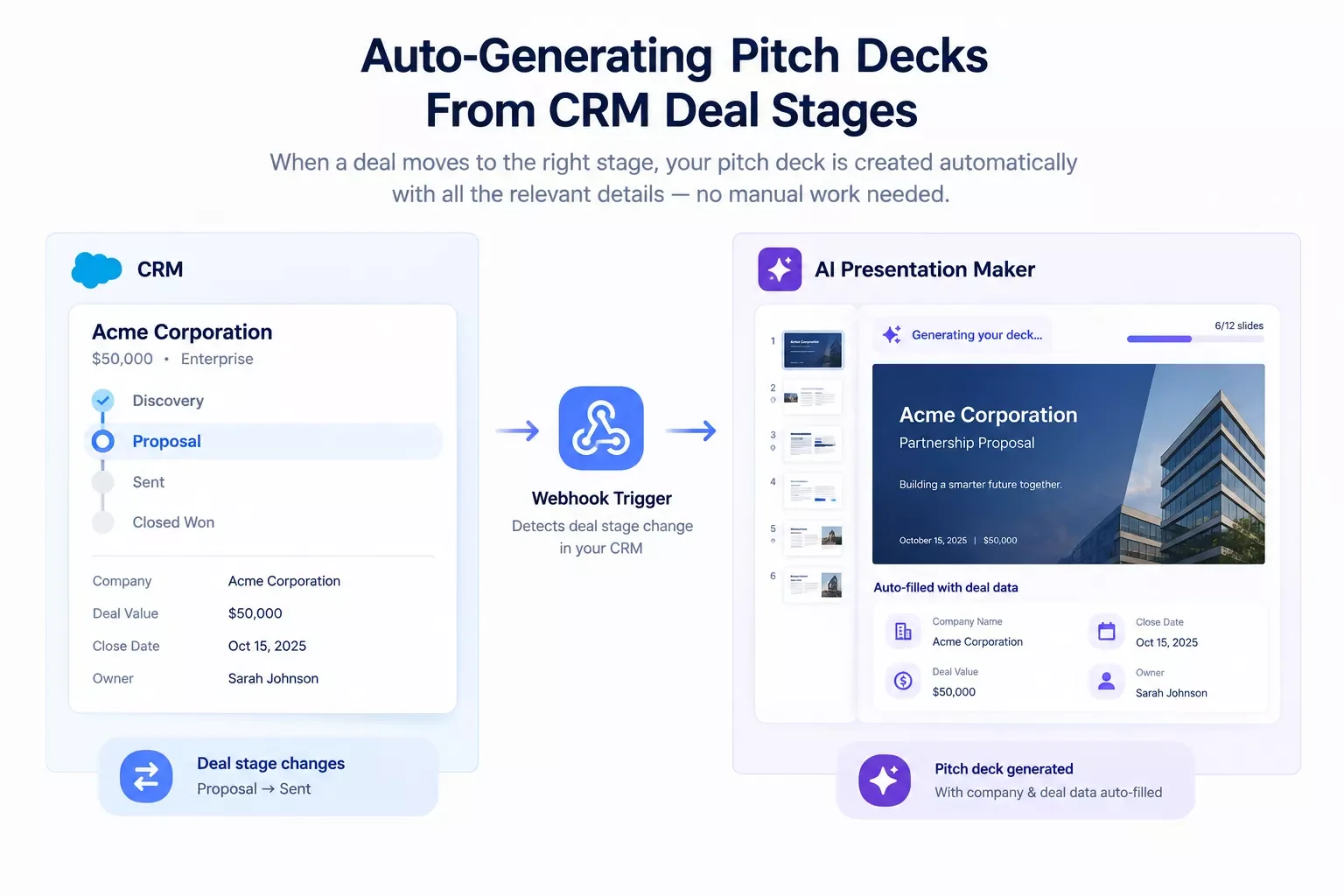
Here's a direct answer to the question none of today's top-ranking comparisons touch: yes, you can set up an automation that builds a pitch deck the moment a deal in your CRM moves to a specific stage, without opening a slide tool at all. None of the six AI PPT makers above do this natively. They're all built for one thing: you sit down, type a prompt, and generate a deck by hand. That's fine for a one-off. It's a real time sink if you're sending a similar deck to every prospect who hits, say, "Proposal Sent" in your pipeline.
The fix is a simple Make.com scenario. A CRM update (a deal moving stages, a new field getting filled in) triggers a webhook. That webhook pulls the relevant deal data (company name, deal size, contact name, whatever fields matter for your pitch) and feeds it into a template or an AI content-generation step, then drops the finished deck into a folder or sends it straight to the rep who owns that deal. No manual data entry, no opening a slide tool, no copy-pasting company names into placeholder text for the tenth time this week.
This same pattern already shows up elsewhere in solopreneur-side automation. A contract-to-invoice automation setup that fires the moment a deal closes, essentially the same trigger-based logic applied to a different document type, solves the exact same underlying problem: stop treating repetitive document creation as a manual task every single time it comes up. The same idea extends further, too, a email automation that triggers itself off the same kind of CRM or form event works on the exact same principle.
The practical setup looks like this: your CRM's webhook module watches for the stage change you care about, a data-mapping step formats the deal fields into whatever variables your deck template expects, and a final step either populates a pre-built template or calls an AI generation API with those specifics baked into the prompt. It's not complicated to build. It's just not something any of these six tools will tell you about, because none of them are built to watch your CRM in the background.
Deep Dive Into Features
We're basing this section on documented pricing pages, official feature lists, and aggregated user feedback from G2 and Reddit threads (r/productivity, r/startups, r/Entrepreneur) gathered as of September 2026, not hands-on testing of every plan tier.
Gamma: Speed Over Polish
Gamma generates a complete 10-slide deck from a single prompt in roughly 30 seconds, which is genuinely the fastest first-draft speed in this comparison. A full deck generation costs 80 to 100 credits, and five AI-generated images add another 100 to 200 on top of that. Do the math on the free tier's 400 one-time credits and you'll see the problem: most users burn through their entire free allocation in two or three decks, not two or three months. G2 rates it 4.2 out of 5, with PowerPoint export quality showing up as the single most common complaint across user reviews, roughly 38% of the negative feedback centers on fonts and layouts shifting during export.
Canva AI: The Free Tier That Actually Works
Canva's Magic Design pulls from the platform's enormous asset library, meaning your AI-generated deck starts from a stronger visual base than a tool building everything from scratch. The free tier includes real AI features, not just a trial countdown, and Pro runs $12.99 a month with the broadest export list of any tool here: PDF, PPTX, MP4, GIF, and shareable link. The tradeoff is a look that's instantly recognizable as "Canva" to anyone who's used the platform, and a roughly 100-character prompt limit that caps how specific you can get before generation.
SlideEgg AI: Betting on a Template Library
SlideEgg's AI sits on top of a template library in the hundreds of thousands, which shows up in the output: decks tend to look more finished on the first try than tools generating pure text-to-layout from nothing. Its real differentiator is the $299 Lifetime plan, a one-time payment for 200,000 AI credits and full Pro features, the only genuinely perpetual-access option among all six tools compared here. G2 rates it 4.6 out of 5. The catch: its AI generation engine is newer than Gamma's or Canva's, so the prompt-to-slide quality, while functional, is still catching up.
Beautiful.ai: The Design-Consistency Specialist
Beautiful.ai isn't really an AI content generator, it's a design-enforcement system. Its Smart Slide technology automatically resizes and reflows layouts as you add or remove content, so a non-designer can't easily break the deck's visual consistency. There's no free tier at all, Pro runs $12 a month individually, and team pricing climbs to roughly $40 per user per month, a cost that Reddit users consistently flag as steep for smaller organizations even while praising the actual product.
Plus AI: Living Inside Slides and PowerPoint
Plus AI skips the export problem entirely by running as an add-on directly inside Google Slides and PowerPoint. There's no separate app, no import step, just AI assistance layered onto the tool you already use. It's SOC 2 Type II compliant, a real consideration if client data ever ends up in your decks, and can convert an uploaded PDF or Word document straight into slide form. Pricing runs around $10 a month after a 7-day trial, with no ongoing free tier.
Microsoft Copilot: Built for Microsoft 365 Teams
Copilot's strongest use case is document-to-deck conversion, feed it a Word brief or meeting notes and it extracts the structure automatically, referencing your existing SharePoint, OneDrive, and Teams content along the way. Data stays inside your organization's M365 tenant, which makes it the safest option here for regulated industries. At roughly $30 a month on top of an existing Microsoft 365 subscription, with no free tier, it's difficult to justify unless your team is already using Copilot across other Microsoft apps too.
Quick Reference: Specs at a Glance
Pricing & Hidden Costs
The sticker price rarely tells the full story with these tools. Here's what it actually costs at a realistic volume: say you're generating 20 decks a month, roughly one every working day.
On Gamma's Plus plan (~$9/month, verify current billing cycle, 1,000 monthly credits), 20 decks at 80-100 credits each puts you at 1,600-2,000 credits needed, meaning you'd likely need to step up to the Pro tier at roughly $19-25/month for its higher monthly credit allowance, effectively doubling the advertised entry price for anyone generating decks daily. Canva AI's $12.99/month Pro plan doesn't meter by credit in the same punishing way, making it more predictable at this volume. SlideEgg AI's $299 Lifetime plan starts looking genuinely attractive here: at 20 decks a month for even a year, you'd have paid far more than $299 on any competing monthly plan, and the lifetime credits (200,000) would last years at that pace.
⚠ Watch Out For: Free-tier credit caps on Gamma and SlideEgg AI are one-time allocations, not monthly resets. Budget for hitting that wall within your first week of real use, not your first month.
⚡ Pro Tip: If you're generating more than 15-20 decks a month, run the math on a lifetime or annual plan before defaulting to the cheapest monthly tier, the per-deck cost flips in favor of the higher upfront commitment faster than most people expect.
Here's how free-tier generosity actually compares once you look past the marketing:
Final Verdict & Use-Case Scenarios
Here's the direct picks by situation, not a generic "it depends":
Solopreneurs pitching prospects weekly, budget-conscious: Canva AI. The free tier is genuinely usable long-term, not a countdown to a paywall, and the export options cover almost anything a client might ask for.
Anyone generating decks daily and tired of subscriptions: SlideEgg AI's Lifetime plan. $299 once beats any monthly plan within a year at real volume, and the template library means less time fighting a blank layout.
Sales teams needing brand consistency across multiple reps: Beautiful.ai. The Smart Slide auto-layout genuinely prevents the "everyone's deck looks different" problem that plagues teams without design oversight.
Anyone who lives inside Google Slides or PowerPoint already: Plus AI. No export step means no formatting cleanup, no extra tool to learn, no broken layouts.
Enterprise teams already paying for Microsoft 365 and Copilot elsewhere: Microsoft Copilot in PowerPoint. Outside that specific situation, the $30/month is hard to justify for PowerPoint alone.
Fastest rough draft, willing to do a rewrite pass: Gamma. Nothing else here matches the 30-second turnaround, you just need to budget time for cleanup afterward.
Conclusion & Rating
Based on documented features, current pricing, and aggregated user feedback (G2 and Reddit, gathered September 2026), here's how each tool rates overall:
- Gamma: 4/5 — unmatched speed, held back by export quality complaints
- Canva AI: 4.5/5 — the strongest overall value on this list
- SlideEgg AI: 4/5 — a genuinely different pricing model worth serious consideration
- Beautiful.ai: 4/5 — best-in-class for team brand consistency
- Plus AI: 4/5 — the smoothest workflow for existing Slides/PowerPoint users
- Microsoft Copilot: 3.5/5 — excellent within its narrow enterprise use case, expensive outside it
None of these ratings assume hands-on testing of every paid tier, they're grounded in what's publicly documented and what real users report, not a marketing page's claims.
Master Stroke — Integration With Make.com
Here's what none of these six tools do on their own: watch your business for a trigger and build the deck without you touching a slide editor. That's not a knock on any of them, it's just outside what a presentation tool is built to do. A Make.com scenario is the layer that sits on top and closes that gap, whichever of the six tools above you end up choosing.
The setup from earlier in this article, a CRM stage change triggering an automatic deck build, works with any of these tools that offer an API or a template-population method. Pair Canva AI's API with a Make.com webhook watching your CRM, and every prospect who hits "Proposal Sent" gets a branded deck with their company name and deal specifics already filled in, without you lifting a finger. It's one of the more thorough breakdowns of Make.com automation workflows you'll find aimed specifically at solopreneurs, from SmartSoloFlow, not because the workflow itself is complicated, but because almost nobody pairs their pitch-deck tool with their CRM this way yet.
This kind of pairing isn't unique to pitch decks either. The same trigger-based logic runs underneath these AI automation tools that pair with Make.com, and even something as different as an AI customer service bot connected to Make.com follows the same underlying principle: let a trigger do the work instead of a person. If you want a broader sense of how far this stack-completeness approach goes, this comparison of AI agents against Make.com's own built-in tools and this roundup of AI SEO tools that connect to Make.com are both worth a look, and for the full picture of how this site evaluates tools like these, the AI tool reviews and comparisons hub is the place to start.
If you want this working alongside your existing stack without piecing it together yourself, this is exactly what I build for solopreneurs and small teams who'd rather spend their week closing deals than assembling decks.
Want your pitch decks building themselves?
If piecing together a CRM-to-deck automation isn't how you want to spend your afternoon, reach out and I'll set it up for you, done, working, and ready to go.
Let's TalkPeople Also Ask
What is the best AI PPT maker for professional business presentations in 2026?
Canva AI for broad flexibility and export options, or SlideEgg AI if you want a template-backed foundation with a one-time payment option. Beautiful.ai is the pick specifically for teams that need consistent, on-brand output across multiple presenters.
Can an AI PPT maker automatically generate a deck when a new deal reaches a certain stage in my CRM?
Not on its own, none of the standalone AI PPT makers watch a CRM for triggers. You need a Make.com scenario connecting your CRM's webhook to the deck tool's API or a template-population step, which then builds the deck automatically when a deal hits your chosen stage.
Is a free AI PPT maker good enough, or is it worth paying for a premium plan?
For occasional use, Canva AI's free tier is genuinely sufficient. If you're generating more than a few decks a month, Gamma and SlideEgg AI's free credits (400, one-time) run out fast, and a paid plan or SlideEgg's lifetime option becomes the better value.
Which AI PPT maker has the cleanest PowerPoint export?
Plus AI and Microsoft Copilot both generate natively inside PowerPoint, so there's no export step to break formatting. Among standalone tools, Canva AI and Beautiful.ai produce cleaner .pptx files than Gamma, whose card-based web format frequently shifts fonts and layouts on export.
Are AI presentation tools safe to use with confidential client data?
It depends on the tool. Microsoft Copilot keeps data inside your Microsoft 365 tenant, and Plus AI holds SOC 2 Type II compliance. The other tools send content to external AI providers for processing, so review each one's privacy policy before uploading unreleased plans or client financials.
FAQ
How much does a good ai ppt maker cost per month?
Most land between $9 and $13 a month for individual plans, Gamma around $9-10, Canva AI at $12.99. Beautiful.ai and Plus AI run close to $10-12. Microsoft Copilot is the outlier at $30/month, and only makes sense on top of an existing Microsoft 365 plan.
Do any of these tools work without an internet connection?
No, all six require an internet connection for AI generation. Gamma, Canva AI, and Beautiful.ai are fully browser-based. Plus AI needs connectivity to generate content, though basic editing inside Google Slides or PowerPoint continues to work offline.
Which AI PPT maker is best for a one-time investor pitch deck?
Gamma or Plus AI for the first draft structure, then plan on a manual editing pass either way. For a deck this important, treat every AI-generated statistic as unverified until you've checked the original source yourself.
Can I connect an AI PPT maker to my existing sales stack, not just my CRM?
Yes, if the tool offers an API (Canva, Gamma, and SlideEgg AI all do). A Make.com scenario can sit between almost any two tools in your stack, not just CRM to deck, the CRM-trigger setup described above is just the most common starting point.
⚡ Pro Tip: Don't pick a tool based on the free tier alone. Run the actual math on your monthly deck volume first, the "cheapest" option often isn't once you factor in credit limits.
Choosing the right ai ppt maker comes down to matching the tool to how often you're actually generating decks, not which one has the flashiest demo. For most solopreneurs, that's Canva AI or Gamma. For anyone tired of monthly bills, it's SlideEgg AI's lifetime plan. And for anyone whose pitch decks follow a predictable pattern tied to CRM activity, none of these six tools solve that on their own, a simple Make.com scenario sitting on top of whichever one you choose does.
If you'd rather have this automation built for you than piece it together yourself, that's exactly the kind of stack-completeness work I do at SmartSoloFlow, contact me and we'll get your CRM talking to your deck tool directly.
Found this guide useful? Share it with a fellow freelancer who's still building decks by hand. 🚀
Got a question or a workflow roadblock? Drop it in the comments below — happy to help.
Last Updated: September 11, 2026

// Comments