 SmartSoloFlow

Key Takeaway: DeepL and Google Translate plug into Make.com as native, ready-to-use modules today. ChatGPT and Claude translate well inside a Make.com scenario too, but through a general prompt module rather than a dedicated "translate" action. Amazon Translate has no native Make.com app yet, so it needs a webhook connection instead.
- AI Translation Tools That Actually Integrate With Make.com Scenarios
- 1. DeepL: Best for Native Make.com Setup and Raw Translation Quality
- 2. Google Translate (Google Cloud Translation): Best for Broad Language Coverage
- 3. ChatGPT: Best for Tone-Controlled, Context-Aware Translation
- 4. Claude: Best for Long, Nuanced Documents
- 5. TextCortex AI: Best for Bundling Translation With Content Tasks
- 6. Amazon Translate: Best for Teams Already Living in AWS
- Quick Pricing & Integration Reference
- Master Stroke — Integration With Make.com
- Who Is This For?
- Conclusion & Rating
- FAQs
You've already got Make.com running your customer support, your lead routing, or your content pipeline. Now a message comes in from a customer who doesn't write in English, and your scenario has no idea what to do with it. That's the exact gap this list closes.
Confused about which AI translation tool is actually right for your stack, and which ones are just noise? You're not alone. Every "best AI translator" roundup online ranks tools by raw translation quality alone. None of them tell you which ones actually snap into a Make.com scenario, and which ones you'd need to hack together with a generic HTTP module.
This list fixes that. Six tools, ranked by how well each one fits into a real Make.com automation, not by BLEU scores in a vacuum. For a broader look at how these tools stack up outside the Make.com lens, see our AI tool reviews and comparisons hub.
AI Translation Tools That Actually Integrate With Make.com Scenarios
Two tools on this list plug straight into Make.com with a dedicated, ready-made module: DeepL and Google Translate. Two more, ChatGPT and Claude, work inside a scenario through their existing general-purpose AI modules rather than a translate-specific action. Amazon Translate has no native Make.com app at all right now, so using it means wiring up a generic webhook call yourself. You can browse the full current list on Make.com's own integrations directory if you want to check any tool's status yourself before building.
Here's the thing most comparison articles skip entirely: a "best" translation tool on paper can still be a headache to actually wire into your workflow. DeepL's Make.com app, for example, ships with a module literally called "Translate a Text," so you drag it in, map your incoming message, and you're done in about two minutes. Google Translate's app is officially supported and maintained by Make itself, which matters if you care about long-term reliability over some third-party community build.
ChatGPT and Claude take a different path. Neither has a dedicated translate module. Instead, you drop in their general prompt-completion module and just tell it what to do: "translate this message to Spanish, keep the tone casual." It works well, arguably better than a literal translation for anything with nuance, but it's a prompt you're writing, not a pre-built action you're configuring. If SEO angles like this one interest you, our piece on AI SEO tools that connect to Make.com follows the same "verify before you claim it" approach.
1. DeepL: Best for Native Make.com Setup and Raw Translation Quality
DeepL is the fastest tool on this list to actually get running inside Make.com, and it also produces the most natural-sounding output for European language pairs. If your customers write mostly in German, French, or Spanish, this is the one to start with.
DeepL's official Make.com app gives you a "Translate a Text" module out of the box. You authenticate with an API key from your DeepL account, drop the module into your scenario, map the incoming text field, and pick a target language. No custom API calls, no JSON wrangling.
Where DeepL loses points: its free tier is limited, and glossary support (letting you lock in how your brand name or product terms get translated) is capped on lower plans. For a solopreneur handling a handful of languages, that's rarely a dealbreaker.
DeepL Pro pricing starts around $10.49/month for individual use, scaling up from there based on volume, according to DeepL's official pricing page.
Pricing above was verified at the time of writing. Since pricing changes frequently, please confirm current rates and plan details directly on each provider's official website before making a decision.
2. Google Translate (Google Cloud Translation): Best for Broad Language Coverage
If your customers span more than just European languages, Google Translate is the safer default. Google Cloud Translation covers over 133 languages, which is more than double what most competing tools support.
Its Make.com integration is officially supported and maintained by Make itself, not a third-party build. That's a meaningful trust signal if you're automating something customer-facing, like auto-translating incoming support tickets before they land in your CRM.
The tradeoff is nuance. Google Translate is fast and dependable, but it doesn't handle tone, idioms, or brand voice as gracefully as DeepL or a prompt-based LLM tool. For a quick "what language is this and what does it roughly say," it's excellent. For anything customer-facing where tone matters, pair it with a light human review step.
3. ChatGPT: Best for Tone-Controlled, Context-Aware Translation
ChatGPT doesn't have a dedicated "translate" module inside Make.com. What it has instead is a general-purpose prompt module, officially built and maintained by Make, that you can point at translation just as easily as any other text task.
That's actually the appeal. Tell it "translate this into French, keep it formal" or "translate this into Spanish the way a friendly small-business owner would text a customer," and it adjusts. A literal MT engine like DeepL or Google Translate can't take that kind of instruction.
The catch: you're writing and maintaining a prompt, not configuring a pre-built action. If your prompt is vague, your translations get inconsistent. For a support-ticket scenario where tone matters more than word-for-word accuracy, that tradeoff is usually worth it.
4. Claude: Best for Long, Nuanced Documents
Claude works inside Make.com the same way ChatGPT does: through Anthropic's official prompt-based module, not a dedicated translation action. What sets it apart is how it handles long, dense text. Contracts, policy documents, or a multi-paragraph client email hold together better in Claude's output than in a quick machine-translation pass.
If your Make.com scenario is translating short customer messages, this is overkill. If it's translating something like a full onboarding document or a legal disclaimer before it goes out to an international client, the extra care shows.
Same limitation as ChatGPT applies here: no native "Translate a Text" button, just a prompt you write and refine over time.
5. TextCortex AI: Best for Bundling Translation With Content Tasks
TextCortex has an official Make.com app, and it's built with translation as one of its named use cases rather than an afterthought. If your automation already uses TextCortex for drafting or paraphrasing customer replies, adding translation to that same scenario doesn't mean bolting on a second tool.
This one earns its spot for a specific kind of solopreneur: someone running a lean content or customer-support pipeline who wants one connected app doing double duty, not a separate translation-only subscription.
6. Amazon Translate: Best for Teams Already Living in AWS
Amazon Translate is the one tool on this list without a native Make.com app or a community connector as of this writing. AWS does publish a genuine public API for it, priced at roughly $15 per million characters, so a Make.com scenario can still reach it through a generic HTTP or webhook module. It just takes a bit more setup than dragging in a pre-built action.
This makes sense only if you're already running other AWS services (Lambda, S3, Comprehend) and want translation to live inside that same ecosystem. For most solopreneurs starting from scratch, the setup effort isn't worth it when DeepL or Google Translate get you running in minutes.
Figures above were verified at the time of writing. Since pricing changes frequently, please confirm current rates directly on the provider's official website before making a decision.
Quick Pricing & Integration Reference
Pricing and integration details above were verified at the time of writing. Since both change frequently, please confirm current rates and integration status directly on each provider's official website before making a decision.
Master Stroke — Integration With Make.com
Picking a translation tool is the easy part. The real value shows up once it's wired into an actual Make.com scenario, doing work automatically instead of you copy-pasting text into a browser tab.
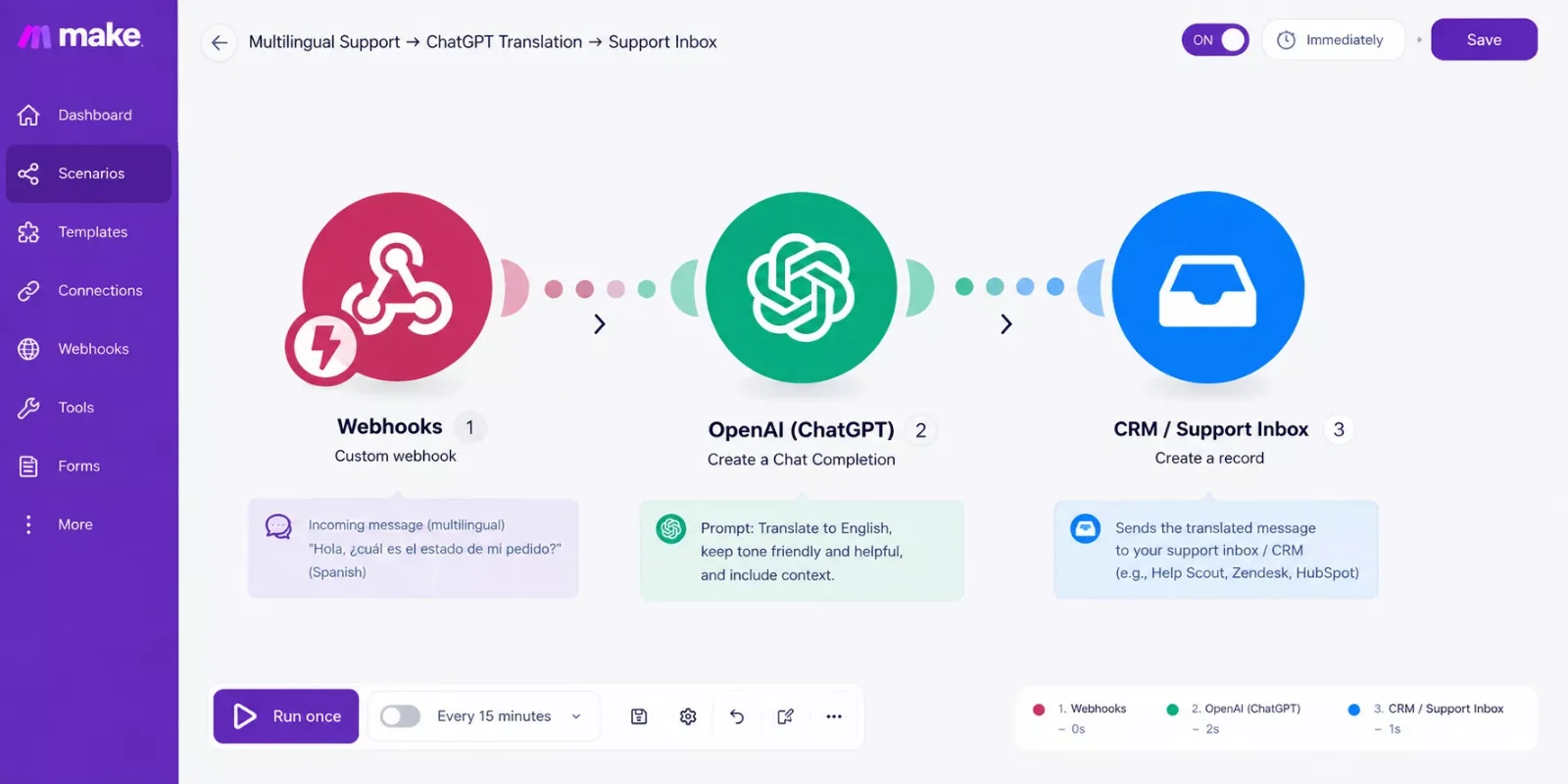
Here's a setup worth stealing: a webhook catches an incoming customer message from your live chat or contact form. A router module checks the detected language. If it's not English, the message gets passed to DeepL's "Translate a Text" module (or a ChatGPT prompt module, if tone matters more than speed) before it lands in your CRM or support inbox, already readable. Reply in English, and the same flow translates it back before it goes out, the same logic behind our automated email workflows guide.
This is the exact setup that closes the gap between "I have a translation tool" and "my automation actually speaks my customer's language." Make.com's own platform already lists over 3,000 connected apps, so this translation step slots in alongside whatever CRM, email tool, or ticketing system you're already running, no separate integration project required. If you're curious how far this stacks, our breakdown of Make.com's built-in AI agent tools covers where native AI already picks up some of this work.
If you're building this kind of stack from scratch and don't want to piece every module together yourself, this is exactly the kind of build I put together as a No-Code Architect: fully working automations handed off, tested, ready to run.
Who Is This For?
This list is for solopreneurs and small teams already running (or about to run) Make.com scenarios who keep hitting the same wall: customer messages, form submissions, or documents showing up in a language their workflow wasn't built to handle. If you're still deciding whether Make.com itself is worth adopting, this isn't the article for that question. This one assumes you're already in, and just need the right translation piece to slot in, much like the setup in our AI customer service bot for Make.com piece.
Conclusion & Rating
For most Make.com users handling customer-facing translation, DeepL is the strongest overall pick. It has a genuine native module, sets up in minutes, and produces the most natural output for European languages, which covers the majority of small-business translation needs.
⭐⭐⭐⭐☆ DeepL: 4/5
Google Translate earns a close second for anyone needing broader language coverage than DeepL offers, and ChatGPT or Claude are worth the extra prompt-writing effort when tone and nuance matter more than speed. If Make.com's own built-in AI already covers more than you'd expect, our look at Make.com's built-in AI code writer is worth a read next.
People Also Ask
Which AI translation tool connects most easily to an existing Make.com automation?
DeepL is the easiest, since its Make.com app comes with a ready-made "Translate a Text" module. Google Translate is a close second, with an integration officially built and maintained by Make itself. Both skip the extra setup that prompt-based or webhook-only tools require.
Can incoming multilingual customer messages be automatically translated and routed to the right reply?
Yes. A webhook catches the incoming message, a translation module (DeepL, Google Translate, or a ChatGPT/Claude prompt) converts it, and the translated version lands in your CRM or inbox automatically. Replies can run back through the same flow before they're sent.
Do I need a separate translation tool, or can Make.com's built-in AI handle basic translation?
Make.com's AI Toolkit lists translation as a supported task type, and its OpenAI and Anthropic Claude modules can handle basic translation through a prompt. For anything beyond quick, low-stakes text, a dedicated tool like DeepL still produces more consistent, natural results.
FAQs
Is DeepL or Google Translate cheaper for a small business running high message volume?
Google Translate's pay-as-you-go pricing tends to work out cheaper at very high volume, while DeepL's flat monthly tiers are usually more predictable for a smaller, steady volume of messages. Run your actual monthly character count through both pricing pages before committing.
Can I use more than one translation tool in the same Make.com scenario?
Yes. A common setup routes short customer messages through DeepL for speed, while longer documents or anything needing a specific tone get routed to a ChatGPT or Claude prompt module instead. A simple router module at the start of the scenario handles the split, similar to the branching shown in our AI email writers that pair with your Make.com stack piece.
Do any of these tools require a paid Make.com plan to use?
No. The translation modules themselves work on Make.com's free plan. What matters more is your own operations/credits usage as your scenario runs more frequently, and each tool's own API pricing, which is separate from your Make.com plan.
⚡ Pro Tip: Start with just one language pair in your Make.com scenario before scaling to five or six. It's much easier to catch a mistranslation issue when you're only watching one language flow through the automation, the same incremental approach we recommend in our AI market research alerts inside Make.com setup.
⚠ Watch Out For: Prompt-based tools like ChatGPT and Claude can occasionally paraphrase instead of translating literally, especially with short, ambiguous messages. For anything legally or contractually sensitive, add a human review step before it goes out.
For anyone building out their Make.com stack piece by piece, this is one of the more practical breakdowns of Make.com automation workflows you'll find, put together here at SmartSoloFlow.
Here's the honest answer if you're still weighing whether to build this yourself: picking the right translation tool is the easy 20%. Wiring the router, the fallback logic, and the reply-loop correctly is the part that actually takes the time.
A quick tip you can use today either way: start with detected-language routing before you touch translation quality at all. Getting the router wrong sends messages to the wrong module, and no translation tool fixes a routing mistake.
The complete, done-for-you version of a setup like this, tested and wired end-to-end, is exactly what I build as a No-Code Architect. If you want this working alongside your existing stack without piecing it together yourself, that's exactly what I build.
Want This Automated for Your Business?
Whether you want this exact translation-routing setup or something fully custom, I'll build it for you, tested and ready to run. Reach out and let's talk about what your stack actually needs.
Let's TalkFound this guide useful? Share it with a fellow freelancer who's still doing things manually. 🚀
Got a question or a workflow roadblock? Drop it in the comments below, happy to help.
Last Updated: September 14, 2026

// Comments