 SmartSoloFlow

Key Takeaway: Picking a chatbot builder is the easy part. The real win is connecting it to Make.com so every captured lead lands straight in your CRM instead of sitting untouched in a dashboard.
Primary Tool(s): ManyChat + Landbot
Build Time: ~1-2 Hours
A chat bot builder can capture leads all day long, but if nobody's checking that dashboard, those leads go cold fast. Small business owners don't have time to babysit a chatbot inbox, and hiring a developer to wire it into a CRM isn't in the budget. This guide walks through picking a solid no-code solutions overview chatbot builder and, more importantly, routing every captured lead straight into your CRM automatically, with Make.com doing the connecting work behind the scenes.
What Is a No-Code Chatbot Builder?
A no-code chatbot builder is a drag-and-drop tool that lets you design conversation flows, capture visitor information, and deploy a bot on your website or social channels, all without writing a single line of code. You build the conversation the way you'd build a flowchart: connect a few boxes, set some rules, and publish.
Tools like ManyChat and Landbot are built for exactly this. You pick a template, customize the questions your bot asks, and it goes live in an afternoon. The part most guides skip is what happens after the conversation ends. In my experience working with small business owners, the bot itself is rarely the bottleneck. It's what happens to the lead once the chat is over.
That's where Make.com comes in, the same automation layer behind connecting your other business workflow software. Once your bot captures a name, email, or service request, Make.com can pick that information up automatically and push it wherever it needs to go, whether that's your CRM, a spreadsheet, or an email inbox. We'll cover the exact setup for that later in this guide.
The global chatbot market is projected to grow from roughly $11.8 billion in 2026 to $41.2 billion by 2033, according to Grand View Research's chatbot market analysis. That growth is being driven largely by small and mid-sized businesses adopting no-code tools instead of custom-built bots, which used to require a developer and a much bigger budget.
3 Major Business Benefits
Before getting into setup, it helps to know exactly what a no-code chatbot builder buys you. Here are the three that matter most for a small business:
- Faster lead response, without hiring anyone. A chatbot answers the first question and captures contact details the moment a visitor lands on your site, even at 11pm on a Sunday. You're not losing leads to slow response times anymore.
- Real cost savings over a custom build. Most no-code chatbot builders run in the $15-$40 range to start, though pricing shifts as your contact volume grows. A custom-coded bot with the same capabilities typically starts in the thousands, plus ongoing developer maintenance.
- Zero technical skill required to launch or edit. You can update your bot's questions, add a new service offering, or change your greeting message yourself, the same afternoon you think of it, without waiting on anyone else's calendar.
But the honest caveat here is that a chatbot builder alone doesn't finish the job. It captures the lead. What you do with that lead next is what actually determines whether it turns into a customer, which is exactly the gap this guide is built to close.
Real-Life Use Case
Picture a small landscaping company running a chatbot on its website. A visitor lands on the homepage, asks about pricing for a spring cleanup, and the bot collects their name, phone number, and property zip code before the conversation ends. That's a good lead. The problem is what happens next.
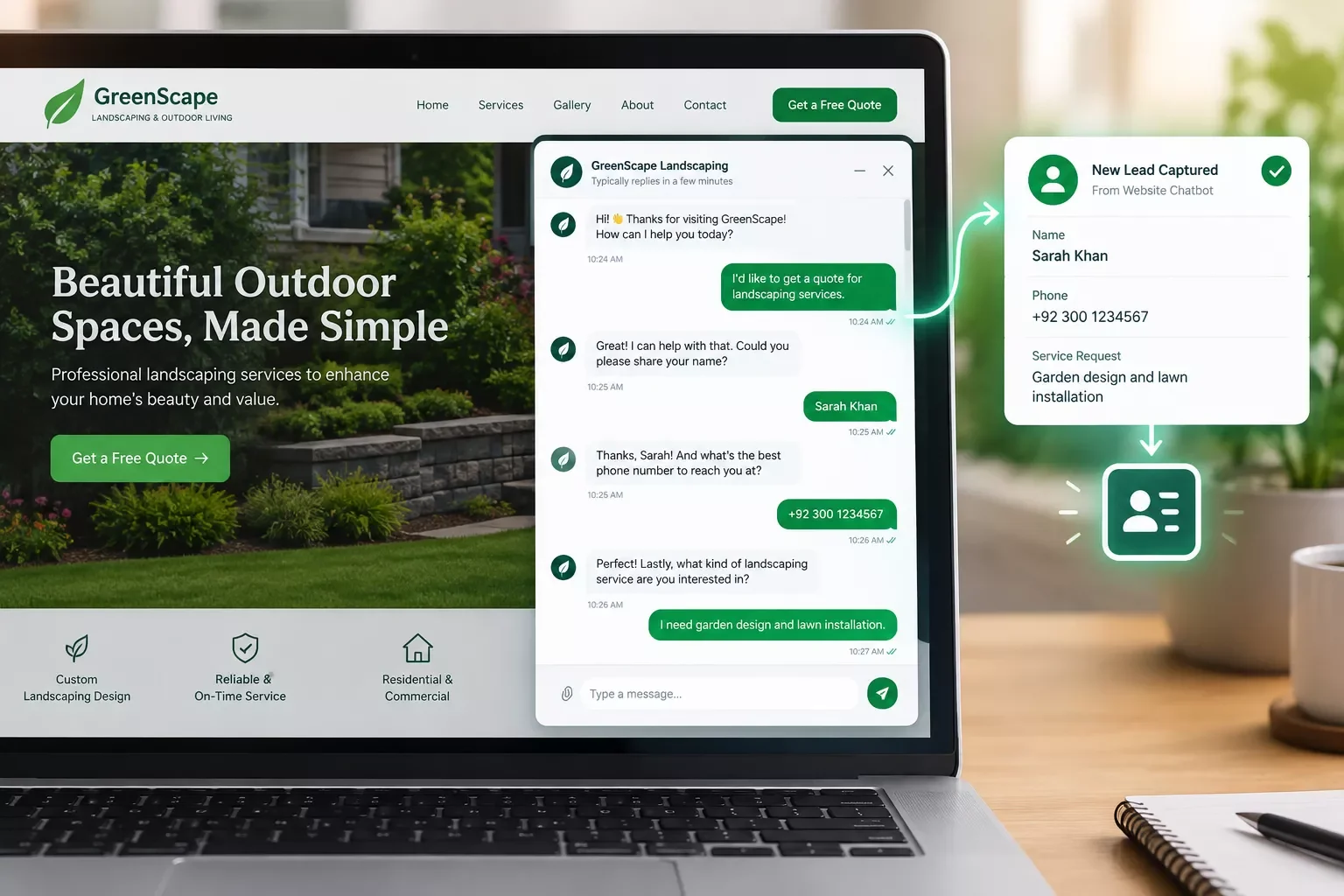
Without automation, that lead sits inside the chatbot's own dashboard. The business owner has to log in, check for new conversations, and manually copy details into a spreadsheet or CRM, if they remember to check at all. But that's exactly where warm leads go cold. A prospect who asked about pricing on Tuesday afternoon deserves a follow-up call before Wednesday, not whenever someone finally opens the chatbot app. If your business doesn't have a real website yet to host this bot on, picking a no-code website builder is the logical first step before any of this.
With Make.com sitting between the chatbot and the CRM, that same lead gets pushed into the CRM the instant the conversation ends. No login, no manual copying, no forgetting. The business owner just sees a new CRM record waiting, already tagged and ready for a follow-up call.
How to Route Chatbot Leads Straight Into Your CRM
Routing chatbot leads into a CRM automatically takes three pieces: a chatbot builder that supports outbound triggers, a Make.com scenario that listens for new leads, and a CRM connection to receive them. Both Make.com's official ManyChat integration and Make.com's Landbot integration are Make-Verified apps, meaning Make.com's own team built and maintains the connection, not a third-party workaround.
Here's the routing logic, step by step:
- Connect your builder to Make.com. In ManyChat, this means generating an API token from Settings, which requires a ManyChat Pro account, not the free plan. Landbot connects with its own API key, tied to a paid Landbot plan.
- Set the trigger. Your Make.com scenario watches for new subscriber data or a completed flow, depending on which builder you're using.
- Map the fields. Name, email, phone, and service request each get matched to the correct field in your CRM. This is the step most generic guides skip entirely, and it's where most setups actually break if rushed. If you don't have a CRM in place yet, connect it to a free CRM built for exactly this before mapping any fields.
- Test with a real conversation. Run your chatbot once yourself before going live, and confirm the test lead actually lands in the CRM correctly.
If you're already comfortable inside Make.com and want to see what else it can automate beyond this one workflow, this roundup of AI automation tools that pair well with Make.com is worth a look once your chatbot-to-CRM setup is live.
How to Get Started
Don't try to build the perfect bot and the perfect automation on day one. Start smaller than you think you need to.
Pick one builder, ManyChat or Landbot both work well here, and build a simple three-question flow: name, contact info, and what they're looking for. Publish it on your website first. Once you've collected a handful of real conversations, connect it to Make.com and set up the CRM routing covered above. According to a HubSpot State of AI report, 68% of small business owners who adopted a chatbot saw a positive ROI within 60 days, with response times improving by roughly 80% on average. Getting the basic version live matters more than getting every detail perfect before you launch. Once it's running smoothly, what to do once your no-code build is actually live is worth reading next.
Build a 3-question lead-capture chatbot flow for a [type of business] website.
Question 1: Ask the visitor's name.
Question 2: Ask for their phone number or email.
Question 3: Ask what service or product they're interested in.
End the flow with: "Thanks! Someone from our team will follow up within one business day."
Tag this conversation as "New Lead" and prepare all three fields to be sent to an
external CRM via a Make.com webhook.
People Also Ask
What is the best no-code chatbot builder for a small business in 2026?
There isn't one universal answer. ManyChat and Landbot both work well and connect natively to Make.com, which matters most if routing leads into a CRM is the priority. The right pick depends more on whether your leads come through your website or social messaging.
Can leads captured by a chatbot be automatically sent to a CRM without manual export?
Yes. Connecting your chatbot builder to Make.com lets captured lead data flow into your CRM the moment a conversation ends, with no manual export, copy-pasting, or login required on your end.
Do I need coding skills to build and connect a chatbot to my other business tools?
No. Both the chatbot builder and Make.com are visual, no-code tools. You're clicking and connecting boxes, not writing code, even when routing data into a CRM.
How long does it take to set up a chatbot builder for a small business?
A basic three-question lead-capture flow typically takes under an hour to build and publish. Adding the Make.com to CRM routing on top usually adds another 30 to 60 minutes, depending on how many fields you're mapping.
Is ManyChat or Landbot better for routing leads into a CRM?
Both are Make-Verified apps, so neither has an edge on CRM routing specifically. ManyChat tends to fit social-first businesses better, while Landbot leans toward website-embedded lead flows.
Does a chatbot builder work with any CRM, or only specific ones?
Through Make.com, a chatbot can connect to virtually any popular CRM, since Make.com's library covers thousands of apps rather than a short fixed list. If your CRM isn't listed by name, Make's generic webhook module usually still handles it.
Can I switch chatbot builders later without losing my Make.com automation?
Mostly, yes. The Make.com scenario itself stays intact, but you'll need to reconnect the trigger to the new builder's app and re-map any fields, since each builder stores lead data slightly differently.
What if I want to add WhatsApp or Instagram later?
Both ManyChat and Landbot support WhatsApp and Instagram messaging on top of website chat. Your existing Make.com routing setup generally extends to those channels with a few added trigger adjustments, not a full rebuild.
Will connecting my chatbot to Make.com slow down my website?
No. Make.com runs the automation on its own servers after the chatbot conversation ends. Nothing about the CRM routing step touches your website's loading speed. If your automations ever do misfire, cleaning up a workflow automation that's misfiring walks through the common fixes.
Is there a free way to test this before committing to a paid plan?
Make.com's free tier is enough to build and test the routing scenario. ManyChat's API connection does require its Pro plan, though, so budget for that specifically once you're ready to move past testing.
Conclusion
A chat bot builder earns its keep the moment it stops being a dashboard you have to remember to check. Pick ManyChat or Landbot, build a simple lead-capture flow, and connect it to Make.com so every lead lands in your CRM automatically. That's the difference between a chatbot that looks impressive and one that actually grows your business.
⚡ Pro Tip: Test your CRM routing with a fake lead first, using your own name and a throwaway email, before pointing real website traffic at it. It takes five minutes and saves you from finding a broken automation the hard way.
⚠ Watch Out For: ManyChat's API connection to Make.com requires a Pro account, not the free plan. Factor that cost in before committing to this specific setup, or budget for Landbot instead if staying on a free chatbot tier matters more to you right now. A few common no-code builder headaches can also crop up here, so it's worth a quick read if anything stops working mid-setup.
Setting this up yourself is absolutely doable with an afternoon and this guide. But if you'd rather skip the trial-and-error and just hand it off, this is exactly the kind of build I take on as a No-Code Architect. If setting this up yourself isn't the best use of your week, this is exactly the kind of build I hand off, fully working, for small teams like yours.
Want This Set Up Without the Trial and Error?
Want this exact chatbot-to-CRM automation built for your business, or something fully custom? Reach out and let's talk through what you need.
Let's TalkFound this guide useful? Share it with a fellow freelancer who's still doing things manually. 🚀
Got a question or a workflow roadblock? Drop it in the comments below — happy to help.
Last Updated: September 14, 2026

// Comments