 SmartSoloFlow

Key Takeaway: A "Sent" status on your invoice generator only confirms delivery, not that your accounting software actually received the data. The fix takes minutes, not a developer.
Primary Tool(s): Invoice generator (QuickBooks Free/Wave) + Make.com
Build Time: ~20-30 Minutes
Your invoice generator says "sent," but your accounting software still shows nothing. This is one of the most common and most misunderstood problems small business owners run into with free invoice generators like QuickBooks' free tool or Wave. The two systems aren't actually the same thing: one creates and delivers the invoice, the other keeps your books. If nobody built a real connection between them, "sent" and "recorded" are two entirely separate events, and only one of them just happened.
The good news: you don't need a developer or a custom build to fix this. Most silent sync failures come down to five repeatable causes, from a stuck draft status to an expired connection, and each one has a clear, no-code fix. This guide walks small business owners through exactly what's breaking, why it happens, and how to close the gap for good using Make.com, without touching a line of code. If you're new to this space, this no-code solutions overview covers the broader picture of what these tools can do for a small business.
Common Mistakes
Silent sync failures almost always trace back to one of five repeatable causes, and recognizing which one you're dealing with is the first step to actually fixing it, not just re-sending the invoice and hoping. This pattern is a lot like what happens when fixing broken spreadsheet automation goes wrong: a quiet, unglamorous mismatch somewhere in the middle, not a dramatic system failure.
- The invoice never left "Draft" status. Many tools only push data to your accounting software once an invoice is formally marked sent or moved to an "awaiting payment" state internally, not just emailed out.
- Customer record mismatch. If the client's name or email in your invoice generator doesn't exactly match the customer record in QuickBooks or Wave, the sync can silently fail instead of creating a duplicate.
- Expired or disconnected authentication. Most integrations use OAuth-based connections that can quietly expire after inactivity or a password change, breaking the link without any visible warning.
- Duplicate invoice numbers blocking the queue. A repeated invoice number, common if you've ever manually re-issued one, can stop that invoice and everything behind it from syncing.
- Silent API rate limits or timing delays. Accounting platforms cap how many requests they'll accept in a short window; hit that limit and the sync simply queues or drops instead of erroring loudly.
Why They Happen
The root cause is almost always the same: a free or simple invoice generator is built to create and deliver a document, not to maintain a live, two-way connection with your accounting software. Unless someone has explicitly built that bridge, "sent" only means the email went out. Your books have no idea the invoice exists.
This is exactly why fixing silent invoice-to-accounting sync failures needs a different approach than most generic invoicing guides offer. QuickBooks' own free invoice generator, for example, is explicitly designed to work for people who aren't even QuickBooks customers, which means it was never built assuming a live accounting connection exists at all. Wave's free invoice generator works the same way: it creates a clean PDF, and a real Wave account with an actual sync setup is a separate step entirely. The disconnect isn't a flaw. It's just two tools doing two different jobs, and most small business owners never realize they need to connect them on purpose. If you're managing invoicing as a freelancer specifically, this guide on how to automate invoicing for freelancers covers tool selection from the ground up.
How to Fix Each One
Each fix below is matched directly to the mistake causing it, and none require writing code or hiring a developer. Here's exactly what to do for each of the five causes above.
- Stuck in Draft: Open the invoice in your generator or accounting dashboard and manually confirm its status has moved to "Sent" or "Awaiting Payment," not just saved as a draft. If your tool has a status toggle, this alone often resolves the gap.
- Customer mismatch: Go into QuickBooks or Wave directly and check the customer record's name and email against what's on the invoice. Standardize both to match exactly, then trigger a manual re-sync from your accounting dashboard.
- Expired authentication: Reconnect the integration. In QuickBooks and Wave, this usually means going to Settings, finding the connected app, and clicking Reconnect or Disconnect-then-Connect-Again.
- Duplicate invoice numbers: Rename the conflicting invoice with a suffix (like 0042-A) and document the change, then let the queue clear on its own.
- Rate limits and timing delays: Usually nothing is actually broken here. Wait for the next sync cycle, and if it's still stuck after two or three cycles, that's when a manual re-sync or a support ticket makes sense.
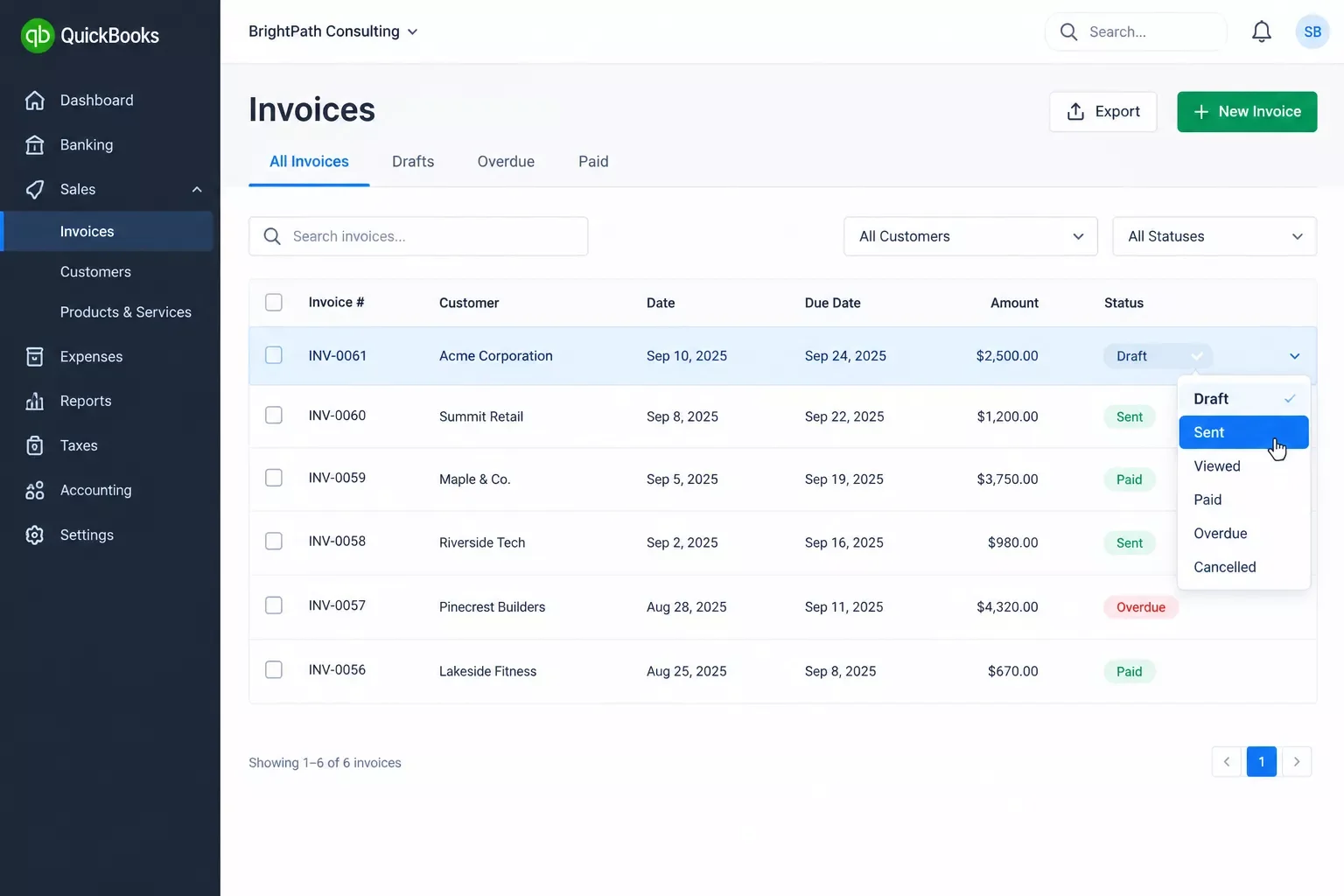
For business owners who'd rather stop checking this manually every week, this is exactly the kind of repetitive check that a lightweight Make.com scenario handles automatically. Both Make.com's QuickBooks integration and Make.com's Wave integration are official, Make-reviewed apps, which means a scenario can watch for a newly sent invoice, confirm it actually posted to your books, and flag or retry it automatically if it didn't, all without a developer involved. Similar logic applies to keeping payment gateways that automate fulfillment in sync with your books. It's one of the more practical entry points into Make.com automation workflows for a small business that just wants its books to stay honest, from SmartSoloFlow.
2026 Advanced Tips & Scalability
Once the basic sync gap is fixed, the next question most small business owners ask is how to stop checking for this manually every single week. The answer is a simple monitoring layer, not a bigger accounting system. This is the same principle behind connecting your business workflow software to one central hub instead of checking each tool separately, and it overlaps with broader business process automation fixes worth knowing regardless of which tool is breaking.
A lightweight Make.com scenario can run on a schedule (say, once a day) and compare your invoice generator's "sent" list against what's actually landed in QuickBooks or Wave. When something's missing, it can send you a Slack message or an email alert instead of you discovering the gap during tax season. This is a genuinely small build (typically a handful of modules), so it doesn't require the "advanced" label to scare anyone off. It's the difference between finding a sync failure in real time versus finding it three months later when a client says they never got billed.
For agencies or business owners managing invoices across multiple clients or entities, the same scenario can branch to check several accounting connections in one pass, which is where this starts to genuinely save billable hours instead of just preventing an occasional headache.
Daily Invoice Sync Check (Make.com scenario outline):
1. Scheduler module - runs once daily, e.g. 8:00 AM
2. Get list of invoices marked "Sent" in your invoice generator (last 24 hrs)
3. Search matching invoice/customer record in QuickBooks or Wave module
4. Router: if found -> log as confirmed
   if not found -> send Slack/email alert with invoice number + client name
5. Optional: auto-retry the sync once before alerting
How to Get Started
Getting this working doesn't require a developer, a big software purchase, or even a full afternoon. Start with the manual fixes above, since most sync gaps are a one-time settings issue, not a recurring pattern. If you're still seeing this happen weekly, that's your signal to set up the monitoring scenario instead of continuing to check by hand.
The honest starting point for most small business owners: fix what's broken right now using the five steps above, confirm your QuickBooks or Wave connection is actually reconnected and authenticated, then decide if the ongoing monitoring layer is worth the 20-30 minutes it takes to set up. For anyone billing more than a handful of clients a month, it almost always is. If lead capture is your next bottleneck after invoicing, this piece on automating lead capture with a free CRM is a natural next read.
People Also Ask
Why did my invoice generator stop syncing with my accounting software?
Usually it's one of five things: the invoice is stuck in Draft, the customer record doesn't match between apps, your authentication has quietly expired, a duplicate invoice number is blocking the queue, or you've briefly hit an API rate limit. It's rarely a real outage.
Can a free invoice generator connect to QuickBooks or Wave without a developer?
Yes. Both QuickBooks and Wave have official, Make-reviewed integrations, so a no-code Make.com scenario can connect them without any custom development or coding knowledge required.
What's the fix when an invoice shows as sent but never appears in accounting records?
First confirm the invoice status has actually moved past Draft, then check that the customer record and authentication connection are both current. If none of that works, a manual re-sync from your accounting dashboard usually clears it.
Do free invoice generators sync with accounting software automatically?
Most standalone free invoice generators don't, by default. Tools like QuickBooks' free generator are explicitly built for people who may not even have a QuickBooks account, so a real accounting sync has to be set up separately, either natively or through an automation tool like Make.com.
How do I know if my invoice actually reached my accounting software?
Check the customer or transaction list directly inside QuickBooks or Wave, not just your invoice generator. If the invoice isn't there within a few minutes of sending, treat it as a sync failure and work through the five common causes above.
FAQs
Do I need a paid Make.com plan to fix invoice sync issues?
No. Make.com's free tier covers a simple sync-check scenario for most small business volumes. You'll only need a paid tier if you're running very high invoice volumes or want more frequent scheduled checks.
Will fixing this cause duplicate entries in my accounting software?
Not if you fix the root cause first. Re-sending or manually re-creating an invoice without checking for an existing record is what usually causes duplicates, not the fix itself.
Is this the same issue for QuickBooks and Wave, or different?
The underlying causes are nearly identical (draft status, mismatched records, expired auth), but the exact menu paths to reconnect or re-sync differ slightly between the two platforms.
Can I automate this check so I never have to look for it manually again?
Yes. A scheduled Make.com scenario can compare your sent invoices against your accounting records daily and alert you the moment something doesn't match.
A "sent" invoice that never shows up in your books isn't a sign your systems are broken, it's usually just one of five predictable gaps, and every one of them has a fix that takes minutes, not a developer. Once it's fixed, it stays fixed, especially if you add the lightweight daily check described above.
⚡ Pro Tip: Before troubleshooting anything else, check the customer record match first. It's the single most common cause and the fastest one to fix.
⚠ Watch Out For: When you reconnect an expired authentication, some platforms won't automatically retry invoices that failed before the reconnection. Check your last few days of sent invoices manually after reconnecting, just once, to make sure nothing slipped through during the gap.
If you've read this far because you're tired of manually checking whether your invoices actually landed in your books, that instinct is worth listening to. The genuinely helpful move here is simple: fix the five causes above once, and treat the daily sync-check scenario as optional insurance, not a requirement. But if setting even that up isn't the best use of your week, this is exactly the kind of build I hand off, fully working, for small teams like yours, so you never have to think about it again.
Want This Fully Automated for Your Business?
If chasing down invoice sync gaps isn't how you want to spend your week, I build done-for-you Make.com automations for small businesses like yours. Reach out and let's set it up properly.
Let's TalkFound this guide useful? Share it with a fellow freelancer who's still doing things manually. 🚀
Got a question or a workflow roadblock? Drop it in the comments below, happy to help.
Last Updated: September 14, 2026

// Comments