 SmartSoloFlow

Key Takeaway: Predis.ai is a genuinely fast AI content generator for social posts, but it has no native Make.com app. Pair it with Make's HTTP module and Buffer's official app if you want real auto-publish and auto-logging.
Looking for an AI social media agent that actually saves time instead of adding a new tab to check? Predis.ai is one of the more capable options for busy solopreneurs and small teams who already run Make.com and want their content pipeline to run itself. It drafts captions, images, and short videos from a single prompt, and it does this well. What it doesn't do on its own is publish anything or tell you what happened after it posts.
That's where most "AI agent" reviews stop short. This one doesn't. You'll get an honest look at what Predis.ai actually costs, who it fits best, and the exact Make.com setup (a webhook call into Predis, then Buffer's official app to publish and log the result) that closes the gap between "AI wrote a great post" and "the post is live and I have a record of it."
Best For: Solopreneurs and small teams who want AI-drafted social content and already run (or are ready to run) a Make.com automation to publish and log it.
Standout Feature: Fast multi-format content generation (posts, carousels, short video) from a single prompt, plus built-in competitor analysis.
Overall Rating: ⭐⭐⭐⭐☆ Predis.ai: 4/5
Who Is This For?
Predis.ai fits a specific kind of user well: someone running social media mostly solo, who needs a steady stream of on-brand posts without hiring a designer or copywriter. It's built for marketers, small business owners, and content creators who'd rather review AI-generated drafts than start from a blank page every morning.
It's a strong match if you're already comfortable with Make.com and want to close the loop between "content is ready" and "content is live." The tool itself doesn't publish or track anything past generation, so if you're hoping for a fully hands-off, one-click agent, you'll need the Make.com layer this article walks through later. Freelancers managing multiple client accounts will also get real value from the unlimited team members on even the entry-level plan, since that's not always the norm in this category. If your work also involves other repetitive scheduling tasks, it's worth browsing AI scheduling assistants that fill in the gaps Predis.ai doesn't cover.
It's a weaker fit for large agencies running dozens of brands at once. The Lite plan caps you at 60 AI-generated posts and publishing to 5 channels a month, which is plenty for one business but tight for an agency juggling many.
Deep Dive Into Features
Predis.ai's core strength is content generation, and it's a genuine one, not just AI-generated marketing copy about itself. Give it a product name, a topic, or a website link, and it drafts a full post: image or short video, caption, and hashtags, in one pass. Multiple Capterra reviewers (2026 verified reviews) independently point to this as the reason they switched from pure schedulers, since a scheduler still needs someone to write the post first.
Competitor analysis is the second standout feature, and reviewers are split on it. Several call it genuinely useful for spotting what's working in their niche. Others report it's slow to scan Instagram and Facebook profiles, and occasionally returns no data at all. Treat it as a helpful extra, not the reason to buy.
Multi-platform publishing rounds out the core set. Predis.ai connects directly to Instagram, Facebook, LinkedIn, TikTok, and a handful of others, so once a post is drafted, you can push it out without leaving the dashboard, for platforms it supports natively. It's worth knowing upfront: it doesn't have a native Make.com connection, which is exactly the gap the Master Stroke section below solves. For a broader look at tools built the same way, our roundup of AI automation tools that pair with your Make.com stack covers several others worth comparing.
Pricing & Hidden Costs
Predis.ai runs on a usage-based model, not flat per-seat pricing, and that shapes who it's actually cheap for.
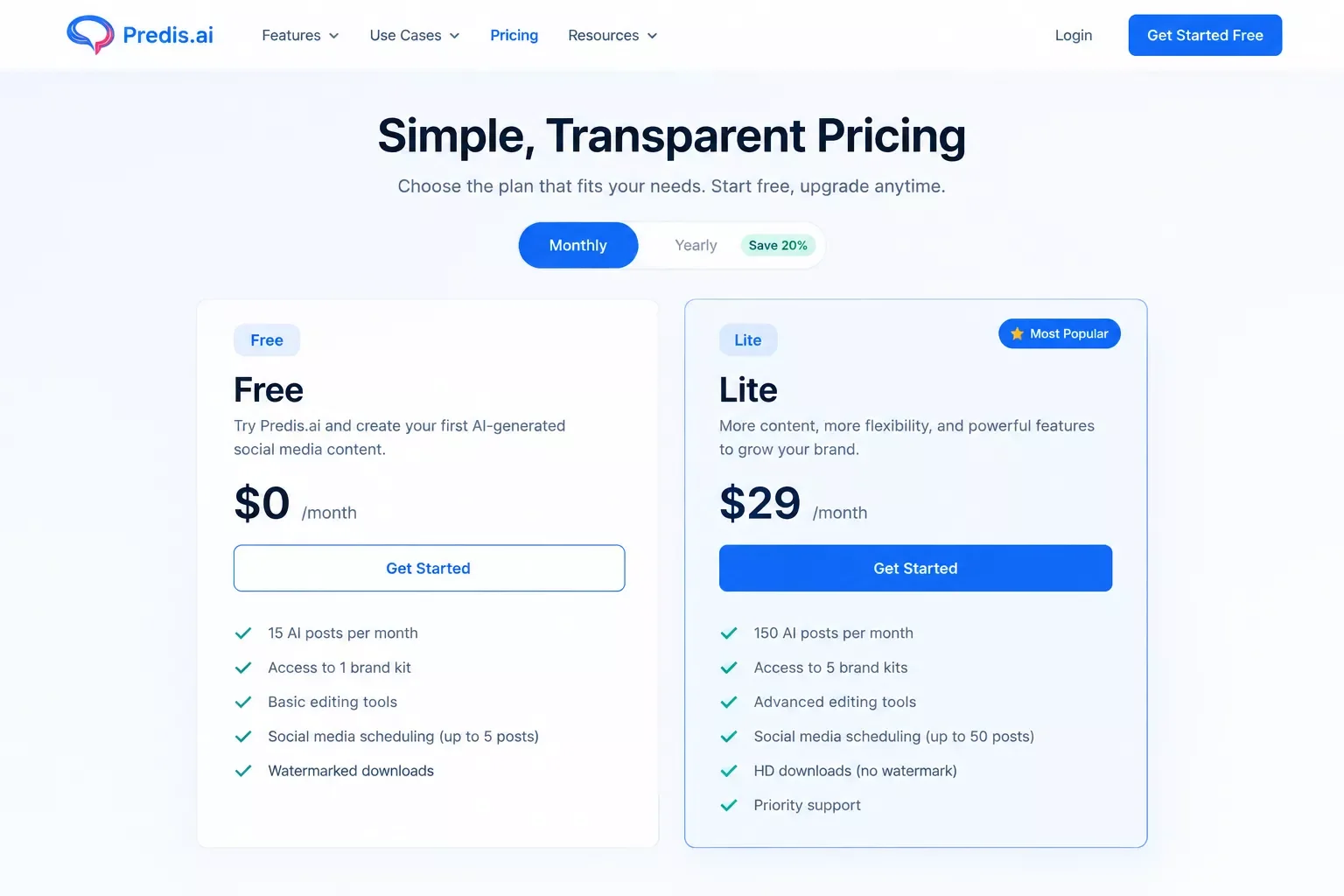
The Free plan covers one brand and its social handles at no cost, a reasonable way to test the content quality before paying anything. The paid Lite plan starts at $32/month and includes 60 AI-generated posts, 60 competitor-analysis runs, publishing to 5 channels, and 50 minutes of AI voice-over, with unlimited team members even at this entry tier.
Here's the real-world math: if you're posting daily across 3 platforms, that's roughly 90 posts a month, over the Lite plan's 60-post allowance. You'd either need to upgrade to a higher tier or trim your posting cadence, so budget for that before you commit to a daily schedule.
Pricing above was verified at the time of writing. Since pricing changes frequently, please confirm current rates and plan details directly on Predis.ai's pricing page before making a decision.
⚡ Pro Tip: Count your actual monthly post volume across all channels before picking a plan. The Lite plan's 60-post cap gets used up fast if you're posting to multiple platforms daily.
⚠ Watch Out For: Predis.ai's data export is CSV-only, per multiple 2026 user reviews, and it doesn't fully support every browser (Chrome and Safari are the safe choices). Check both before building your workflow around it.
Pros & Cons
Pros
- Genuinely fast, multi-format content generation (image, video, caption, hashtags) from one prompt
- Unlimited team members even on the entry-level paid plan
- Direct publishing to several major platforms without leaving the dashboard
- Free plan lets you test content quality before paying anything
Cons
- No native Make.com app, so real automation needs a webhook/API workaround
- Competitor analysis can be slow or return no data, per multiple user reviews
- Data export is CSV-only
- Post allowance on the entry plan runs out fast for daily multi-platform posting
The same "great content tool, thin native automation" pattern shows up elsewhere in this space too, our review of AI email writers that pair with Make.com runs into a similar gap.
Master Stroke — Integration With Make.com
Here's the part every other "best AI social media agent" roundup skips: automating what happens after the AI drafts the post. Predis.ai writes a genuinely good caption, but it doesn't tell you when it posted, where it posted, or keep a record you can check later. That's a real, verified gap. Even Blotato's own deep-dive on AI social agents admits most of these tools are still schedulers with a chatbot bolted on top, so this isn't unique to Predis.ai. The same webhook-first pattern shows up in our AI sales agent connected to Make.com case study, if you want to see it applied to a different part of the business.
This is exactly the kind of workflow SmartSoloFlow builds, and it's one of the more useful Make.com automation workflows for anyone running social media solo.
One honest correction before the walkthrough: Predis.ai does not have an official Make.com app. If you search Make's own integrations directory, you won't find Predis.ai listed as a Verified partner app. What it does have is a real public REST API, so you connect it into Make.com through the generic HTTP module, not a plug-and-play native connector. Buffer, on the other hand, does have an official, Make-maintained app with real "create a status update" and "edit a status update" actions, so that half of the workflow is a genuine one-click connection.
Here's how the pieces fit together:
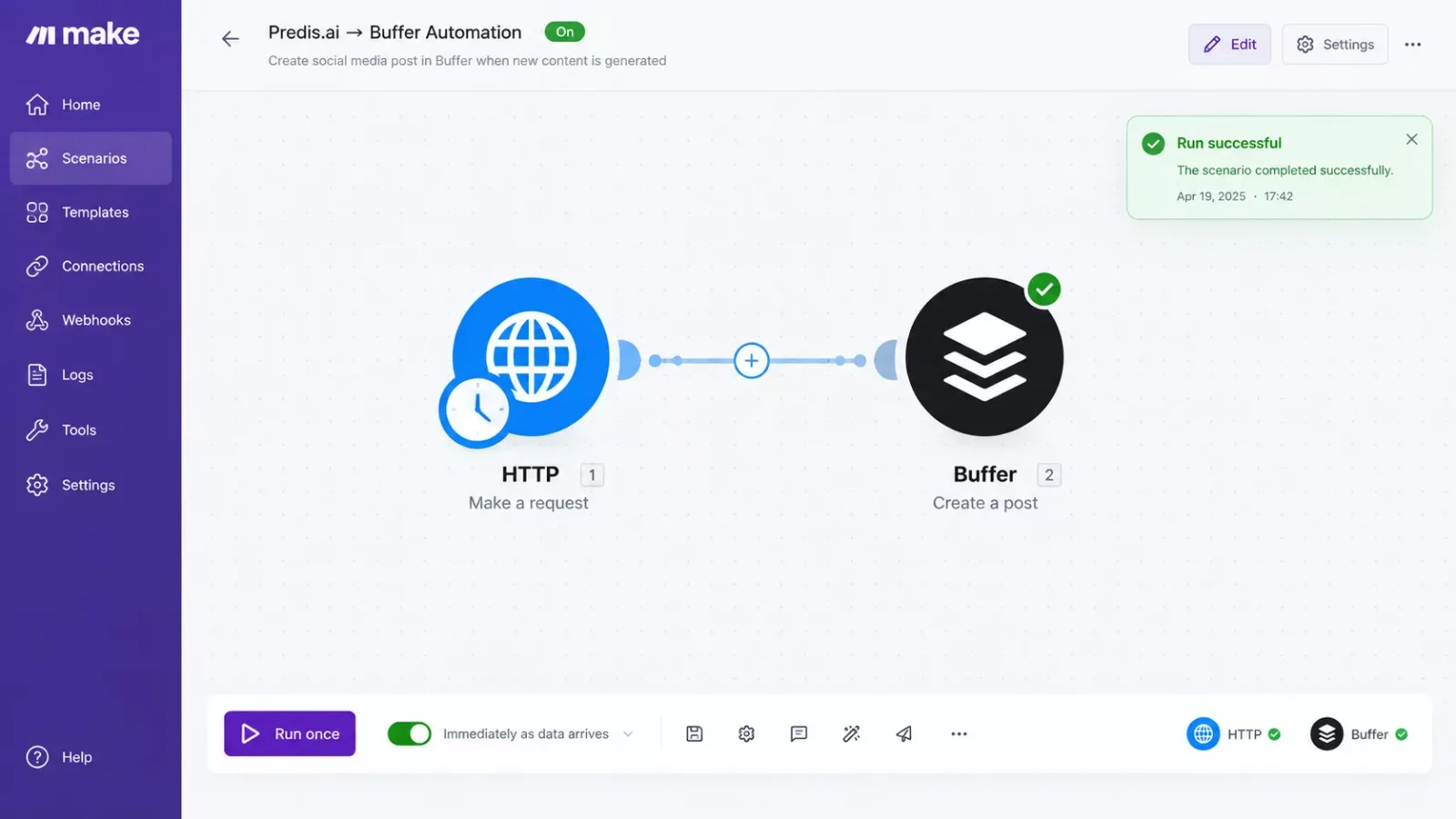
In plain terms: Make.com's HTTP module calls Predis.ai's API to pull the draft it just generated. That draft gets handed to Buffer's official module, which creates the status update and publishes it. The last step logs the result (which post, which channel, what time) into a tracker, like a Google Sheet, so you have a record without checking five different dashboards. It's this kind of connective layer, more than any single AI tool, that actually strengthens your Make.com automation workflows over time, which is what SmartSoloFlow focuses on for solopreneurs building out their stack.
Want this workflow built for your exact stack?
If piecing this together yourself isn't the best use of your week, this is exactly the kind of Make.com automation I build, fully working, so you don't have to.
Let's TalkFinal Verdict & Use-Case Scenarios
Ideal for Solopreneurs and Freelancers: pick Predis.ai if you're managing your own social presence (or a handful of client accounts) and want AI to handle the first draft of every post, then hand publishing off to a Make.com automation so nothing sits in a queue waiting on you.
Ideal for Content-Heavy Small Teams: pick Predis.ai if unlimited team members matter more than a huge post allowance, since even the entry Lite plan covers a full team without extra seat costs.
Skip it if: you need dozens of posts a day across many client brands. The post-volume cap and lack of a native Make.com app mean you'll spend more time managing workarounds than a purpose-built agency tool would require. The same "check before you assume" caution applies broadly, our look at AI SEO tools that connect to Make.com found the same native-vs-workaround split.
Conclusion & Rating
Predis.ai earns its place as a genuinely useful AI content generator, not just another scheduler wearing an "AI agent" label. The content quality is real, the free plan lets you confirm that before spending anything, and unlimited team members on the Lite plan is a fair deal.
⭐⭐⭐⭐☆ Predis.ai: 4/5
The one star it loses is for the automation gap. Without a native Make.com app, you have to build the webhook connection yourself (or have someone build it for you), which isn't a fair ask for every reader who just wants their agent to work out of the box.
If you're weighing whether picking a tool matters more than the automation wrapped around it, it's worth saying plainly: even the best AI social media agent still leaves you doing the busywork of publishing and tracking by hand. What actually closes that gap is the Make.com setup this article walked through, not the AI drafting tool alone. If piecing together a webhook, an HTTP module, and a Buffer connection isn't how you want to spend an afternoon, this is exactly the kind of stack-completion build I put together for solopreneurs who'd rather have it working than spend a weekend wiring it up themselves. If you want to see more of what a fully agent-driven research and automation stack looks like, our AI research agents for Make.com users piece is a good next read.
⚡ Pro Tip: Start on the Free plan, draft a week of real posts, and only upgrade to Lite once you know Predis.ai's writing style actually matches your brand voice.
Ready for the full stack, not just the AI half?
SmartSoloFlow builds the exact Make.com automation this article covers, tailored to your accounts and your tracker of choice. Reach out and let's set it up.
Let's TalkPeople Also Ask
What's the difference between a social media AI agent and a scheduler?
A scheduler just publishes content on a timeline you already wrote. An AI agent, like Predis.ai, drafts the actual content, captions, images, and video, from a simple prompt, then hands it off to publish. The scheduling is the last step, not the whole job.
Can an AI social media agent decide what and when to post on its own?
Most tools, Predis.ai included, draft content but wait for you to approve and schedule it. Fully autonomous posting with no review step exists but is rare, and most reputable tools default to a human approval gate before anything goes live.
Can an AI social media agent handle customer replies and DMs automatically?
Not Predis.ai specifically, it's focused on content creation and publishing, not inbox management. If DM and comment automation is what you need, that's a separate tool or a separate Make.com scenario connected to your inbox.
Is it safe to give an AI social media agent access to my accounts?
Yes, if it's set up correctly. Connect through OAuth or a scoped API key, never your actual password, and keep a human approval step before anything publishes. That's standard practice across reputable tools in 2026, Predis.ai included.
If you want to see how Predis.ai stacks up against AI agents more broadly, our full AI Agents comparison guide covers the wider landscape. And if scheduling, not AI drafting, is what you actually need first, our roundup of the best social media scheduling tools is worth a look too.
FAQs
Does Predis.ai have a free plan, or do I need a credit card to try it?
Predis.ai has a genuine free plan for one brand, no credit card required. It's enough to test content quality before deciding whether the $32/month Lite plan is worth it for your posting volume.
How does Predis.ai compare to Ocoya or Sintra AI for content generation?
All three generate AI content, but Predis.ai leans hardest into fast multi-format drafting (image, video, captions) plus competitor analysis. Sintra AI bundles social into a broader suite of AI "employees," and Ocoya leans more scheduler-first with AI added. Pick based on whether you want a focused content tool or a broader assistant suite.
Is Predis.ai a good fit if I only post to one platform?
Yes, the Free plan already covers one brand across its connected handles, so a single-platform user doesn't need to pay anything just to try the content quality.
Do I need to know how to code to set up the Make.com automation in this article?
No. Make.com's HTTP module is point-and-click, you're just pasting an API endpoint and key into fields. No custom code is required, though you do need to be comfortable following a technical setup guide.
Found this guide useful? Share it with a fellow freelancer who's still doing things manually. 🚀
Got a question or a workflow roadblock? Drop it in the comments below, happy to help.
Last Updated: September 19, 2026

// Comments