 SmartSoloFlow

Key Takeaway: Picking a website builder gets your store online. It does not automatically keep your inventory accurate or your fulfillment on track once orders start coming in.
Primary Tool(s): Shopify or Wix + Make.com
Build Time: ~3-5 Hours
If you picked an online shop website builder to get selling fast, you already solved the hard part. But taking orders is only step one. Without automation, small business owners end up copying orders into spreadsheets by hand, restocking from memory, and emailing shipping updates one at a time, work that eats hours you do not have and cannot afford to hire a developer to fix.
I've watched this exact bottleneck slow down more small shops than any design or platform choice ever did. The fix isn't a fancier builder. It's connecting the one you already have to a workflow that runs itself. That's what this guide walks through, step by step.
What Is an Online Shop Website Builder?
An online shop website builder is a platform that lets you build and run a store without writing code. Shopify, Wix, and similar tools handle the storefront design, product pages, checkout, and payment processing in one place.
Most small business owners pick one of these because hiring a developer for a custom store is expensive and slow. A builder gets you selling in days instead of months. The tradeoff is that these platforms are built to handle what happens on your storefront, not what happens after someone clicks "buy." If you haven't settled on a platform yet, our no-code website builder guide breaks down the full comparison.
Here's a quick snapshot of what the two most common options cost to get started:
Pricing above was verified at the time of writing. Since pricing changes frequently, please confirm current rates and plan details directly on each provider's official website before making a decision. See Shopify's official pricing page for the latest figures.
Either platform gets your store live. Neither one, on its own, keeps your inventory numbers accurate across sales channels or tells your shipping software the second an order comes in. That's the gap tools like Make.com are built to close, and it's what the rest of this guide walks through.
3 Major Business Benefits
Automating what happens after checkout saves time on inventory updates, cuts shipping errors, and frees you from manually re-entering order data into other tools you already use.
1. You stop losing hours to manual data entry. Every order that comes in through your store normally means copying details somewhere else, a spreadsheet, an accounting tool, a shipping label generator. Automating that step alone can save several hours a week for a busy solo shop owner.
2. You catch stock problems before customers do. Native inventory counts on most builders only track what happens inside that one platform. If you sell anywhere else too, a marketplace, in person, a second store, automation keeps those numbers in sync instead of you finding out you oversold something at 11pm.
3. Your customers get faster, more consistent updates. Automated fulfillment triggers mean shipping confirmations and tracking numbers go out the moment a label prints, not whenever you get around to it between other tasks.
Real-Life Use Case
Picture a small home goods shop running on Shopify. Orders come in fine. The problem starts right after: the owner logs into Shopify to check new orders, manually updates a separate spreadsheet for accounting, then emails themselves a reminder to update stock counts before they oversell a popular item.
On a slow week, that routine is annoying but manageable. On a good week, it falls apart fast. A single viral product post or a small seasonal bump can bring in a dozen orders in an afternoon, and suddenly the owner is choosing between packing boxes and keeping the books straight. Something always slips, usually the inventory count, which is exactly the moment a customer orders something that's already sold out. If your inventory tool already exists but keeps falling out of sync, it's worth fixing broken inventory integrations before automating anything new on top of them.
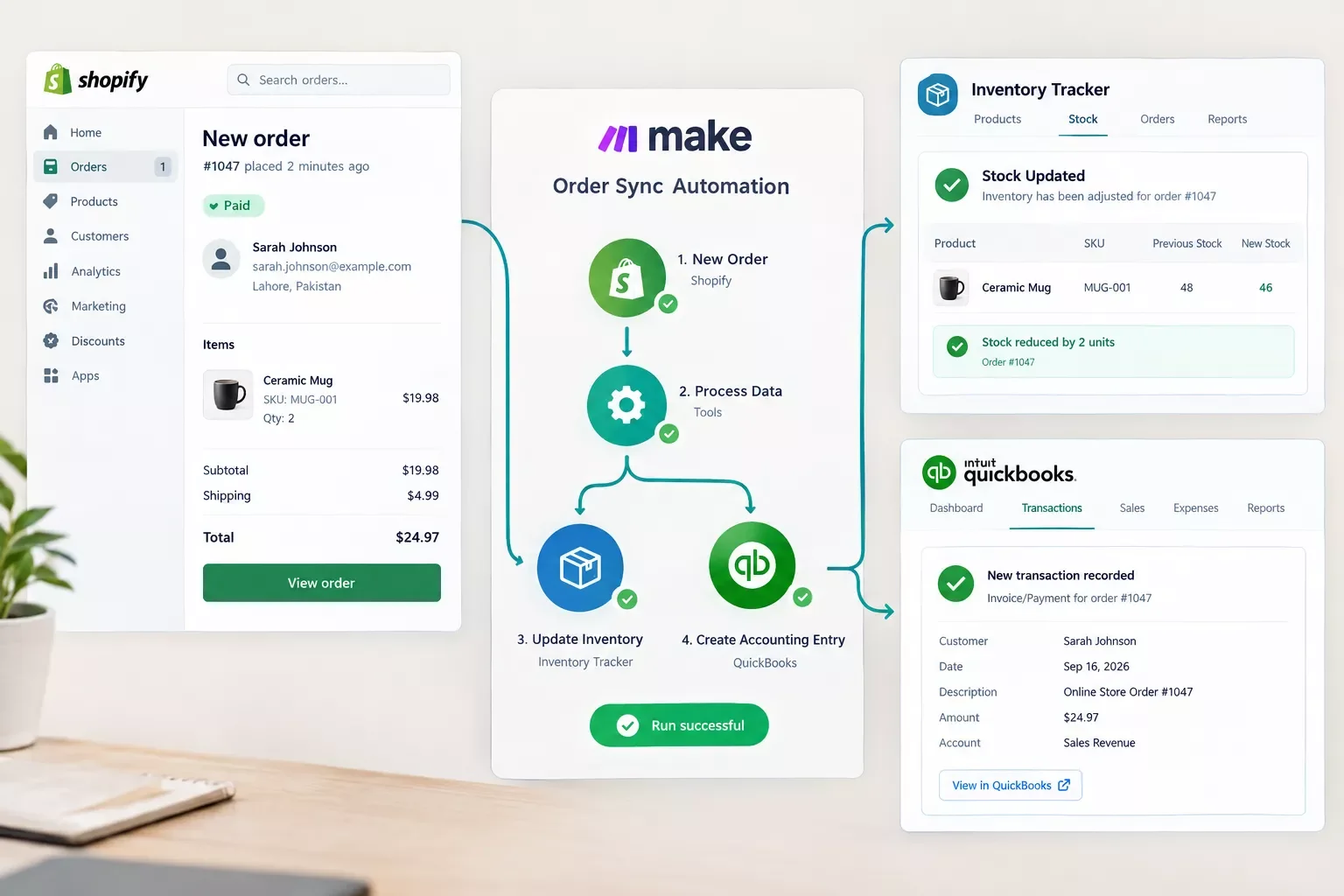
Once that shop connected its store to an automated workflow, the same order now triggers three things at once: the accounting entry gets created, the inventory count drops automatically, and a shipping label request goes out. What used to take 20 minutes per order now takes zero. That's not a hypothetical. It's the exact pattern small shops run into the moment their order volume passes "a few a week," and it's usually the first automation that pays for itself within a single busy weekend.
Automating Inventory and Fulfillment Beyond Native Store Tools
Your builder's native tools stop at the edge of that one platform. To actually automate inventory and fulfillment, you need a workflow that connects your store to the other places your business runs, like your accounting software, your shipping carrier, or a second sales channel, and keeps them all updated without you touching a keyboard. For a broader menu of options, this roundup of ecommerce automation software picks covers tools built for exactly this job.
This is exactly the gap the top-ranking guides for "online shop website builder" don't cover. They'll help you pick between Shopify and Wix all day, but none of them show you what to do once orders start actually coming in.
None of this requires custom development. Make.com has an official Shopify integration built specifically for this, sitting between your store and everything else, watching for new orders and running the steps above automatically, every single time, without you opening a spreadsheet. On the fulfillment side, these payment gateways that automate fulfillment pair well with the same workflow.
If you want a broader look at which AI and automation tools are actually worth pairing with a workflow like this one, our roundup of AI automation tools that pair with Make.com is worth reading through.
How to Get Started
You don't need to rebuild anything. Start with the one connection that saves you the most time right now, usually inventory sync or order-to-shipping automation, then add more connections as you get comfortable.
- Sign up for Make.com (a free plan works for testing this).
- Connect your store platform (Shopify or Wix both have official Make.com apps).
- Pick your trigger: "New Order Placed" is the most common starting point.
- Add the actions you want to run automatically: update inventory, create an accounting entry, or generate a shipping label request.
- Run a test order and confirm everything fires correctly before turning it on for real customers.
If the accounting side of this keeps causing headaches downstream, it's often invoice generator sync issues rather than the workflow itself, worth ruling out early.
Trigger: New Order Placed (Shopify/Wix)
Step 1: Look up product in inventory sheet by SKU
Step 2: Subtract ordered quantity from stock count
Step 3: If stock count falls below 5, send a low-stock alert email
Step 4: Create a new row in accounting sheet with order total, date, customer name
Step 5: Send shipping label request to carrier API with order address
According to a 2025 SellersCommerce industry report, global ecommerce sales crossed $6.8 trillion, with over 60% of new digital-first brands launching directly through their own online stores rather than marketplaces. That volume is exactly why manual order handling stops working the moment a small shop starts to grow.
2026 Advanced Tips & Scalability
Once the basics are running, a few upgrades genuinely change how much time you get back. If you sell on more than one channel, whether that's a physical location, a marketplace, or a second storefront, syncing inventory across all of them in one workflow stops the double-selling problem before it starts.
Adding a low-stock alert that pings you (or automatically reorders from your supplier) means you stop finding out about shortages from an angry customer email. And if you're using an AI tool for customer support or product descriptions already, connecting that tool into the same workflow means new products can get listed and described without you starting from a blank page every time.
None of this needs to happen at once. Most small shop owners add one automation, get comfortable with it, then layer in the next one a few weeks later. If leads come in through a separate page, a good next step is to automate lead capture with a free CRM, or look at landing page builders that auto-route leads if you're running a second channel outside the main store.
People Also Ask
What is the best online shop website builder for a small business in 2026?
Shopify and Wix are the two most common choices for small businesses. Shopify tends to suit stores planning to grow their catalog, while Wix's Core plan is often more affordable for a smaller shop just getting started. Either works well once paired with an automation layer.
Can an online store automatically sync inventory or order data to other tools beyond its own platform?
Yes, but not natively. Most builders only track inventory inside their own platform. Connecting your store to a workflow tool like Make.com lets orders trigger updates in your accounting software, shipping carrier, or a second sales channel automatically.
Is Shopify worth it, or is a general website builder with ecommerce features enough?
For a small shop with a limited catalog, a general builder like Wix is often enough and cheaper. Shopify becomes worth the higher cost once you're managing more products, multiple sales channels, or need deeper reporting and automation options.
Do I need to know how to code to set up this kind of automation?
No. Tools like Make.com are built with a visual, drag-and-connect interface specifically so non-technical store owners can set up workflows without writing a single line of code.
Will automating my store break anything if I set it up wrong?
It shouldn't, as long as you test with a sample order first. Most workflow tools let you run a test scenario before turning automation on for real customers, so mistakes get caught before they affect anyone.
How much does it cost to automate inventory and fulfillment this way?
Make.com has a free tier that covers light usage, and paid plans start affordably from there. For most small shops, the cost is far lower than the hours saved on manual order handling each month.
Can this work with a platform other than Shopify or Wix?
Yes. Most major store builders and ecommerce platforms have official or community-built connections available, so the same basic workflow pattern applies regardless of which builder you're on.
Conclusion
Choosing a website builder was never the hard part. Keeping your inventory accurate and your fulfillment moving once real orders start coming in, that's where most small shops lose hours they don't have. Connecting your store to a simple automated workflow closes that gap without hiring a developer or learning to code.
⚡ Pro Tip: Start with just one automation, usually inventory sync, before adding more. Trying to automate everything on day one is the most common reason small shop owners give up halfway through setup.
⚠ Watch Out For: Always run a test order before switching automation on for real customers. Skipping this step is the most common cause of duplicate orders or incorrect stock counts in a new workflow.
If setting up your store already felt like a full-time job, you're not alone, and you don't have to keep doing this part manually either. The complete, done-for-you automation for exactly this kind of setup is exactly what I build as a No-Code Architect. If setting this up yourself isn't the best use of your week, this is exactly the kind of build I hand off, fully working, for small teams like yours.
Want This Running Without Lifting a Finger?
Whether it's this exact setup or something custom to your store, I'll build the automation so you never touch a spreadsheet again. Reach out and let's talk about what your shop actually needs.
Let's TalkFound this guide useful? Share it with a fellow shop owner who's still doing things manually. 🚀
Got a question or a workflow roadblock? Drop it in the comments below, happy to help.
Last Updated: September 16, 2026

// Comments