 SmartSoloFlow

Key Takeaway: Choose your builder for how it shows your art, then automate what happens after someone submits your inquiry form. That second step is where commission leads get won or lost.
Primary Tool(s): Wix + Make.com
Build Time: ~2 Hours
The best website builder for artists is the one that shows your work well and also handles the inquiry that follows. Most small business owners in the art world pick a builder for looks, then lose commission leads because nobody confirms a form submission or logs it anywhere. That's a time problem, not a talent problem, and you don't need a developer to fix it. This guide compares five builders that artists actually use, then shows how to set up a Wix inquiry form that sends a confirmation email and logs every submission as a row in your tracker through Make.com. You'll also see where the setup gets technical, including one webhook step that Wix itself calls advanced. If you take commission or gallery inquiries, expect a working system in about two hours. No code, no agency retainer, and no leads slipping through the cracks.
- What Is an Artist Website That Captures Inquiries on Its Own?
- Best Website Builder for Artists: 5 Options Compared
- 3 Major Business Benefits of Automating Artist Inquiries
- Artist Website Inquiry Automation: What Happens After Someone Hits Submit
- How to Set Up Inquiry Automation with Wix and Make.com
- What You Need Before You Start
- Build Separate Forms for Commissions, Gallery Submissions, and Press
- Step 1: Set Up the Wix Confirmation Email
- Step 2: Create the Webhook in Make
- Step 3: Send the Form Data from Wix to Make
- Step 4: Add the Row in Google Sheets
- Step 5: Test It End to End
- Real-Life Use Case: A Commission Artist's Week
- How to Get Started
- The Bottom Line for Artists Who Take Inquiries
What Is an Artist Website That Captures Inquiries on Its Own?
An artist website that captures inquiries on its own is a portfolio site where every form submission triggers an automatic reply and a saved record. The site shows your work, the form collects the request, and an automation tool such as Make.com handles confirmation and tracking in the background, with no copy-and-paste from you.
Why bother? The Art Basel and UBS Art Market Report 2026 found that online-only sales made up 15% of the global art market's value in 2025, a smaller share than the year before, as buying rebalanced toward in-person channels. That's my read, not the report's: for many artists, the website is less a checkout counter and more a front door. Someone finds you, fills out a form, and the real conversation starts from there.
Here's the catch. A form that sends nothing back leaves the visitor guessing. Did it go through? Will anyone answer? Meanwhile you're busy in the studio, and the message sits in an inbox next to fifty others. That gap is where commissions quietly disappear.
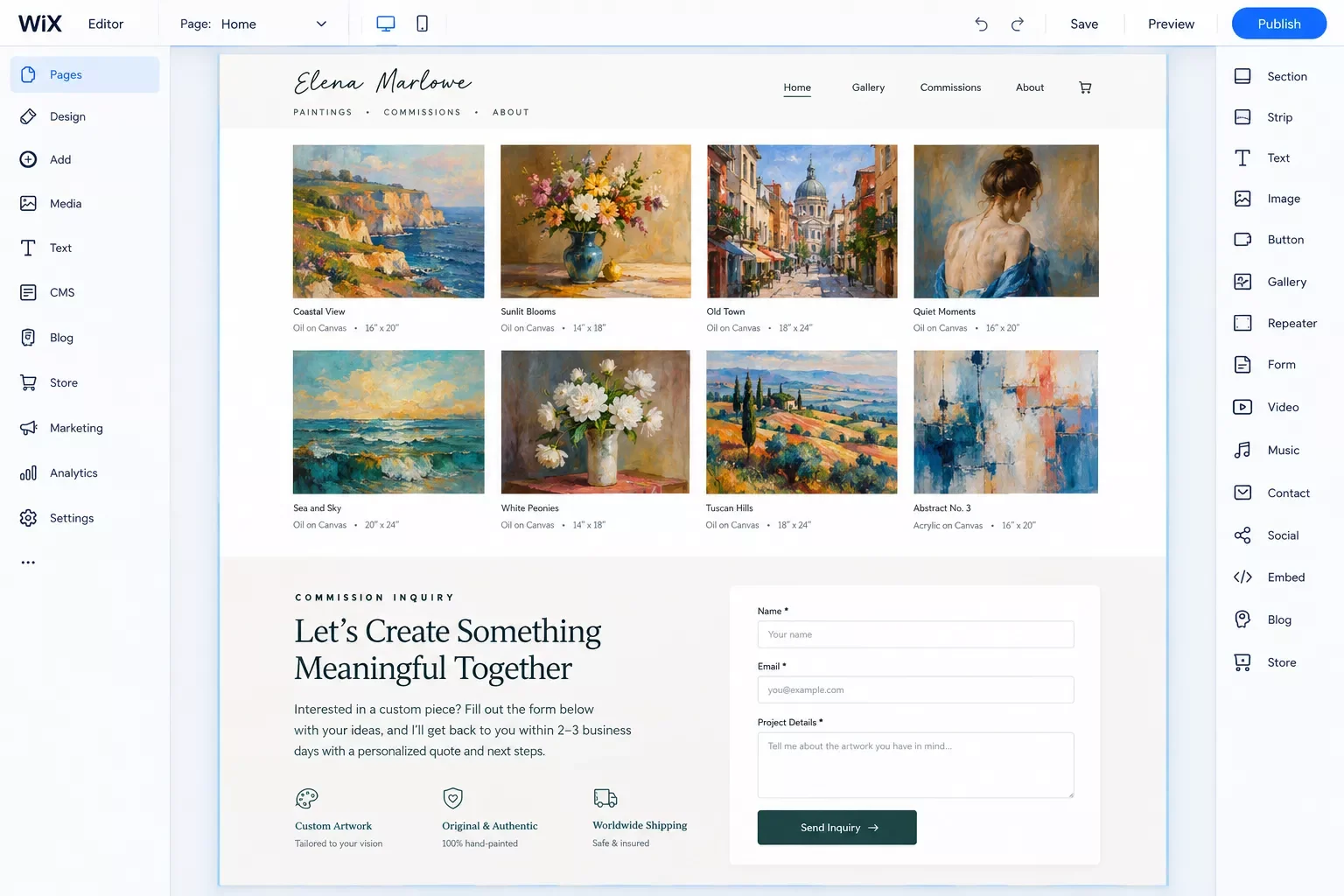
Automation closes the gap. Make.com is a visual automation platform where you connect apps into a "scenario," a chain of steps called modules. New users get a free Make account to start building scenarios. Make also has an official Wix app with a form-submission trigger, but Make's documentation says it needs a paid Wix account and a technical connection setup. There's a simpler route that this guide uses: Wix can send each submission straight to Make through a webhook.
Here's what the finished system does in plain terms. A visitor submits your commission form, a confirmation email goes out automatically, and a new row lands in your tracker so every lead sits in one place. The rest of this guide gets you there, starting with choosing a builder.
Best Website Builder for Artists: 5 Options Compared
The best website builder for artists depends on how you sell. Squarespace suits visual portfolios, Wix gives the most layout freedom, Shopify fits high-volume art sales, Pixpa is built around creative portfolios, and Hostinger is a low-cost starter. Pick by selling model first, then check how each one handles inquiry forms.
- Squarespace: Reviewers keep putting it on top for visual polish. Website Builder Expert and Creative Bloq both name it their overall pick, and Website Builder Expert points to its Acuity Scheduling add-on (an extra monthly cost) for selling creative services. It also flags that the editor has no autosave. For automation, Make lists a verified Squarespace app, but it requires an account with commerce features and centers on orders and products. Catching plain contact-form leads may need a workaround, so check that before you commit.
- Wix: Website Builder Expert labels it best for commission-based artists. Two trade-offs from reviewers: you can't switch templates once your site is live, and the free plan shows Wix ads and can't use a custom domain. Make has an official Wix app, but it needs a paid Wix account and a technical connection setup, so this guide sends form data through a webhook instead.
- Shopify: Built for selling. Website Builder Expert rates it best for artisanal crafts, with Instagram and Etsy integrations and strong multichannel tools. It's more store than portfolio, and that same testing found the section-based editor limiting for design. If selling prints is your main goal, see our walkthrough on building an online shop.
- Pixpa: Tooltester describes it as a builder that specializes in artist sites, with client galleries, image compression controls, IPTC data support for photo metadata, and an online store.
- Hostinger: Website Builder Expert's speed tests ranked it the fastest-loading builder it tested, which helps when you upload lots of high-resolution images. The trade-off is no app market, so you're limited to its built-in tools. If you want to connect outside apps, confirm how before you buy.
Reviewers don't agree on one winner. Website Builder Expert bases its picks on 300+ hours of research and a weighted score across design, functionality, ease of use, pricing, support, and reputation, and it picks Squarespace. Creative Bloq does too, while Cybernews picks Wix. If you want a deep, design-first comparison, that methodology is worth reading. For platforms beyond artist-specific ones, see our full guide to the best no-code website builders. For a general-purpose comparison, see our guide to website builders for small businesses. If you serve another niche, we've also compared builders for real estate agents and builders for restaurants.
This guide walks through Wix for one practical reason: Wix's own automation tools handle the confirmation email, and they can send each submission to Make through a webhook. That isn't a claim that Wix is the best-looking choice. While writing this, I only verified Make's app support for Wix and Squarespace. For Shopify, Pixpa, or Hostinger, search Make's app directory before you commit, and confirm current plan details on each provider's own site, since they change often.
3 Major Business Benefits of Automating Artist Inquiries
Automating artist inquiries gives you three things: every visitor gets an acknowledgment, every lead lands in one tracker, and you skip the developer bill. Each one protects the same thing, the commission you were about to lose to silence.
- Nobody is left guessing. Picture a collector who fills out your form for a $400 pet portrait on a Sunday night. With no reply, they wonder whether it worked, and they might message the next artist on their list. A good acknowledgment also says what happens next, like when you'll reply and what details you need. If you want more than one message, our guide to email automation triggers covers follow-ups that fire on form events.
- Every lead lands in one place. Wix emails the site owner by default when a form is submitted, but those emails pile up next to everything else in your inbox. Make can add each submission as a row in Google Sheets, where you can sort by date and see status at a glance. Make's Google Sheets modules handle adding and managing rows, so nothing gets copied by hand. The same idea works for landing pages that send leads to a CRM.
- You skip the developer. Wix Automations and Make are both visual tools, so there's no code to write. There's still a one-time technical setup, since you paste one webhook link from Make into a Wix automation, and the setup section below walks through it step by step.
None of this replaces you answering the lead. It just gets the first response out fast and keeps a clean record while you're busy making art.
Artist Website Inquiry Automation: What Happens After Someone Hits Submit
Artist website inquiry automation means that the moment someone submits your form, a chain runs without you: the visitor gets a confirmation, the request is logged in a tracker, and you see the lead in one place. On Wix, part of that chain is built in, and Make.com fills in the rest.
Start with what Wix already does. By default, Wix emails the site owner whenever someone submits a form, and you can edit who gets notified, the subject line, and the message. Wix Automations can also send an automatic reply to the visitor, as long as your form has an email field. In the recipient settings, choose the option that sends to the email address from the form. Pick the wrong recipient and the thank-you email lands in your inbox instead of theirs.
So why add Make.com? If all you need is a confirmation email, Wix can handle it and you can stop there. Make earns its place when you want a running tracker outside Wix, different handling for different form types, or a chain that reaches into other apps. That's my take, and it's why the setup below keeps the Wix side as simple as possible.
Two things happen once a visitor submits your form, and neither waits on the other. Wix sends the confirmation email itself, straight from the automation in Step 1 below. At the same time, a separate Wix automation sends a webhook to Make.com, which adds a new row to your Google Sheet. You open the sheet on your own schedule, see the lead with its details, and reply. Website Builder Expert's roundup, the top result I read closely, compares templates, pricing, and sales tools, but it doesn't cover what happens after a form is submitted. That gap is the whole point of this section.
⚠ Watch Out For: Two senders means two emails. If Wix already sends an automatic reply, don't add a second confirmation in Make, or every visitor gets a duplicate. Choose one sender and turn the other off.
How to Set Up Inquiry Automation with Wix and Make.com
To set up artist website inquiry automation, build a Wix form with an email field, turn on a Wix automation that replies to each visitor, then send every submission to a Make.com webhook that adds a row to Google Sheets. Expect about two hours, most of it spent on the webhook step.
⚠ Watch Out For: Wix's help page for its HTTP request action says it's meant for advanced users who already know webhooks. The steps below are short, but expect to test more than once. Make's official Wix app is a separate route. It needs a paid Wix account and a more technical connection setup, and Make's documentation (updated September 18, 2026) says new connections through its legacy method can't currently be created. That's why this guide uses a webhook instead.
What You Need Before You Start
- A Wix site with a form that includes an email field. Wix says automated emails only work when the form has one.
- A Make account. New users get a free one.
- A Google account and a blank Google Sheet. Make's Google Sheets modules require a Google account.
Wix's help page for the HTTP request action doesn't mention a plan requirement, but plans and features change. Confirm the action shows up in your own Automations dashboard before you spend time on the rest.
Build Separate Forms for Commissions, Gallery Submissions, and Press
Don't send every request through one catch-all form. A commission buyer needs different questions than a gallery curator or a reporter, and each deserves a different reply. In Wix Automations, a trigger can point at any form or at specific forms, so one form per inquiry type lets each one get its own confirmation message.
For a commission form, ask for name, email, project type, size or medium, deadline, budget range, and a short description. Keep it under eight fields, since long forms tend to scare people off. That's a rule of thumb, not a study. Start with the commission form only, and add the others once the first one works.
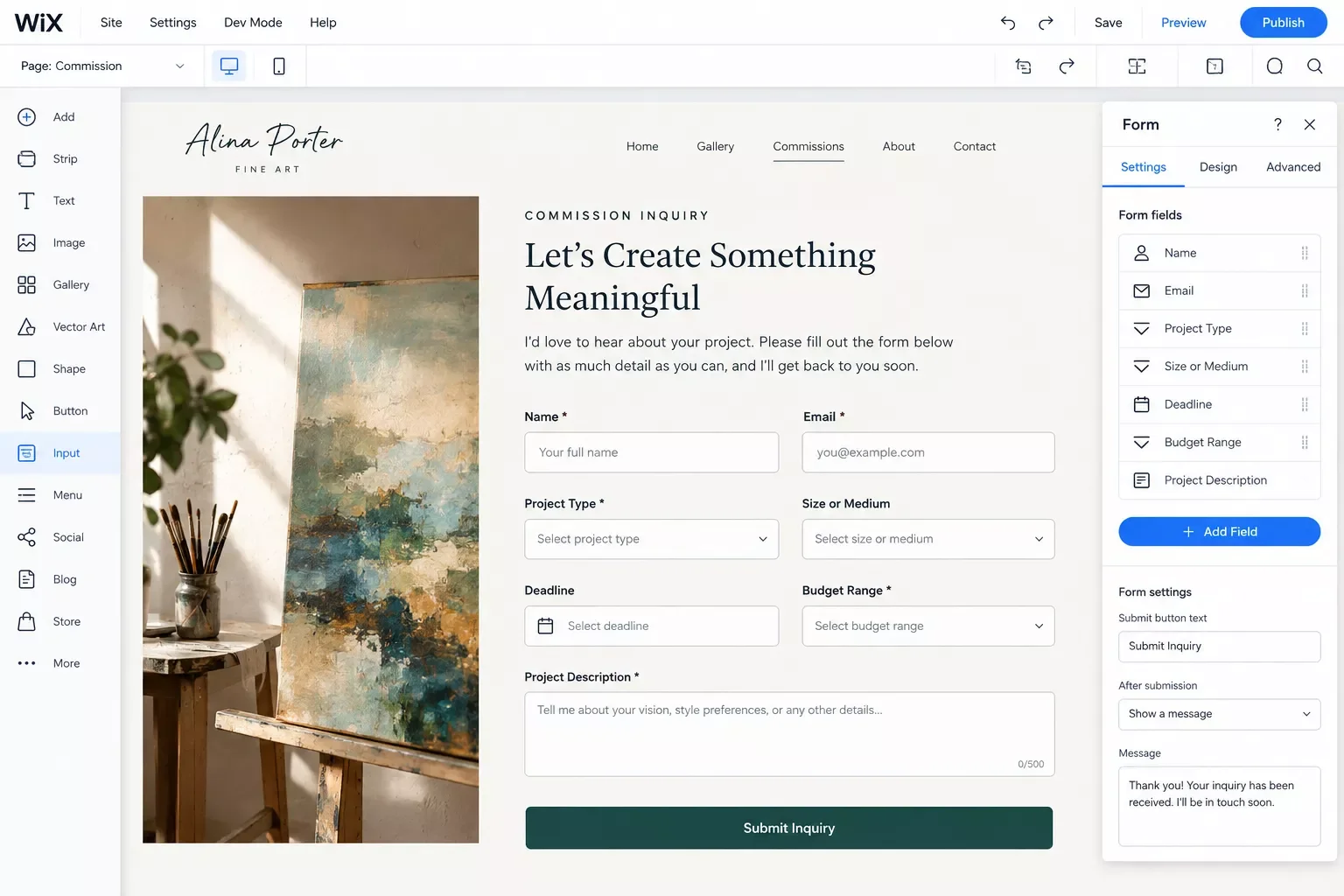
Step 1: Set Up the Wix Confirmation Email
- In your Wix dashboard, open Automations and click + Create Automation.
- Click Start from Scratch and name the automation, like "Commission form reply."
- Choose Wix Forms as the trigger, then Form submitted, then select your commission form. Wix shows two trigger icons: blue for new Wix Forms and red for old ones. Pick the one that matches your form.
- Click + to add a step, choose Action, and pick Send an email.
- Under recipients, select the option that sends to the email address from the form. If you pick a collaborator or the site owner instead, the thank-you email lands in your inbox, not theirs.
- Write your message. Thank them, say when you'll reply, and list the details you need next. The prompt at the end of this guide can draft it for you.
Step 2: Create the Webhook in Make
- In Make, click Create a new scenario.
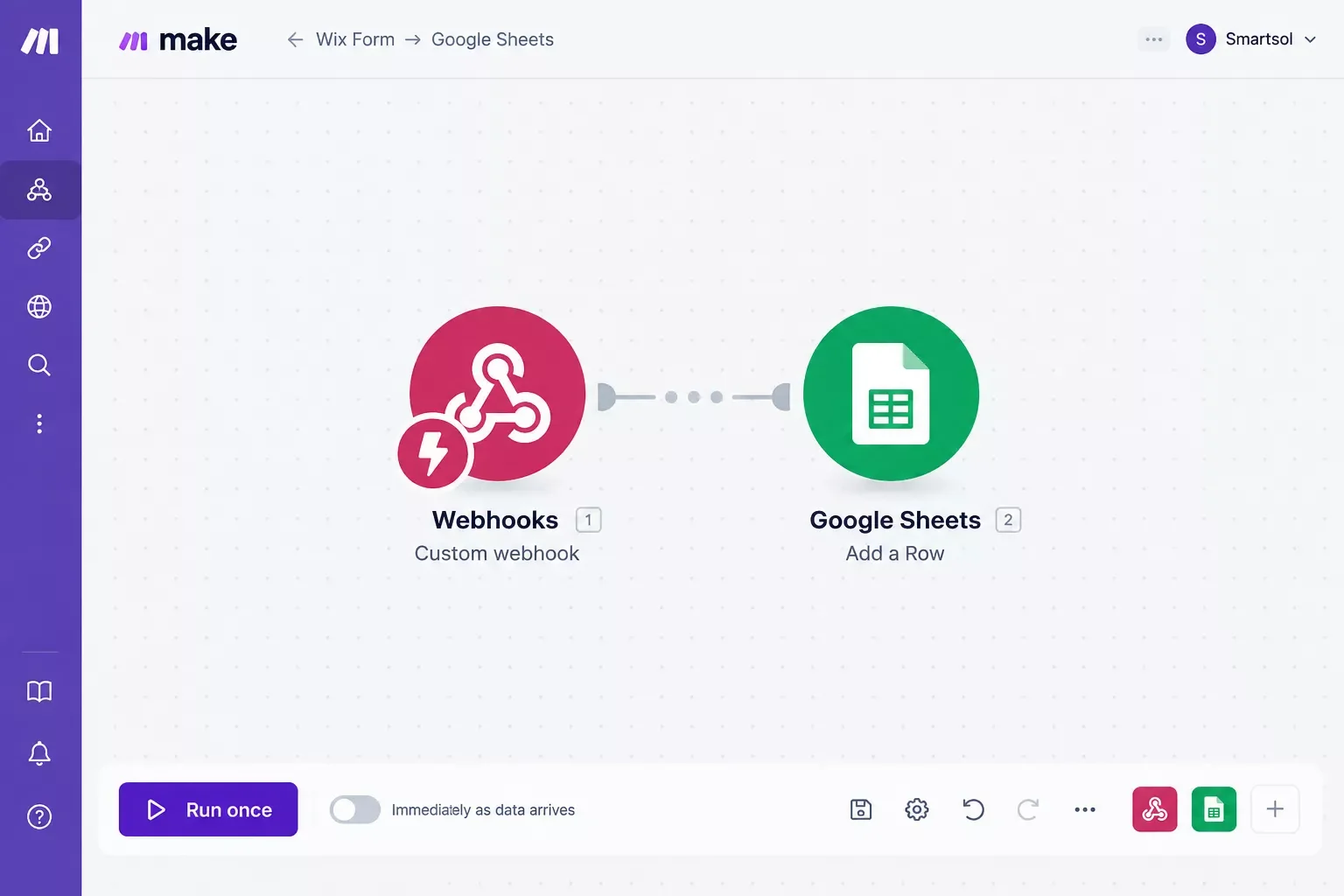
- Add the Webhooks app and choose the Custom webhook module.
- Click Add, name the webhook (for example, "Artist inquiry form"), and click Save.
- Make generates a URL and starts listening for requests. Click Copy address to clipboard. Treat that URL like a password, since anyone who has it can send data into your scenario.
Step 3: Send the Form Data from Wix to Make
- Back in your Wix automation, click + to add another step, choose Action, then Send HTTP request.
- Set the method to POST and paste your Make webhook URL into the Webhook URL field.
- For the body, choose Entire payload, which sends every form field. Click Preview Structure to see exactly what will go out.
- Save and activate the automation. If it's switched off, Wix won't send anything.
- In Make, click Run once so the scenario listens. Then submit a test entry on your live form. Make receives the request and works out the data structure, so you can map the fields in the next step.
Step 4: Add the Row in Google Sheets
- In Make, add the Google Sheets module that adds a row (Add a Row). Click Create a connection and sign in with your Google account.
- Pick your spreadsheet and sheet. Set up the column headers first: Name, Email, Inquiry Type, Budget, Deadline, Message, and Status.
- Map each column to the matching data item from the webhook. Type "New" into the Status column, and type the inquiry type by hand (Commission, in this first scenario).
- Click OK and save the scenario. Each scenario needs its own webhook, so repeat Steps 2 through 4 for any other form you add later.
Step 5: Test It End to End
Switch the scenario on in Make, then submit one more test entry on your live site. Check three things. The confirmation email should arrive in the inbox you typed into the form. A new row should appear in your sheet. And you should get Wix's default notification, since Wix emails the site owner on every submission. Delete your test rows before real inquiries start coming in. If a row never shows up or the form stops sending leads, our troubleshooting guide for online forms covers the common fixes.
Rather Have This Built for You?
If your week is better spent on commissions than webhooks, we can set up this inquiry system on your site, or build something fully custom.
Let's TalkReal-Life Use Case: A Commission Artist's Week
For example: a portrait illustrator takes commissions through her Wix site. Before automation, inquiries arrive as plain emails mixed in with everything else. She replies in batches on Friday, and a few visitors submit the form twice because they can't tell whether the first one went through.
After setup, each submission triggers a reply that states her turnaround time and lists the details she needs. The same submission adds a row to her Google Sheet with the status "New." On Monday she filters the sheet by status, replies to the new leads first, and changes each one to "Quoted" or "Declined" as she goes. Nothing sits unseen in an inbox.
This is an illustrative scenario, not a customer case study, but it shows the shape of the system. The tools stay the same whether you paint portraits, sell prints, or take wedding-invitation commissions. For a wider look at portfolio sites that turn visitors into leads, see our guide on portfolio sites that turn visitors into leads.
How to Get Started
Open your Wix dashboard, go to Automations, and check whether your current inquiry form sends any reply at all. If it doesn't, build the confirmation email from Step 1 first. It's the quickest win in this guide, and it works on its own before you touch Make. Add the tracker when you're ready.
Here's a ready-to-use prompt for drafting that confirmation email:
You are helping a working artist write the automatic confirmation email that goes out when someone submits a commission inquiry form on their website.

Write the email in first person, warm and direct, under 120 words, in American English.

Include:
- A thank-you that uses the placeholder [First Name]
- My typical reply time: [X business days]
- The details I'll need next: [size, medium, deadline, budget]
- One sentence saying I'll reply from [my email address]

Do not promise pricing, availability, or a delivery date.

About me: I'm a [painter / illustrator / ceramic artist] who works in [style or medium].
People Also Ask
What happens after someone submits a contact form on my website?
By default, Wix emails the site owner. If the form has an email field, a Wix automation can also send the visitor an automatic reply, and another can show the submission in your Wix Inbox. For a running lead list you control, add a tracker, such as a Google Sheet.
Should artists use separate forms for commissions, gallery submissions, and press inquiries?
Yes, in most cases. Each type needs different questions and a different reply. Wix Automations can target specific forms, so a commission form can send its own confirmation while a press form sends another. Start with the commission form, since that's where a lost lead costs you the most.
Is there one best website builder for every kind of artist?
No. Reviewers disagree: Website Builder Expert and Creative Bloq pick Squarespace overall, while Cybernews picks Wix. A better question is how you sell. Commissions, prints, originals, and digital downloads each favor different features, so match the builder to your selling model first, then test a free trial.
Can I build an artist website for free?
Yes, but with limits. Wix has a free plan, though Tooltester notes it shows Wix ads, can't use a custom domain, and isn't set up for selling. If you want a professional look or plan to sell, expect to upgrade. Plan details change, so check Wix's site.
Which website builder is easiest for a beginner artist?
Squarespace is the usual answer. Website Builder Expert calls it the easiest builder it has tested, and Creative Bloq describes its interface as relatively easy to use. Wix offers more features and layout freedom, which can mean a steeper start. Try a free trial or free plan before you pay.
Can Make.com connect to my Wix form?
Yes, in two ways. Make has an official Wix app with a form-submission trigger, but it needs a paid Wix account and a technical connection setup, and Make's documentation says new connections through its legacy method can't currently be created. The simpler route is a Wix automation that sends each submission to a Make webhook, as shown in Step 3 above.
Do I need to know how to code to automate my inquiry form?
No coding is required, but the setup is technical. Wix and Make are both visual tools. Even so, Wix's help page calls its HTTP request action advanced and says it assumes some webhook experience. Follow the steps above, test each one, and expect to try a couple of times.
Can I use Squarespace instead of Wix for this?
Possibly. Make lists a verified Squarespace app, but it requires an account with commerce features, and its modules center on orders and products. Catching plain contact-form leads may need a workaround. Check Make's current app details before you commit to a builder for this reason alone.
Is Google Sheets the only place I can log inquiries?
No. Make connects to thousands of apps, so the same webhook could feed a free CRM or another tool. I only verified Google Sheets for this guide, so check Make's app directory before swapping in something else. A spreadsheet is the simplest place to start.
The Bottom Line for Artists Who Take Inquiries
Picking the best website builder for artists gets your work in front of people. What happens after they hit submit decides whether that attention turns into commissions. A confirmation email and a simple tracker are small pieces, but they close the gap most artist sites leave open.
If you've read this far, your inbox is probably the weak link, not your portfolio. Here's one tip you can use today: put your real reply time in the confirmation, like "I reply within two business days," and then keep that promise. It builds more trust than a fast reply you can't repeat.
If wiring this up yourself isn't the best use of your week, this is exactly the kind of build I hand off, fully working, for small teams like yours. As a No-Code Architect, I set these systems up so artists and other small business owners can get back to the work they actually get paid for. Tell me what your form and inbox look like today, and I'll point you to the right next step.
⚡ Pro Tip: Test your form from your phone as well as your computer. Many visitors will fill it out on mobile, and that's where a cramped field or a missing confirmation shows up first.
Work With SmartSoloFlow
SmartSoloFlow publishes practical Make.com automation workflows for small business owners, and builds them for clients too. If you want an inquiry system like this set up on your own site, contact SmartSoloFlow and tell us where your leads slip through today.
Found this guide useful? Share it with a fellow freelancer who's still doing things manually. 🚀
Got a question or a workflow roadblock? Drop it in the comments below. Happy to help.
Last Updated: September 21, 2026

// Comments