 SmartSoloFlow

Key Takeaway: The best website builder for a real estate agent isn't just the prettiest one. It's the one that also gets new leads out of your contact form and into your inbox or CRM automatically, without you hiring a developer.
Primary Tool(s): Wix + Make.com
Build Time: ~2-4 Hours
Looking for the best website builder for real estate agents in 2026? Wix is the strongest overall pick for agents who want a professional site without a developer, and it's one of the only builders on our full guide to the best no-code website builders with an official Make.com connection built in. That last part matters more than most comparisons admit. A real estate agent's core pain point isn't building the site. It's what happens after someone fills out the contact form. This guide ranks seven builders on templates, IDX support, and ease of use, then shows the one step most agents skip: connecting your new site's leads to your CRM, email, or phone automatically, so nothing sits unread in a form inbox for three days.
If your business isn't real-estate-specific, our broader roundup of website builders for small business owners covers the same ground for a general audience.
- 1. Wix: The Best All-Around Pick (and the Only One With Native Make.com Support)
- 2. Placester: Built Specifically for Real Estate, at a Lower Entry Price
- 3. AgentFire: Best for Custom Branding, If You're Willing to Assemble the Rest
- 4. Real Geeks: Best for Agents Who Want Ads, Site, and CRM in One Package
- 5. Squarespace: The Best-Looking Option, With One Real Gap
- 6. Sierra Interactive: Best All-in-One Platform for Growing Teams
- 7. Luxury Presence: Best for High-End Branding and Native IDX Depth
- Real Estate Website Lead Automation: Why Most Builders Leave This to You
- How to Auto-Route Leads From Your New Website (No Developer Needed)
- Already Have a CRM? Don't Get Locked Into a Bundled One
- How to Get Started
- Conclusion
1. Wix: The Best All-Around Pick (and the Only One With Native Make.com Support)
If you want one website builder that handles real estate templates, an AI-assisted setup, and a genuine path to lead automation, Wix is the one to start with. Its real estate templates cover listing pages, agent bios, and neighborhood pages out of the box, and Wix's own AI tools can generate a full site from a short description of your brokerage and target market.
Here's the detail most "best real estate website builder" roundups leave out. Wix has an official, Make-maintained integration listed directly on Wix's official Make.com integration page, not a third-party workaround. That means a lead form on your Wix site can trigger a Make.com scenario the moment someone submits it, no custom code required. One catch worth knowing upfront: connecting Wix to Make.com requires a paid Wix plan, not the free tier, so budget for that if lead automation is the whole point of building the site.
For a solo agent or a two-person team, Wix is the pick that lets you launch fast and still have a real automation path once you're ready for it.
2. Placester: Built Specifically for Real Estate, at a Lower Entry Price
Placester is one of the few builders on this list designed around real estate from the ground up rather than adapted to it. Plans start around $59 to $79 a month plus a separate IDX fee, and every template already includes an MLS-connected property search, not a bolted-on plugin.
The tradeoff is flexibility. Placester's templates look polished, but you're working inside a real-estate-specific system, so customization outside that box is more limited than a general builder like Wix. Placester also offers a paid concierge setup service for agents who'd rather not touch the editor at all, which tells you something about who this platform is really built for: agents who want the real estate features handled, not agents who want to fine-tune the design.
Placester includes basic CRM and lead capture natively, but it's worth checking whether that CRM is the one you actually want to run your business on before you commit, since switching CRMs later is far more disruptive than switching website builders.
Pricing above was verified at the time of writing. Since pricing changes frequently, please confirm current rates and plan details directly on each provider's official website before making a decision.
3. AgentFire: Best for Custom Branding, If You're Willing to Assemble the Rest
AgentFire is a WordPress-based builder built around hyperlocal SEO and neighborhood-specific landing pages, and it's a strong pick for agents who want a website that looks genuinely custom rather than templated. Pricing starts around $149 to $165 a month for the Pro plan, plus a setup fee that typically runs $700 to $800 depending on the design tier.
Here's the part worth knowing before you sign up. AgentFire's core plan does not include a full native CRM. It ships with basic lead capture and a Lead Manager, but most agents end up connecting a separate CRM for real follow-up workflows. Marketing extras like automated newsletters or Google Business Profile optimization are sold as separate add-ons, which is common in this space but can add up fast if you assume they're included.
AgentFire earns real credit for support and design quality. It's just not a true all-in-one platform, so budget for the fact that lead automation here means connecting outside tools, not flipping a switch inside the builder.
Pricing above was verified at the time of writing. Since pricing changes frequently, please confirm current rates and plan details directly on each provider's official website before making a decision.
4. Real Geeks: Best for Agents Who Want Ads, Site, and CRM in One Package
Real Geeks bundles a lead-generation website, a built-in CRM, and Facebook/Google ad management into a single system. Two independent sources put current pricing at roughly $399 a month plus a $250 setup fee. The standout feature is how tightly the pieces connect: a lead clicks your ad, lands on your IDX site, registers, and flows straight into the CRM for automated follow-up without any manual export.
That tight integration is also the tradeoff. You're buying into Real Geeks' own CRM and ad-management ecosystem, so if you already run a CRM you like, you'll either replace it or end up paying for two systems that don't talk to each other natively.
For a small team that wants ads, website, and CRM handled by one vendor with minimal setup, Real Geeks is a genuinely strong fit. For a solo agent who already has a CRM they're happy with, it's worth pausing before you commit.
Pricing above was verified at the time of writing. Since pricing changes frequently, please confirm current rates and plan details directly on each provider's official website before making a decision.
5. Squarespace: The Best-Looking Option, With One Real Gap
Squarespace isn't built for real estate specifically, but it's one of the most polished general-purpose builders available, and plenty of agents use it successfully for personal branding and listing showcases. Templates are clean, mobile responsive out of the box, and easy to edit without any code.
The gap: Squarespace has no native IDX or MLS integration. If you want live listing search on your site, you'll need a third-party plugin or embed, typically from a provider like iHomefinder or Realtyna, which adds a separate monthly cost on top of your Squarespace plan.
If your priority is a beautiful personal-brand site and you're comfortable handling listing search through a bolt-on tool, Squarespace is worth serious consideration. If IDX is non-negotiable from day one, a real-estate-specific builder like Placester or Real Geeks will get you there with less assembly.
6. Sierra Interactive: Best All-in-One Platform for Growing Teams
Sierra Interactive bundles a real estate website, IDX search, and a genuinely deep CRM into one premium platform. Pricing runs from $299.95 a month on the Starter tier up to $724.95 a month for the Growth tier on month-to-month billing, with a $500 setup fee that's waived if you commit annually. The CRM handles contact management, lead routing, and email/text automation natively, and it connects to close to 100 third-party tools.
That depth comes at a price point built for teams, not solo agents on a tight budget. Multiple independent reviews note the same thing: Sierra is priced and positioned for growing or high-volume teams, and solo agents often find the monthly cost hard to justify against a smaller lead volume.
If you're past the solo-agent stage and running a small team that needs website, IDX, and CRM to genuinely work together out of the box, Sierra Interactive is one of the strongest all-in-one options on the market right now.
Pricing above was verified at the time of writing. Since pricing changes frequently, please confirm current rates and plan details directly on each provider's official website before making a decision.
7. Luxury Presence: Best for High-End Branding and Native IDX Depth
Luxury Presence takes a white-glove approach. Every site starts with a one-on-one design consultation built around your brand and your market, and pricing starts around $500 a month. What sets it apart technically is native IDX connecting to more than 400 MLSs, with listing data refreshed roughly every three minutes, faster than most competitors on this list.
The tradeoff is straightforward: you're paying premium prices for premium design and a genuinely deep IDX feed. If your budget is tight or your priority is speed to launch over brand polish, this isn't the pick. If you're an established agent whose brand is part of your competitive edge, the design quality here is hard to match.
Pricing above was verified at the time of writing. Since pricing changes frequently, please confirm current rates and plan details directly on each provider's official website before making a decision.
Across all seven builders, one theme keeps repeating. Every single one, even the all-in-one platforms, treats "capture the lead" as the finish line. What happens the moment after someone hits submit is where things get interesting, and it's where SmartSoloFlow's own experience building no-code automation for small businesses actually comes in.
Real Estate Website Lead Automation: Why Most Builders Leave This to You
Most real estate website builders stop the moment your contact form submits successfully. None of the seven platforms above route that lead anywhere automatically unless you're paying for their bundled CRM, and even then, it usually only talks to itself. Real estate website lead automation means the form submission itself triggers the next step, a CRM entry, a text alert, an email to your assistant, without you checking an inbox first.
That gap matters more than it looks. Research from the MIT/InsideSales.com Lead Response Management study, led by Dr. James Oldroyd, found that leads contacted within five minutes are roughly 21 times more likely to convert into a qualified opportunity than leads contacted after 30 minutes. A real estate lead sitting unread in a form inbox for even an hour is already a colder lead than it was ten minutes ago.
Here's the part every comparison list above skips: you don't need Real Geeks' bundled CRM or Sierra Interactive's $500-a-month platform just to close that gap. A simple no-code automation, built once, does the same job for a fraction of the cost.
How to Auto-Route Leads From Your New Website (No Developer Needed)
The fastest way to close the automation gap on a builder like Wix is a single Make.com scenario that watches your site's contact form and pushes every new submission wherever you actually work.
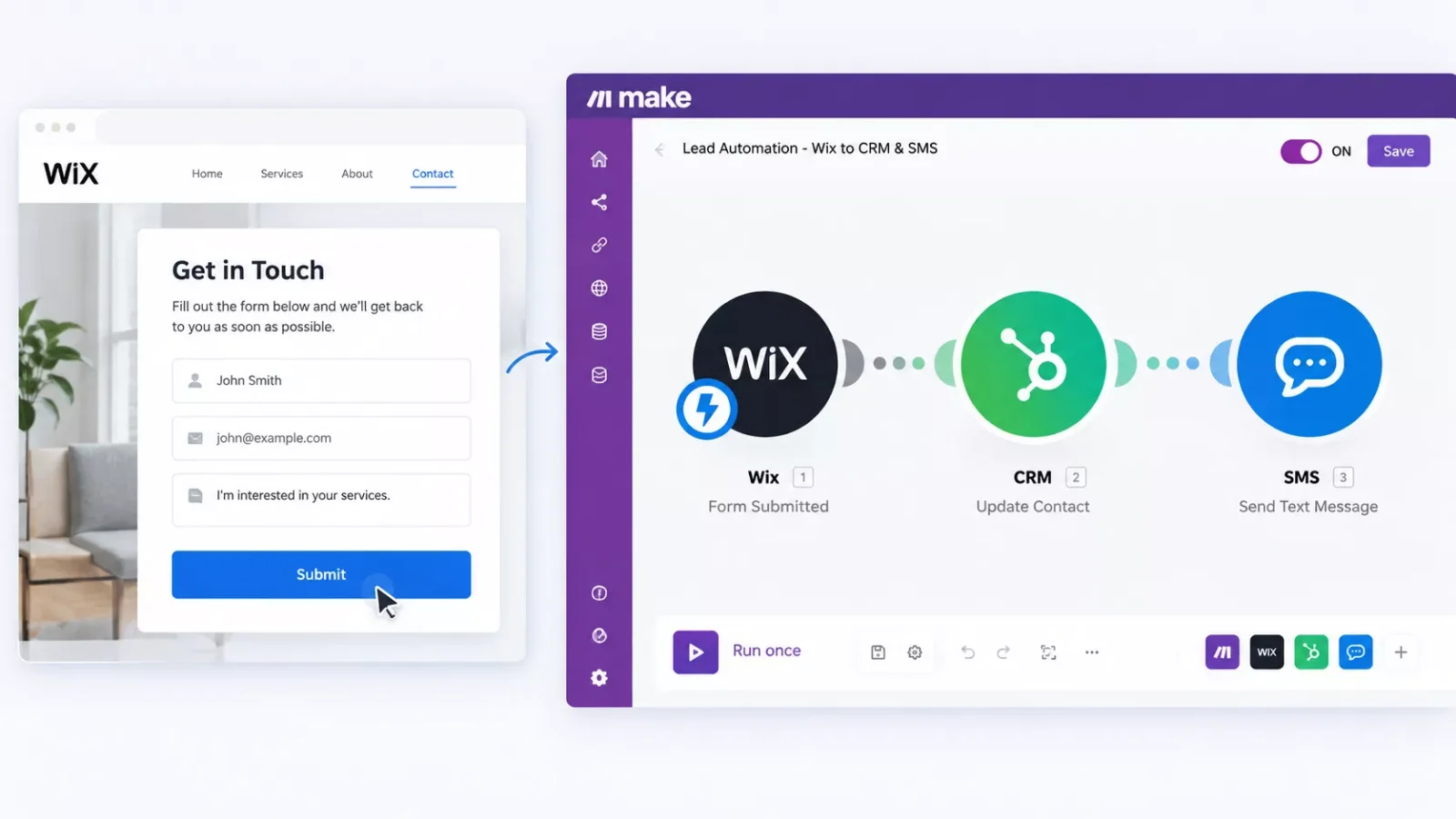
Here's the logic in three steps:
A few practical notes before you build this. Wix's Make.com connection is an official, Make-maintained integration listed on Make.com's own app directory, not a workaround, so the "Form Submitted" trigger is genuinely reliable. The one catch: you'll need a paid Wix plan to unlock the Make.com connection, the free tier doesn't include it. Once connected, that same scenario can update almost any CRM, set up email automation that triggers itself through Gmail or Outlook, or fire off a text through a messaging module, all from that one trigger.
Budget half an hour to set this up the first time. After that, it runs on its own every time a lead comes in, at any hour, whether you're showing a house or asleep. If you want to go further, plenty of AI automation tools that pair with Make.com can extend this same setup, from AI lead scoring to automated follow-up drafting.
Also worth connecting the same way: connecting your business workflow software to this exact scenario, so leads don't just land in a CRM, they trigger your actual follow-up process too.
Already Have a CRM? Don't Get Locked Into a Bundled One
A pattern shows up across several builders on this list. Real Geeks, Sierra Interactive, and Placester all push you toward their own bundled CRM as part of the package. That's a real convenience if you're starting from zero, but it becomes a real cost if you already use a CRM your team knows and trusts.
This is where a webhook-based automation actually wins over a bundled system. A Make.com scenario doesn't care which CRM you use. The same "lead submitted" trigger can update Follow Up Boss, HubSpot, a Google Sheet, or a dozen other tools, or even feed a chatbot that routes leads automatically for after-hours inquiries. Switching website builders never means switching CRMs too, and one of the more thorough breakdowns of no-code website automation you'll find, from SmartSoloFlow, is built entirely around keeping those two decisions separate.
How to Get Started
Pick one of the seven builders above based on your budget and how much of the CRM/lead-gen bundle you actually want included. If you're not sure, Wix is the easiest starting point precisely because it doesn't lock you into anyone's bundled CRM and still gives you a real, official path to automation the moment you're ready for it.
Once your site is live, set up the Wix-to-Make.com connection before you start driving traffic to it, not after. It takes about thirty minutes, and every lead that comes in afterward gets routed automatically from day one instead of sitting in a form inbox you forget to check on a busy showing day. The same automation habit pairs well with appointment booking software for solopreneurs, so showings get scheduled just as automatically as leads get captured.

⚠ Watch Out For: Several builders on this list, especially Placester, AgentFire, and Real Geeks, charge a separate setup or IDX fee on top of the advertised monthly price. Always ask for the total first-year cost before signing, not just the sticker price.
Building the site is the easy part. Turning that site into something that actually works for you while you're out showing homes, not just sitting in a browser tab, is exactly what a done-for-you automation setup solves.
If setting up that Make.com scenario yourself isn't the best use of your week between showings and closings, this is exactly the kind of build I hand off, fully working, for small teams like yours. Want this set up for your business, or need something custom for your specific CRM? Let's talk.
Skip the Setup, Get the Automation Working
I'll build your Wix-to-CRM lead automation for you, fully tested, so every new lead lands where you actually work, not in a form inbox you forget to check.
Let's TalkPeople Also Ask
Can real estate agents build their own website without coding?
Yes. Builders like Wix, Squarespace, and Placester use drag-and-drop editors and pre-built real estate templates, so no coding knowledge is needed. Most agents can launch a working site with listings, an about page, and a contact form in a few hours.
What features should a real estate agent website builder include?
Look for IDX or MLS listing search, mobile-responsive templates, a lead capture form, and some path to CRM or automation integration. Without that last piece, every lead your site captures still has to be checked and forwarded manually.
Does a real estate website builder support CRM and lead follow-up integrations?
It depends on the platform. Real Geeks and Sierra Interactive bundle their own CRM in. Wix stands out for supporting an official Make.com integration, letting you connect to almost any CRM instead of being locked into one vendor's system.
Do I need a website as a real estate agent?
Yes. Most buyers start their home search online, and a professional website builds credibility, showcases listings, and gives you a place to capture leads that isn't dependent on a third-party portal like Zillow.
Which real estate website builder is best for a solo agent on a tight budget?
Wix is the strongest starting point for a solo agent. It's affordable, doesn't require an IDX contract to get started, and has a real, official automation path via Make.com once you're ready for it.
Do I need IDX integration on day one?
Not always. If you're building your personal brand first, a general builder like Squarespace works fine short-term. If live MLS search is core to your business now, choose a real-estate-specific builder like Placester or Real Geeks instead.
Can I switch website builders later without losing my leads?
Yes, as long as your leads flow into a CRM you control rather than being trapped inside the builder's own bundled system. That's the main reason a webhook-based automation, rather than a platform's built-in CRM, gives you more long-term flexibility.
Is a Make.com automation hard to set up on a real estate website?
No. On a builder with an official integration like Wix, connecting a form submission to a CRM or text alert typically takes under an hour, with no coding involved.
Conclusion
Picking a website builder for your real estate business comes down to two decisions, not one: which platform fits your budget and IDX needs, and what happens the instant a lead submits your contact form. Wix, Placester, AgentFire, Real Geeks, Squarespace, Sierra Interactive, and Luxury Presence each solve the first decision well in their own way. Almost none of them solve the second unless you build it yourself. For the bigger picture on where all this fits, see how no-code automation helps small businesses more broadly, and if you want to round out your stack further, these AI SEO tools that connect to Make.com are worth a look once your lead automation is live.
⚡ Pro Tip: Before you commit to any builder, ask directly whether it has a genuine third-party automation integration, not just its own bundled CRM. That one question determines whether you're locked into one vendor's ecosystem or free to connect any tool you want later.
If you'd rather have this entire setup, the website builder choice, the lead form, and the automated routing to your CRM, handled for you instead of piecing it together on a weekend, that's exactly the kind of build SmartSoloFlow specializes in for small real estate teams. Contact us to talk through what fits your business.
Found this guide useful? Share it with a fellow agent who's still checking their form inbox manually. 🚀
Got a question or a workflow roadblock? Drop it in the comments below, happy to help.
Last Updated: September 18, 2026

// Comments