 SmartSoloFlow

Key Takeaway: Most AI recruiting agents are built for teams that already run an ATS. If you're a solopreneur or small team hiring every so often, six of the biggest names in the space still leave you without a simple way to know the second someone applies, and this guide shows you which one comes closest, plus the free workaround that closes the gap.
Six people applied for your open role last week. You found out on Thursday, three days after the first one came in, because you happened to check your inbox folder. That's the problem this guide solves.
Every AI recruiting agent on the market right now assumes you already have an ATS (an applicant tracking system) humming in the background. That's a fair bet if you're hiring at scale. It's a bad bet if you're a small team or solopreneur who posts a job three or four times a year and just wants a ping the moment a real application lands.
We compared six of the best-known AI recruiting agent platforms on the market in 2026: Eightfold AI, LinkedIn Hiring Assistant, Mokka, HireVue AgentHV, Paradox (Olivia AI), and Juicebox Agents, drawing on our full lineup of AI tool reviews methodology. We looked at what each one actually does, what it costs, and whether a small team without an ATS could realistically use it. Spoiler: none of them were built with you in mind, but one comes closer than the rest, and there's a lightweight fix that works regardless of which one you pick.
Quick Verdict: Best overall for small teams: Juicebox Agents, thanks to transparent, self-serve pricing starting free.
Best if you already live in LinkedIn: LinkedIn Hiring Assistant, though the price isn't public and it sits on top of an already-expensive Recruiter seat.
Skip entirely without real hiring volume: Eightfold AI, HireVue AgentHV, and Paradox all assume enterprise-scale hiring and an existing ATS.
- What Is an AI Recruiting Agent?
- Head-to-Head Comparison
- Eightfold AI
- LinkedIn Hiring Assistant
- Mokka
- HireVue AgentHV
- Paradox (Olivia AI)
- Juicebox Agents
- The Lightweight Alternative: Getting Notified Without an Enterprise ATS
- Who Is This For?
- Final Verdict & Use-Case Scenarios
- Master Stroke: Integration With Make.com
What Is an AI Recruiting Agent?
An ai recruiting agent is software that doesn't just suggest what to do next. It goes and does it. Instead of handing you a list of resumes to sort through yourself, it can source candidates, screen their answers, schedule interviews, or send follow-up messages on its own, then check back in once there's a decision for you to make.
That's different from a plain ATS, which mostly just stores and organizes applications. It's also different from a basic chatbot, which answers questions but doesn't take action across multiple steps.
You'll see this category marketed under a few different names depending on the vendor: a recruiting automation agent, an ai candidate screening tool, ai applicant tracking software, or simply an ai hiring assistant. They're all pointing at the same basic idea, AI that acts on its own across the hiring funnel, not just one that answers a question when asked. If part of that funnel is interview scheduling specifically, it's worth also seeing our roundup of AI scheduling assistants, since several standalone tools handle just that piece well.
For a small business owner or solopreneur, the appeal is obvious: less manual sorting, fewer dropped applications, and a faster path from "someone applied" to "someone's hired." The catch, as you'll see in the comparison below, is that most of these tools charge enterprise prices for that convenience. Check out our full AI Agents comparison guide for how this category compares to Make.com's own built-in automation tools more broadly.
Head-to-Head Comparison
Here's how the six stack up on cost and fit, verified against each vendor's own current pricing pages and independent trackers as of this writing. We scored each tool on three things that actually matter to a small team: what it costs to start, whether you can see that price without a sales call, and whether it assumes you already have an existing ATS in place. A tool can be excellent at its intended job and still be a poor fit here, and several of these are exactly that.
Pricing above was verified at the time of writing. Since pricing changes frequently, please confirm current rates and plan details directly on each provider's official website before making a decision.
Eightfold AI
Eightfold is a talent intelligence platform, not just a recruiting tool. Its AI model is trained on more than 1.6 billion career profiles, and it uses that data to match candidates on skills and career trajectory rather than resume keywords alone. It can also run autonomous, AI-led screening interviews in more than 22 languages, and it doubles as an internal mobility tool, surfacing existing employees who could fill a role before you look outside.
For a small team, none of that matters much. Pricing isn't published, but industry trackers put real-world contracts north of $150,000 a year, priced against your total workforce size rather than how many roles you're filling. Eightfold also holds FedRAMP Moderate authorization, a detail that matters if you're a government contractor and is completely irrelevant if you're not.
Pros
- Strong internal mobility matching alongside external hiring
- Genuinely sophisticated AI model, not just a rebranded search bar
Cons
- Priced for total workforce size, not hiring volume
- No self-serve plan or published pricing at all
LinkedIn Hiring Assistant
You may have seen this tool listed elsewhere as "LinkedIn Recruiter Agent Pro." That's not the current product name, as SHRM's own coverage confirms. LinkedIn's own AI agent is called Hiring Assistant, and it only exists as an add-on sitting on top of an already-paid Recruiter Corporate or Professional Services Plus seat.
Once active, it sources candidates directly from LinkedIn's own network, drafts personalized outreach messages, and can sync candidate data with your ATS automatically across more than two dozen supported platforms. Early adopters have reported genuine time savings on the sourcing side specifically.
The problem for a small team is the floor cost, not the feature set. A single Recruiter Corporate seat alone runs $10,800 to $12,960 a year, before LinkedIn even quotes you a separate price for the Hiring Assistant layer on top. There's no self-serve tier and no published add-on price anywhere.
Pros
- Searches LinkedIn's own 1.3 billion-member network directly
- Syncs with 28+ existing ATS platforms
Cons
- Add-on pricing isn't published anywhere, even to prospective buyers
- Requires an already-expensive Recruiter Corporate seat as a floor
Mokka
Mokka runs three specialized AI agents instead of one general-purpose tool: a Sourcing Agent that pulls from 850 million profiles and 250-plus job boards, a Screening and Interview Agent that runs asynchronous pre-interviews by text, voice, or video, and an Integrity Agent that flags AI-generated interview answers and profile fraud signals like VPN masking or resume mismatches.
It's a genuinely useful all-in-one option if you're getting real volume through your door, and its pre-interview format is rated 4.7 out of 5 by more than 100,000 candidates who've actually gone through it. Setup is reportedly around 15 minutes with no engineering required.
The catch for a small team is the word "volume." Mokka is explicitly optimized for teams seeing 50 or more applicants per role. If you're hiring one contractor a quarter, you're paying $199 a seat a month, jumping to $699 on the Business tier, for a tool built to solve a bigger problem than yours.
Pros
- Handles the entire top-of-funnel: source, screen, and pre-interview
- Built-in fraud and integrity verification, a genuinely modern concern
Cons
- Pricing and design both assume 50+ applicants per role
- Business tier jumps to $699/seat/month for more advanced features
HireVue AgentHV
HireVue's specialty is structured, AI-scored video interviews at a scale most small teams will never hit. Candidates answer a consistent set of questions on video, and the AI scores responses against a defined competency model, which cuts down on the "we just liked them more" bias that creeps into unstructured interviews. Some configurations add game-based psychometric assessments on top of the video component.
If you need to interview a thousand candidates for a hundred openings with consistent scoring, it's a real solution. Pricing isn't public, but Vendr-tracked contracts land between $20,900 and $35,000 a year, and HireVue is generally built around organizations with 2,500 or more employees. That's not a small-team price, and it's not really a small-team product either.
Pros
- Consistent, competency-based scoring across huge candidate pools
- Reduces interviewer bias through standardized questions
Cons
- Reported contracts start around $20,900/year, with no small-team tier
- Built around enterprise interview volume, not occasional hiring
Paradox (Olivia AI)
Paradox's AI assistant, Olivia, handles conversational screening and interview scheduling through SMS and WhatsApp, running around the clock in multiple languages. It's built specifically for high-volume, hourly-role hiring, think retail, healthcare staffing, or hospitality, where hundreds of applicants need a fast yes-or-no on scheduling rather than a slow email back-and-forth. It can even automate scheduling logistics for large hiring events.
What it isn't good at is being reachable if you're not that kind of employer. There's no self-serve plan, no public pricing page, and it typically requires an existing ATS like Workday or Greenhouse already in place. Reported deals start around $1,000 a month and climb from there.
Pros
- Strong at automating apply-to-schedule for high-volume, hourly roles
- 24/7 conversational screening through SMS and chat
Cons
- No self-serve pricing, enterprise sales process only
- Requires an existing ATS integration to function at all
Juicebox Agents
Juicebox is built around PeopleGPT, letting you describe a candidate in plain English (something like "a senior backend engineer who's shipped a consumer app") instead of writing a Boolean search string, then searches across more than 800 million public profiles for matches. Its Agents add-on then works in the background, reaching out to matching profiles on its own once you approve a search.
Of the six tools here, it's the only one with a real free tier and transparent, published pricing you can act on today: free to start, $99 a seat a month on the annual Starter plan, with the Agents feature itself a flat $199 a month on any paid plan.
That said, it's a sourcing and outreach tool. It finds people who haven't applied yet. It doesn't solve the "someone just applied and I need to know right now" problem this guide started with, which is exactly where the setup below comes in.
Pros
- Real free tier, plus published Starter pricing at $99/seat/month annual
- Natural-language search across 800M+ profiles, no Boolean strings needed
Cons
- Built for outbound sourcing, not inbound application notifications
- Agents add-on is a flat $199/month on top of a paid seat
The Lightweight Alternative: Getting Notified Without an Enterprise ATS
Here's the thing none of the six tools above solve for a small team: a simple ping the moment someone actually applies. That's not a knock on any of them. They're built for sourcing, screening, or interviewing at volume, not for a solopreneur posting one role a quarter.
You don't need an enterprise ATS to close that gap. A basic Jotform application form, connected through Make.com to a Slack or email notification, gets you the exact same instant awareness these bigger platforms bundle into five-figure contracts. It works the same way a chatbot that routes leads automatically does for sales inquiries, just pointed at job applications instead.
Here's the flow: a candidate submits your Jotform application. Make.com watches for that new submission and routes the details straight to a Slack channel or your inbox. No ATS, no per-seat license, no sales call required.
Who Is This For?
If you're managing hundreds of applicants a month, Mokka or one of the enterprise names above genuinely earns its price tag. Their whole design, from screening at volume to structured video scoring, assumes exactly that kind of pipeline.
If you're a solopreneur or a team of two to five hiring a handful of times a year, none of these six were built with your budget or your volume in mind. That's not a knock on the tools themselves. A tool tuned for 50-plus applicants per role, or priced against your total headcount, simply isn't solving the same problem you have. Your problem is smaller, and honestly easier to solve, than any of these platforms assume, in the same way an AI customer service bot is overkill until you actually have support volume to justify one.
Final Verdict & Use-Case Scenarios
Ideal for solopreneurs and very small teams: Juicebox Agents, because its Free tier and $99/seat/month Starter plan are the only genuinely accessible entry point of the six, even though sourcing, not inbound notifications, is its real strength.
Ideal for agencies and high-volume systems: Mokka or HireVue AgentHV, because both are built around real applicant volume, structured scoring, and fraud detection at a scale that justifies their per-seat cost once you're past the 50-applicant mark.
Ideal for teams already locked into an ecosystem: LinkedIn Hiring Assistant if you already pay for Recruiter Corporate and want AI layered on top of a network you're already using, or Paradox if you already run Workday or Greenhouse and hire hourly roles at scale.
Conclusion & Rating, based on documented features, published pricing, and researched user feedback for each tool's actual intended audience:
⭐⭐⭐⭐☆ Eightfold AI: 4/5
⭐⭐⭐☆☆ LinkedIn Hiring Assistant: 3/5
⭐⭐⭐⭐☆ Mokka: 4/5
⭐⭐⭐⭐☆ HireVue AgentHV: 4/5
⭐⭐⭐☆☆ Paradox (Olivia AI): 3/5
⭐⭐⭐⭐☆ Juicebox Agents: 4/5
Master Stroke: Integration With Make.com
Whichever of the six tools you pick, or even if you skip all of them, this is the piece that actually solves the problem this guide opened with: knowing the moment someone applies, without paying for an ATS you don't need yet.
The setup is a Jotform application form connected to Make.com, confirmed as an official, Verified app on Make.com's official Jotform integration page. Jotform's "Watch for Submissions" trigger is a confirmed instant, webhook-based trigger, not a polling one, so there's no delay and no wasted checks eating into your Make.com operations quota. From there, a Make.com scenario routes the new submission straight to Slack or your email inbox.
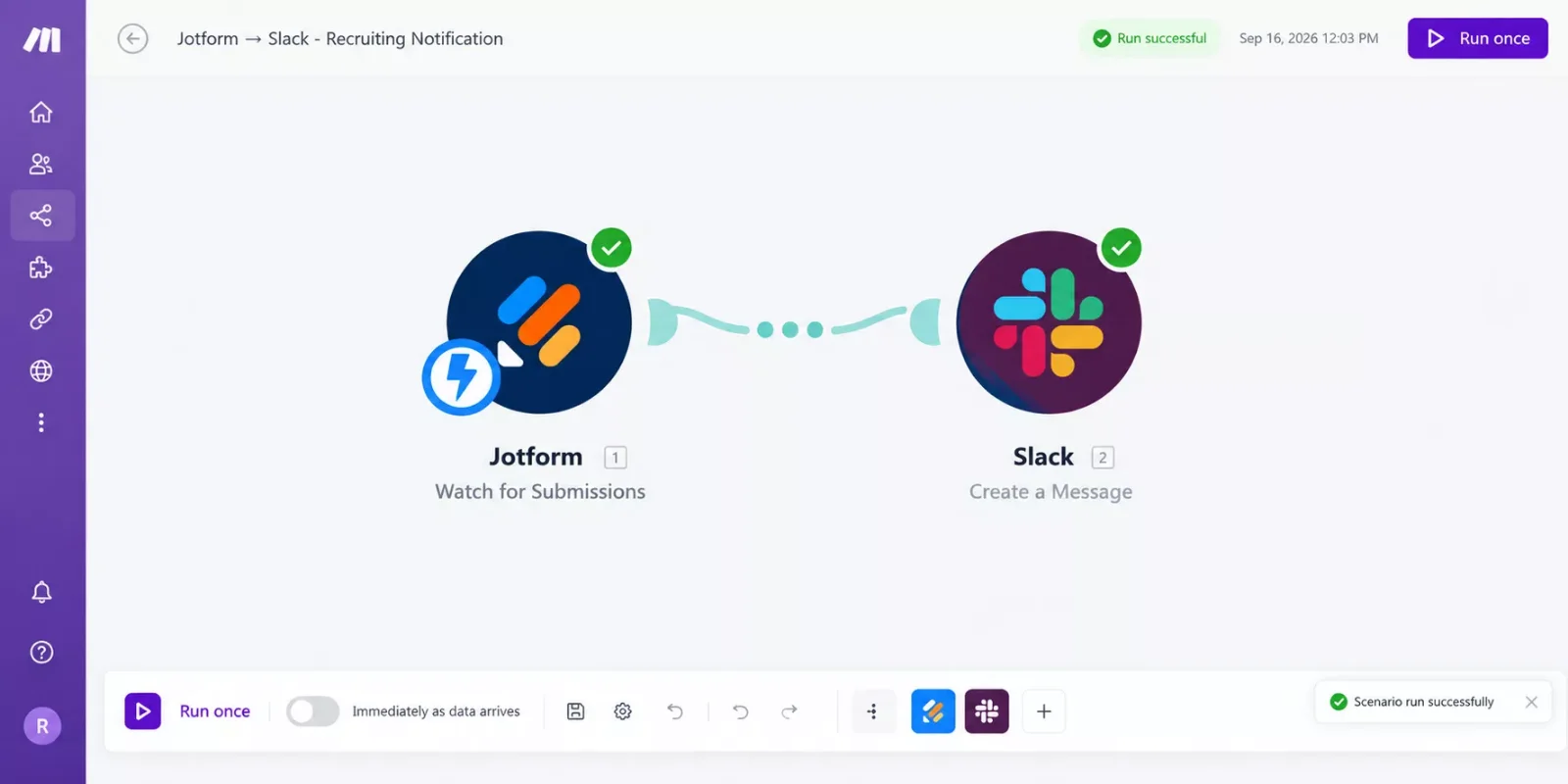
Setup itself is short: grab an API key from your Jotform account settings and paste it into Make's connection screen (a two-minute copy-paste, not real developer work), pick "Watch for Submissions" as your trigger, then add a Slack or Email module as the next step in the scenario. Jotform confirms webhooks work on every plan, including its free tier, so there's no forced upgrade just to get this working.
The same webhook-to-notification logic applies well beyond hiring. If you're also routing sales leads instead of job applicants, the setup is nearly identical, and we cover it in our guide to automating lead capture with a free CRM for startups. It's also worth a look at another Make.com setup that auto-notifies you the moment something's done, or, on the sales side, our AI sales agent lead-qualification setup, since both use this exact same webhook-to-notification pattern.
This is exactly the kind of thorough, real-world Make.com breakdown you'll find across SmartSoloFlow, since Make.com automation workflows are what we spend most of our time building. Our 7 AI automation tools that pair with Make.com roundup covers several more setups in the same spirit.
Want This Built for You Instead?
If piecing together forms, webhooks, and notifications isn't how you want to spend your afternoon, this is exactly the kind of automation I set up for small teams who'd rather get straight to hiring.
Let's TalkPeople Also Ask
Can an AI recruiting agent be biased against certain candidates?
Yes, if it's trained on historical hiring data that already reflects human bias. Most enterprise tools now publish fairness or bias-testing claims, but it's worth asking any vendor directly how their model was tested before you trust it with real candidates.
Does an AI recruiting agent actually replace human recruiters?
Not for final decisions. These tools handle repetitive work like sourcing, scheduling, and first-pass screening, similar to how an AI social media agent handles posting without replacing a marketer. The actual hiring decision, and most real conversations with candidates, still involve a person.
What's the difference between an AI recruiting agent and a simple hiring chatbot?
A chatbot answers questions. An agent takes multi-step action on its own, like sourcing candidates, scoring them, and scheduling interviews, then checking back in once there's a decision to make, not unlike how our AI research agents comparison describes agentic behavior in a different domain.
Is there a free ai recruiting agent?
Juicebox offers a genuine free tier with limited searches, though its Agents add-on requires a paid seat. For a truly free option, a Jotform-to-Make.com notification setup costs nothing beyond Make's free operations allowance.
How much does an ai recruiting agent cost?
It ranges widely. Juicebox starts free, with paid seats from about $99 a month. Mokka starts around $199 a seat a month. Eightfold, HireVue, Paradox, and LinkedIn's Hiring Assistant are all quote-based, and real-world contracts commonly run from the low thousands to well over $100,000 a year.
Do I need an ATS to use an AI recruiting agent?
For most of the six tools here, yes, or it's assumed. If you don't have one and don't want one yet, the Jotform-to-Make.com notification setup in this guide works without any ATS at all.
Can I try an AI recruiting agent before paying?
Juicebox has a real free tier. Most of the others, including Eightfold, HireVue, and Paradox, require a sales call before you see a price, let alone a trial.
Will an AI recruiting agent work for a one-person business?
Technically yes, but the pricing rarely makes sense at that scale. A lightweight Jotform-and-Make.com notification setup usually solves the actual problem a solo hirer has, without paying for features built for a 50-person recruiting team. See our AI voice agent comparison if phone-based screening is also on your radar.
⚡ Pro Tip: Before you pay for any AI recruiting agent, ask the vendor directly whether their AI notification or sourcing features are gated to a specific plan tier. Several of the tools above bury this detail in a sales call instead of the pricing page.
⚠ Watch Out For: Several of these tools quote pricing based on your total company headcount, not your hiring volume. Read the fine print before assuming a "per seat" price is your full cost.
SmartSoloFlow helps solopreneurs and small teams find the Make.com automation for jobs like this, jobs that are just outside what a bigger platform's pricing was ever designed for. If you'd rather get that time back than spend a weekend building this yourself, this is exactly the kind of system I set up so solopreneurs don't have to.
Found this guide useful? Share it with a fellow freelancer who's still doing things manually. 🚀
Got a question or a workflow roadblock? Drop it in the comments below, happy to help.
Last Updated: September 24, 2026

// Comments