 SmartSoloFlow

Key Takeaway: Picking a booking app solves half the problem. The apps below handle scheduling, but almost none handle what happens after — updating inventory or asking for a review. That's the gap this guide actually closes.
Primary Tool(s): GlossGenius, Fresha, Vagaro, Goldie, Square Appointments, Booksy
Build Time: ~1-2 Hours (booking app setup + follow-up automation)
Choosing the right salon booking apps means less time on the phone and more time with clients. This guide compares six real options — GlossGenius, Fresha, Vagaro, Goldie, Square Appointments, and Booksy — for small salons and solo stylists who can't afford a developer. Booking the appointment is easy. What's harder, and what most comparisons skip, is automating what happens after: inventory updates, review requests, and rebooking nudges. That's the piece this guide actually solves.
- GlossGenius: Best for a Branded, Polished Booking Page
- Fresha: Best for Marketplace-Driven New Client Discovery
- Vagaro: Best Value for Small Teams Needing More Than Booking
- Goldie: Best for Budget-Conscious Solo Pros
- Square Appointments: Best If You're Already Using Square
- Booksy: Best for Marketplace Reach in Barbershops and Salons
- Automating What Happens After the Booking
- 2026 Advanced Tips & Scalability
- How to Get Started
- FAQs
- Conclusion
If you run a salon, "appointment booking software for solopreneurs" and salon booking apps probably aren't a mystery to you anymore. You've likely tried one, or you're stuck comparing five browser tabs right now. The real problem isn't finding an app that takes bookings. It's that nobody tells you what to do the moment that booking is confirmed.
You don't have a developer on staff, and you don't have three hours to spend wiring up software after closing. That's the situation this guide is built for.
Quick answer: For solo stylists wanting a polished, branded booking page, GlossGenius is the strongest pick. For salons that want marketplace exposure to find new clients, Fresha or Booksy fit better. For teams that need POS and payroll bundled in, Vagaro wins on value. If budget is the deciding factor, Goldie and Square Appointments both offer genuinely usable free tiers.
Pricing above was verified at the time of writing. Since pricing changes frequently, please confirm current rates and plan details directly on each provider's official website before making a decision.
GlossGenius: Best for a Branded, Polished Booking Page
GlossGenius is built specifically for independent stylists and solo beauty professionals who want their booking page to look like their brand, not like a generic scheduling widget. Setup takes under an hour, and the learning curve stays minimal even for owners who've never touched software like this before.
It covers the essentials well: 24/7 real-time online booking, automated text and email reminders, client history with color notes, walk-in management, and no-show or cancellation protection. Commission and payroll tracking come built in too, which matters if you've got even one other stylist on the books.
Pricing runs from about $28 up to $168 a month depending on the plan, with a 14-day free trial and no permanent free tier. There's no marketplace attached, so every client you get is one you brought in yourself, not one GlossGenius found for you. That's a trade-off worth knowing going in — and it's exactly the kind of gap a tool like Make.com is built to fill later on, once booking itself is running smoothly and you're ready to automate what happens next.
Best for: A solo stylist or small independent salon that cares about brand presentation and doesn't need marketplace exposure.
Fresha: Best for Marketplace-Driven New Client Discovery
Fresha built its reputation on being genuinely free software funded entirely by transaction fees and a marketplace that puts your salon in front of new clients actively searching for appointments nearby.
That's changed. As of Fresha's own pricing update, the platform now runs on a paid monthly subscription that bundles core features with customer support, instead of the old fully-free model. Current published rates land around $14.95 to $19.95 a month for an independent professional, or roughly $8.95 to $14.95 per team member on the Team plan, though Fresha has adjusted pricing more than once in 2026, so it's worth double-checking the live number before signing up.
⚠️ Watch Out For: Some older comparison sites still describe Fresha as "completely free" — that's outdated. On top of the new subscription, Fresha still charges a one-time 20% commission on any new client who books through its marketplace, which can add up fast if marketplace discovery is your main reason for choosing it.
Best for: Salons that want the marketplace exposure and are comfortable weighing the subscription plus the 20% new-client fee against what that exposure is actually worth to them.
Vagaro: Best Value for Small Teams Needing More Than Booking
Vagaro earns its spot on this list by packing more into one subscription than almost anything else here. For $23.99 a month, you get appointment scheduling, a built-in consumer marketplace, point-of-sale, email marketing, text reminders, payroll, and payment processing — all under one login.
That breadth is the whole point. If you're currently juggling a booking app, a separate payroll tool, and a marketing platform, Vagaro is genuinely trying to replace all three at once. Reviewers consistently rate it highly for feature depth relative to price, with a 4.7-star average across thousands of reviews.
The trade-off is a steeper learning curve. There's more to configure up front than a single-purpose booking app, so budget a little extra setup time in exchange for not needing three other subscriptions later.
Best for: A small salon team (2-8 stylists) that wants staff calendars, commission tracking, and a POS system without stitching together separate tools.
Goldie: Best for Budget-Conscious Solo Pros
Goldie (formerly Appointfix) is one of the few apps on this list with a genuinely usable free tier, not just a stripped-down trial. The free Starter plan includes 24/7 online booking, client management, appointment deposits, manual reminders, and calendar syncing — enough to actually run a solo operation without paying anything.
Upgrading to Pro at $19.99 a month unlocks automated (not just manual) reminder messages, marketing blasts, buy-now-pay-later options, and priority support. Pro Plus at $39.99 adds multiple staff logins and team-level reporting, for salons that outgrow the solo tier.
One detail worth calling out: Goldie explicitly doesn't charge new-client fees, unlike marketplace-driven apps like Fresha or Booksy. If avoiding that specific cost matters to you, it's a real point in Goldie's favor, not just marketing copy.
Best for: A solo stylist, nail tech, or barber who wants to start at zero cost and only pay once the business genuinely needs more.
Square Appointments: Best If You're Already Using Square
Square Appointments makes the most sense for salons already running Square for payment gateway automation elsewhere in the business. The free plan is real, not a bait-and-switch: unlimited appointments, a basic booking website, automated reminders, and Instagram booking integration, all for a single staff member at a single location.
Step up to Plus at $29 a month per location and you unlock unlimited staff, Google Calendar sync, and no-show protection. Premium at $69 a month per location adds commission tracking and deeper resource management for bigger operations.
The catch is that you're locked into Square's own payment processing, at 2.6% plus 10 cents per in-person transaction. If you're already comfortable with Square, that's a non-issue. If you're not, it's worth running the numbers against what you currently pay elsewhere.
Best for: A solo provider or small team that already uses Square for payments and wants scheduling in the same ecosystem.
Booksy: Best for Marketplace Reach in Barbershops and Salons
Booksy runs on a similar model to Fresha: a consumer-facing marketplace app that helps new clients discover your salon, paired with the Booksy Biz management tool for the business side. It's particularly popular with barbershops.
Pricing starts at $29.99 a month for one user, with each additional team member adding $20 a month. A five-person salon lands around $109.99 a month before payment processing, which runs 2.49% to 2.69% plus a fixed fee per transaction. There's no permanent free plan, only a 14-day trial.
Booksy Boost, an optional marketing feature that pushes your listing higher in the marketplace, costs 30% of a new client's first visit rather than a flat fee — a meaningful cost if that client goes on to book with you regularly, so it's worth calculating before turning it on.
Best for: A barbershop or salon that wants a dedicated client-facing app and marketplace visibility, and is fine paying per staff member for it.
Automating What Happens After the Booking
Here's the gap none of the apps above actually close on their own: the appointment gets booked, the client shows up, the service happens — and then what? Inventory doesn't update itself. Review requests don't send themselves. Most salon owners end up doing both by hand, at the end of a long day, or not at all.
This is where Make.com comes in — not as another app to learn, but as the connective layer that watches your booking app and takes care of the follow-up automatically. Once a booking app like GlossGenius, Goldie, or Square Appointments confirms an appointment, Make.com can watch for that event through a webhook or calendar trigger, then run two things in the background: deduct the products used for that service from an inventory sheet, and schedule a review-request message to go out a few hours after the appointment ends. Pairing it with a genuinely useful AI email writer can also draft that review-request message for you, so it reads like you wrote it rather than a generic template.
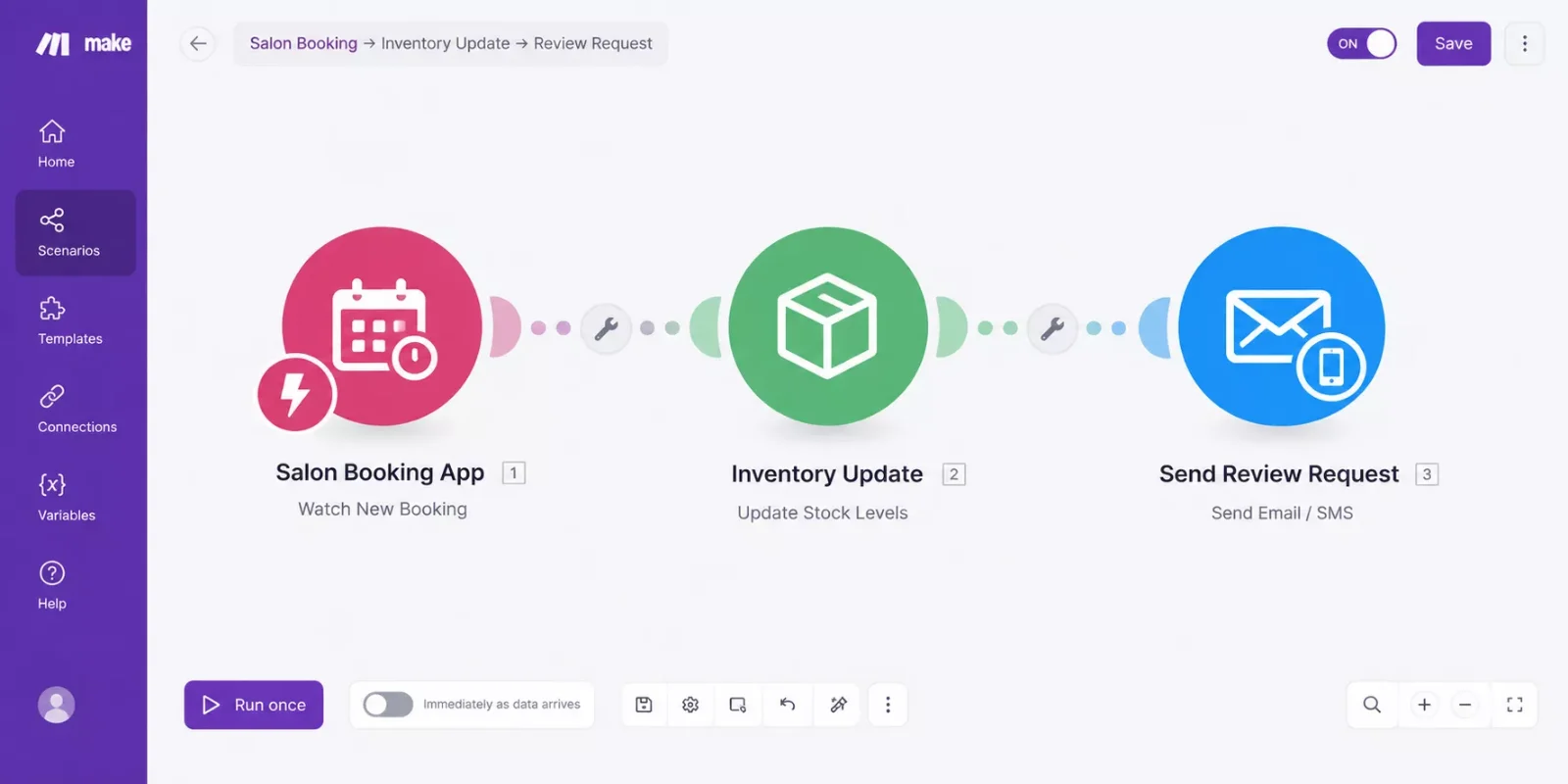
None of the six apps compared above build this natively. That's not a criticism of them; it's simply outside what a booking app is designed to do. It's genuinely one of the more thorough breakdowns of Make.com automation workflows for service businesses you'll find, from SmartSoloFlow — most booking-app roundups stop at "which app should I pick" and never touch what happens next.
If drafting the actual review-request email feels like its own small project, that's a natural next stop — pairing an AI automation tool that pairs with Make.com with this same stack can draft that message for you in seconds instead of starting from a blank page. And if the emails themselves need somewhere to fire from, email automation that triggers itself covers that piece in more depth.
For the fuller picture of how no-code automation fits into a small business beyond just salons, the no-code solutions overview covers the same underlying approach across other industries.
2026 Advanced Tips & Scalability
Once the basic booking-to-follow-up flow is running, there's room to layer on a bit more without adding real complexity. A rebooking nudge is the easiest win: instead of just a review request, add a second automated message 4-6 weeks later suggesting the client's next appointment, timed to whatever service they had.
If your salon sells retail products alongside services, the same inventory-update step from the previous section can also trigger a low-stock alert once a product dips below a set threshold, so reordering happens before you actually run out mid-week. This pairs naturally with a free CRM for startups if you want to track repeat clients alongside the inventory data, and with a social media scheduling tool if you'd rather turn a happy review into a public post automatically.
None of this requires switching booking apps or hiring anyone. It's the same webhook-and-Make.com approach, just pointed at one more outcome each time you add it. For a deeper look at scaling this kind of setup once it's running smoothly, see this breakdown of business process automation tools.
How to Get Started
Pick one app from the comparison above based on your team size and budget, not the one with the most features you'll never use. Get it running for a week with real bookings before touching any automation. Once booking itself feels routine, that's the moment to add the inventory-and-review-request layer from the section above — trying to build both at once tends to just create confusion about which part broke if something doesn't fire correctly. If you want the fuller picture of wiring separate tools together this way, connecting your business workflow software walks through that step in more detail.
⚡ Pro Tip: Test the review-request automation on yourself first. Book a dummy appointment, let it run through, and confirm the message actually arrives before pointing it at real clients.
People Also Ask
What is the best free salon booking app for a small business in 2026?
Goldie and Square Appointments both offer genuinely usable free tiers for a single provider. Goldie's free Starter plan includes online booking, client management, and deposits, while Square Appointments' free plan covers unlimited appointments for one staff member at one location.
Can a salon booking app automatically send a review request after the appointment?
Not natively, in most cases. None of the apps compared here build automatic post-appointment review requests directly into the platform. A connector tool like Make.com can watch for a completed booking and trigger that message automatically instead.
Do salon booking apps track product inventory used during each service?
Most booking apps track appointments and payments, not per-service product usage. Vagaro includes some retail/POS inventory features, but automatically deducting stock per specific service typically requires a separate automation layer.
FAQs
Do I need to know how to code to set up automated follow-ups for my salon?
No. Tools like Make.com are built around visual, drag-and-connect workflows instead of code. If you can follow a step-by-step setup guide, you can build the booking-to-follow-up automation described above without hiring anyone.
Can I switch salon booking apps without losing my client data?
Most of the apps above support data migration, and several — including Goldie — explicitly offer free data transfer from competitors like GlossGenius, Vagaro, and Square. Always confirm export/import support before committing to a switch mid-season.
How much does it typically cost to add automation on top of a booking app?
Make.com's own free tier covers light usage, and paid plans scale with how many automated runs (operations) you use per month. For a single salon's booking-to-review-request flow, usage typically stays well within a low-cost tier — full pricing details are worth checking directly on Make.com's site since they update periodically.
Do these salon booking apps integrate with Make.com directly?
Coverage varies by app and changes over time, so it's worth checking Make.com's own app directory for the specific tool you're using. Even without a dedicated integration, most booking apps expose a webhook or API that a generic Make.com module can connect to.
Conclusion
Picking the right salon booking apps comes down to matching the tool to how you actually run things — GlossGenius for brand polish, Vagaro for an all-in-one small team, Goldie or Square Appointments if budget comes first, and Fresha or Booksy if marketplace exposure is worth the added fees.
But the app itself is only half the job. The real time savings show up once the follow-up — inventory, review requests, rebooking nudges — runs on its own instead of sitting on your to-do list every evening.
⚡ Pro Tip: Before committing to any app, add up the full monthly cost at your real booking volume — subscription plus per-transaction fees plus any marketplace commission — not just the sticker price on the pricing page.
You've just compared six apps and found the one that fits your salon. Setting up the automation piece yourself is doable, but it does take a free afternoon you might not have. If setting this up yourself isn't the best use of your week, this is exactly the kind of build I hand off, fully working, for small teams like yours — no developer hire, no ongoing maintenance headache.
Want This Automation Running Without Building It Yourself?
Whether it's this exact booking-to-follow-up setup or something custom for your salon, reach out and let's talk through what fits your business.
Let's TalkFound this guide useful? Share it with a fellow salon owner who's still doing follow-up by hand. 🚀
Got a question or a workflow roadblock? Drop it in the comments below — happy to help.
Last Updated: September 12, 2026

// Comments